


Key takeaways:
- AI code generators fall into three main groups: AI code assistants, AI app builders, and AI coding agents.
- GitHub Copilot, Gemini Code Assist, Tabnine, and Aider help developers write, understand, and improve code within their existing workflows.
- Replit AI, Bolt.new, v0.new, and Lovable can turn ideas and prompts into working web applications.
- Devin, Claude Code, Codex, and Cursor can handle larger coding tasks, but generated code still needs testing and developer review.
The AI coding tool that writes the most code may not be the right one for your team.
That’s because “AI code generator” now covers very different products. Some tools help you write and debug code inside an IDE. Others can turn a prompt into a working application. And coding agents can go further, taking a task, inspecting a codebase, editing files, running commands, and working through the implementation.
So which one should you use?
If you’re building a quick MVP, an AI app builder may save you hours. If you already have a development team, an AI coding assistant may fit your workflow better. And if you want AI to take on larger engineering tasks, a coding agent may be the better option.
This guide compares 12 of the best AI code generators in 2026 across these three categories. You’ll see what each tool is best at, who should use it, what free access is available, how much it costs, and where it fits in the development process.
Not sure which AI code generator fits your development needs? Explore the Goodfirms list of AI Code Generators to compare software based on features, pricing, reviews, and other important details. Find the right tool for your team before you commit to a plan.
Best AI Code Generators in 2026
|
Tool |
Best For |
Free Option |
Paid Pricing |
|---|---|---|---|
|
GitHub Copilot |
Everyday coding and GitHub workflows |
Yes |
|
|
Gemini Code Assist |
Google Cloud and enterprise development |
No individual IDE plan |
$19/user/month billed annually |
|
Tabnine |
Enterprise coding and privacy |
Available |
|
|
Aider |
Terminal-based AI pair programming |
Open source |
Free. Pay your LLM provider for API tokens used |
|
Replit AI |
Building and publishing apps |
Yes |
From $18/month billed annually |
|
Bolt.new |
Rapid web app development |
Yes |
From $18/month billed annually |
|
v0.new |
Web applications and UI development |
Yes |
Plus $30/user/month |
|
Lovable |
Websites, MVPs, and business apps |
Yes |
From $21/user/month billed annually |
|
Devin |
Autonomous software engineering |
Yes |
Pro at $20/month |
|
Claude Code |
Repository-level development |
Yes/paid usage |
Pro at $17/month billed annually |
|
Codex |
Delegating coding tasks |
Limited free access |
ChatGPT plans from $17/month |
|
Cursor |
Agentic development and codebases |
Yes |
Starting at $16/month billed annually |
The main difference between these tools is how much of the development process they can handle.
An AI code assistant may help write the next function or explain an error. A coding agent can take a larger task, inspect the repository, edit files, run commands, and continue working based on the results. An AI app builder starts with the product idea and generates much of the application. Let’s learn it in detail.
AI Code Assistants vs AI App Builders vs AI Coding Agents
The 12 tools covered here fall into three groups based on their primary use case.
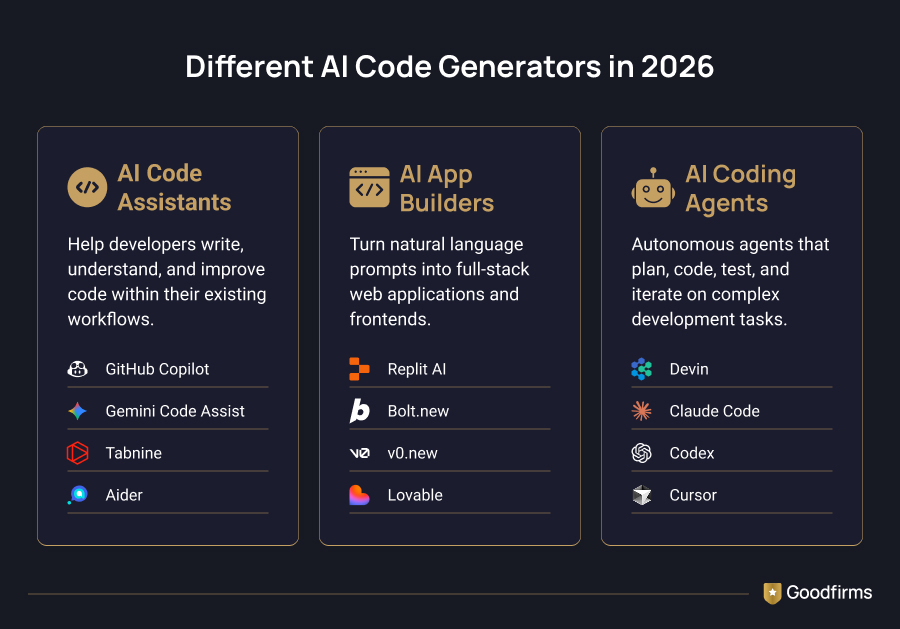
AI Code Assistants
AI code assistants work alongside developers in an existing coding environment. They can generate code, complete code, explain files, suggest changes, and help with testing and debugging.
Examples: GitHub Copilot, Gemini Code Assist, Tabnine, Aider.
AI App Builders
AI app builders start with an idea rather than an existing development environment.
You describe the website or application you want to create, and the platform generates the project. Depending on the product, you can also connect databases, add authentication, publish the application, and continue making changes through natural-language prompts.
Examples: Replit AI, Bolt.new, v0.new, Lovable.
AI Coding Agents
AI coding agents can take on multi-step software development tasks instead of only returning code suggestions.
They can inspect codebases, modify files, run commands, test changes, and work through a task with less step-by-step input.
Examples: Devin, Claude Code, Codex, Cursor.
12 Best AI Code Generators in 2026
Here are our top 12 code generator tools that you must try.
1. GitHub Copilot: Best for Everyday AI-Assisted Coding
GitHub Copilot is designed to work inside the tools developers already use. It provides code completion, chat, code review, and agent features, while its GitHub integration connects AI assistance with repositories, issues, and pull requests.
Copilot now includes asynchronous coding agents that can take a task, work on it in the background, and return changes for review. GitHub also supports third-party agents, including Claude and OpenAI Codex.
The current individual plans include a Free option, with Pro priced at $10 per month. GitHub also offers Pro+, Max, Business, and Enterprise plans with different usage limits and administrative features.
Best for: Everyday development, GitHub workflows, code completion, code review
|
Goodfirms’ take: Copilot is a practical choice for teams that want AI added to an existing development workflow rather than moving to an entirely new coding environment. |
2. Gemini Code Assist: Best for Google Cloud Development
Gemini Code Assist provides AI-powered coding assistance in supported development environments. It can generate and transform code, answer questions about code, provide suggestions, and assist developers working with Google Cloud.
Google currently offers Gemini Code Assist Standard and Enterprise editions. Enterprise is designed for organizations that need additional capabilities and controls.
There is an important 2026 change to note. Google discontinued Gemini Code Assist for individuals on June 18, 2026. Individual users are directed to Antigravity, Google's newer agentic coding platform, as the official migration path, while Standard and Enterprise editions continue to be available for organizations.
Google's published pricing lists Standard at $19 per user per month and Enterprise at $45 per user per month when billed annually.
Best for: Google Cloud development, enterprise teams, IDE-based coding assistance
| Goodfirms’ take: Gemini Code Assist is most relevant to teams already working with Google Cloud and looking for AI assistance within their development environment. |
3. Tabnine: Best for Enterprise AI Coding
Tabnine focuses on AI-assisted software development with an emphasis on privacy, security, deployment flexibility, and organizational control.
Its platform can be deployed in cloud, on-premises, or air-gapped environments. Tabnine provides code assistance and AI chat grounded in the developer's codebase.
Tabnine has also expanded into agentic development. Its Agentic Platform can automate multi-step workflows such as refactoring, debugging, and documentation.
Tabnine's current pricing starts at $39/user/month.
Best for: Enterprise development, privacy-conscious teams, controlled AI adoption
| Goodfirms’ take: Tabnine is worth considering when an organization needs AI coding assistance without giving up control over where its development environment and code are handled. |
4. Aider: Best for Terminal-Based AI Pair Programming
Aider is an open-source AI pair programmer designed to work in the terminal.
It can be used with a new project or an existing codebase and can connect to a wide range of language models. Aider also works with Git, making it useful for developers who prefer a command-line workflow.
Aider itself is open source. The cost depends on the tokens you use for your preferred LLM.
Best for: Terminal-based development, experienced developers, open-source workflows
| Goodfirms’ take: Aider is a good choice for developers who want control over their AI coding setup and prefer working directly with their repository. |
5. Replit AI: Best for Building and Publishing Apps
Replit AI is built around creating applications through natural-language instructions.
Its Agent can turn a description into an application, make changes based on additional prompts, and work with Replit's development, database, and deployment features. Replit's current Starter plan is free and includes daily Agent credits. The pricing plan starts at $18/month when billed annually.
Replit is useful for people who want to move quickly from an idea to a working application without setting up a complete local development environment first.
Best for: Prototypes, MVPs, internal tools, browser-based development
| Goodfirms’ take: Replit AI is a good starting point when the goal is to build and publish a working application without spending much time on initial setup. |
6. Bolt.new: Best for Rapid Web App Development
Bolt.new is an AI-powered website and app builder that lets users create projects through natural-language instructions.
Its current platform includes website hosting, databases, private projects, file uploads, and custom domains on eligible plans. The free plan includes public and private projects, 300,000 tokens per day, 1 million tokens per month, website hosting, and unlimited databases. Pro is currently $18 per month when billed annually.
Because Bolt uses token-based usage, the amount of work you can complete depends on how much context and processing each task requires.
Best for: Web apps, prototypes, websites, rapid product development
| Goodfirms’ take: Bolt.new makes sense when you want to get a web application running quickly and prefer a browser-based workflow. |
7. v0.new: Best for Web Applications and UI Development
v0 has expanded considerably beyond its earlier focus on generating UI components.
Its current product supports web application development and can generate working code, create interfaces, connect applications to data, and work through development tasks using AI.
The current pricing page lists a Free plan with $5 in monthly credits, a Plus plan at $30 per user per month, and a Business plan at $100 per user per month. Paid plans include additional monthly credits and access to models and collaboration features.
Best for: Web applications, frontend development, UI generation
| Goodfirms’ take: v0.new is now better viewed as an AI development platform for web applications rather than only a UI generator. |
8. Lovable: Best for Websites and Business Applications
Lovable is an AI software engineer designed to help users build websites and web applications through natural-language conversations.
Users can describe what they want to build, review the generated application, and continue asking for changes. Lovable also provides cloud hosting and AI capabilities for applications.
Lovable uses credits rather than a simple unlimited-use model. Its free plan currently includes a daily grant of five build credits, up to 30 per month, along with monthly Cloud credits. Paid plans provide larger credit balances.
Best for: MVPs, websites, internal tools, business applications
| Goodfirms’ take: Lovable is a good fit for teams that want to turn an idea into a working web application without starting with a traditional coding workflow. |
9. Devin: Best for Autonomous Software Engineering
Devin is positioned as an AI software engineer rather than a conventional coding assistant.
It can work on software engineering tasks, including coding, testing, debugging, and other development work. Devin also provides cloud-based development capabilities and Devin Desktop for working with local development environments.
Its current self-serve plans include Free, Pro, Max, and Team. Pro is $20 per month, Max is $200 per month, and Team is $80 per month.
Best for: Autonomous software engineering, repository-level tasks, engineering teams
| Goodfirms’ take: Devin is one of the clearest examples of an AI coding agent designed to take on software engineering work rather than only provide coding suggestions. |
10. Claude Code: Best for Repository-Level Development
Claude Code is Anthropic's coding agent for working directly with software projects.
It can read files, edit code, search a repository, execute commands, run tests, create commits and pull requests, and work through larger development tasks. It can also connect to external tools through MCP and supports background and parallel agent workflows.
Claude Code can be used through Anthropic's subscription plans, which start at $17/month when billed annually.
Best for: Large codebases, terminal workflows, debugging, refactoring
| Goodfirms’ take: Claude Code is a strong option for developers who want an agent to work directly with their repository and handle more than one coding step at a time. |
11. Codex: Best for Delegating Coding Tasks
Codex is OpenAI's coding agent for software development tasks.
It can inspect code, make changes, run commands, and automate repeatable development work through its CLI. Codex is also available through the web, desktop, IDE extension, and cloud environments.
ChatGPT pricing starts at $17 per month when billed annually.
Best for: Delegated coding tasks, software engineering workflows, automated development
| Goodfirms’ take: Codex is useful when you want to hand an AI a defined development task and have it work through implementation rather than simply return a code snippet. |
12. Cursor: Best for Agentic Development in an AI Coding Environment
Cursor has developed from an AI-powered code editor into a broader agentic coding platform.
Its current plans include access to coding agents, cloud agents, MCPs, skills, hooks, and Bugbot. Cursor's documentation also describes its agent capabilities for planning and building features, fixing bugs, and working with codebases.
The pricing plan is $16 per month.
Cursor's pricing also uses usage pools, so the amount of work available depends on the models selected and how much they are used.
Best for: Professional development, codebase work, agentic coding
| Goodfirms’ take: Cursor is a strong option for developers who want an AI agent integrated closely with their everyday coding environment. |
Find the Right AI Code Generator for Your Needs
AI coding now covers several different workflows. Some tools help developers write code faster. Others can take on development tasks. AI app builders can start with an idea and produce a working application.
That makes comparing tools before choosing one more useful than simply picking the most popular name.
If you want to compare AI code generators by features, pricing, user reviews, and other software details, explore the Goodfirms AI Code Generators listing.
You can use the list to compare available options and find a tool that fits your development needs. You can also consult with top AI consulting companies before you finalize your platform.
FAQs - AI Coding Tools & Agents
What are the best AI code generators in 2026?
The best AI code generator depends on the intended use. GitHub Copilot, Gemini Code Assist, Tabnine, and Aider focus on AI-assisted coding. Replit AI, Bolt.new, v0.new, and Lovable focus on application development. Devin, Claude Code, Codex, and Cursor take a more agent-based approach to software engineering.
Which AI code generator is best for beginners?
Replit AI, Bolt.new, v0.new, and Lovable are easier starting points for users who want to create web applications without setting up a traditional development environment. They let users describe what they want to build and then continue modifying the generated application through prompts. Developers who already work with code may prefer an AI assistant or coding agent that works directly with a repository.
Which AI code generator is best for professional developers?
There is no single option for every professional developer. GitHub Copilot fits teams that want AI inside an established GitHub workflow. Aider suits developers who prefer the terminal. Devin, Claude Code, Codex, and Cursor are better suited to developers who want AI to handle larger software engineering tasks.
Are AI code generators free?
Several tools offer free plans or free usage. GitHub Copilot, Replit AI, Bolt.new, v0.new, Lovable, Devin, and Cursor all provide some form of free access. Aider is open source, although users may still pay for the AI models or APIs they connect to. Paid plans generally provide higher limits and additional features.
What is the difference between an AI code assistant and an AI coding agent?
An AI code assistant mainly helps with tasks such as code completion, generation, explanation, and debugging. An AI coding agent can take a larger task and work through multiple steps, such as inspecting a repository, editing several files, running commands, and testing changes. The distinction is becoming less strict as assistants add agent capabilities.
Can AI app builders create complete applications?
Yes. Replit AI, Bolt.new, v0.new, and Lovable can generate substantial parts of working web applications from natural-language instructions. Depending on the platform, they can also provide databases, hosting, deployment, authentication, or integrations. Production applications still need testing, security checks, technical review, and maintenance.
Is AI-generated code safe to use?
AI-generated code should be reviewed before it reaches production. Developers should check authentication, authorization, input validation, dependencies, API security, database queries, data handling, and test coverage. Review should be stricter when an AI coding agent has permission to modify repositories or execute commands.
Can AI code generators replace software developers?
AI code generators can automate many development tasks, but they do not remove the need for developers in most professional projects. Developers are still needed for requirements, architecture, code review, security, testing, production operations, and decisions that require knowledge of the product and business. AI is becoming a larger part of software development rather than a complete replacement for engineering teams.


