Key takeaways
- AR in education places 3D models, animations, and labels over the real classroom through a phone, tablet, or smart glasses.
- Market research firms put the AR in education market at roughly USD 5.17 billion to USD 8.7 billion in 2026, with yearly growth forecasts between 18% and 33%.
- A recent meta-analysis of 28 studies found a large positive effect of AR on science learning outcomes for secondary students.
- Cost, teacher training, and a shortage of good content are still the biggest reasons schools hold back.
- The safest way to start is a phone-based pilot tied to one learning goal, then scale once you see results.
A printed diagram of the human heart stays flat on the page. Point a phone at it with an AR app, and the heart lifts off the paper, beats, and turns in your hand.
That is AR in education at its simplest. It layers digital content over what students already see around them. Teachers can show things that are too small, too far, too risky, or too expensive to bring into a classroom.
Schools and edtech teams are paying attention. Market research from 360iResearch values the AR in education market at USD 5.17 billion in 2026, while MarkWide Research puts it at USD 8.7 billion. The numbers differ, but every forecast points up.
This guide covers what AR in education is, how it works, where it helps, and where it struggles. You will also find a simple plan to roll it out in a school or build your own AR learning product.
Planning to build an AR learning product? Start by exploring the top AR and VR development companies and shortlist the ones that match your budget and tech stack.
What Is AR in Education?
AR stands for augmented reality. In education, it means using a device camera and software to place digital objects, text, or animations on top of a real view. A student who points a tablet at a desk might see the solar system floating above it, with each planet ready to be tapped
The real classroom stays visible the whole time. That is the biggest difference between AR and VR, which replaces your surroundings with a fully digital world. Because most students already carry a smartphone, AR can start without buying any new hardware.
If you are wondering what AR means in education for a teacher, think of it as an extra layer on top of your lesson. The textbook, the whiteboard, and the lab bench all stay. AR adds depth to them.
AR, VR, and MR in Education: How They Differ
People often group VR and AR together, and many schools use both. Mixed reality, or MR, sits in between. Here is a quick comparison.
|
Features |
AR |
VR |
MR |
|---|---|---|---|
|
Experience |
Digital layers over the real world |
A fully digital environment |
Digital objects that react to the real space |
|
Typical device |
Phone, tablet, smart glasses |
VR headset |
Mixed reality headset |
|
Classroom fit |
Every day, lessons, labs, and field trips |
Simulations and immersive remote sessions |
Advanced labs and group design work |
|
Entry cost |
Low |
Medium to high |
High |
AR usually wins on cost and ease. VR suits situations where you want the student fully inside another place, like a deep-sea dive or a historic battlefield.
How Does AR Work in a Classroom?
Most classroom AR uses one of three methods. Marker-based AR starts when a student scans a printed image or QR code in a textbook or worksheet. Markerless AR finds a flat surface, such as a desk or floor, and places a 3D object on it. WebAR runs inside a browser, so students open a link and skip the app download.
Devices matter less than lesson design. Phones and tablets cover most needs. Smart glasses and mixed reality headsets suit specialized labs where students need both hands free, like surgical training or machine repair.
A typical AR lesson follows a simple pattern. The teacher introduces a concept, students scan a trigger, explore the 3D content in pairs or small groups, and then answer questions that connect what they saw to the topic. The exploring part is short. The discussion afterward is where most of the learning happens.
Key Benefits of AR in Education
1. Stronger Understanding of Abstract Concepts
Some ideas are hard to grasp from a flat page. Molecular bonds, planetary orbits, and blood flow all make more sense when a student can rotate them and look from different angles.
The research backs this up. A 2020 to 2025 meta-analysis of 28 studies covering 2,841 secondary school students reported a large overall effect of AR on science learning outcomes. An earlier meta-analysis of 64 studies published in Educational Research Review found a medium effect on learning gains. Both point in the same way, which is that AR helps when it is used well.
2. Higher Engagement and Motivation
Students respond to lessons they can touch and explore. Research reviewed in a 2023 meta-analysis in Humanities and Social Sciences Communications notes that many studies have linked AR to stronger motivation to join learning activities.
3. Safer Practice for Risky or Costly Tasks
Some skills are hard to practice for real. A school cannot run a live surgery or a nuclear reaction in a lab. AR lets learners rehearse procedures, see what happens when a step goes wrong, and repeat it as many times as needed. The cost stays low, and nobody gets hurt.
4. Learning Beyond Classroom Walls
AR apps run on devices students already own. Lessons can continue at home, on a campus tour, or at a heritage site. Working professionals can use AR-based training between shifts, and remote learners get an experience closer to what on-campus students see.
5. Better Fit for Different Learners
Visual and hands-on learners often struggle with text-heavy lessons. AR gives them another way in. Students can also move at their own pace by going deeper into a model or replaying a step until it clicks.
Applications and Examples of AR in Education
Here is how AR is being used across subjects and levels.
1. Science and Engineering
Students can explore 3D molecules, circuits, and machine parts, then take them apart and put them back together. Engineering classes can place a digital design over a physical prototype to check the fit before anything is built.
2. Medical Education
Anatomy lessons can place organs and muscle layers over a body or a model. Trainees can rehearse procedures step by step, which reduces dependence on scarce lab time and cadavers.
3. History and Geography
A class studying a monument can place a full-size model in the playground. Students walk around it, study the details, and read the history tied to each part. The old Leaning Tower of Pisa-style lesson now works on any phone.
4. Language Learning
AR can label objects around a student in the language they are learning. A 2026 paper on VR and AR in language education notes that AR blends virtual elements with real environments, which supports interactive practice. The same paper also lists barriers that slow wider adoption.
5. Higher Education
Universities use AR in engineering labs, architecture studios, and medical schools. Many of these programs rely on custom learning platforms that tie AR content to coursework and grading. If your institution needs that kind of build, you can compare education software development companies with experience in learning platforms.
6. Corporate and Vocational Training
Companies use AR and VR for onboarding, safety drills, and equipment training. Immersive formats are also reaching people skills, which our piece on VR soft skills training covers in more detail.
AI and AR in Education
AI is changing how AR content gets made and used. Generative tools can produce 3D models and quiz prompts faster, which lowers the cost of building lessons. AI can also adjust an AR activity to a student's level, add live captions or translation, and answer questions about the object on screen.
As these pieces mature, an AR lesson can respond to each learner. Today, most AR lessons play the same sequence for everyone. That gap is where the next wave of tools is heading.
Challenges and Disadvantages of AR in Education
AR does not suit every lesson, and schools run into the same problems again and again.
- Cost. Headsets, tablets, and custom content add up fast, especially for large student groups. A school that wants its own AR app also needs a budget for building and maintaining it. Teams that need a mobile app can compare education app developers before committing to a scope.
- Teacher training. A survey of 93 educators worldwide named the lack of AR educational apps, equipment costs, weak digital skills, and classroom management as key barriers.
- Access and equity. A 2026 doctoral study based on interviews with 10 US K-12 teachers found that access, equity, cost, and limited professional development held adoption back. The sample is small, but the themes match larger surveys.
- Privacy and ethics. AR apps use cameras and sometimes location data. Schools need clear rules on what is stored and who can see it, especially for minors.
- Uneven results. The 28-study meta-analysis mentioned earlier also found high variation between studies. In short, a flashy AR app with no lesson plan behind it rarely improves outcomes. Teachers get better results when AR time lines up with a clear learning objective.
Goodfirms Insight: Education has no shortage of developers. We have reviewed 8,312 education app developers across 119 countries as of October 2026, and 2,429 AR and VR companies have been reviewed, each passing our 4-step verification. The filter that matters is AR delivery, so check portfolios for AR projects and ask for references from education clients.
How to Bring AR into Your School or Edtech Product
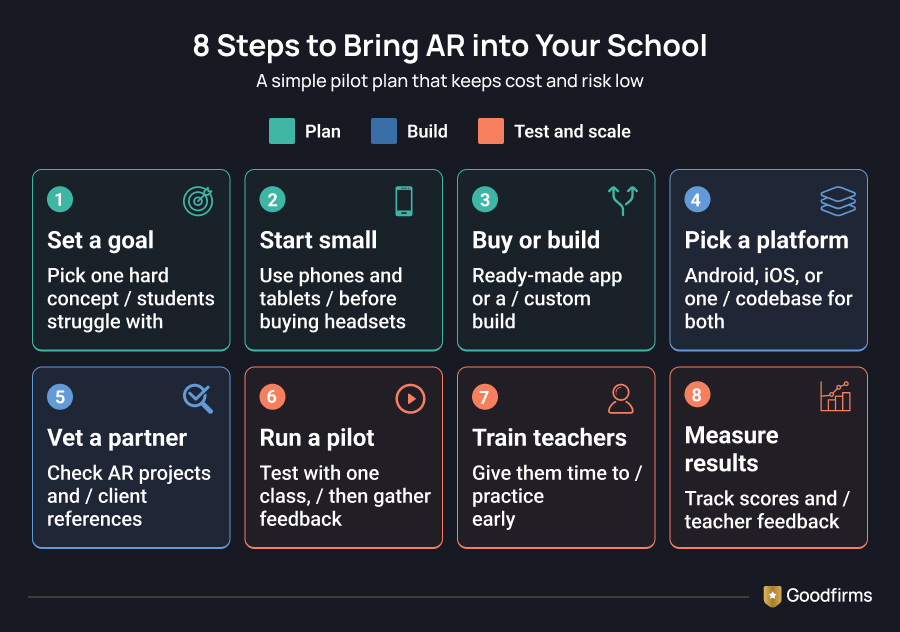
If you want to try AR, a simple plan keeps risk low.
1. Set a learning goal. Pick one concept that students find hard, such as cell structure or fractions. A narrow goal makes it easy to judge whether AR helped.
2. Start with phones and tablets. They keep costs low and let you test the idea before buying headsets.
3. Decide between ready-made and custom. Off-the-shelf apps work for common topics. Custom apps make sense for a specific curriculum or a product you plan to sell.
4. Choose the right platform. If your students mostly use Android devices, look at teams with Android education app development experience. If you need one codebase for iOS and Android, compare partners who build with React Native or Flutter.
5. Vet your development partner. Look for a team that has already shipped AR projects, ideally in education. Ask to see their portfolio, request references from past clients, and confirm which tech stack they will use. Check how they handle testing on different devices, since classroom phones and tablets vary a lot. Our guide on how to hire an AR/VR development company walks through the questions to ask before you sign.
6. Pilot with one class. Collect feedback from students and teachers. Compare results with a class that did not use AR.
7. Train teachers early. Give them time to practice before the pilot starts. Most failed rollouts skip this step.
8. Measure and expand. Track test scores, engagement, and teacher feedback before rolling out wider.
Future of AR in Education
Forecasts see strong growth ahead. 360iResearch projects the market to reach USD 28.95 billion by 2032, while MarkWide Research expects USD 39.78 billion by 2035. The reports use different methods, so treat the exact figures as a range.
Three shifts are likely over the next few years. Lighter smart glasses will make hands-free AR practical in labs and workshops. AI will build and personalize AR lessons on demand. Browser-based AR will remove app downloads and lower the entry barrier for schools with tight budgets.
Conclusion
AR in education gives students a closer look at ideas that are hard to see on a page. It also gives them a safer way to practice risky skills. The research is encouraging, and the market is growing fast.
Results still depend on good lesson design, trained teachers, and a realistic budget. Start small, link every AR activity to a learning goal, and measure what changes. Once the pilot shows results, scaling becomes much easier.
FAQs - AR Contribute to the Education Industry
1. What is AR in education?
AR in education is the use of augmented reality to place digital 3D models, animations, and information over a real view through a phone, tablet, or glasses. It helps students see and explore concepts that are hard to show in a classroom. A student can rotate a heart or a planet on the desk and look at it from every angle.
2. What does AR stand for in education?
AR stands for augmented reality. It adds digital content to the real world instead of replacing it, which is why most students can use it on a regular smartphone. Students keep seeing their classroom, and the digital layer appears on top of it. That makes AR easier to start with than most other immersive tools.
3. How is AR used in education?
Teachers use AR for 3D science models, anatomy lessons, virtual monument tours, language labeling, and safe practice of technical or medical procedures. Universities use it in labs and design studios, and companies use it for staff training. Most of these lessons run on a phone or tablet, so schools can start small.
4. What are the advantages of AR in education?
AR improves understanding of abstract topics, raises engagement, allows safe practice of risky tasks, and lets students learn outside the classroom. A 2020 to 2025 meta-analysis reported a large effect on science outcomes. It also gives visual and hands-on learners another way to take in a lesson at their own pace.
5. What are the disadvantages of AR in education?
The main drawbacks are device and content costs, limited teacher training, a shortage of quality apps, classroom management challenges, and privacy concerns around camera use. Results also vary a lot between studies. A clear lesson plan and early training for teachers help reduce most of these problems.
6. Is AR better than VR for classrooms?
AR is usually easier to start with because it runs on phones and keeps students aware of the room. VR suits fully immersive simulations, but they need headsets and more space. A good approach is to begin with AR on devices you already own and add VR later for specific lessons.