JPG to SVG
Deployment
Best for
Overview
About JPG to SVG
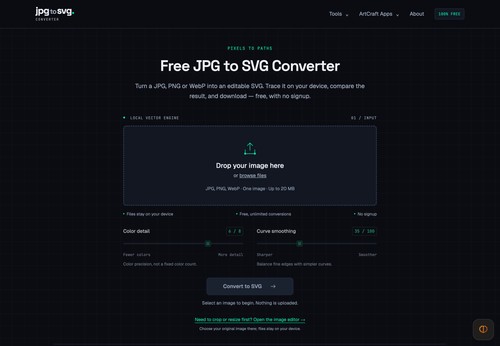
JPG to SVG provides a focused browser workflow for preparing images and turning raster artwork into real SVG paths. Upload a JPG, PNG or still WebP image, adjust color detail and curve smoothing, compare the original and vector preview, then download your SVG.
The image editor lets you crop with a draggable selection or exact dimensions, resize the image, and export PNG, JPEG or WebP. An edited image can go straight into SVG tracing on the same page. Image processing runs locally on your device; there is no account to create, watermark or daily conversion quota.
The site also offers independent Crafting Apps guides, including PhotoCraft, VectorCraft and WordCraft, plus a source-based GetArtCraft review. Clearly labelled official links help readers find the relevant applications and downloads.
At a glance
Software information
Industries served, licensing and the support JPG to SVG provides.
Industries
- Graphic-design
Licensing
- Proprietary
- Free version
Support
- 24x7 Support
Training
- Documentation
Knowledge Base
Capabilities
JPG to SVG features
The full feature set, grouped by module.
Plans
JPG to SVG pricing
Media
Screenshots & video