
Architectural and construction BIM system

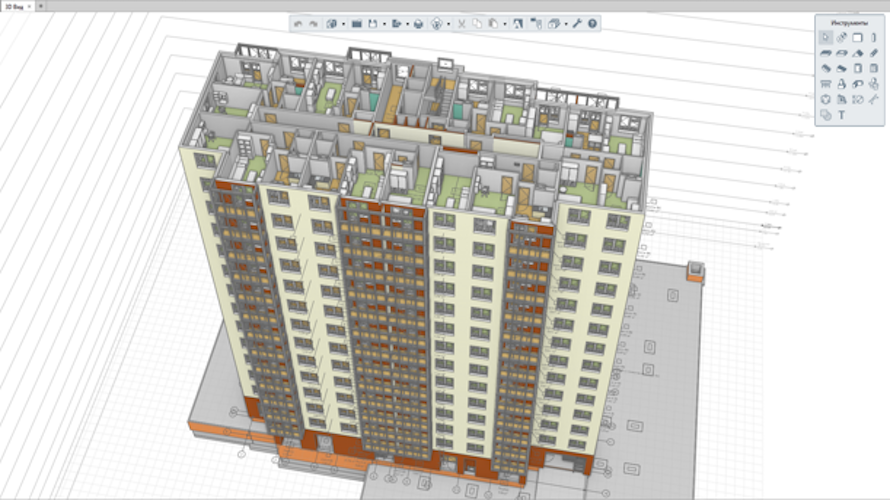
The Renga BIM system is based on two general principles: designing in 3D space (for enhanced visualization) and using intuitive, context-based interface (for simplicity of interaction with the 3D model. An architect can create a building in the 3D view, using object tools like walls, beams, windows, etc. You can also switch to the 2D drawing plan at any moment and continue the creation of 3D modeling in that view. A lot of specialists have already appreciated this approach and have found the Renga software operating speed to be a great deal higher compared to other software. In the Renga BIM system, the architects and structural engineers work in a single environment with the same 3D model. Each member of the project team can track the changes their colleagues have made. This feature reduces the chance for discrepancies between architectural, structural and MEP models, validating the accuracy and consistency of the model. It also shortens the approval cycle.
Ascon
Licensing & Deployment
  • Cloud Hosted
  • Web-based
Support
  • Phone
Knowledge Base
  • Help Guides
  • Video Guides
  • Blogs
  • Webinars

Renga Architecture Core Features

Focus of 3D CAD Feature
  • 2D Models
  • 3D Models
  • Data Import/Export

Renga Architecture Pricing

Pricing Type
  • Flat Rate
Free Version
  • Yes
Payment Frequency
  • Monthly Payment
  • Annual Subscription
  • One-Time Payment
  • Free
Plans & Packages
Standard
$80 Per Month

Renga Architecture Reviews

5.0 1 Review
  • Relevance
  • Most Recent
  • Rating: high to low
  • Rating: low to high
Write a Review

Renga Architecture is a beginner, it gives me a very good chance for a heads up.

Excellent software that gives a nice navigation experience and also, all docs including 3D files open fast. As an engineer I was looking for an architect software for a building remodel and this software looks like it's it. It has all amazing features and professional design and build tools. It also shows all the information regarding the elements of the whole project. I highly recommend this to anyone wanting to better their career. A big thanks to the developers for such wonderful software and efforts to make it easier for all architects.
What was the project name that you have worked with Renga Architecture ?

3D CAD Software

How long have you used Renga Architecture ?

4 Months

How frequently you use Renga Architecture ?

Daily

How do you find pricing of Renga Architecture ?

mid-tier

What do you like the most about Renga Architecture ?

Well done, the help is compact and useful. A very useful tool in handy to make clients understand the drawing with a 3D model in context. Base functionality is enough for a basic viewer.

What do you like the least about Renga Architecture ?

Sometimes it takes time to understand each of the use of its features.

Rating Breakdown

  • Ease of Use
  • Features
  • Customer Support
  • Overall Rating