Key takeaways
- Digital Rights Management (DRM) protects a file after it leaves your hands, while Data Loss Prevention (DLP) stops sensitive data from leaving in the first place.
- For most teams, DLP comes first and DRM second. Flip the order if your main risk is outsiders misusing files you send.
- They work best together: DLP flags sensitive files and triggers DRM protection, provided both tools use the same classification labels.
- Only 16% of those surveyed said DLP blocked their most significant incident before data left their organization (Cloud Security Alliance, 2026).
A contract you email to a client can be forwarded, printed, or screenshotted the moment it leaves your inbox. A spreadsheet sent to the wrong person is out the door before anyone notices. The Digital Rights Management (DRM) vs. Data Loss Prevention (DLP) decision starts with which of those failures worries you more, because each tool stops a different one.
DRM controls what recipients can do with a file after you share it. DLP watches where sensitive data is headed and stops it from leaving by mistake.
For most teams, the sensible order is DLP first, then DRM. This guide covers what each tool does, where they overlap, and how to decide between them. Let’s look at which one makes sense for your business.
Ready to start a shortlist? Browse digital rights management software on Goodfirms, a research-backed reviews and ratings platform, and filter by the features you need
DRM vs. DLP: Which One Does Your Business Need
You should go for DRM if your biggest worry is what people do with files after you share them. Choose DLP if your biggest worry is sensitive data being accidentally leaked. If both worries are real, you will eventually need both. Find your situation below.
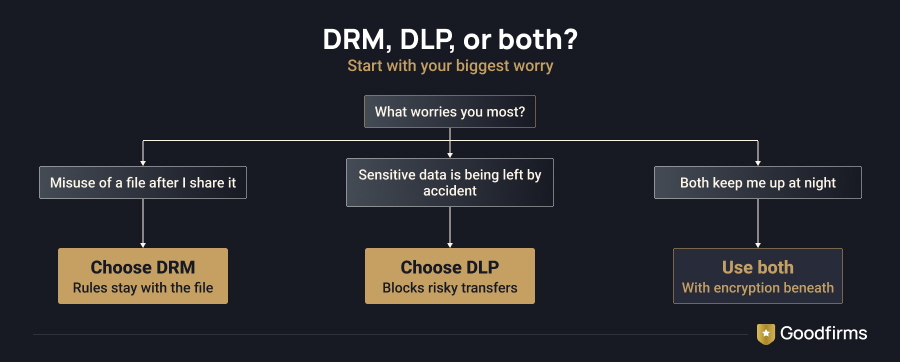
You create or sell content. Publishers, course creators, software vendors, and media companies fight piracy and unauthorized sharing. That is a DRM problem. DLP will not prevent a customer from sharing your paid video with a friend.
You share sensitive documents with outsiders. Law firms, consultancies, investment teams, and anyone running a deal room need control over files once they sit on someone else’s device. DRM gives you that control, including the ability to revoke access later.
You handle regulated personal data. Healthcare providers, banks, insurers, and retailers that store payment details need to know where that data travels. Rules such as HIPAA, GDPR, and PCI DSS put pressure on exactly that, and DLP is built for it.
Your team lives in cloud apps. If work happens across email, chat, shared drives, and browser uploads, DLP gives you visibility into how data moves between them.
You are a small team on a tight budget. Start with the basic DLP rules that many office and email suites already include. Then add DRM for a few important documents, such as pricing models or investor decks.
If several of these situations apply to your business, you may need both tools. Let’s look at how each one protects your data.
DRM vs. DLP: What Each Tool Actually Does
IBM’s Cost of a Data Breach Report 2026 puts the global average cost of a data breach at a record $4.99 million, up 12% from the previous year. One misdirected email can put a confidential spreadsheet in the wrong hands. While DLP helps prevent sensitive data from leaving the organization, DRM limits how a protected document can be used after it is shared.
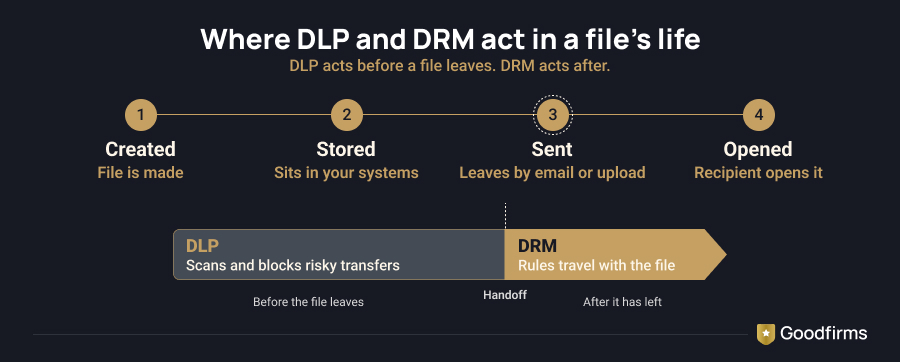
DRM is the lock on the document. It decides who can open a file and what they can do with it, even after the file has been shared. DLP is the guard at the door, watching where sensitive data is headed and stopping or flagging anything that shouldn’t leave.
What is DRM?
DRM is a file-level security technology. Instead of guarding the network around a document, it attaches protection to the document itself, so the rules stay with it when it is shared outside your organization.
It works by wrapping a file in encryption and attaching a license that spells out the rules. When someone opens the file, the system checks the license before it releases the decryption key. If the rules allow access, the file opens. If they do not, nothing happens.
You can block printing, disable copy and paste, limit screenshots, set an expiry date, restrict access by country or IP range, add a visible watermark, and even revoke access after the file has been sent. An email attachment normally slips out of your control the moment you hit send. With DRM, you can still pull it back, and a central console logs who opened or tried to open each protected file.
There are two types of DRM.
- Content DRM protects videos, music, and ebooks from unauthorized use by streaming platforms and digital publishers.
- Enterprise DRM, or information rights management, protects business files such as contracts, product designs, and financial documents.
If you want to compare DRM software, Goodfirms’ digital rights management software page lets you filter vendors by features such as watermarking, expiry management, and access control, with reviews alongside. For example, Fasoo Enterprise DRM lists access control, watermarking, license management, and PDF protection among its features, with pricing available on request.
Across the 31 tools on that page, capabilities vary widely. Access control appears in 23 of them, watermarking in 20, activity tracking in 17, and expiry management in only 11. Pricing is mostly closed too: 20 of the 31 are quote-based, and the nine that publish a monthly entry price range from $25 to $499. For enterprise documents, the page also includes SealPath IRM, Vaultize DRM, and Vitrium Security.
Business benefits
- Keep IP, contracts, financial reports, and confidential designs protected outside your network.
- Makes sharing with partners, clients, legal teams, and remote staff safer.
- Gives auditors and legal teams a usage record.
- Helps content businesses reduce losses from piracy and unauthorized redistribution.
Limitations
- Protects only files that are labeled or wrapped with rules, so an unprotected file slips through.
- Can add friction for recipients, who may need to sign in or install a viewer to open a file.
- Cannot stop someone from photographing a screen.
What is DLP?
DLP is a data-focused security technology. Rather than protecting a single file, it watches how sensitive information moves through your systems and steps in when something is about to go where it should not.
DLP checks emails, file uploads, cloud storage, chat messages, USB transfers, and print jobs for sensitive information, such as card numbers, national ID numbers, health records, source code, and confidential documents. When it detects inappropriate data sharing, it can block the transfer and quarantine the message. It can alert the employee or record the incident for review.
DLP rules can also take the situation into account. It looks into who is sending the data, where it’s going, and what information it contains. For example, an email from a finance manager to a colleague may be allowed, while a contractor uploading the same file to a personal drive could trigger a warning or be blocked.
DLP catches common problems, such as sending the wrong attachment, sharing a file with the wrong person, or using an unapproved app. But once a file reaches someone else’s device, DLP has limited control over what they do with it. This is where DRM steps in and protects the file even after it has been shared.
When evaluating DLP software, check whether it covers the endpoints, email systems, and cloud applications your business uses.
In an October 2026 Cloud Security Alliance survey of 433 IT and security professionals, only 16% said DLP blocked their most significant incident before data left the organization. The survey’s lead voice, Hillary Baron, pointed to GenAI as a newer route for data to leave that older DLP tools were not built to cover. That is the case for pairing DLP with a control that stays with the file once it is shared.

Enterprise DLP is no longer about deployment but effectiveness. Weak enforcement, alert overload, and new GenAI data-exit channels are exposing gaps in legacy DLP.
Business benefits
- Reduces accidental exposure of customer, patient, and payment data.
- Gives security teams visibility into risky habits so that they can fix processes and train staff.
- Creates an audit trail of blocked and allowed transfers for regulators and internal reviews.
Limitations
- Loses control once an approved file lands on someone else’s device.
- Needs data discovery, policy tuning, and testing to avoid false alarms.
- Can bury security teams in alerts if rules are too broad.
Let’s quickly glance through how they differ from each other.
Key Differences at a Glance
|
Aspect |
DRM |
DLP |
|---|---|---|
|
Main job |
Control how a file is used |
Stop sensitive data from leaving |
|
Where protection lives |
Inside the file, wherever it goes |
On endpoints, networks, and cloud apps |
|
Works after sharing |
Yes |
Mostly no |
|
Best against |
Unauthorized copying, forwarding, printing, and piracy |
Accidental leaks, careless sharing, and policy breaches |
|
Typical data |
Contracts, designs, research, paid content |
Customer records, health data, payment data |
|
Common users |
Publishers, legal teams, R&D, media, deal teams |
Banks, healthcare, retail, any regulated firm |
|
Blind spot |
Does not detect unlabeled sensitive data on its own |
Cannot follow a file once it has left |
The two tools address different parts of data security, but they can work together to provide more complete protection.
How DLP and DRM Work Together
DLP and DRM cover different stages of a file’s life. DLP protects data while it sits within your systems and tries to leave. DRM takes over once a file has been shared. When both are used together, protection follows a file from the day it is created through storage, sharing, and all subsequent uses.
Suppose a finance team sends a quarterly forecast to an outside investor. Then, DLP scans the email, recognizes the attachment as confidential, and requires it to be protected before it goes out. After that, DRM applies rules such as no printing, a 30-day expiry, and a watermark displaying the investor's name. If the investor forwards the file to someone else, the new recipient cannot open it.
In practice, the two tools connect in a few ways:
- Detection leads to protection
When DLP detects sensitive information or reads a file’s classification label, it can trigger DRM to apply the appropriate usage restrictions. For example, a file marked Confidential may be protected automatically when it is shared. Classification labels such as Public, Internal, and Confidential help security tools determine how to handle the file.
- Continued monitoring
DLP can continue scanning a file for sensitive information even after DRM protection is applied. This allows it to flag content that breaks company security rules without removing the restrictions on the file.
- Blocking transfers vs. controlling access
DLP blocks an employee from sending confidential data through an unapproved channel. If the file is shared through an approved channel, DRM can allow the recipient to view it while preventing them from downloading, printing, or forwarding it.
- Coverage beyond your network
DLP works best inside the environments it monitors. DRM keeps its rules attached once a file leaves, even if someone copies it to another device.
Benefits of using both
- Helps prevent data leaks
Both tools help reduce the risk of sensitive information falling into the wrong hands, but they work at different stages. DLP can catch a misdirected email or suspicious upload before the data leaves the organization. DRM adds another layer of protection by restricting what the recipient can do with the file after receiving it.
- Strengthens compliance and data governance
Compliance rules often expect sensitive data to be protected at every stage, not just while it sits on your servers. DLP covers the early stages: it finds and labels regulated data, tracks its movement, and blocks transfers that violate policy. DRM covers what comes after, keeping access rules attached to a file once it has been shared. Together, they give auditors a fuller picture of how data was handled from start to finish.
Not every pairing works this smoothly. Automatic handoffs depend on the vendors supporting each other, so confirm the integration before you count on it. Whatever you choose, use one classification scheme across both tools. If each keeps its own labels, employees get confused and start looking for workarounds. If you need help setting up classification labels and policies, you can compare cybersecurity companies on Goodfirms.
When evaluating DRM and DLP tools, look for essential features and confirm that the tools can work together.
Vendor Evaluation Checklist: What to Look For in DRM and DLP
Ask each vendor these questions before you buy.
For DRM software
- Identity-based access: Can you restrict access to specific users or groups?
- Access revocation: Can you revoke access to a protected file after sharing it?
- Expiry controls: Can you set access expiration dates or time limits?
- Offline access: Can you specify whether, and for how long, users can open files without an internet connection?
- Recipient compatibility: Can authorized recipients open protected files on their devices and applications?
- Audit logs: Can you track file access, usage, and attempted access by unauthorized users?
For DLP software
- Coverage: Does the solution monitor the endpoints, email systems, cloud applications, and transfer channels your business uses?
- Data classification: Can it identify sensitive information using content analysis, predefined rules, or classification labels?
- Policy enforcement: What happens when a policy is triggered? Can the system block a transfer, alert an administrator, quarantine content, or require approval?
- False-positive management: Can your team review alerts, fine-tune policies, and reduce unnecessary interruptions?
For both solutions
- Integration: Can DRM and DLP share relevant classification labels, policies, or alerts?
- Consistent policies: Will the same sensitivity classifications lead to appropriate protection across the tools?
- Testing: Can you test the integration with representative files, users, and workflows before deploying it across the business?
Final Thoughts
The DRM vs. DLP choice doesn't have to be an either-or decision. Both tools protect sensitive information, but in different ways. DRM helps you control what people can do with a file after you share it, while DLP helps prevent sensitive data from being shared in the first place. Which one you need first depends on your biggest concern: misuse of shared files or accidental data exposure. As your business handles more sensitive information, you may find that using both makes the most sense.
FAQs- DRM vs. DLP
What is the main difference between DRM and DLP?
DRM controls what recipients can do with a file after it is shared, while DLP stops sensitive data from leaving your environment in the first place. DRM attaches rules such as no printing, an expiry date, or a watermark to the file itself. DLP monitors email, cloud apps, and devices and blocks risky transfers. If recipients' actions worry you most, start with DRM; if accidental leaks worry you most, start with DLP.
Can DRM replace DLP?
No. DRM only protects files that have been labeled or wrapped with rules. It cannot protect an unprotected spreadsheet sent to the wrong person by mistake. On the other hand, DLP is a tool that scans content and flags such slips before the file leaves. If you already run DRM, add DLP rules that spot sensitive files and trigger protection, provided your vendors support it.
Can DLP and DRM work together?
Yes, they can work together. DLP watches emails, uploads, and transfers. It can prevent a confidential file from being sent out. After that, DRM locks that file down with rules such as no printing, an expiry date, and a watermark displaying the recipient’s name. These rules stay with the file wherever it goes. For the two to pass a file between them cleanly, they need to read the same classification labels. Ask each vendor how it integrates before you buy.
Do small businesses need both DRM and DLP?
Usually not at the start. A small team can begin with the DLP rules built into its email or office suite, then add DRM for a handful of high-value documents, such as pricing models or investor decks. Growth, compliance demands, or frequent outside sharing are the signs that it is time for both.
Which is easier to deploy?
DRM is usually quicker to deploy when you only need to protect a small set of documents. A full DLP rollout typically takes longer because it needs data discovery, policy tuning, and testing to avoid false alarms. If you need fast coverage, start with the basic DLP rules in your email or office suite and add DRM for a few high-risk files.


.jpg)