Key takeaways
- Saved cards, billing schedules, and approval history do not move on their own, so plan the card transfer before anything else.
- Recurly’s July 2026 data puts average involuntary churn at 1.25% a year, and a careless switch adds to that loss.
- Ask every processor for a written card transfer process, an uptime promise, and sandbox access before comparing prices.
- Move customers in stages grouped by renewal date, and keep the old processor connected as a backup.
- Keep the old account open for at least one full billing cycle to cover refunds, chargebacks, and retries.
You can switch payment processors without losing recurring customers, but a careless move quietly costs you renewals.
Saved cards, billing schedules, and approval history do not move on their own, so subscribers who never chose to leave can end up with failed payments.
Experienced eCommerce development companies stage the switch carefully, so no sale or renewal slips away.
The risk is measurable. Recurly’s July 2026 network data puts average involuntary churn, where a recurring payment fails without the customer knowing, at 1.25% a year across industries. If you have ever refreshed a dashboard hoping a renewal batch cleared, you know why that number matters. One step in this process, the card transfer, decides whether subscribers ever notice the change.
Want a tool that keeps recurring payments running through the switch? Browse the best payment processing software on Goodfirms and filter for recurring billing.
The six steps in this article show how to move processors without losing recurring customers in the current business landscape, but first, here is why migrations usually go wrong.
Why Do Payment Processor Migrations Go Wrong?
Migrations go wrong when the work is treated as a technical swap, and the customer side gets forgotten. A processor holds the saved cards, the billing schedules, and the approval history that banks use to trust your charges, and none of the three move on their own.
The cost shows up in churn. Recurly's churn benchmarks list involuntary churn at 1.30% for plans priced between $10 and $25 a month and 0.18% above $250, so stores with many small recurring orders carry the most exposure.
Customers rarely see the technical cause behind a failed payment. They only see the business that had flaws in their payment processing system. Tien Tzuo, founder and CEO of Zuora, put the stakes plainly in a 2024 PYMNTS interview with Karen Webster, CEO of PYMNTS:

Don’t focus on the sale, focus on the ongoing relationship., ,
Protecting that relationship during a switch takes a clear sequence, and the six steps below follow the order that can keep your recurring customers with you.
How Do You Switch Payment Processors Step by Step?
Switch payment processors in six steps: take inventory, pick the processor, transfer saved cards, build the integration, test in a sandbox, and move customers in stages. Each step ends with a deliverable you can check off, such as a finished inventory, a signed-off test table, or a stable first rollout stage.
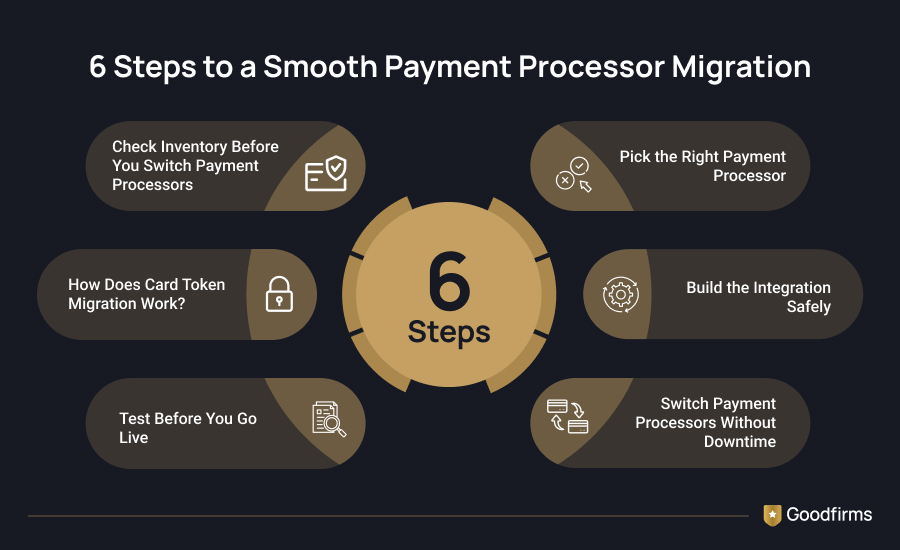
Now, let's understand each step in detail.
Step 1: Check Inventory Before You Switch Payment Processors
Start by writing down everything your current payment setup touches. Treat it like a packing list for a house move: anything left off the list gets forgotten in the old place.
- Where customers pay you: website checkout, mobile app, card machines in a shop, invoices, and marketplaces.
- Tools connected to payments: accounting software, customer records, and reports. Ask your eCommerce app developer which ones plug in through a ready-made add-on and which were built by hand, since hand-built links take more work to rewire.
- Your contract: end date, automatic renewal, notice period, exit fee, and who owns the saved card data.
- Your numbers: monthly sales volume, average order size, the split between online and in-person sales, and the payment types customers use, such as cards, bank debits, wallets, and buy-now-pay-later.
Download your sales and payout reports now, because dashboards usually shut off when the contract ends. If you run card machines, note each machine's ID and serial number too.
Step 2: Pick the Right Payment Processor
Choose the processor you could leave again. Most teams compare rates, but the better test is whether the vendor will put its card export process in writing before you sign. A low rate means little if checkout breaks on your biggest sale day, so look at the price last.
Question to Ask: Is it reliable?
Why it Matters: A written uptime promise of 99.9% or higher keeps checkout open nearly all the time
Red Flag to Avoid: The promise appears only in ads
_________________________________________________________________________________________________________
Question to Ask: Will someone be available to help after office hours?
Why it Matters: Payment problems do not wait for office hours
Red Flag to Avoid: Email-only support
_________________________________________________________________________________________________________
Question to Ask: Can your developer practice safely?
Why it Matters: A test mode lets mistakes happen without real money
Red Flag to Avoid: Thin guides and no test mode
_________________________________________________________________________________________________________
Question to Ask: Can it take over my saved cards?
Why it Matters: Subscribers keep paying without re-entering details
Red Flag to Avoid: No written transfer process
_________________________________________________________________________________________________________
Question to Ask: Is it secure?
Why it Matters: PCI DSS Level 1 is the highest compliance validation level
Red Flag to Avoid: Vague claims
_________________________________________________________________________________________________________
Question to Ask: Does it accept my customers' payment types?
Why it Matters: Missing wallets or local methods lose sales
Red Flag to Avoid: Gaps in your main market
Step 3: How Does Card Token Migration Work?
A token is a coded stand-in for a saved card number. Your store keeps the tokens, and the processor keeps the real card details in a locked vault. When you change processors, the vault contents must move, and both payment processors (old and new) handle that between themselves in an encrypted transfer, so your team never sees a card number. The flow has four moves:
- You tell both payment processors you want to transfer and agree on a secure way to send the file.
- The old payment processor sends the encrypted file, and the new one unlocks it and creates fresh tokens.
- You receive a mapping file, which works like a translation table between old and new tokens.
- Your eCommerce website developer loads the new tokens into your database and checks a sample.
Plan for waiting, and expect the timeline to vary by processor. Stripe’s migration guide, for example, says the old processor’s handover can stretch from days to several weeks and that Stripe typically completes the import within 10 business days of receiving correct files. Ask your new processor for its own figure in writing. Cards that customers update during that gap are missed by the file, so schedule a second, smaller transfer. Also ask whether original payment references, called network transaction IDs, travel with the cards. Without them, issuers can decline renewals they would otherwise recognize as part of an agreement the customer already made.
Tidy the list before it moves. Remove expired cards, close dormant subscriptions, and flag unusual billing deals. Check that every customer ID matches the new system, since a mismatch means a failed charge. Move active subscribers first and archived accounts later, and keep a rollback plan that returns people to the old processor without a billing gap.
Step 4: Build the Integration Safely
Integration means connecting your store to the new processor. Your developer should build it in a staging area, a private copy of your site where mistakes cost nothing, and leave the live store untouched until testing ends. Ask them to keep secret keys out of the code and to listen for alerts called webhooks, such as payment received, payment failed, refund issued, and subscription charged. Each alert needs a signature check so a fake message cannot mark an unpaid order as paid.
Stripe’s own migration guide advises building the new integration before requesting the card transfer. It also warns that retrying many migrated cards at once can look suspicious to card issuers, so pause bulk retries until your approval rate settles. Ask your developer to flag charges on saved cards as merchant-initiated (Stripe calls this off_session), since issuers may decline unlabeled ones.
Finance teams should know that the new processor's payout reports use different column names and timing. The matching of sales to bank deposits needs updating before the first live payout.
Security rules deserve a look as well. The PCI Security Standards Council states that 51 of the 64 new requirements in PCI DSS v4.0 became mandatory on March 31, 2025, including protections for scripts on payment pages. Ask your acquiring bank which PCI self-assessment questionnaire applies to the new setup. Stores that need a custom-built payment connection, or plan to accept crypto, can partner with one of the best crypto payment gateway development companies listed on Goodfirms.
Step 5: Test Before You Go Live
Testing means making pretend purchases in the sandbox, the processor's practice mode, where no real money moves. Hold the launch until all scenarios below work.
- Successful card payment: Payment captured and an alert received
- Declined card: A clear message was shown, and no charge was made
- Expired card: Readable error on the payment form
- Failed 3-D Secure check: Order stays unpaid with a retry prompt
- Full and partial refunds: Correct amount returned and dashboard updated
- Dispute alert: Notifications arrive with the evidence request
- Multi-currency order: Correct conversion and payout currency
- Recurring charge: Automatic charge succeeds on schedule
Ask finance and support teams to test as well. They should open the new dashboard, run a report, issue a refund, and read the payout calendar before any customer touches the system. Also, confirm that refunds show up in payout reports, that receipts and confirmation emails are sent, and that dispute notices carry what your team needs to reply.
Step 6: Switch Payment Processors Without Downtime
Move customers over in stages, the way you would move house, one room at a time. Send a small share of customers to the new processor and compare how many payments get approved against the old one. Keep the old processor connected as a backup so traffic can return in seconds. Increase the share only after each stage holds steady. Turn off scheduled billing at one processor before turning it on at the other, which prevents double charges. Subscription stores get cleaner comparisons by moving customers grouped by renewal date.
Treat this as the One Owner Rule: at any moment, exactly one processor owns each customer’s billing schedule. Two owners mean double charges, and none means a missed renewal.
Watch five numbers: approval rate, reasons for declines, payment-related support tickets, refund and dispute volume, and days from charge to bank deposit. Write the rollback trigger down before the first stage, for example, an approval rate that stays below the old processor's level for a full day.
It is normal to fear that one bad night of failed renewals will cost a month’s revenue. A written rollback trigger exists for exactly that fear, because it turns a panic decision into a pre-agreed one.
Keep the old account open for at least one full billing cycle, since refunds, chargebacks, and retries from earlier charges still run through it. Close it once nothing is pending, and you have downloaded every remaining report.
The payment processing software you pick decides how smoothly these six steps run.
How Do You Choose the Best Payment Processing Software?
The best payment processing software is the one that makes each of the above six steps easier to finish. A tool that cannot import saved cards, has no practice mode, or reports payouts in a confusing format will slow the switch at exactly the point where it needs to be fast. Below are the qualities to look for in the best payment processing software.
- Inventory: Full export of sales, payout, and refund history, plus clear contract and exit terms.
- Pick a processor: A written uptime promise, round-the-clock support, and the payment types your customers use.
- Card migration: A documented card import process, including network transaction IDs and network tokens.
- Integration: Clear developer guides, webhook alerts with signature checks, and payout reports that match your accounting.
- Testing: A full sandbox with test cards for declines, refunds, disputes, and recurring charges.
- Go live: Support for staged traffic, a quick fallback to the old processor, and reports on approval rates and declines
Shortlisting is the right payment processing can be challenging. Goodfirms can help you with a well curated list of payment processing software. Use its Recurring/Subscription Billing filter under Popular Features to make this task easier. Then read the verified user reviews, before you shortlist the ones that fit your budget and requirements.
Ask each shortlisted payment processing software vendor to explain Step 3 and Step 6 in writing. Their answers show quickly how much help you will get once the switch is underway.
FAQs: Switching Payment Processors
Get answers to the most common questions about switching payment processors.
Will customers need to re-enter card details when I switch payment processors?
Not if the card transfer works. When both processors support a secure token transfer, subscribers stay on autopay and never see a payment form. Re-entry becomes necessary only when the old provider refuses to export cards, or when the transfer fails or misses cards that customers updated during the wait. A written transfer process from the new provider is the clearest sign that autopay will survive the move.
How long does it take to switch payment processors?
Plan for several weeks end-to-end. The saved-card transfer is the slowest part, and its timeline depends on how quickly the old processor hands over the data, so ask both vendors for dates in writing. Integration, sandbox testing, and a staged rollout come on top, and your developer can start building while the file is in transit. Stores with no saved cards skip the transfer and finish sooner.
How much does it cost to switch payment processors?
Costs come from four places: any early termination fee in your current contract, developer time for integration and testing, the period when both accounts run side by side, and any migration fee the new processor charges. Your Step 1 inventory captures the contract terms, so check the exit fee and notice period first. Ask each shortlisted vendor to put its migration fees in writing before you sign.
What is the best time to switch payment processors?
Pick a quiet stretch on your renewal calendar, away from month-end billing, product launches and seasonal sales. The calendar shows which days carry the fewest charges, so a failed batch touches fewer subscribers. Avoid cutting over right before a major sale, because a checkout problem on that day costs far more than a delayed switch.
Can I run two payment processors at the same time?
Yes, and running both is the standard way to switch without downtime. New customers can go to the new processor while existing subscribers stay on the old one until their saved cards arrive. Follow the One Owner Rule: each customer’s billing schedule lives at exactly one processor at any moment, which prevents double charges and missed renewals. Keep the old account open for at least one full billing cycle to cover refunds and chargebacks.
What happens if the old processor refuses to export saved cards?
Start with the contract, because data ownership and data return clauses usually govern saved card data. Ask the new provider whether it can request the transfer directly, and escalate through the account manager at the old processor. If the cards stay locked, collect new cards through the new processor and run a staged email campaign asking active subscribers to re-enter details, starting with the highest-value accounts.
Does switching payment processors affect PCI DSS compliance?
Yes. A new processor changes the PCI DSS questionnaire and responsibilities that apply to your store, because card data now flows through a different environment. The PCI Security Standards Council made 51 of the 64 new PCI DSS v4.0 requirements mandatory on March 31, 2025, including protections for scripts on payment pages. Stores on a fully hosted payment page may qualify for SAQ A, so ask your acquiring bank which questionnaire fits and confirm in writing who is responsible for card data during the transfer.
Should I hire an eCommerce development company to switch payment processors?
Hiring helps when the checkout was custom-built, the store runs subscription billing, or the team lacks time for card transfer, integration, and testing. eCommerce development companies handle the sandbox build, webhook setup, and staged rollout, and verified Goodfirms reviews show which ones have migrated payment systems before. A store with a plug-in checkout and no saved cards can often manage the switch in-house.
Conclusion: What Is the Safest Way to Switch Payment Processors?
You can switch payment processors without losing recurring customers when the work follows a clear order. The risks sit in details customers never see: saved cards that fail to transfer, billing dates that slip, and payment references that go missing. Take the six steps one at a time, from the first inventory to the final cleanup, and test each stage before starting the next. If your team lacks the time or technical skills, hire a software development company specializing in payment processor migration to handle the card transfer, integration, and testing. Add payment processing software that supports every step, and your customers will barely notice that you decided to switch payment processors.