LT Browser

4.7 (15 Reviews)|Write a Review|Claimed profile
United States HQFounded 2020

Deployment

Web-basedWindowsMacLinux

Best for

Medium

Overview

About LT Browser

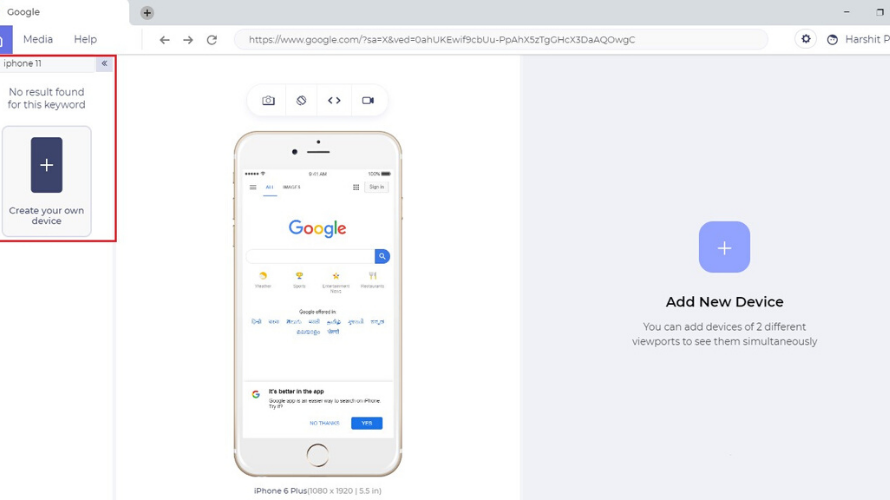
LT Browser is a specialized development tool designed to streamline responsive web design testing. Built by TestMu AI (Formerly LambdaTest), it addresses the friction of modern cross-device debugging by letting developers load a single URL and preview it side-by-side across more than 50 pre-configured mobile, tablet, and desktop viewports.

A core feature is mirrored interactions: any scroll, click, or text input performed in one screen is duplicated instantly across all others in real time. This makes layout inconsistencies instantly noticeable.

LT Browser integrates smoothly with local developer setups by supporting hot reloading, so saved code updates reflect across all viewports immediately. Each device frame features its own dedicated Chromium DevTools window for isolated CSS and JavaScript debugging. Additionally, it offers built-in Lighthouse performance audits and native integrations with tools like Jira, GitHub, and Slack to log and share layout bugs effortlessly.

At a glance

Software information

Industries served, licensing and the support LT Browser provides.

Industries

  • Information-technology-services

Licensing

  • Open Source
  • Monthly Payment
  • Annual Subscription
  • Free
  • Free trial
  • Free version

Support

  • Live Chat
  • Phone
  • 24x7 Support

Training

  • Help Guides
  • Blogs
  • On-Site Training

Knowledge Base

  • Help Guides
  • Blogs
  • On-Site Training
Languages (1)
English

Review analytics

What customers report

4.7
Based on 15 verified reviews

What users say

Review Analytics of LT Browser

Every review is verified through Goodfirms before it's published.

4.715 Verified Reviews
Ease of use (4 reviews)4.5
Features & functionality (4 reviews)4.5
Customer support (4 reviews)4.5
Value for money (4 reviews)4.5
Integrations (4 reviews)4.2
Review Summary
Summarized from 15 verified reviews · Updated September 2026
LT Browser is widely praised for its ease of use and intuitive interface, making responsive testing accessible even to new users. Reviewers consistently highlight the scroll-sync feature for side-by-side device comparison and screenshot capture as major time-savers in the development workflow. The tool integrates with project management platforms like JIRA for streamlined bug tracking and supports local testing with hot-reloading and built-in developer tools. One reviewer noted occasional lag in screenshot capture, though performance reportedly improves with updates.
✦ AI-generated summary. May not reflect every review.
Detailed Reviews of LT Browser
Sort ByWrite a Review

What reviewers mention most

Rod Morales Verified Review
Posted on Oct 1, 2020

“Handy tool for web designers”

Overall rating5.0
Helped us curb down the reformatting of websites and switching tabs for comparison while testing across a myriad of devices. It solves our pain point by providing a handy toolbox to test for all the device sizes in one location. Helped us eliminate redundant tasks for the team and was very easy to get started with. A useful tool for mobile web testing!

Taylor RusenVerified Review
Posted on Aug 31, 2020

“Does more than just responsive testing!”

Overall rating5.0
There are numerous tools that can let us perform responsive testing. However, LT browser puts more on the table with the ability to share bugs on a variety of project management tools. We use it with JIRA and it has saved us a lot of time and effort involved in bug logging. Plus, the inbuilt developer tools have helped us debug on the fly. Being a web developer, I personally know how tedious a testing process can be considering the breadth of devices we have to deal with. But to be honest, LT browser has enabled me to be more productive.
Lewis ColdwellVerified Review
Posted on Aug 24, 2020

“It's a game changer for us!”

Overall rating5.0
The major pain point of responsive testing is viewing your website in different mobile, tablet & desktop view ports and comparing them. The sync scroll feature of LT Browser has helped us to deal with that by providing a side by side comparison where every interaction on one device gets mirrored. The screenshot capturing feature gets a bit laggy sometimes but they seem to be improvising the performance with every new update. Also the bug tracking feature comes in handy for us specially during this pandemic when everyone is working remotely. Kudos to you guys. Keep improvising!
Joe ElmoufakVerified Review
Posted on Jul 21, 2020

“Scroll sync is amazing”

Overall rating5.0

We compared numerous responsive testing tools, however, the efficient scroll sync in the LT browser was a clear winner for us. The mirrored interactions allowed us to compare our website in a side by side view over numerous devices. The feature has been a time saver for us. Kudos to LambdaTest.

Aliyah Michle, Co-Founder at IT Noida IndiaVerified Review
Posted on Jul 13, 2020

“Capturing Screenshots is so easy in LT Browser”

Overall rating5.0
LT Browser is very easy to use. We got a demo once and now we are able to operate it completely. A good initiative by LambdaTest. I like its screenshot capturing feature.

Capabilities

LT Browser features

The full feature set, grouped by module.

Automated Testing

  • Code-less Testing
  • Test Reports
  • Test Recording
  • UI Testing

Plans

LT Browser pricing

Free Version
Yes
Payment Frequency
Monthly Payment, Annual Subscription, Free
Preferred Currency
USD ($)
Free Trial
30 Days

Media

Screenshots & video