The debate has raged on for years: Which smart AI assistant is the best in the industry? The contenders include, among others, Google's Assistant and Amazon's Alexa. They share standard functionality and building principles. Yet, they differ in the ecosystems where they are built to thrive and in the scope of their outreach to serve users.
Virtual assistants are becoming increasingly popular among people of all ages. Honed by AI software, these assistants can accomplish a huge set of tasks. Want to make a call to your mother? That is no problem; just tell ask assistant to do it for you when you drive your vehicle. Want to order Groceries? Your tour assistant will do that, too. There are a handful of tasks that AI-powered assistants cannot do today.
Smart assistants that process natural language and return relevant information to the users in milliseconds represent the future of personalized computing and searches. This comparison blog aims to help users choose between Google Assistant and Alexa, two of the most popular digital assistants on the market.
Goodfirms looks to uncover their features and benefits to help you choose your AI assistant and maximize your productivity.
Quick Introduction to Alexa
Alexa originated in Amazon's highly technology-oriented Amazon Lab126, founded by Gregg Zehr in 2004. The lab was originally primed to release hardware for Amazon.
After the launch of the highly successful Kindle e-reader in 2007, the focus shifted to developing devices that users could interact with via voice to accomplish tasks. These devices would house software capable of understanding and executing voice commands. After years of research and prototypes, Amazon finally launched the connected home device , the Echo, powered by the Alexa digital voice assistant.
The portable speaker module had a computer processor and a microphone that could pick up commands in spoken English. Alexa was born out of the need to address only voice commands and execute tasks online without a screen interface.
Introduced in late 2014, Alexa and its supported devices have sold over 100 million unit 2020. It is expected to double in sales by the end of the year. In 2025, Alexa can integrate with more than 500 million devices worldwide, making it one of the most widely adopted voice assistants. With access to Alexa Voice Services (AVS), the absolute powerhouse behind the voice assistant's expertise, software developers have sought to expand Alexa's capabilities and functionalities. They have so far equipped it with over 160,000 unique skills as of 2025. The digital assistant is also remarkably quick - it has a latency of just 1.5 seconds between receiving a command or query and replying.

Source - Amazon Developers
Quick Introduction to Google Assistant
Google unveiled its latest artificial intelligence creation - the Google Assistant - in May 2016 at a Google developer keynote focusing on connected appliances and smart home integration.
In the same year, Google opened the assistant platform to developers as part of the Actions on Google initiative, allowing the advancement of the assistant's functions. The assistant's popularity and quick learning meant its proliferation onto multiple gadgets—from Android-OS phones to Refrigerator systems.
The artificial intelligence-powered voice assistant can operate on various devices, regardless of whether they have a screen interface. It is also platform-independent, with its application for Apple's macOS. Assistant-supporting systems have now shipped over 1 billion units worldwide by 2020. That's just the tip of the iceberg.
The parent company has also integrated the assistant into many interconnected smart display devices as part of the ambitious Android Things project. Overall, the assistant can recognize and respond in over 30 languages, in the voice of reputed celebrities.
As for core functions, Google Assistant is skilled at multiple actions—making phone calls, reserving tables, booking tickets, controlling smart home devices, providing weather updates, setting reminders and more.
Source - Google Assistant
Devices & Hardware Support for Alexa and Google Assistant
Virtual assistants typically run on very simplified hardware and software combinations, especially Amazon Alexa and Google Assistant. For most devices supporting these two artificial intelligence platforms, good microphones are needed to pick up user commands, fast microprocessors, and lightning-quick internet. The microphones initially pick up the commands transmitted through the respective cloud services that host the NLP and ML programs. The commands sent back are processed and executed.
Some devices, like the Amazon Echo Show and other Google devices, support screen interfaces, which allow users to display information received after command execution.
Due to the various devices that support Alexa and Assistant today, there are multiple combinations of the product must-haves before they are ready to execute user voice commands.
Software design and implementation of Alexa and Google Assistant
What's the one thing Alexa and Google Assistant have in common? Well, it has to be their software implementation. Both digital assistants run on the premise of Machine Learning (ML) and Natural Language Processing (NLP).
The above two concepts help the assistants convert speech to text efficiently. Over the years, Amazon and Google have achieved stupendous conversion rates, and the developer community is harnessing even more upgrades to their core offering.
Artificial Intelligence (AI) is crucial in both of these technology platform. AI helps Alexa efficiently control and execute commands for specific tasks after Machine interpretation. However, with the digital assistant market becoming a fiercely competitive landscape, the similarities between Alexa and Assistant have reduced to a narrow set of points.
Alexa Software implementation:
Alexa uses Alexa Voice Services (AVS) to convert speech to text over the cloud. The device housing Alexa records your speech and sends it back to the cloud, where Amazon rapidly converts speech into independent commands. The Artificial intelligence then executes the parsed commands. Alexa can quickly check the weather and easily control your smart home.
But Alexa's ingenuity lies in its ability to learn. As Alexa interprets commands, it determines how to respond to user requests and understands errors in its responses to make it 'smarter' the next time it faces similar situations or commands. Alexa also learns new words.
Alexa Plus, unveiled in 2025, is a generative AI-powered version of Alexa with more advanced capabilities—like personalized routines, natural dialogues, and memory for user preferences. It supports tasks such as ordering groceries, sending invites, and generating creative content.
Google Assistant Software Implementation:
Google has similar characteristics to Alexa. Once a microphone receives user commands via speech, the voice message is transmitted over the Internet into Google's platform. The assistant software breaks the statement down into individual-sounding words. The sounds are compared to a central library or database to match dialects worldwide.
Once a command has been successfully identified, the instructions are passed back down through the cloud to the Google Assistant, who then informs the user of the information or executes the command as stated. The process takes about 2 seconds to complete, from transmission to execution.
User Experiences
A hallowed concept for creating artificial intelligence products, the user experience must be flawless. If the virtual assistants can mimic conversational tones, they have succeeded halfway in achieving the original goals. However, user experiences aren't juaren'tated to conversations.
User experiences cover the gamut of information dissipation methods and the availability of the right information at the right time. By 2025, there are about 8.4 billion voice assistant devices in use globally—more than the world’s population—and Google Assistant is expected to have about 92 million users in the U.S., ahead of competitors. So, one must not ignore its impact on SEO.
Alexa User Experience:
The Amazon-created artificial assistant has more than one trick up its sleeve. The Alexa platform provides users an exceptional experience when interacting with it through voice. The platform learns new words and understands the context of your commands.
Like most artificial intelligence platforms, it accurately understands user dialect. The platform supports nine of the world's most commonly spoken languages. The Works with Alexa platform has enabled developers to tap into Alexa's NLP capabilities and equip it with over 160000 unique skills.
Individualization is vital for a better user experience. With Alexa+, users can train Alexa to recognize their voice and visually identify them using voice ID and visual ID on compatible Echo Show models. The Alexa+ advance capabilities also include more natural conversations, personalized routines, empathy, context awareness, and multimodal responses .
Google Assistant User Experience:
Google's progress in speech processing capability is visible in the assistant. It can now recognize and correctly interpret over 95% of spoken words, a far better ratio than Alexa.
Google created the Assistant platform based on a combination of factors central to the Voice User Interface (VUI), which is called Conversation Design. Thanks to its integration with multiple devices with graphical user interfaces and screens, the platform can share information searched for through visual components.
The assistant counts rapid speech recognition capability among its Arsenal, which helps it answer user commands accurately and effectively. Google has expanded Assistant’s capabilities through Matter smart home integration, Gemini-powered AI features, and third-party developer tools, allowing it to support thousands of unique actions and skills.
The software can recognize up to ten individual users linked through their accounts. This means that the software can recognize different users and carry out their commands in the context of the persona created by it. Considering Google's device operating software and ecosystem, the assistant can manage system-wide capabilities ("Hey, Google," "Reduce the brightness of my screen") and offer a seamless user experience.
Features of Alexa & Google Assistant -
Voice Activation Commands:
The scientific and technological community has long aspired to merely speak to a device and instruct it to accomplish complex tasks. The invention of the IBM Shoebox in 1961 paved the way for innovation around voice-controlled devices.
Modern voice-controlled assistants are technologically advanced with accurate speech recognition capability and can connect with multiple devices through the Internet of Things (IoT). Therefore, AI assistants must be initialized just as quickly with voice activation commands as they are to carry out other complex commands.
Initializing Alexa:
'Alexa.' 'That's activate the Amazon-created AI; you must speak its name to an Alexa-integrated device, e.g., Amazon Echo. Things get even more exciting - you can change the waking word to Amazon, Echo, or computer - talk about pulling a cue from Star Trek!
You'll manually tap the Alexa Wake button if you're using an iOS or Android phone, the Amazon Music Store, or even the Amazon shopping application. The apps do not support the wake word.
If you are trying to access Alexa through Windows, open the Cortana Application and type "open Ale". Once set, the connection will allow you to task and command Alexa through the Windows-based AI Assistant.

Source - Amazon Developers
Initializing Google Assistant:
On most Android devices, a simple "Hey, Google" is enough to wake the assistant. On the Google Assistant application on iOS, open the app and alter the application settings to begin a voice search when you initialize it with "okay, Google." All of this is okay within the Google Assistant application. No plans are in place to integrate the assistant into another digital AI.
Furthermore, retraining Google Assistant to understand your voice more efficiently and consistently is possible.
.png)
Source - Google Assistant
Online Shopping
Consumers have altered how they buy items, no matter how trivial, ever since the burst of e-commerce. In terms of footfalls and revenue, online shopping is now on the brink of surpassing offline shopping.
In this cramped and competitive landscape, AI assistants play a vital role. From automated purchases to storing crucial financial information, assistants reshape how users interact with e-commerce portals.
Alexa:
Thanks to its integration with the Amazon ecosystem, shopping with Alexa is relatively simple. To enable purchasing on Amazon, one needs to activate the 'Purchase with Alexa' feature in the settings. Using this command, a user can say 'Alexa, add a pair of scissors to my cart,' or 'Alexa, add a record shampoo,' or even'‘Alexa, add a glass cup to my shopping list, and the AI assistant will do the rest. These are three subsets of purchase commands - buying, adding to the list, and reordering. When asked, they will dish out recommendations to the user based on reviews and ratings. Also, the virtual assistant can cancel orders anytime. Want to track your order? That's no problem. Alexa does that, too, when asked, "Alexa, where's?"
However," Alexa solely depends on the Amazon ecosystem, which is incompatible with any other shopping ecosystem.
Alexa Conversations has been a revelation for the company. The initiative's idea is to ensure that the user and Alexa can have natural conversations, as we would with other human beings. The programming that has gone into this is immense. Alexa has been able to answer user requests without them being questions (as you'd traditionally associate them to be) and even answered multiple questions in one go.

Alexa has the ball in her court as far as shopping is concerned!
Google Assistant:
Google's Google Shopping program expands the assistant's functionality. Users with Google Assistant-supporting devices can order from stores such as Costco, Walmart, and at least ten other supermarkets. To this end, you need to have valid accounts at these supermarkets for Google Assistant to link to as part of its functionality.
Post this, and you must confirm your payment details in the Google Shopping app. All you have to say is, "Okay, Go"- add bird food," or "Okay Google, buy me baby food," or "Ok", Google, buy me from Tesco." Google "assistant, however, doesn't fit within the Amazon store. The assistant will track your orders from these stores as well.
The assistant can also tell you where to buy goods by pinpointing locations close to you with the desired product. "Okay, go! Tell me where to buy a mobile phone."
In many ways, Google's partnership with retailers gives it an edge over Alexa. Also, the scope of shopping functionality is not limited to reordering higher in the assistant.
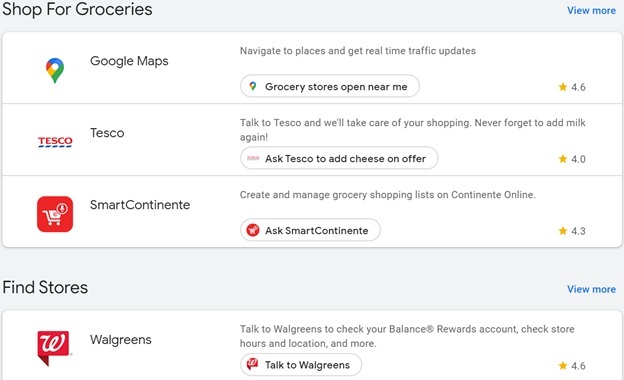
Make shopping your A-Game with Google Assistant.
Parent Company Ecosystems
Ecosystems form an integral part of user choice when purchasing a product or service. Apple has successfully designed the iOS ecosystem— replete with Apps, Support Services, and Products— to cater to every user's needs. The support provided by parent companies in their ecosystems helps apps and services flourish.
Alexa Ecosystem:
Amazon's product ecosystem allows Alexa to stay connected across multiple devices (including Echo, Dot, Show, Smart Clock, and even Auto). Without an operating system supported by Amazon, Alexa's ability to do multiple tasks has increased through the Works with Alexa initiative. It allows third-party developers to use the Alexa system to configure various tasks in-app or otherwise.
Amazon's ecosystem with entertainment offerings, including Amazon Prime, Amazon Music, Prime Music, Fire TV, Ring Camera, Smart Home tools and miscellaneous associated services, pulls users toward the devices.
Google Assistant Ecosystem:
As one may know, Google's monopoly over the Android ecosystem has helped it add assistants to hundreds of millions of devices worldwide. This includes smartphones, tablets, computers, and smart home devices—third-party or built by Google.
The Android ecosystem allows an assistant to download applications, purchase in-app offerings at the drop of a word (literally!), and even converse with audiences on voice search parameters. Google's ecosystem is far richer than Amazon's. Amazon's sessions on Google initiative allow developers to hone applications with the assistant in mind, making them more responsive, easily reachable, and highly interactive for users of Android and multiple Google Smart Home devices.
Productivity offerings
Productivity is the holy grail for any assistant and the companies that create them. Think about the numerous times you need to record, accomplish, or automate tasks - you would need specialized software to tackle all these functions. Assistants now make achieving peak performance possible on a personal level.
Productivity with Alexa:
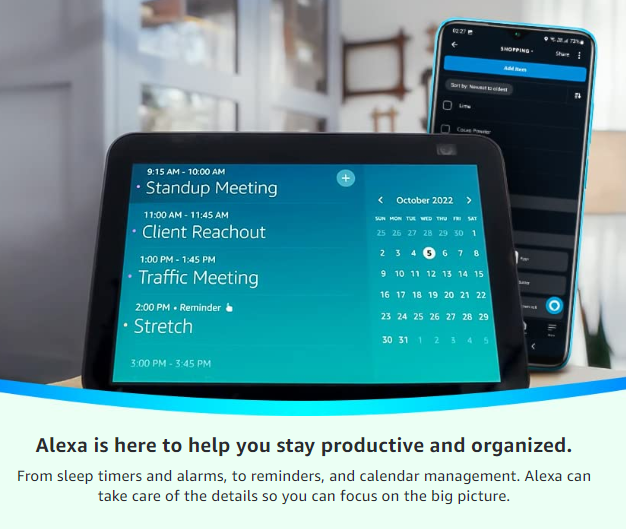
Alexa can access your calendar once you link it to an iCloud, G Suite, or Outlook account. You can send an email and block calendar blocks. Alexa can even reply to emails, list your day, and remove or reschedule appointments.
With Alexa, you can also create and manage many lists. Just tell Alexa to make a list for shopping or your daily chores. The Amazon-created assistant can also make quick calculations as you do your work. Ask it to define words, check valuations of currencies, and perform simple BODMAS calculations.
Productivity with Google Assistant:
Google's experience and work in the productivity department have set the stage for the assistant to work magic. One can easily make phone calls and remove or reschedule meetings on the default Google Calendar by saying, "Okay, go to the calendar task."
Replying, creating, and formatting emails is comfortable, while Google Assistant can also make notes in the default application. Recording the meeting minutes is no small task, but the assistant carries it out efficiently. Just say, "Okay, go, "and record this. caOkay
Google Assistant can also create geo-specific reminders and notes. For example, "Okay, remind me to purchase eggs from Walmart on 42nd Street." Check your latest notification by asking, "What are my notifications?". You can also skip to DND mode on your Assistant-supporting device. Check any facts on the assistant's search engine - Google - while calculations become easy to execute. An assistant can have your entire travel itinerary right before you, as and when required. It includes picking out travel dates, booking your travel to the station, and making reservations at your preferred place of stay.
In productivity, Google certainly has one up on Amazon's Ama - Alexa Mobile Accessory protocol.
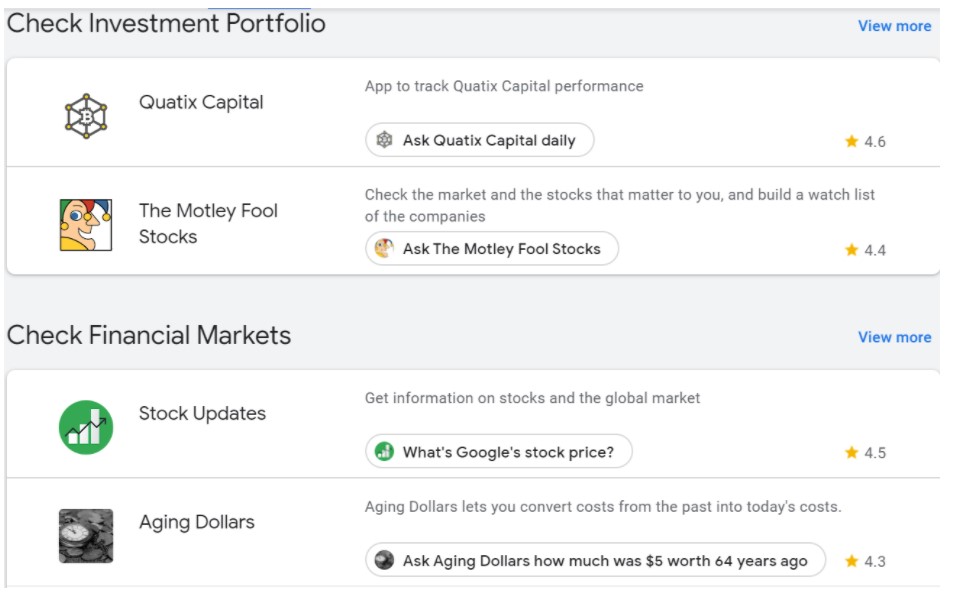
Productivity Apps that have Google Assistant integration.
Entertainment
Are you interested in watching that movie on Netflix? Perhaps a little jazz over the speaker system tonight would lighten the mood? Well, now, with the aid of assistants, you need not physically search for the entertainment form of your choice. Once configured, let the virtual assistants take over for you.
Entertainment with Alexa:
Amazon has integrated Alexa with Amazon Prime Video, Music, and Radio Stations.
Music lovers may play their favorite tracks on Amazon Music. "The Killer, "the album "Amazon," is all teed. Alexa can also play soundtracks over Apple Music, Spotify, or other famous radio stations. In the mood for a podcast? Excellent, Alexa has you covered there as well. Once you latch onto a FireTV account, you can access hundreds of thousands of labels through the Alexa App.
Similarly, movies on Amazon's Prime Video platform can be streamed to any Alexa-supporting device using the same commands as music. You can also find your favorite show's release dates.
Have fun with Alexa by playing exceptional games of skill or designing your own game with the virtual assistant. The Amazon-backed AI assistant can play games of adventure, skill, trivia, and even kids' commands like 'Alexa, let's play Monopoly,' etc., will trigger commands on Alexa-supported Amazon devices to help you become the party's host or to listen to Alexa's voice read you a book. Ask Alexa to read, download, or listen to your Kindle or Audible with ease.
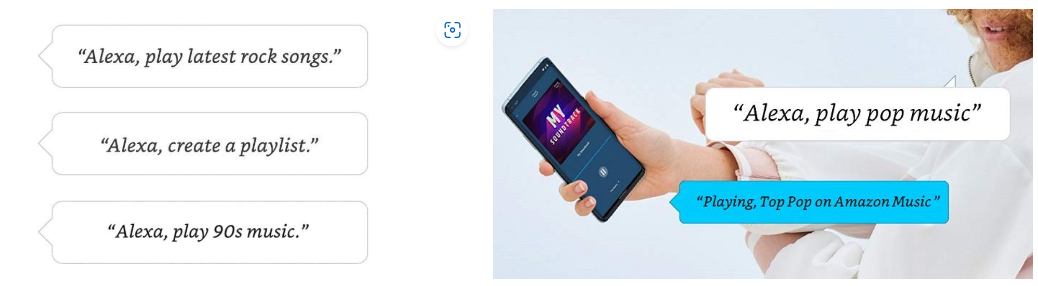
Entertainment and Alexa dance to the same tune
Entertainment with Google Assistant:
Just like Alexa, Google Assistant has numerous Entertainment features. You can link your primary Google Account with your Netflix account. Then you can instruct the assistant to play your favorite title, provided it is available on the video-streaming platform.
The Mountain View-based company's assistant can also play your favorite tracks on Google Music and Spotify. In the mood for a game? Challenge Google Assistant to games like Jeopardy, multiple trivia titles, and other adventure games. Once you ask it to do so, Google Assistant can also read audiobooks from the Google Audiobooks store.
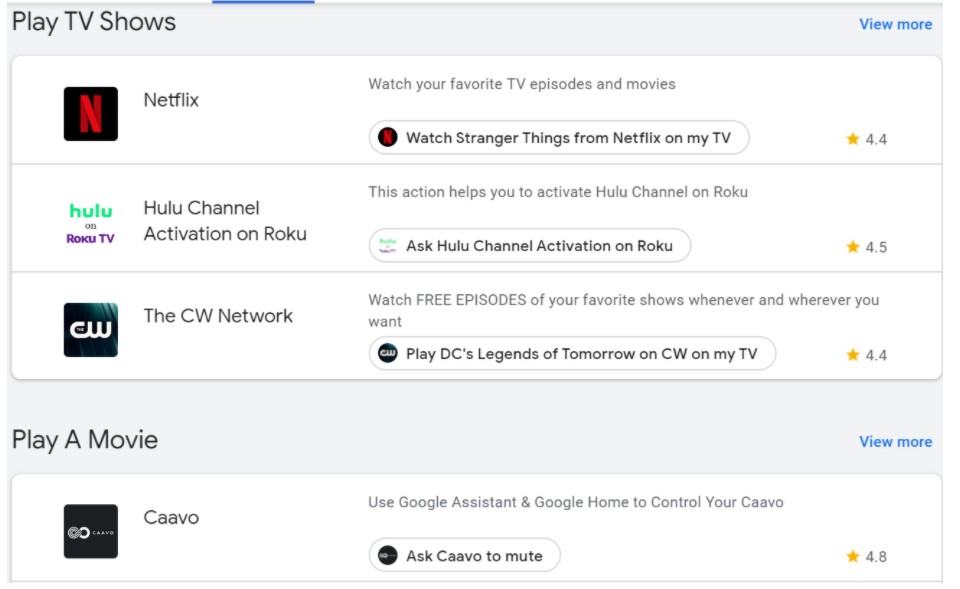
Google is certainly no slouch when it comes to TV.
Video and VOIP call
Nowadays, video calls are the go-to solution for businesses to conduct meetings and for family members worldwide to stay in touch. Are you hamstrung by range and connectivity issues? A good internet connection will help you make good Voice over Internet Protocol (VoIP) calls. With Zoom, WhatsApp, and Google Hangouts dominating the landscape, did you know your faithful digital assistants can easily make video or voice calls?
Calling with Alexa:
Thanks to the work with the Alexa initiative, communications via Alexa are straightforward. Call loved ones and people with US, Canada, and Mexico phone numbers through an Alexa-enabled device as quickly as you can call someone in your contacts list with Amazon devices and IDs. It includes Voice calls as well as video calls. Say, "Alexa, C" ll {Contact}," and you're through.
An essential prerequisite is the Amazon Alexa app, which requires you to verify your phone number and sync your contacts list. After installing the app, you must update your profile, add a phone number, and enjoy unlimited voice or video calls. You can also accept or reject calls from other callers using Alexa just as easily.
Features like drop-in allow one to turn Alexa devices into intercom systems to check on your loved ones. Furthermore, Announcements help convey important information through an interconnected network on Alexa devices in the house.
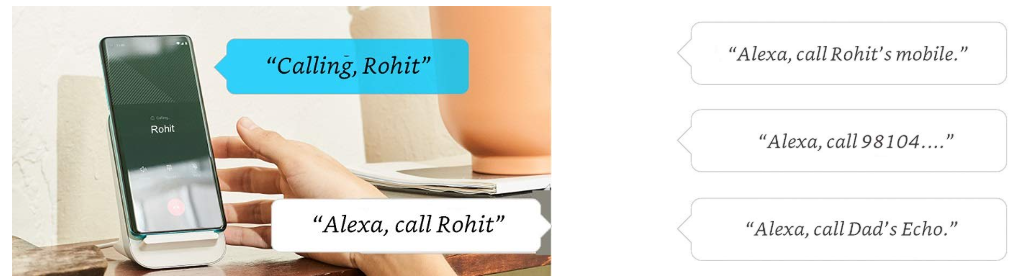
Hands-Free Calling With Alexa
Calling through Google Assistant:
The assistant is incredibly efficient while making phone calls. However, you can't receive incoming phone calls via an assistant-enabled device (a significant disadvantage over Alexa), but you can make calls via Google Smart devices.
Just as with Alexa, you need to have the Google Home app and sync your phone number and contacts list through it before proceeding. One may call US and Canadian numbers free of charge if you have a phone number belonging to one of these countries. You may even use a Google Fi or Voice number if you have enough credits or a US or Canada-based number.
Initiate the assistant - "Okay, Google" - and instruct it to call a person, saying, "Call {Contact Name}." You can "also issue commands like "redial ""or ask "Google to find the nearest business near you and instruct the assistant to call them.
One can initiate phone calls via video or VOIP through Google Duo or WhatsApp. You may even instruct Google Assistant to discover miscellaneous information during the call. Multiple people can use Assistant-enabled Apps to make calls by directly linking their voice to their Google Account.
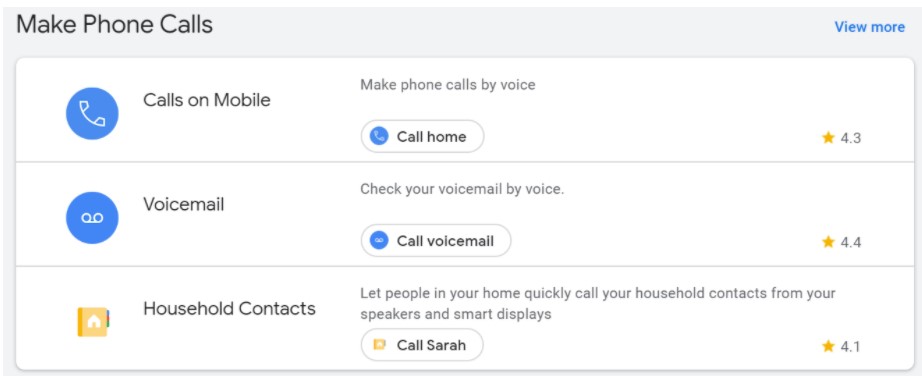
Making Phone Calls via Google Assistant is easy as 1,2,3.
Smart Home capability
Assistants such as Alexa and Google were created and improved over time, with the ideology of making homes even more connected and functional. With the growing demand for smart homes in the US, digital assistants will prove valuable to a subset of users.
Amazon and Google have created a unique ecosystem of smart home appliances, each tapping into the potential of its respective smart assistant. Both have functionalities to control the ambient temperature in the house, switch devices on or off, and even control individual appliances.
Both have productivity measurements within the household and specific devices to help you complete tasks. From voice-activated complete entertainment systems to smart security systems, audio-assisted showers, room lighting, and vacuum cleaners, Alexa and Assistant have come a long way from being novelties.

Alexa+
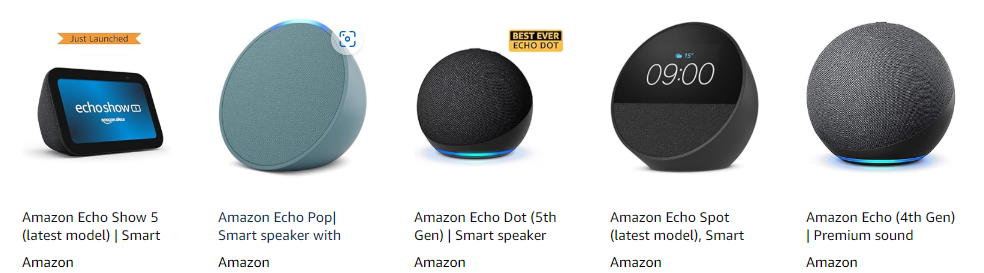
Other Versions of Amazon Echo
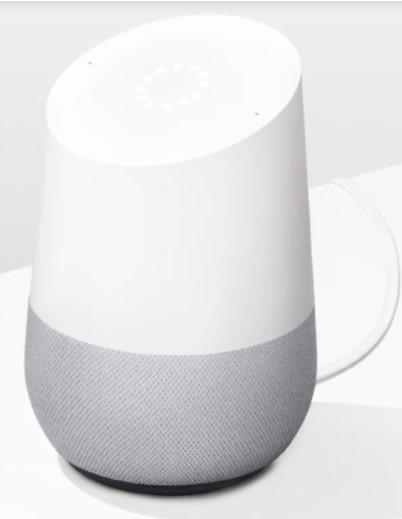
Google Home
Third-Party Integrations (Software & Hardware)
A virtual assistant should be able to learn new commands and potentially execute a plethora of tasks per day. These days, the pure stock input of commands from parent companies is not enough. Therefore, initiatives to devise the best out of virtual assistants are already on war footing.
The Works with Alexa and Android Things programs have changed the landscape for integrations worldwide. Various applications and even devices from third-party manufacturers have integrated innovative systems' abilities to enhance their products.
Assistants are assimilating commands at a breakneck pace, whether a smartwatch that executes multiple voice commands or an application that helps you book taxis on the go. Even the devices that support assistants are growing—from TVs to smart locks.
Average Price for Google Assistant and Alexa-Supported Devices
The average prices for Google Assistant-supported Home and Nest products range between $99 and $349. Also, Google Assistant-enabled smartphones cost approximately $100 and $1500, depending on the class of device used—economic or premium.
Google's is now shipping with refrigerators and washing machines from producers such as LG and Samsung, each priced between $700 $100 and beyond. Smartlocks and CCTV cameras that support Google Assistant controls ship between $149 and $199—a set of lighting options with Google Assistant voice control costs close to $130.
A range of smaller devices, each with functions ranging from Alarm clocks to WiFi routers, now support Google's. They cost between $49 and $79.
On the other hand, Alexa supports all the Amazon Ecosystem devices. The Echo Dot r(5th Gen) typically launches around $49.99, with Prime Day deals dropping it to roughly $32. The newer Echo Pop retails near $39.99, sometimes discounted to $22. Secondary smart devices, such as the Alexa-supporting smartwatch from Fitbit (Versa 2), cost $198.99.
The Amazon Echo Show, a touchscreen version of the Echo, comes priced at $229 onward.
Amazon's Echo TV also supports Alexa and starts at $120. Alexa is limited to the Amazon ecosystem; however, smart locks from August that support Alexa functionality range between $250 and $350, depending on their versions.
Philips WiFi lighting also has built-in Alexa functionality and is priced between $49.99 and $60. Arlo's smart security integrates Alexa's functionality in the security department, and on user choice, costs between $115 and $400.
Alexa-supported appliances, ranging from smart televisions to washing machines, have already flooded the market from makers such as LG and Samsung. Their prices range between $700 and $4000, primarily for TVs.
Support & Services
Amazon has a dedicated Alexa FAQ page for any problems users may face with the virtual assistant. It can be accessed here. Support for voice privacy, device security, and general Alexa support is all answered here.
Similarly, Google has documented various possible errors and troubleshooting aids that will be handy for users of Google Assistant on multiple devices. They can be accessed here.
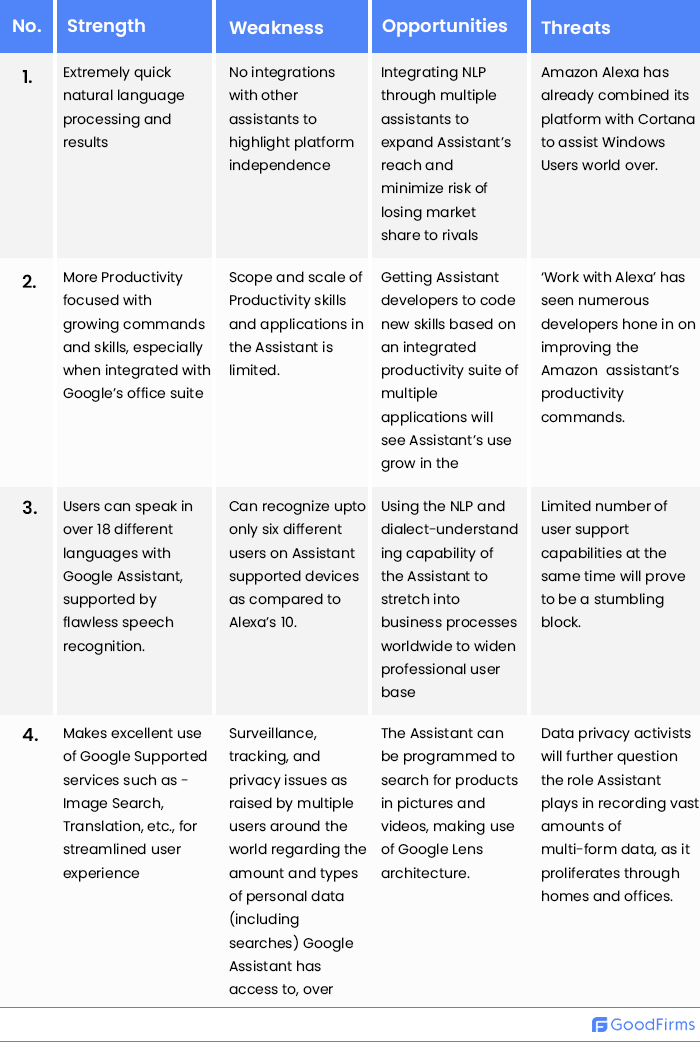
Strengths and Weaknesses of Alexa and Google Assistant
Despite being replete with the latest advancements in voice user interface capabilities, both Alexa and Google Assistant have minor or major setbacks, depending on how you view their flaws. Here are the pros and cons of Amazon and Google Voice Assistant for your benefit.
Alexa SWOT:
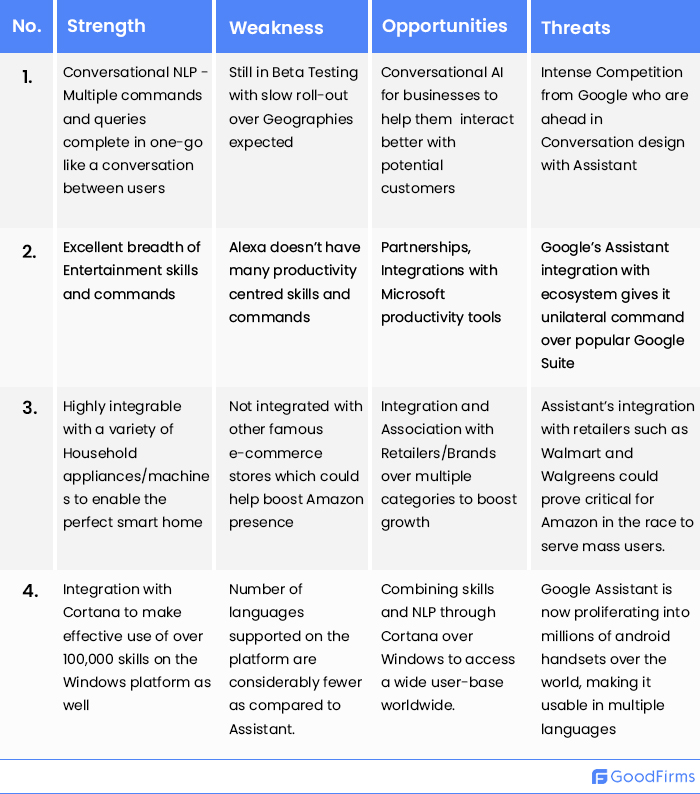
Google Assistant SWOT:
Expert Opinion
Alexa and Google Assistant have been at their digital jugulars for years. With both assistants still developing their fledgling abilities to more fluid and all-encompassing ones in the technology world, how effectively they evolve remains to be seen.
With both parent companies, Amazon and Google, keen to ensure an unhindered user experience, it is obvious that experts will help consumers decide which platform to stick with.
Here are some expert opinions on both Voice Assistants -
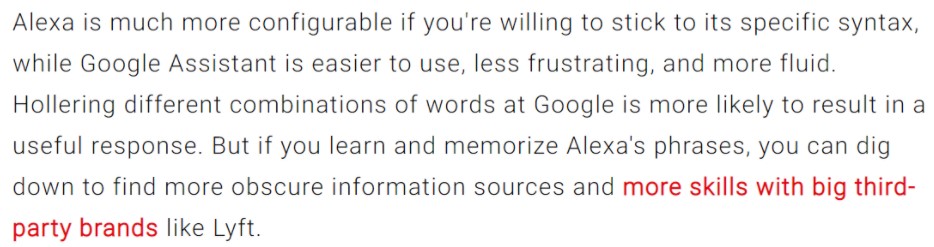
Sascha Segan, Columnist and author at PC MAG
Hugh Langley, while writing for the Ambient on Alexa's contextual capabilities versus an assistant -

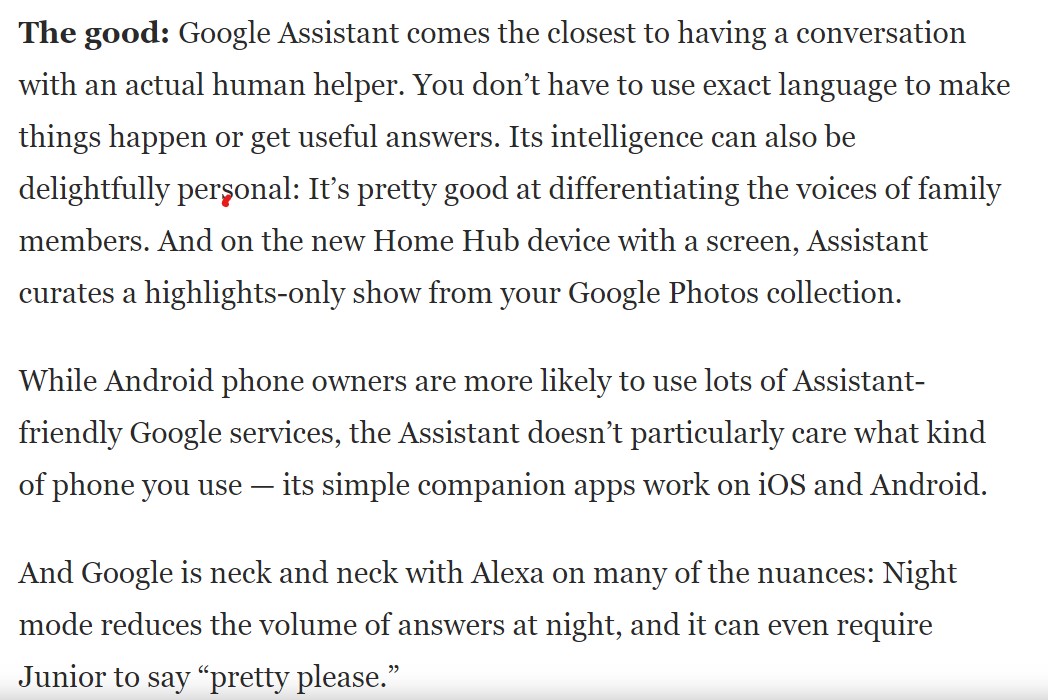
Geoffrey A. Fowler, Technology Columnist for the Washington Post,
had this to say about Google's Google's t -
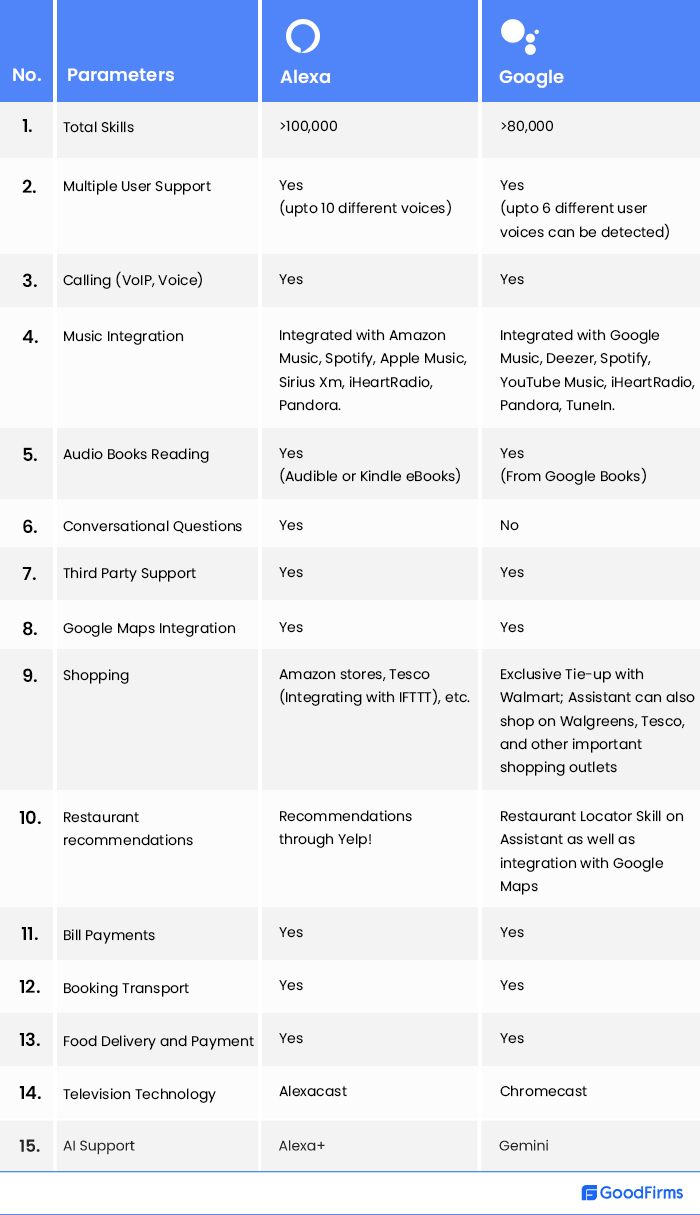
Comparing Alexa and Google Assistant
No comparison blog can be complete without comparing some key characteristics of the two most popular Artificial Intelligence Voice Assistants. Here are some of the best features that are up for comparison between Google Assistant and Alexa.
Verdict
Artificial intelligence software solutions are used in various applications, and their importance is growing phenomenally these days. With this technology, the future looks more intelligent. Some of the best AI software is used in voice and sound recognition, image recognition, video detection, text-based applications, and so on.
A Microsoft survey in 2019 highlighted that Google Assistant and Siri share the most significant chunk of the virtual assistant market—36 percent each. The intelligent virtual assistant market is on course to become a $45.1 billion industry in 2027.
The jury is still out, but early indications say Google Assistant is a clear winner in productivity features. At the same time, Alexa has taken the lead in entertainment and the complete smart home sector. However, the race is far from decided. The world is still innovating around the concept of VUIs, and it will grow at an explosive rate shortly. Even new entrants and small players in this industry are testing this technology cost-efficiently with free and open-source AI software.
We appreciate your views on this article. Post in the comments below or use our feedback portal to help us learn and improve the content.
Want to expand your search to include various forms of software that may be useful to you?Goodfirms' directory has multiple solutions that are required for businesses to succeed.