Key takeaways
- Integration API connects your business systems so they share data automatically, instead of your team doing it by hand.
- The most common types are CRM, payment gateway, HR (including Workday API integration), and AI API integration.
- A strong partner shows clear documentation, solid security practices, and a track record of ongoing monitoring — not just a one-time build.
- Cost and timeline depend on complexity and the number of systems involved, so treat a fixed quote without any discovery conversation as a red flag.
Every time someone on your team copies a customer's email from your CRM into your billing tool, that's a sign your systems aren't talking to each other. When you multiply that across a system from one of your payment gateway companies, a platform built by HR software developers, and now an AI tool, it's hours a week spent on work your systems could be doing automatically if they were connected.
This is where Application Programming Interface (API) integration comes in: connecting your business systems so they share data automatically, instead of your team moving it manually.
This blog breaks down what API integration actually involves, where it's most commonly used, and how to scope the work before you bring in outside help. Let’s dig deeper.
Ready to bring in outside help? Compare top API developers on Goodfirms — verified reviews, past projects, and pricing, all in one place.
What is API Integration, in Plain Business Terms?
API integration is the process of connecting two or more software applications via their APIs to exchange data automatically. So nobody has to manually move information between systems. This might mean linking tools your own team relies on day to day, or it might mean connecting your product to systems your clients use
Here's what that looks like in practice: say your online store needs current inventory numbers from your warehouse system. Rather than accessing the warehouse database directly, the store sends a request via the API and receives the data it needs. Setting up integrations is essentially building and maintaining these request-and-response paths so systems stay current with each other automatically.
A business running one or two tools might never notice the difference. But as the company grows and adds more software, the gaps start to show up as manual work: someone retyping customer details from one system into another, updating the same spreadsheet twice, exporting a file from one place just to import it somewhere else.
Integration API closes those gaps directly, so workflows run without the manual handoffs, data stays accurate across tools, and the software a business relies on actually functions as one connected system rather than a pile of disconnected parts.
The definition of API integration hasn't changed. What has changed in 2026 is who's actually making those requests.
Why API Integration Matters More in 2026
A Postman survey of over 5,700 developers, architects, and executives in 2025 found that API strategy is quickly becoming AI strategy. In other words, how a business builds its APIs is now inseparable from how effectively it supports AI tools. 89% of developers now use generative AI daily in their work, but only about a quarter of them are actually designing their APIs with AI agents in mind — the majority are still building for human use only, and some haven't factored AI agents into their API design at all
AI agents are already active API consumers, not a future one. 51% of organizations have already deployed AI agents in production — often built by AI agent development companies — and another 35% plan to do so within the next two years. Most of the APIs that agents now rely on, though, were originally built for predictable, human-scale traffic — steady call volumes, manageable rate limits, and the kind of "read the docs and figure it out" tolerance a person brings that a machine doesn't.
The gap between human-built APIs and machine-scale traffic also creates new risks: agents can call an API nonstop and much faster than a person ever could, so businesses now worry about AI systems accessing more than they should. A single overlooked permission or unclear error response, tolerable when a person hits it occasionally, becomes a much bigger problem when a machine hits it thousands of times an hour.
With AI agents now in the mix, it helps to know exactly what kind of integration you're dealing with. That's the specific problem AI API integration solves — ensuring that the same system-to-system connections work smoothly whether a person or an AI agent makes the request.
Not all API integrations work the same way — and knowing which type you need is the first step to scoping the work correctly.
What are the Most Common Types of API integration?
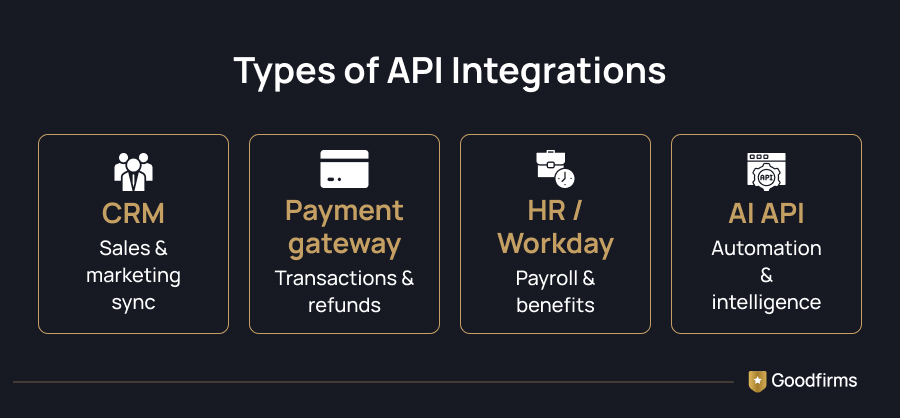
Most businesses don't think about API integrations in terms of technical architecture—they think about the systems they need to connect. These are the integration types that organizations most commonly implement as they grow, enabling their core business applications to exchange data automatically.
1. CRM Integrations
Syncing your customer relationship management system — whether that's one of the best CRM software or something custom-built with other tools — so that every interaction with a lead or customer updates in one place. This keeps sales and marketing working from the same, current information instead of separate lists.
2. Payment Gateway Integrations
Connecting your website or app to payment processing software so transactions, refunds, and subscription changes flow into your accounting and order systems on their own, no manual reconciliation needed. High-volume businesses feel this most — a small reconciliation gap on a handful of transactions is easy to catch. Still, the same gap across thousands starts eating into accounting, tax reporting, and support time.
3. HR and Workday API integration
Larger organizations often run HR data in Workday, and a Workday API integration links that system to payroll, benefits administration, or other human resources (HR) software, so employee data doesn't have to be maintained separately in each system. This matters most once headcount and the number of HR-adjacent tools both start to grow.
4. AI API Integration
More and more businesses want to connect AI models or AI-powered services — often built by artificial intelligence companies — into their existing workflows: for example, having a support ticket automatically summarized, or a document automatically classified. AI API integration is what makes that possible: it's the connective layer between your existing systems and an AI service that adds automation or intelligence on top of them. This matters most for support and operations teams handling repetitive, high-volume tasks — where automating a routine judgment call saves more time than automating a simple data transfer ever could.
Each of these types is built using one of a few underlying technical approaches.
How are API Integrations Built?
Behind these business use cases are several technical approaches. The right implementation depends on how many systems need to connect, how frequently data must be exchanged, and how easily the integration should scale and be maintained over time.
Integration Architecture
- Point-to-point
A direct, one-to-one connection between two systems. Simple to set up for a single connection, but this approach gets messy fast — Connect five systems this way, and you may end up maintaining a web of separate connections, as each application requires its own direct link to the others.
- Hub-and-spoke
All systems connect to a central hub rather than to each other directly. The hub manages routing, making it easier to add or remove systems later without rebuilding every connection.
- ESB (Enterprise Service Bus)
A more structured integration architecture is typically used by larger organizations with complex internal systems. The ESB acts as a central nervous system, routing, translating, and managing data between applications.
- iPaaS (Integration Platform as a Service)
A cloud-based platform that handles the connections for you, often with pre-built templates for popular business tools. This is a popular approach for growing businesses because it reduces the need to build and maintain custom integration infrastructure. Some businesses also use dedicated API management tools to monitor and govern APIs once integrations are live.
Data Synchronization
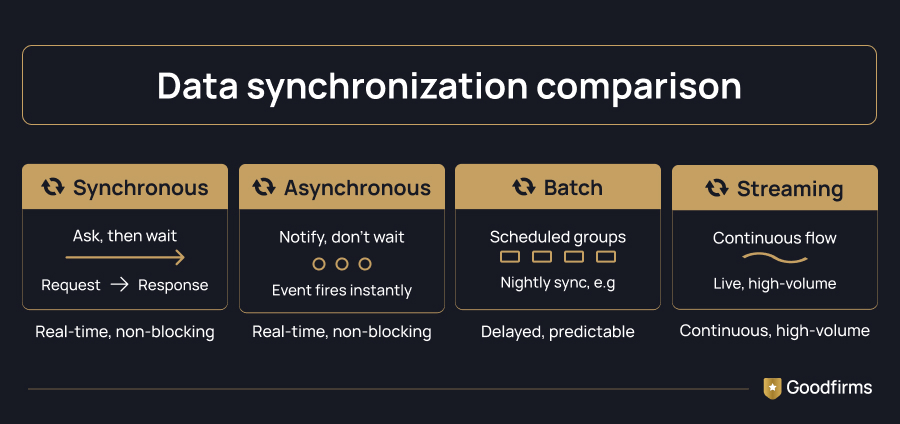
- Synchronous (request-response)
One system asks a question and waits for the answer before moving on — like checking inventory in real time before confirming an order.
- Asynchronous (webhooks/events)
Instead of asking and waiting, a system sends a notification the moment something happens — like alerting your CRM the instant a payment goes through — without either system pausing to wait on the other.
- Batch
Data moves in scheduled groups rather than instantly — for example, syncing all of the day's transactions to your accounting system every night. This works well when real-time isn't necessary.
- Streaming
Data flows continuously and is processed as it arrives, rather than in scheduled batches. This matters most for businesses handling high volumes of fast-changing data, such as live pricing or usage tracking.
API Technologies and Styles
- REST
The most common protocol in use today is lightweight, flexible, and the default choice for most modern integration work. For a closer look at how this plays out in mobile apps specifically, see the benefits of integrating APIs in mobile app development.
- GraphQL
It enables the requesting system to ask for exactly the data it needs in a single call, rather than pulling everything and sorting through it. It is useful when systems need to be efficient with data.
- SOAP
An older, more structured protocol that is still common in banking, healthcare, and other industries with strict security and compliance requirements.
- gRPC
It isbuilt for fast, efficient communication between internal systems — often used when speed and performance matter more than broad compatibility.
Unlike traditional integrations, AI integrations often involve sending prompts or requests to an AI model and receiving generated content, predictions, or recommendations rather than only exchanging predefined structured data. Sending and receiving generated content this way makes factors such as response latency, usage costs, and data privacy important considerations when designing and managing AI-powered workflows.
While the technical approach affects scalability, performance, and maintenance, most growing businesses rely on multiple integrations working together. Their long-term success depends not only on choosing the right architecture but also on working with a partner who can design, secure, document, and maintain those integrations over time.
What API Integration Capabilities Should You Look for in a Partner?
Not every development firm that says it does "integrations" approaches the work the same way. Some treat it as a one-time build-and-forget task; others treat it as infrastructure that needs to keep working as your systems change. That difference shows up long after the contract is signed, so it's worth checking for upfront. When comparing top API developers, a few capabilities are worth checking for before you sign on:
1. Clear Documentation and Testing Practices
It's important to know how a firm documents an integration once it's live — not just the code, but what each connection does, why it was built that way, and what happens if a step fails. Good documentation is what makes an integration maintainable by someone other than the person who built it, which matters the day that person moves on to a different project or leaves the firm entirely. You should ask to see a sample of documentation from a past project — a firm confident in its process will have one ready to show you.

Documentation is supposed to make integrations easier, but it rarely gives you the full picture.
2. Security, Authentication, and Data Handling
Integrations often move sensitive data — customer records, payment details, employee information — between systems, which makes this one of the highest-stakes parts of the project. A partner should be able to clearly explain how they handle authentication (API keys, tokens, OAuth), how data is encrypted both in transit and at rest, and how access is limited so that only the systems and people who need the data can reach it. If a firm gets vague or defensive when asked to walk through this in detail, treat that as a signal, not an oversight.
3. Error Handling, Monitoring, and Maintenance
APIs change. A vendor updates their endpoint, a rate limit shifts, a field gets renamed — and without monitoring in place, an integration can quietly fail for weeks before anyone notices, silently dropping data the whole time. You must ask directly: what happens when something breaks? Is there automated alerting, or does someone have to manually notice the problem? Who is responsible for catching it, and how quickly can they respond once they do?
4. Proven API Integration Capabilities from Past Projects
Equally important is seeing examples of integrations a firm has actually built — ideally ones similar in scope to yours, whether that's a CRM sync, a Workday API integration, or an AI API integration. A firm that can walk you through a real project, including what went wrong and how they fixed it, is generally a safer bet than one that only speaks in generalities. You shouldn’t be satisfied with vague answers like "we've done lots of integrations." They are worth pressing on until you get a specific example.
5. Scalability and Flexibility after Launch
An integration that works well for two systems today may need to support five systems, higher data volumes, or new AI-driven workflows a year from now. You need to ask whether the partner's proposed architecture is built to accommodate that kind of growth, or whether adding a new system later would require rebuilding significant parts of what you're paying for now. A partner who thinks about this upfront tends to design more durable, adaptable systems from the start.
Choosing the right partner is only half the job. The other half happens before you ever talk to one.
How do you scope an API Integration Project before hiring a Firm?
This is where most integration projects actually succeed or fail — not in the coding, but in the prep work done before a single line of code is written. A firm can only scope and price a project as accurately as the information you give them. Walking in with vague answers gets you a vague quote, and vague quotes are how projects run over budget and past deadline.
Questions to Answer Internally First
Before you talk to a development partner, work through these questions with your own team. You don't need perfect answers — you need honest ones.
- Which systems need to connect, and do they already have APIs available?
List every system by name, not just by category. "Our CRM" isn't specific enough — is it Salesforce, HubSpot, or something custom-built? Check whether each system has a public API at all; some legacy or heavily customized platforms don't, which changes the scope of the project significantly before a developer even gets involved.
- Roughly how much data will move, and how often?
You don't need exact numbers, but you should know the shape of it: are you syncing a few hundred customer records once a day, or tens of thousands of transactions in real time? This single answer affects both the architecture a developer will recommend and the price they'll quote.
- Who within the organization owns each system, and who needs to sign off on data sharing between them?
Integration projects stall more often due to internal approval issues than to technical difficulties. If your CRM is owned by sales and your HR platform is owned by HR, both need to be in the loop before a vendor starts building — not after.
- What does success look like?
Get specific here. "Fewer manual steps" is a start, but which steps? Fewer hours spent re-entering data each week? Faster monthly reporting? Real-time inventory checks at checkout? A vendor can't build toward a goal you haven't defined, and neither can you evaluate whether the finished integration actually worked.
What to Include in Your Brief or RFP
Once you've answered the questions above, turn them into a written brief. At a minimum, include:
- The systems involved, by name and version if relevant
- What data needs to move between them, and in which direction (one-way or two-way sync)
- Compliance or security requirements — this matters especially for HR, payment, or health-related data, where regulations such as PCI DSS or HIPAA may apply. If HIPAA is in scope, it's worth shortlisting from healthcare software development companies that already build to that standard, rather than checking for HIPAA experience after the fact.
- Your timeline, including any hard deadlines and why they exist
- What "done" looks like, in terms specific enough that both sides can agree the project is complete
The more specific you are here, the more accurate the quotes you'll get back. A brief that says "we need our systems to talk to each other" will get you a wide range of guesses. A brief that lists exact systems, data volume, and success criteria will get you quotes you can actually compare apples to apples.
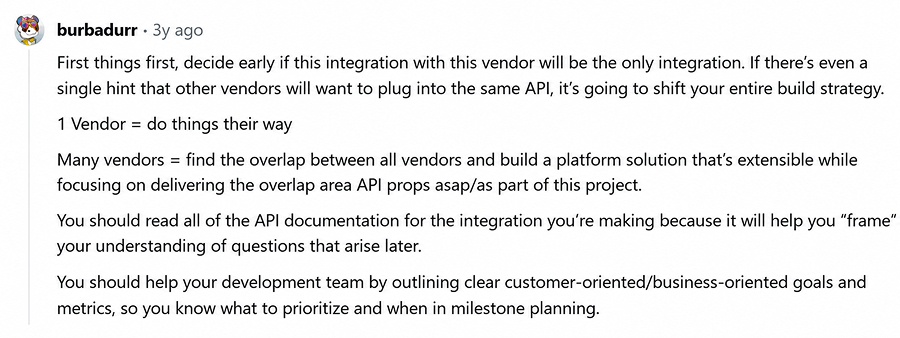
Source: Reddit
Red Flags that Signal a Poor Fit
Watch for these warning signs once you start talking to firms:
- A fixed price before any discovery conversation
If a firm quotes a number before asking about your systems, data, or requirements, that number isn't based on your project — it's a guess, or a deliberately low number meant to win your business before the real scope (and real cost) comes out.
- Vague answers about authentication and error handling
Ask directly: how will they handle API keys or OAuth tokens? What happens when a call fails or a system is down? A firm that can't answer clearly hasn't done this enough times to know what actually goes wrong.
- No examples of similar work
Ask for a past project close to your scope — a CRM sync, a Workday API integration, an AI API integration, whatever's closest to your case. A firm confident in its API integration capabilities should be able to walk you through a real project, including what went wrong and how it was fixed.
- No mention of what happens after launch
Integration work doesn't end at deployment. If a firm doesn't bring up monitoring, maintenance, or what happens when a connected platform changes its API, ask directly — silence here often means it's not part of their process.
Knowing the warning signs is one thing — knowing what a fair price actually looks like is another.
How much does API Integration Cost, and How Long does it take?
Cost and timeline vary from project to project. The biggest factors include the complexity of the integration, the number of systems involved, whether pre-built connectors are available or custom development is required, the volume of data being exchanged, and any security or compliance requirements. The table below shows typical project ranges, while the following section explains what drives those estimates.
|
Integration complexity |
Typical use case |
Estimated cost |
Typical timeline |
|---|---|---|---|
|
Simple integration |
Connecting two SaaS tools with standard APIs |
$1,000–$10,000 |
1–4 weeks |
|
Medium-complexity integration |
Multiple systems, custom workflows, or data transformation |
$15,000–$40,000 |
1–3 months |
|
Complex integration |
Enterprise applications, legacy systems, or advanced automation |
$50,000–$150,000+ |
3–6+ months |
|
Enterprise integration |
ERP, healthcare, finance, compliance, or AI-driven systems |
$100,000–$1M+ |
6+ months |
What Drives the Cost
A generic list of cost factors won't tell you much on its own — every firm you talk to will cite the same five or six variables. What actually separates a real quote from a guess is whether the firm can speak to each of these specifically, for your project, instead of in the abstract. Here's what to listen for on each one:
- Integration Complexity
Don't just accept "it's complex" as an answer. Ask the firm to specify the complexity: is it custom business logic, multiple data transformations, or rules that must remain intact during the sync? A firm that can name the actual complexity in your case (not complexity in general) has actually looked at your systems.
- Number of Systems
Ask how the price changes as you add a system — not just "will it cost more," but by how much and why. Cost doesn't scale linearly here (a fifth system isn't 20% more than a fourth), so a firm that can explain why the curve bends, not just that it does, understands what they're pricing.
- Data Volume and Synchronization Frequency
Give the firm your actual numbers — records per day, real-time vs. batch — and ask them to price against that, not a generic tier. If a quote doesn't visibly change when you tell them your volume is 10x higher than they assumed, they didn't actually price your project.
- Custom Development vs. Existing Connectors
Ask directly: Does a pre-built connector exist for each of your systems, or is this custom work? Tools like the ones listed under integration software can sometimes cover this without a custom build at all. This is one of the biggest cost swings in the whole project, and it's also one of the easiest for a vendor to verify before quoting — if they haven't, their number isn't grounded in your actual stack.
- Security and Compliance Requirements
If your data touches payment, health, or employee records, ask what specific safeguards apply — encryption in transit and at rest, access controls, audit trails — and which regulations (PCI DSS, HIPAA, etc.) they're building toward compliance with. A vague "we take security seriously" isn't an answer; a named standard is.
What Drives the Timeline
Cost and timeline usually move together, but not always for the same reason. A few factors stretch the timeline specifically:
- Testing and QA Depth
Integrations need to be tested against real-world scenarios, such as when a system is down, when data arrives in a malformed state, or when two records conflict. This kind of testing takes real time, and skipping it is how integrations that look fine in a demo break in production.
- Number of Stakeholders and Sign-offs
The more systems and teams involved, the more coordination and approval steps a project needs before it can move forward, which often adds more time than the technical work itself.
- Discovery Depth
Projects that start with a thorough discovery phase — mapping systems, data, and edge cases upfront — tend to run more predictably. Projects that skip discovery often look faster at the start, then lose time later to rework.
Why Fixed Quotes without Discovery are a Warning Sign
Be cautious of a firm that gives a fixed price before any discovery conversation. A reliable development partner should understand your systems, data requirements, and success criteria before committing to a final cost and timeline—a partner who asks detailed questions up front is doing it right, and a flat number with no discovery is usually a sign that the estimate doesn't reflect the actual scope of the work.
Final Thoughts
Integration API is an ongoing investment, not a one-time technical task. It defines how efficiently your systems and AI tools work together. Whether you're syncing a CRM, connecting payment processors, linking Workday to your other HR tools, or building AI API integration into your workflows, the businesses that get the most value are the ones that scope the work carefully up front. Knowing which systems need to connect, what data needs to move, and what "done" actually looks like before bringing in outside help.
Cost and timeline will vary by complexity, but the fundamentals stay the same — clear documentation, solid security practices, and a partner who asks questions before quoting a price. Skipping that discovery step is usually where projects run into trouble later.
FAQ: Integration API in 2026
What is an integration API?
Integration API is the process of connecting two or more software systems so they can automatically share data or trigger actions in each other, without manual re-entry.
How much does API integration cost?
Costs range from roughly $1,000–$10,000 for a simple integration between two SaaS tools up to $100,000–$1M+ for enterprise-grade integrations involving systems built by ERP software companies, healthcare platforms, or AI-driven tools. Most mid-sized projects—multiple systems or custom workflows—fall in the $15,000–$40,000 range.
What should I ask a development partner about the integration API?
Ask about their documentation practices, how they handle security and authentication, how they monitor and maintain integrations after launch, and for examples of similar past projects.
How long does an API integration take?
Simple, single-system integrations typically take 1–4 weeks. Multi-system projects involving custom workflows run 1–3 months, and enterprise integrations—ERP, healthcare, finance, or AI-driven systems—can take 6 months or more.
What's the difference between API integration and AI API integration?
Traditional API integration exchanges structured data between systems; AI API integration instead sends prompts to an AI model and receives generated content or predictions.