Key takeaways
- Not all "AI trading apps" use real AI; many are just rule-based alerts with an AI label.
- AI stock trading apps fall into four buckets: scanners, scoring engines, plain-language assistants, and brokerage-embedded AI features.
- In AI stock trading apps, a high AI score or signal is a probability-based input, not a buy recommendation or profit guarantee.
- AI trading is legal in most major markets as long as trades execute through a regulated broker.
- Always verify performance claims through independent reviews, not just in-app screenshots.
Search "AI stock trading" in any app store today, and you'll get dozens of results promising the same thing: smarter picks, faster signals, less work. Some of that is real. But a lot of it is just a basic price alert wearing an AI label, because that's what gets downloads in 2026.
Most of these apps fall into one of a few buckets: scanners that flag trade setups, scoring engines that rank stocks, plain-language assistants that explain the market, or AI features tucked inside brokerages you already use. Knowing which bucket an app falls into tells you more than any score it gives itself.
This guide covers the best AI stock trading apps 2026 has to offer. It helps to separate true AI stock analysis tools from basic alert apps and marketing-heavy trading platforms.
Looking to build something similar? Compare vetted AI development companies for custom trading tools, or explore top mobile app development companies to bring your own fintech application to market.
The Best AI Stock Trading Apps 2026
Looking for the best AI stock trading apps in 2026? We compared ten of them in terms of features, pricing, and who they suit best. These are the top platforms for stock screening, AI-powered analysis, trade signals, and portfolio support in 2026.
Here's how the major players stack up before we get into the details of each one.
|
App |
Best For |
Starting Price |
Core AI Function |
|---|---|---|---|
|
Trade Ideas |
Active day traders |
Free / $89+/mo |
Real-time scanning & trade signals |
|
Tickeron |
Pattern recognition & bots |
Free trial / paid tiers |
Chart pattern detection |
|
TrendSpider |
AI technical analysis |
~$40+/mo |
Automated charting & backtesting |
|
Danelfin |
AI stock scoring |
Free / $20+/mo |
ML-based 1–10 stock score |
|
Kavout |
Quant-style research |
Tiered/enterprise |
Multi-factor stock ranking |
|
AInvest |
Passive investing |
Free / $25+/mo |
Predictive alerts, rebalancing |
|
RockFlow |
Beginners |
Free |
Plain-language AI assistant |
|
Stoxo |
AI-driven predictions |
Contact vendor |
Trend & prediction signals |
|
Robinhood (Cortex) |
Existing Robinhood users |
~$5/mo (Gold add-on) |
AI news/portfolio summaries |
|
Magnifi |
AI-assisted research |
$10–15/mo |
NLP-based portfolio Q&A |
Now let's look at what each of these is actually doing under the hood.
1. Trade Ideas — Best for Active Day Traders
Trade Ideas is the oldest name on this list, and you can tell from how deep the product goes. Its AI engine, called "Holly," runs millions of test trades on past and live data every night. It then shows you the setups with the best odds before the market opens the next day. If you already scan charts by hand every morning, this app does that work for you.
What makes Trade Ideas worth paying for isn't some hidden prediction formula. It's the mix of fast scanning, broker connections, and a built-in backtester (OddsMaker) that lets you test a strategy before you risk real money. The downside is a real learning curve; this isn't an app you can use for just five minutes a day. Among the AI stock scanner apps on this list, Trade Ideas stands out for real-time scanning, broker integrations, and strategy testing for active traders.
Key features:
- Holly AI engine for overnight backtesting and next-day trade setups
- Real-time scanning with fully customizable alerts
- Direct brokerage integration for one-click or automated execution
- OddsMaker backtester for strategy validation
Pricing: Free plan available; paid plans start around $127/month, depending on the tier.
Keep in mind: Holly gives you ideas, not guarantees. The win rates you see quoted (often around 55–65%) don't include slippage, position size, or the discipline it takes to follow every signal.
2. Tickeron — Best for Pattern Recognition and Trading Bots
Tickeron's AI is built to automate technical analysis, the kind of chart reading a trader would normally do by eye. It scans stocks, ETFs, and options in real time for known patterns, like head and shoulders, double bottoms, and breakouts, and gives each signal a "confidence" score.
What sets Tickeron apart from a basic scanner is its marketplace of AI trading bots and model portfolios. It also has a useful virtual trading mode, so you can test how a bot works with no real money at risk before you decide to fund it. Tickeron is also one of the better options if you’re looking for the best AI trading bots for stocks, thanks to its bot marketplace and virtual portfolio testing tools.
Key features:
- AI pattern recognition across stocks, ETFs, and options
- Virtual portfolio testing before committing real capital
- Marketplace of pre-built AI trading bots and model portfolios
- Daily buy/sell signal feed
Pricing: Free trial; paid plans range up to roughly $250/month, depending on which bots and add-ons you enable.
Keep in mind: The signal feed assumes you already know how to read charts. Beginners often find the interface and the number of signals confusing without that base knowledge
3. TrendSpider — Best for AI-Powered Technical Analysis
TrendSpider doesn't try to predict prices. Instead, it automates the most time-consuming parts of technical analysis: drawing trendlines, marking support and resistance, and checking the same setup across different timeframes at once. If you already trade using charts, this saves hours of manual drawing. It can also spot overlaps that a person might miss while switching between timeframes.
It also has an AI assistant you can train on your own rules, so the alerts feel more like something you'd flag yourself, not a generic signal that everyone else sees too.
Key features:
- Automated trendline and pattern detection across timeframes
- Multi-timeframe analysis for spotting confluences
- Built-in backtesting tied directly to your charting setup
- Customizable AI assistant trained on your own strategy criteria
Pricing: Plans typically starts from $39/month, depending on tier and whether you pay monthly or annually.
Keep in mind: If manual technical analysis hasn't worked for you before, automating it won't fix that. It just makes the same approach faster.
4. Danelfin — Best for AI Stock Scoring
Danelfin is one of the more open tools about what its model actually measures. It scores thousands of US and European stocks and ETFs on a scale of 1 to 10, using a machine learning model trained on hundreds of technical, fundamental, and sentiment factors. It also shares the broad method behind the score, instead of just hiding behind the words "proprietary AI."
The free plan gives you scores for top-rated stocks, so it's an easy way to see AI-based scoring in action before you pay anything. Paid plans unlock full coverage and years of historical score data. For investors looking for AI stock picker apps rather than fast execution tools, Danelfin is closer to research-driven scoring platforms than traditional trading apps.
Key features:
- AI Score (1–10) covering thousands of US and EU stocks plus ETFs
- Price-target and risk indicators generated alongside each score
- Historical score data for backtesting your own filters
- Clean interface aimed at non-technical users
Pricing: Free tier available; paid plans roughly $29–179/month.
Keep in mind: A high score is a signal based on probability, not a buy recommendation. It works best as one part of your research, not the only reason to buy.
5. Kavout — Best for Systematic and Quant-Style Investing
Kavout's "Kai Score" combines fundamental data, price patterns, and news sentiment into one ranking. It's aimed at investors who want a quant-style edge without building their own model. Using several types of data together makes sense in theory, since it lowers the risk of relying too much on any single signal.
It's built more for serious investors, advisors, and smaller institutions than casual users, and the pricing reflects that. Right now, it only covers US stocks, so it won't help much if you trade internationally.
Key features:
- Kai Score combining fundamentals, technicals, and sentiment
- Screening and ranking tools across US equities
- Tiered pricing, including enterprise and institutional access
Pricing: Free tier available; paid plans range from $20 to $ 49/month.
Keep in mind: The scoring method is only partly explained, so you're trusting the model's consistency more than you can check for yourself.
6. AInvest — Best for Passive, Hands-Off Investors
AInvest is built on a simple idea: most people don't want to watch charts all day. They want a system that watches the market for them and adjusts their portfolio automatically. Its "AI Radar" feature is meant to flag market shifts before they fully happen, paired with robo-advisor-style auto-rebalancing.
Getting started is genuinely easy, and that's the whole point. It's made for people who want AI help in the market without learning technical analysis first.
Key features:
- AI Radar for early market-shift alerts
- Automatic portfolio rebalancing
- Simple, modern, mobile-first interface
- Coverage across stocks and ETFs
Pricing: Free to start; pro plans from around $34/month.
Keep in mind: AI Radar's early alerts are useful, but accuracy will vary depending on market conditions and how you combine them with your own research.
7. RockFlow — Best for Beginners
RockFlow's main selling point is "Bobby," an AI assistant that explains market moves and stock news in plain language, instead of dumping raw data on you. Combined with fractional share investing starting at $1, it's clearly built to remove the two biggest barriers for first-time investors: cost and confusion.
It also has an optional copy-trading feature for users who want to follow another investor's approach while they learn. Advanced traders will probably find it too basic, but that's by design, not a flaw.
Key features:
- Bobby AI assistant for plain-language market explanations
- Fractional share investing from $1
- Optional copy-trading
- Clean, mobile-first interface
Pricing: Free, with optional premium features.
Keep in mind: You can't customize it much compared to platforms like Trade Ideas or AlgosOne. It's built for simplicity, not depth.
8. Stoxo — AI-Powered Stock Market Predictions
Stoxo is one of the newer AI stock prediction apps focused on generating market signals and trend-based forecasts rather than acting as a brokerage. Stoxo is built specifically for AI-driven stock market predictions and real-time investment analysis. The goal is to cut down the hours traders normally spend on manual research and chart reading. It doesn't work as a broker or portfolio tracker; instead, it acts as a prediction and signal layer that works alongside whatever brokerage you already use.
It's a platform worth exploring if you want an AI-first prediction tool, rather than a general trading app with AI added as an afterthought. Since it's new, it's worth checking independent user reviews and the vendor's own feature details before reaching out.
Key features:
- AI-driven stock market predictions and trend analysis
- Real-time investment analysis tools
- Built specifically around prediction signals rather than broad portfolio tracking
Pricing: Contact vendor for current plans.
Keep in mind: As with any new platform, ask for performance data you can verify independently, not just marketing screenshots.
9. Robinhood (with Cortex) — Best AI Layer Inside a Mainstream Brokerage
Cortex isn't a standalone AI trading app. It's a generative AI feature inside Robinhood, available to Gold subscribers. It turns breaking news, analyst comments, and portfolio movement into plain-language explanations of why a stock or your whole portfolio is moving. It's also rolling out a natural-language scan builder for more active users.
If you already use Robinhood, this is a cheap way to get AI-generated context without adding another subscription. If you don't already use Robinhood, it's not a strong enough reason on its own to switch brokers.
Key features:
- Cortex Digests summarizing news and portfolio moves in plain language
- Natural-language scan and indicator builder for active traders
- Zero-commission trading with a familiar, simple interface
Pricing: Requires a Robinhood Gold subscription, roughly $5/month.
Keep in mind: Cortex explains what's happening. It doesn't give you the deeper, multi-factor scoring you'd get from a dedicated tool like Danelfin or Kavout.
10. Magnifi — Best for AI-Assisted Research and Search
Magnifi uses natural language processing, so you can ask plain questions about stocks, ETFs, or your own holdings instead of digging through a screener. Questions like "which of my holdings has the highest expense ratio" or "compare these two ETFs" work fine.
It's more like a research chatbot than a signal generator, which makes it a good addition to the more analytical tools above, not a replacement for them.
Key features:
- Natural-language portfolio and stock search
- AI-generated comparisons and explanations of holdings
- Lightweight, conversational interface aimed at casual investors
Pricing: Plans typically run $15/month.
Keep in mind: It's a research helper, not a prediction tool. Don't expect trade signals from it.
What "AI" Actually Means in These Apps
Not every app on this list or on any "best AI trading app" list is doing the same kind of work. It helps to know where each one fits before you pay for it.
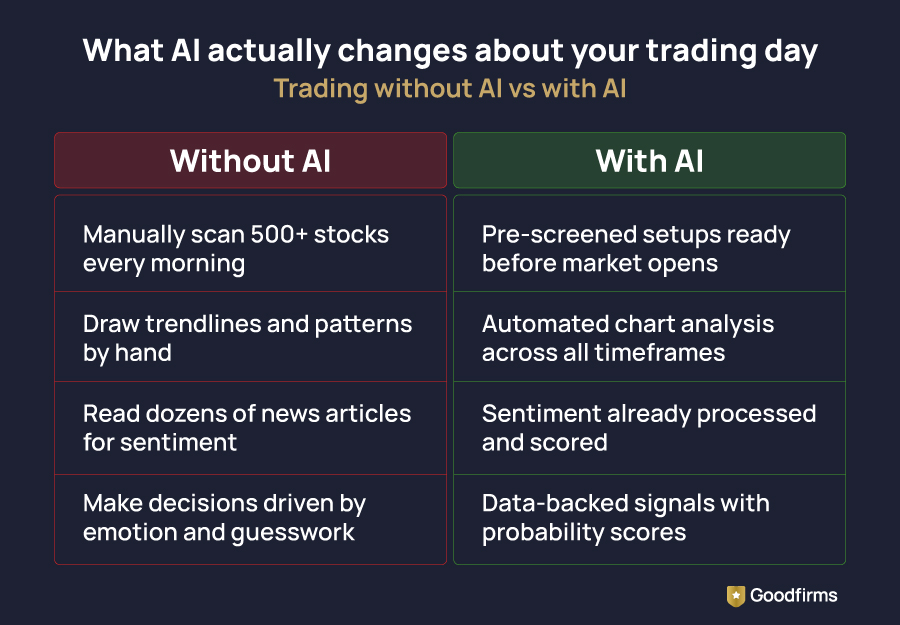
- Rule-based alerts, like a notification when RSI drops below 30, are just conditional logic. They're not really AI, even when they're marketed that way.
- Statistical pattern recognition (used by Tickeron and TrendSpider) automates technical analysis that a trader could otherwise do by hand. It's useful for speed, but it doesn't add new predictive power on its own.
- Machine learning models (used by Danelfin and Kavout) are trained on past data to score or rank stocks. This is real AI, though results still depend a lot on the quality of the data and how well the model avoids relying too much on old patterns.
- Natural language tools (used by Magnifi, Robinhood Cortex, and RockFlow's Bobby) to summarize and explain things. They're genuinely useful for research and understanding, but an LLM doesn't actually know where a stock is heading. It knows how to write a believable explanation of where it's already been.
If you're curious how these models get built in the first place, it helps to know that most come from specialized machine learning and data science teams, not the app's marketing department. AI development companies are a good place to look if you want more context on what that kind of project usually involves.
None of these categories can replace solid research or basic risk management. The real value is less manual work and fewer emotional decisions, not guaranteed returns, no matter which category an app falls into.
How to Choose the Right AI Stock Trading App for You
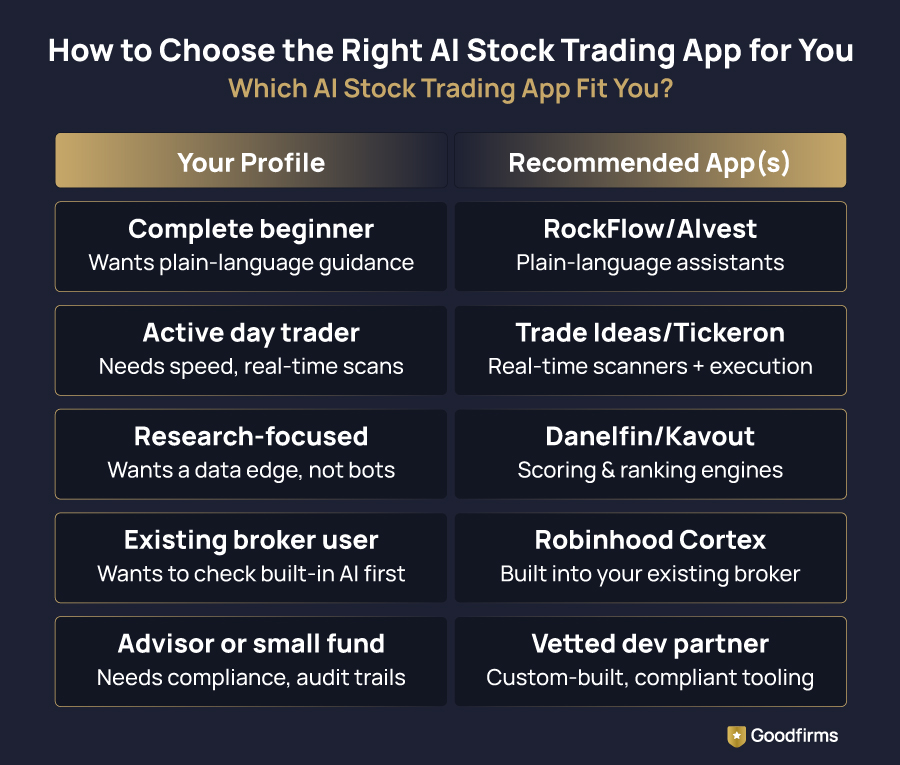
1. If you're a complete beginner, pick an app that explains its reasoning in plain language; apps like RockFlow or AInvest are the best AI stock app for beginners, instead of one that throws raw signals at you. A cluttered scanner can do more harm than good before you understand the basics.
2. Suppose you're an active day trader: speed and real-time scanning matter most. Trade Ideas and Tickeron are built for that pace, with direct brokerage execution and alerts made for intraday moves. An AI stock trading app for active traders should offer real-time scanning, intraday alerts, broker connectivity, and ideally some form of backtesting.
3. If you want a data-based research edge without active trading, Danelfin and Kavout give you a score or ranking you can add to your own decision-making, instead of a black-box bot making decisions for you. If your goal is hands-off investing rather than daily trade execution, an AI stock trading app for passive investors should focus more on rebalancing, research assistance, and long-term portfolio insights.And if you're tracking holdings across more than one broker, dedicated stock portfolio management software usually gives you a clearer, consolidated view than any single trading app can.
4. If you already use a mainstream broker, check whether it has added its own AI feature, like Robinhood Cortex, before paying for a separate subscription. You might already have basic AI insights built into an app you use.
5. If you're an advisor or small fund choosing tools for clients, not just yourself, the standard is different. Disclosure, audit trails, and compliance matter as much as how good the signals are. In that case, working with vetted fintech app development companies is usually a better starting point than consumer-grade apps.
6. If you're looking for the best AI trading app in India, make sure the platform connects directly to NSE or BSE; most global AI stock trading apps don't support local market execution.
Is AI Stock Trading Safe and Legal?
A common question is: Is AI stock trading legal? In most major markets, the answer is yes, provided the app works through a regulated broker and follows local rules around automated execution.
AI-assisted trading is legal in most countries, including the US, where the SEC and FINRA oversee it, and India, where SEBI regulates algorithmic trading through approved exchange APIs. The real legal question isn't whether AI is involved. It's whether the platform you're using is properly registered or works with a regulated broker to execute trades.
Treat any app that guarantees fixed returns, hides its methods completely, or relies on social media hype instead of a real track record as a red flag, no matter how advanced its "AI" sounds in the marketing.
Picking the Right AI Tool, Not Just Any AI Tool
The best AI stock trading app is the one that matches how you actually trade. Active traders need speed and real-time scanning; passive investors need rebalancing and simplicity; researchers need scoring depth. The AI label alone tells you nothing; what matters is which category the tool falls into and whether that matches your workflow.
Use these platforms to reduce manual work and emotional decisions, not to replace research or risk management. Start with a free tier, verify the claims independently, and only commit to a paid plan once the tool has earned it.
FAQs - Best AI Stock Trading Apps
1. What is the best AI stock trading app overall?
There's no single best app for everyone. It depends on whether you're an active trader, a passive investor, or someone who mainly wants AI-assisted research. Trade Ideas is the top pick for active trading, Danelfin and Kavout lead for AI-based stock scoring, and RockFlow or AInvest are best for beginners.
2. Can AI trading apps guarantee profits?
No. AI trading apps can improve pattern detection, speed, and consistency, but no app can guarantee returns, no matter how it's marketed. Markets are still unpredictable, and results depend on strategy, risk management, and market conditions.
3. Are AI stock trading apps free?
Many offer a free plan, including Danelfin, AInvest, RockFlow, and Trade Ideas. But advanced features like real-time scanning, automated execution, or full historical data usually need a paid plan, typically somewhere between $10 and $250+ per month, depending on the platform.
4. Is AI trading legal?
Yes, in most major markets, as long as trades go through a regulated broker. The US (SEC, FINRA), UK (FCA), and EU (ESMA) all allow AI-assisted and algorithmic trading under their existing rules; no mainstream market has a blanket ban on it. What's not legal is promising guaranteed returns or routing trades outside licensed broker systems, no matter how the platform markets itself.
5. Do AI stock trading apps actually work?
They can genuinely help with screening large numbers of stocks, spotting patterns, and cutting down on emotional decisions. But they can't replace understanding what you're trading or basic risk management.
6. How do I verify an AI trading app's claims before paying for it?
Look for performance data you can verify independently, not just in-app screenshots. Check whether the method is explained, even at a basic level, and compare user reviews from more than one source. Goodfirms' verified review listings are one place to check vendor claims before you commit.