Key takeaways
- Cloud computing costs range from under $10/month for small workloads to millions of dollars annually for enterprise-scale deployments, depending on the infrastructure, usage, and pricing model.
- AWS, Azure, and Google Cloud offer similar pricing structures, with committed-use discounts that reduce costs by up to 70% and spot instances that reduce costs by up to 90%.
- Hidden charges such as data egress fees, premium support, regional pricing differences, and idle resources can significantly increase cloud spending.
- Nearly 29% of cloud spend is wasted, making cost optimization a critical part of cloud strategy.
- Rightsizing resources, eliminating idle infrastructure, and using reserved capacity are among the most effective ways to reduce cloud costs.
So, how much does cloud computing actually cost?
Here's the honest answer: anywhere from a few dollars a month to millions a year, with the same provider. A small AWS t3.micro instance costs about $7.59 a month on-demand, while an m5.large costs closer to $70.08 — or roughly $43.80 with a one-year commitment.
Let's look at what different types of businesses typically pay for cloud computing.
Cloud Computing Cost at a Glance
|
Scenario |
Typical Cost |
|---|---|
|
Small website |
<$20/month |
|
Startup SaaS |
$100–$2,000/month |
|
SMB workloads |
$500–$10,000/month |
|
Enterprise cloud environment |
$50,000+/month |
|
Cloud migration project |
$26,000–$130,000+ |
A solo developer might spend less than a coffee each month; an enterprise running AI at scale can burn through seven figures before anyone asks why.
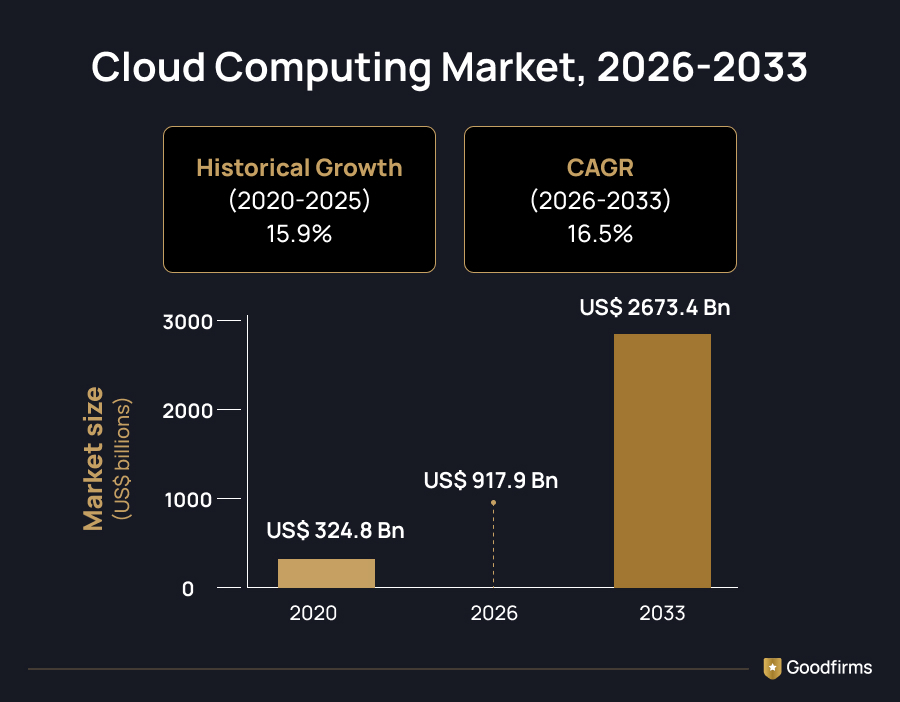
That range adds up fast across the industry, too — Persistence Market Research estimates the global cloud computing market at $917.9 billion in 2026, rising to $2,673.4 billion by 2033.
Most of that spend, though, isn't lost to the obvious line items. It's the fees buried below the pricing page, and the habits that go uncorrected because nobody's tracking them. This blog breaks down what actually shapes your cloud bill, the hidden costs providers don't lead with, and the practices that keep spending under control.
The right partner can be the difference between a runaway cloud bill and a controlled one.Goodfirms' vetted list of cloud computing companies is a solid place to start comparing your options.
AWS vs. Azure vs. GCP: How does Provider Pricing compare?
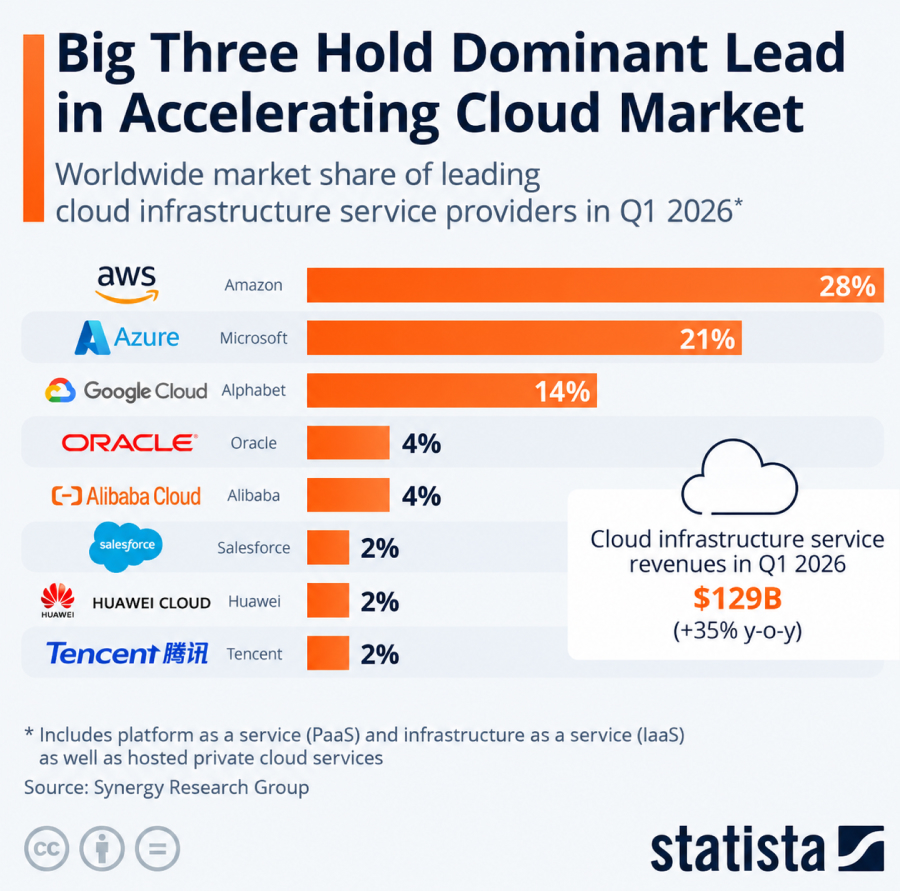
AWS, Microsoft Azure, and Google Cloud all price things in roughly the same way. You get a free tier to experiment with, pay-as-you-go if you want flexibility, and committed-use discounts if your workloads are predictable enough to commit to. Market position tracks fairly closely with scale of options: Statista, citing Synergy Research Group, put AWS at 28% of global cloud infrastructure share in Q1 2026, with Azure at 21% and Google Cloud at 14%.
Source: Statista
As shown earlier, on-demand pricing for common instance types ranges from under $10 per month to $70+ per month, dropping further with a committed term. Committed-use savings scale up from there — AWS's Compute Savings Plans and Azure Reservations can both cut costs by up to 70–72% compared to on-demand pricing. In comparison, spot or preemptible instances on any provider can save up to 90%. Azure also offers a distinct advantage for businesses already invested in Microsoft licensing: its Hybrid Benefit lets you apply existing Windows and SQL Server licenses toward cloud costs.
AWS, Azure, and Google Cloud pricing rates alone won't tell you which provider is right, though. That depends on your workload patterns, what licensing you already have, and whether you value flexibility or predictability more. Many businesses turn to cloud consulting companies to help weigh those trade-offs before committing to a provider.
Those specific numbers are useful, but they only tell part of the story — the real question is what actually drives them in the first place.
What Determines Cloud Computing Costs?
Every provider prices things differently, but most cloud computing costs still come down to three variables: the services you use, the per-unit price for each service, and how much you consume.
Run more virtual machines, and the compute costs go up. Store more files, and storage costs follow. As data volumes grow, networking costs climb. Opt for premium managed services, and your monthly bill will reflect it.
Understanding these three components makes it much easier to predict, control, and optimize cloud spending.
Besides these, it's also important to know which service model you're actually paying for, since that choice shapes how much control you have over those three variables.
What Are the Main Types of Cloud Computing Services?
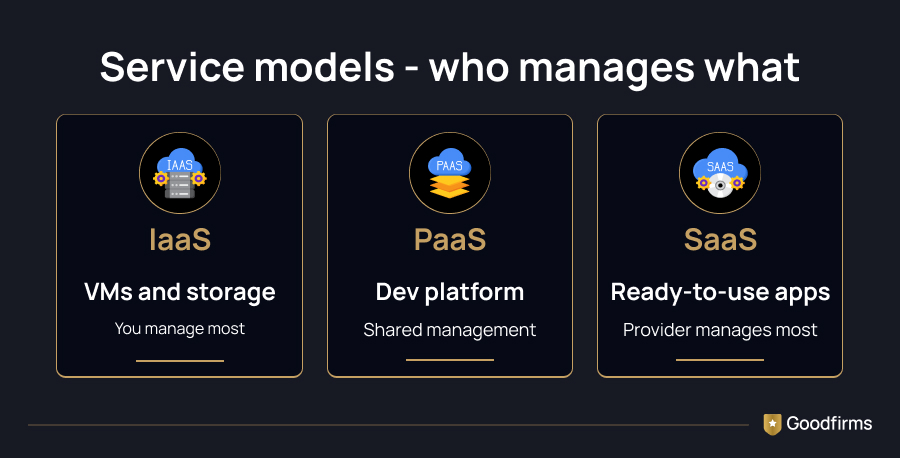
The three main cloud service models differ in how much of the stack you manage yourself.
1. IaaS (Infrastructure as a Service) is the most hands-on option. You get virtual machines, storage, and networking, and everything beyond that is on you.
2. PaaS (Platform as a Service) hands you a lot more than that. Deployment, load balancing, scaling: a platform like AWS Elastic Beanstalk runs all of it behind the scenes, so you can just write and ship code.
3. SaaS (Software as a Service) hands off nearly everything. The provider runs the infrastructure and the application, and you just use it. Google Workspace, Slack, and Salesforce are the clearest examples, since the providers handle updates, security, and maintenance behind the scenes.
Cloud Hosting vs Traditional Web Hosting
Businesses often confuse cloud hosting with traditional web hosting, but they operate very differently.
|
Cloud Hosting |
Traditional Hosting |
|---|---|
|
Uses multiple virtual servers |
Uses a single physical server |
|
Highly scalable |
Limited scalability |
|
Pay only for resources consumed |
Fixed monthly pricing |
|
High availability |
Single point of failure |
|
Automatic resource scaling |
Manual upgrades required |
|
Better for growing businesses |
Better for static websites |
Cloud hosting spreads a website or application across several virtual servers, and cloud hosting providers worth using will let you scale resources up or down as needed, billing you only for what you actually use — no physical hardware to buy or maintain. Traditional hosting works differently: it runs on a single physical server with a fixed set of resources, so the price stays the same whether you're using all that capacity or barely any. You’re typically responsible for maintenance and upgrades yourself.
Businesses migrating from traditional hosting often engage IT service providers to assess infrastructure requirements and reduce migration risks.
Once you know which model you're using, the next step is understanding how you're actually billed for it.
How Cloud Computing Pricing Works
Providers layer three broad pricing models:
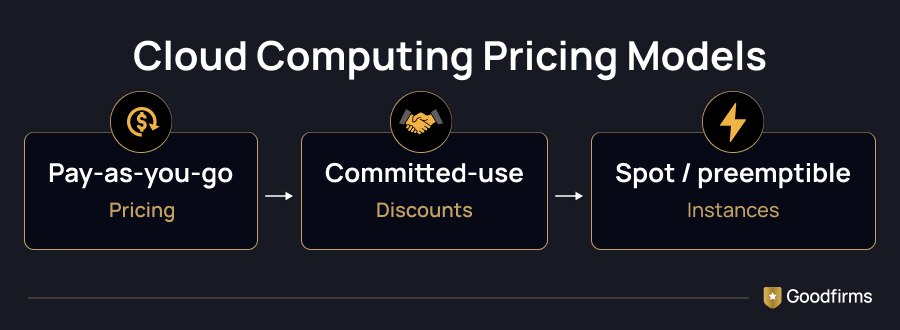
1. Pay-as-you-go is the default and most flexible option. You pay only for what you use, with no upfront commitment. That works well if your workload is unpredictable, though it costs more per unit than other options.
2. Committed-use discounts go the other way: you commit to a set amount of usage over 1 to 3 years, and the provider gives you a lower rate in exchange. AWS calls these Savings Plans and Reserved Instances, Azure calls them Reservations, and Google Cloud calls them Committed Use Discounts. Committing this way can save up to 70% compared to on-demand rates.
3. Spot or preemptible instances offer the steepest discounts of all — up to 90% off on-demand pricing — in exchange for accepting that the provider can reclaim that capacity on short notice. These work well for fault-tolerant or batch workloads that can handle interruptions.
Comparison of Cloud Pricing Models
Here's a quick side-by-side of how the three main pricing models stack up before you commit to one.
|
Pricing Model |
Flexibility |
Cost Savings |
Best For |
|---|---|---|---|
|
Pay-As-You-Go |
High |
Low |
Startups, testing, unpredictable workloads |
|
Reserved / Committed Use |
Medium |
Up to 70% |
Stable, long-term production workloads |
|
Spot / Preemptible |
Low |
Up to 90% |
Batch jobs, AI, analytics, non-critical processing |
Pricing models set the rules — but what actually fills up your bill each month comes down to a few specific factors.
What Factors Affect Cloud Computing Costs?
Most of your cloud bill comes down to three things: compute, network, and storage.
Compute covers the processing power, memory, and temporary storage needed to run your workloads. You're billed based on the type and number of instances you use, typically per hour.
Network connectivity is what you pay to move data in and out of the cloud, plus extras like static IPs, load balancers, and NAT gateways. This pricing has been shifting lately — Google Cloud dropped standard internet egress charges entirely, while IPv4 address fees have become common across major providers.
Storage is billed per GB per month and covers file, block, and object storage. On top of these three, there are hidden costs such as data transfer and retrieval fees, regional and availability zone pricing differences, and separate charges for premium support plans. They are not prominent on the pricing page, though they add up quickly for data-heavy or multi-region operations.
Compute, network, and storage costs add up across an entire company, and the numbers start to climb fast — here's what that looks like at scale.
How much are Businesses actually spending on the Cloud today?
The numbers here are worth sitting with. Gartner forecasts global public cloud end-user spending will reach roughly $850 billion in 2026, up 21.3% from 2025, with accelerating AI adoption driving much of that growth. IaaS and PaaS are growing even faster than the overall market.
Yet much of that spending isn't creating much value. Flexera's 2026 State of the Cloud Report found that 29% of IaaS and PaaS spend is wasted — an uptick that reverses a five-year streak of declining cloud waste. Separately, CloudZero's State of Cloud Cost Report found that only about one-third of organizations have an accurate understanding of where their cloud budget is going — leaving the rest approving invoices without knowing which teams or products are driving the spend.
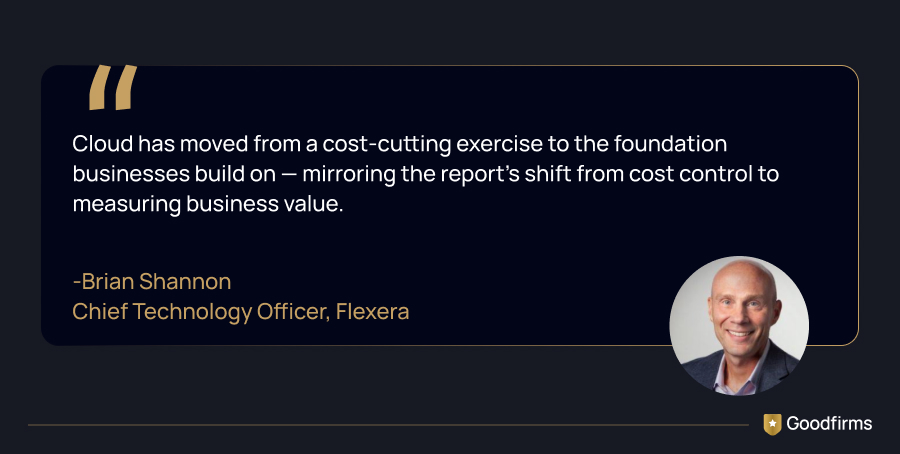
There's also a fast-growing new category of waste: idle AI and GPU costs. As more businesses spin up GPU instances for machine learning, unused capacity in this category has become a meaningful line item that barely existed two years ago. Working with experienced AI development companies can help right-size these workloads before idle capacity turns into wasted spend. CloudZero's research on AI costs found that average monthly AI spend jumped 36% year-over-year to $85,521 in 2025, while only about half of organizations can confidently measure the return on that spend.
That's the ongoing bill once a business is already in the cloud. Getting there in the first place comes with its own price tag — here's what that looks like.
What does Cloud Migration Actually Cost?
A typical small-to-mid-size cloud migration runs roughly $26,000 to $130,000 in total, broken out across four phases — or $10,000 to well over $100,000 if you hand the whole thing to a managed migration provider instead. Here's roughly what to expect at each stage. The ranges below come from Cloudtech's small-business cloud cost guide; other industry estimates bundle these phases into a single total rather than itemizing them, but the overall range is broadly consistent with what those bundled estimates show.
- Assessment and planning: Evaluating your current infrastructure and building a migration strategy typically costs $5,000 to $25,000, depending on the complexity of your environment.
- Data migration: Moving your actual data to the cloud generally costs $1,000 to $5,000, depending on volume and tooling.
- Application refactoring: This is usually the biggest line item: rebuilding applications to run properly in the cloud can cost anywhere from $20,000 to $100,000, depending on complexity.
- Managed migration services: This is another route — a provider handles the whole migration for you (covering assessment, data migration, and refactoring in a single quote) — and pricing ranges from $10,000 to well over $100,000, depending on scope. It costs more upfront, but it usually means fewer mistakes and a faster timeline than tackling it in-house.
Once you're up and running, the real work shifts from migrating to managing. That's the phase where savings are actually won or lost.
How can Businesses reduce Cloud Computing Costs?
A few proven habits consistently move the needle:
1. Rightsize your instances
Most cloud environments are overprovisioned. Reviewing actual CPU and memory usage and downsizing anything consistently running below 40% utilization typically cuts compute spend by 20–30%.
2. Maximize committed-use coverage
Identify workloads with steady, predictable usage and lock in Savings Plans, Reserved Instances, or Committed Use Discounts for them — while leaving on-demand pricing for the unpredictable remainder.
3. Eliminate idle resources
Unattached storage volumes, unused IP addresses, orphaned snapshots, and idle load balancers are some of the most common — and most overlooked — sources of cloud waste.
4. Architect with cost in mind
Serverless functions, auto-scaling, and storage tiering aren't just technical decisions; they're cost levers. Many businesses bring in DevOps Consulting & Services Companies to build this thinking into the architecture from day one. Moving cold data to archival storage tiers alone can dramatically reduce related storage costs.
5. Track cost per unit, not just total spend
A rising cloud bill isn't automatically a problem if revenue or usage is growing faster. Measuring cost per customer, per feature, or per transaction shows whether spending growth is healthy or wasteful.
Organizations that lack dedicated cloud operations teams often partner with DevOps companies or cloud consulting companies to implement an ongoing cost-optimization framework.
Most of these habits are easier to build in with the right partner from the start than to upgrade later.
How to Choose the Right Cloud Computing Provider
Given how many variables affect the final bill, most businesses benefit from expert guidance rather than piecing together a cost strategy on their own. The right partner helps you choose the right pricing model from day one, avoid the hidden costs that catch first-timers off guard, and build an architecture that scales efficiently as you grow.
If you're evaluating options, Goodfirms has curated a list of experienced cloud computing companies, each reviewed on real client feedback, technical expertise, and delivery quality — making it easier to shortlist a partner suited to your budget, industry, and migration complexity.
Depending on your environment, you may also benefit from working with AWS consulting companies, Azure consulting companies, or a Google Cloud Platform consultant specializing in platform-specific architecture and optimization.
Before signing with anyone, ask two or three shortlisted partners for a sample cost breakdown from a past project similar to yours — it's the fastest way to see whether their pricing promises hold up in practice.
Concluding Remarks
Cloud computing costs aren't fixed, and that's both the challenge and the opportunity. Businesses that understand what drives their bill — compute, storage, network, and the pricing model they've chosen — are in a far better position to control costs than those treating the invoice as a black box. Whether you're just starting to explore migration or looking to rein in an existing cloud bill, the right pricing strategy and implementation partner make the difference between cloud computing as a cost center and a genuine competitive advantage.
A few questions tend to come up once businesses get this far — here are the quick answers.
FAQs-Cloud Computing Costs
What's the highest hidden cost in cloud computing?
Data transfer and egress fees catch most businesses off guard, since they vary by provider, region, and transfer direction, and rarely appear clearly on a standard pricing page. These charges apply whenever data moves out of a cloud environment, whether to another cloud, an on-premises system, or the public internet, and they can accumulate quickly for businesses running multi-region architectures or regularly transferring large volumes of data. Reviewing a provider's egress pricing before committing is one of the simplest ways to avoid a surprise bill later.
Is cloud computing cheaper than on-premises infrastructure?
It depends on your workload patterns. For most businesses, replacing aging hardware with flexible, utility-priced infrastructure, the cloud brings real savings by avoiding large upfront capital costs and ongoing maintenance overhead. But for extremely stable, predictable workloads at scale, owned hardware can sometimes be cheaper in the long term, particularly once a business has enough consistent, round-the-clock demand that pay-as-you-go pricing no longer offers much of an advantage over a fixed, depreciating asset.
How long does a typical cloud migration take?
It depends on the scope, but for a mid-sized environment, the assessment, data migration, and refactoring phases together usually take several weeks to a few months. A simple lift-and-shift with few application changes moves faster. Heavy refactoring or legacy dependencies can push that timeline out much further. Bringing in an experienced migration partner from the assessment stage helps, too, since catching compatibility issues early avoids delays down the line.
Can small businesses realistically use the same cloud providers as large enterprises?
Yes. AWS, Azure, and Google Cloud all offer free tiers, pay-as-you-go pricing, and scaled-down instance types, so a smaller budget isn't a barrier to cloud adoption. Small businesses use the same infrastructure enterprises do, just less of it, at a proportionally lower cost. Startup credit programs and simpler onboarding, built for teams without a dedicated IT department, make the entry point even easier.
Should startups use reserved instances or pay-as-you-go pricing?
Pay-as-you-go makes more sense early on, since usage patterns are still unpredictable and you want room to change course without being locked into a term. Once usage stabilizes and baseline demand gets easier to forecast, that's the point to start shifting predictable workloads onto reserved instances or committed-use discounts.