Key takeaways
- HAProxy, NGINX, and Traefik are free to use, but they still require in-house technical expertise for setup, maintenance, and troubleshooting.
- AWS ALB, Amazon Lightsail Load Balancer, and Azure Load Balancer provide managed load balancing with low operational overhead for cloud-native startups.
- Cloudflare Load Balancing starts at $5/month, while Lightsail, AWS ALB, and Azure remain affordable options for most startup workloads.
- Layer 7 load balancers are what most startups actually need; they route by URL, headers, cookies, and content.
- Cloud-native beats self-hosted for early-stage startups, until your team has dedicated infrastructure staff.
- Traffic spikes during product launches kill unbalanced apps; a load balancer is cheaper than downtime.
According to Uptime Institute research, downtime can cost organizations thousands of dollars per hour. For startups, the bigger risk is often lost momentum during launches, investor demos, or viral traffic spikes. If you are looking for the best load balancing software under $50/month, the short answer is: AWS Application Load Balancer (ALB) for growing AWS workloads, Amazon Lightsail Load Balancer for simple AWS-hosted websites and MVPs, Azure Load Balancer for startups running on Microsoft Azure, Cloudflare Load Balancing for budget-conscious teams serving a global audience, and Traefik or HAProxy for startups with in-house DevOps expertise and the ability to manage their own infrastructure.
Browse Goodfirms top load balancing software listings to compare verified user reviews, detailed feature breakdowns, and pricing across the tools.
Startup Load Balancing Software Comparison Chart With Pricing and Features in 2026
|
Tool |
Type |
Starting Price |
Kubernetes |
SSL Offload |
Best For |
|---|---|---|---|---|---|
|
HAProxy Community |
Open source |
Free |
Via Ingress |
Yes |
DevOps-capable teams |
|
NGINX |
Open source |
Free |
Via Ingress |
Yes |
Web and API traffic |
|
Traefik OSS |
Open source |
Free |
Native |
Yes |
Docker/K8s-first stacks |
|
AWS Elastic Load Balancing – (ALB) |
Managed cloud |
~$18–25/month |
Native (EKS) |
Yes |
AWS-hosted startups |
|
Cloudflare LB |
Managed cloud |
$5/month |
No |
Yes |
Budget-first, global CDN |
|
Google Cloud LB |
Managed cloud |
$0.025/hour, per GB - $19.85/month |
Native (GKE) |
Yes |
GCP-native teams |
|
Azure Load Balancer |
Managed cloud |
Pay-as-you-go (often <$20/month for small workloads) |
Native (AKS) |
No (requires Application Gateway for SSL termination) |
Azure-hosted startups |
|
Amazon Lightsail Load Balancer |
Managed cloud |
$18/month |
No |
Yes |
MVPs and small AWS-hosted websites |
Why Startups Need Load Balancing Software Early
Many startups begin with a single server, but traffic spikes, hardware failures, and growth can quickly create performance bottlenecks. Load balancing distributes traffic across multiple servers, improving uptime, reliability, and scalability. Implementing it early is usually far less expensive than dealing with downtime during a product launch or viral growth event.
Why $50/Month Is a Practical Budget for Startups
Most early-stage startups have a tight infrastructure budget and even less engineering time to spare. So the tools in this list stay under $50/month with moderate traffic, or offer free open-source options—perfect for teams chasing growth, not burning time and money on technical overhead.
Key Features: Startups Should Look for in Load Balancing Software
- Health checks: Automated checks that detect unhealthy servers and remove them from rotation before they cause errors. Look for configurable check intervals and thresholds.
- Layer 4 vs Layer 7 balancing: Layer 4 routes by IP and TCP port — fast and simple. Layer 7 routes by HTTP content (URL paths, headers, cookies) — essential for microservices and API routing. Most startups need Layer 7.
- SSL offloading: Handling TLS at the load balancer layer keeps your app servers focused on application logic. Every startup running HTTPS (which should be all of them) benefits from this.
- Cloud and Kubernetes Integration: Native compatibility with AWS, GCP, Azure, Kubernetes, and container platforms simplifies deployment and future scaling.
The 8 Best Load Balancing Software for Startups Under $50/Month (Tools Review)
Let's compare the 8 best load-balancing software options for startups based on key features, advantages, disadvantages, and pricing.
1. HAProxy Community Edition — Best Free Open-Source Load Balancer
HAProxy is the gold standard for high-performance TCP and HTTP load balancing. The community edition is completely free, battle-tested at enormous scale, and used by companies like GitHub, Reddit, and Stack Overflow. HAProxy 3.2 (the current LTS as of 2025) added stronger CPU scaling, HTTP/3 and QUIC support, and easier cloud-native integration.
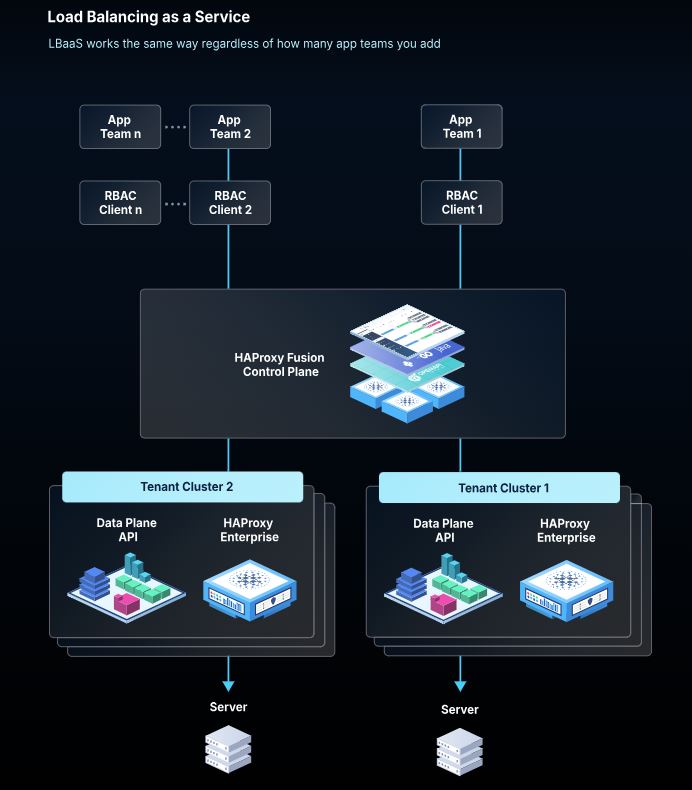
Source: HAPROXY
Key Features:
- Layer 4 and Layer 7 load balancing
- Stick tables for session persistence
- Active and passive health checks
- SSL termination and TLS offloading
- ACL-based traffic routing
- Detailed real-time stats dashboard
Pros:
- Completely free — no licensing, no per-request fees
- Proven at massive scale; deeply trusted by ops teams
- Highly configurable for complex routing rules
- Large community and extensive documentation
Cons:
- No GUI — configuration is entirely file-based
- Requires dedicated time to set up and maintain
- No native service discovery for dynamic environments
Pricing: Free (Community Edition). Their pricing is quote-based and requires contacting the sales team directly for enterprise plans and commercial SLAs.
Best for: Startups with a DevOps engineer or technical co-founder comfortable with Linux and config files. If nobody owns it, it won't get updated.
2. NGINX Open Source — Best for Web and API Traffic
NGINX Open Source is one of the world's most widely deployed web servers and reverse proxies. Its built-in load balancing capabilities support HTTP, HTTPS, TCP, and UDP traffic without additional licensing costs, making it a practical choice for startups running web applications and APIs. NGINX Plus, the commercial version, adds enterprise features such as active health checks, advanced monitoring, and API-driven configuration management.
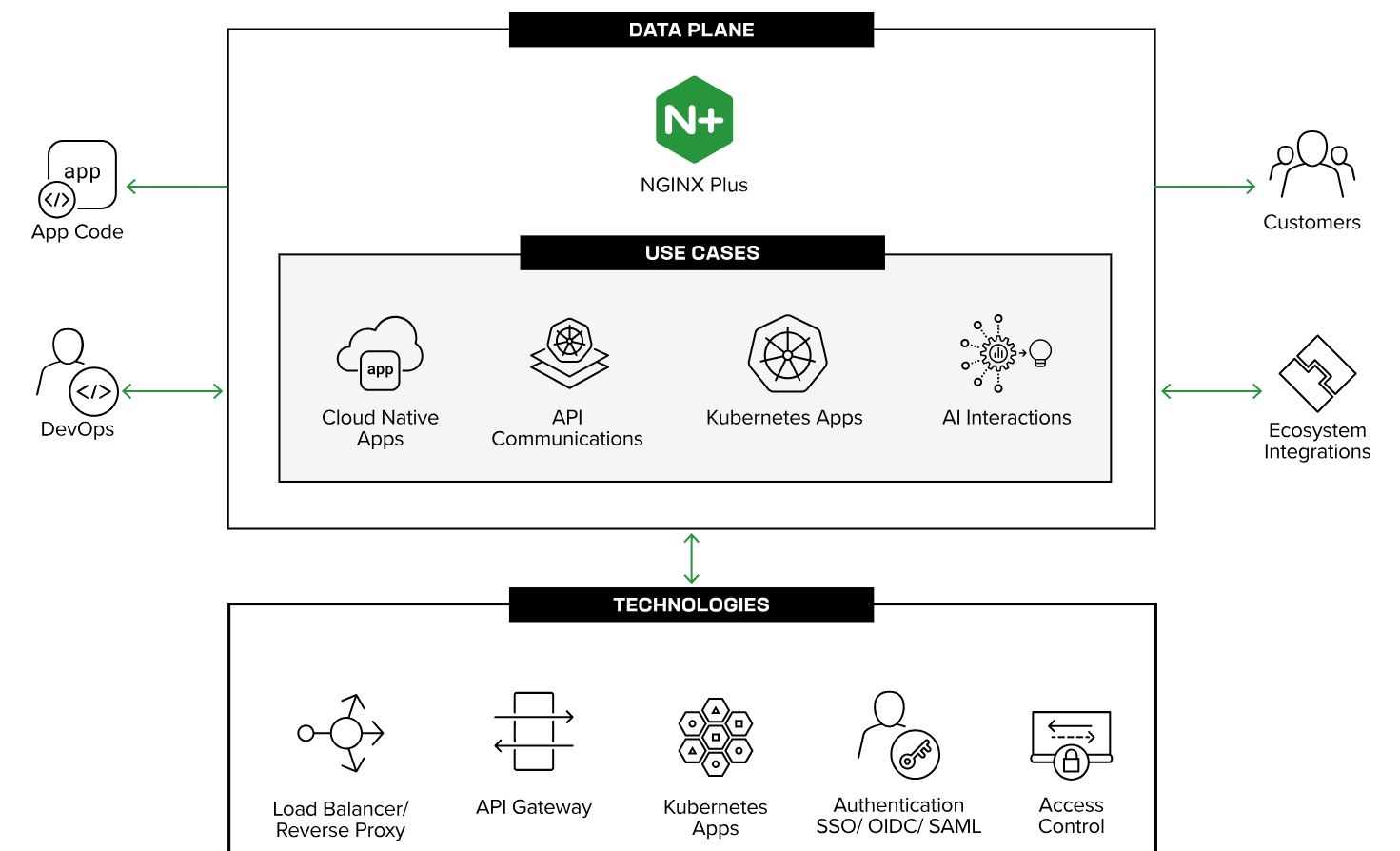
Source: NGINX
Key Features:
- HTTP, HTTPS, TCP, and UDP load balancing
- Round-robin, least connections, and IP hash algorithms
- SSL/TLS termination
- Rate limiting and connection throttling
- Passive health checks (active checks in NGINX Plus only)
- Static file serving alongside proxying
Pros:
- Free, lightweight, and extremely well-documented
- Doubles as a web server — reduces tooling complexity
- Huge community; most DevOps tutorials reference NGINX
- Low memory footprint — runs well on small instances
Cons:
- Passive health checks are available in NGINX Open Source, while active health checks require NGINX Plus
- Configuration changes typically require reloads
- Less flexible than HAProxy for advanced TCP routing scenarios
Pricing: NGINX Open Source is free. NGINX Plus is available through a commercial subscription and includes enterprise support, active health checks, advanced monitoring, and API-based management.
Best for: Startups running web apps or APIs on VPS or cloud VMs who want a proven, low-overhead solution without a dedicated load balancing tool.
3. Traefik OSS — Best for Docker and Kubernetes-Native Startups
Traefik is a cloud-native reverse proxy and load balancer designed specifically for microservices and containerized environments. Where NGINX and HAProxy require configuration reloads, Traefik dynamically detects new services via Docker labels or Kubernetes annotations and configures itself automatically — zero-downtime updates, no restarts.
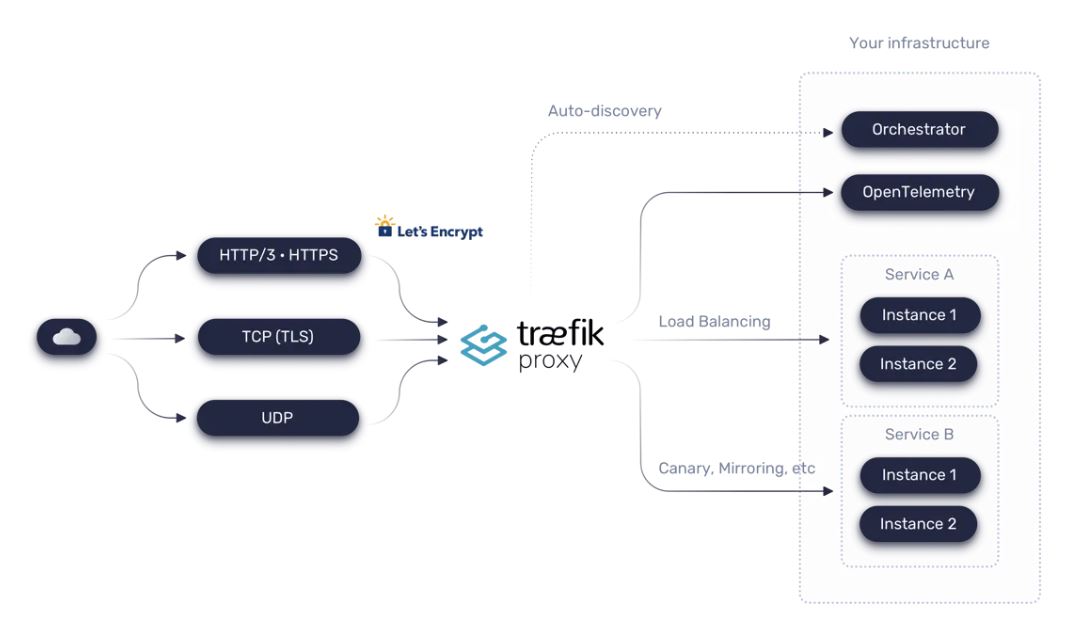
Source: Traefik
Key Features:
- Automatic service discovery (Docker, Kubernetes, Consul, etc.)
- Native Kubernetes Ingress Controller
- Automatic TLS via Let's Encrypt
- HTTP/2, HTTP/3, gRPC, and WebSocket support
- Middleware chaining (rate limiting, auth, circuit breakers)
- Built-in dashboard for traffic visibility
Pros:
- Zero manual config reloads — routes update dynamically
- Free and purpose-built for modern container stacks
- Let's Encrypt integration makes SSL effortless
- First-class Kubernetes support out of the box
Cons:
- Steeper mental model than NGINX for teams new to containers
- Advanced features (Enterprise, Hub) require paid plans
- Observability features are deeper in paid tiers
Pricing: Traefik OSS is free. Traefik Enterprise and Hub are quote-based — not required for startups running standard container workloads.
Best for: Startups already using Docker Compose or Kubernetes who want a load balancer that configures itself as services scale.
4. AWS Elastic Load Balancing – (ALB) — Best for AWS-Based Startups
AWS Elastic Load Balancing (ELB) is Amazon's load balancing service family, which includes Application Load Balancer (ALB), Network Load Balancer (NLB), and Gateway Load Balancer (GWLB). For most startups, Application Load Balancer (ALB) is the recommended option because it provides Layer 7 routing, autoscaling, and native integration with AWS services.
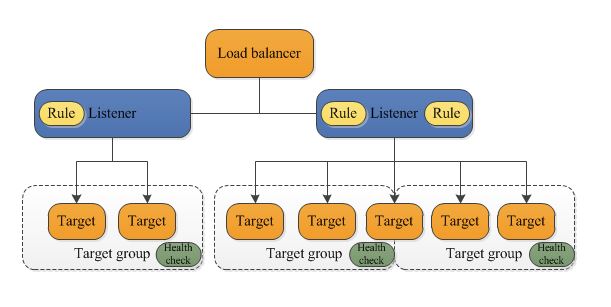
Source: AWS
Key Features:
- Automatic scaling
- Health monitoring
- SSL termination
- Native AWS integrations
Pros:
- Fully managed service
- Application Load Balancer (ALB) offers advanced Layer 7 routing
- Excellent AWS ecosystem integration
- Scales automatically
Cons:
- Costs can increase with traffic
- AWS lock-in
Pricing: AWS Application Load Balancer (ALB), the most commonly used ELB option for startups, costs approximately $0.0252/hour base + $0.008/LCU-hour. For moderate startup traffic, this typically works out to around $18–$25/month — well under the $50 threshold. AWS Free Tier covers the first month at no cost for new accounts. Source
Best for: Startups already on AWS who want zero-maintenance load balancing that scales with their infrastructure.
5. Cloudflare Load Balancing — Best for Budget-Conscious Startups with Global Traffic
Cloudflare's Load Balancing sits on top of its global CDN network, meaning traffic is distributed across your servers and also through Cloudflare's 330+ global edge locations. For startups serving international users, this is a significant advantage at a surprisingly low entry price
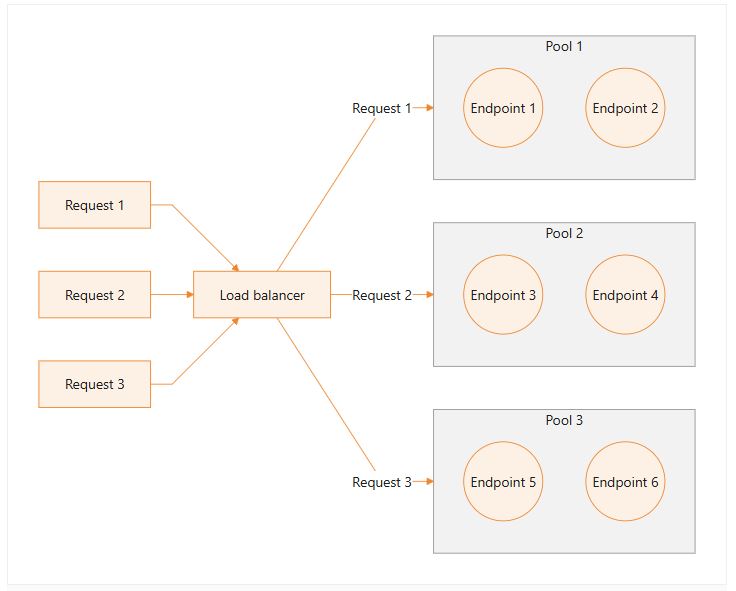
Source: Cloudflare
Key Features:
- Geographic and latency-based routine
- Active health checks with automatic failover
- Steering policies: random, dynamic latency, geo, custom
- Works with any hosting provider (not cloud-specific)
- Integrates with Cloudflare's WAF, DDoS protection, and CDN
Pros:
- Starts at $5/month — the lowest managed entry point available
- Works with any origin — AWS, GCP, DigitalOcean, bare metal
- Global network reduces latency for international users
- No infrastructure to manage
Cons:
- Pricing scales with origin pools and health check frequency
- Limited Layer 4 capability — primarily Layer 7
- Advanced steering and analytics require higher-tier plans
Pricing: Load Balancing starts at $5/month (Cloudflare's verified pricing as of 2026). Add-ons scale with origin count and health check intervals. Source
Best for: Startups on any hosting provider who want managed load balancing with CDN benefits under $10/month.
6. Google Cloud Load Balancing — Best for GCP-Native Startups
Google Cloud Load Balancing is a fully distributed, globally available managed service with no pre-warming required — it handles sudden traffic spikes without needing manual capacity increases. For startups building on GCP, it's the native choice.
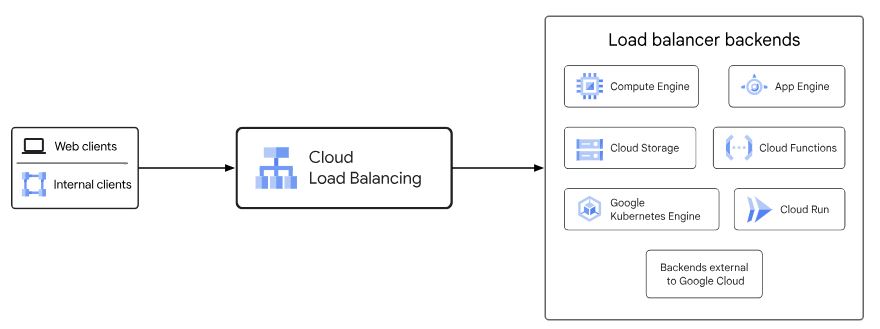
Source: Google Cloud
Key Features:
- Global external HTTP(S), TCP, SSL, and internal load balancing
- Autoscaling with Managed Instance Groups and GKE
- Integrated Cloud CDN, Cloud Armor (WAF), and IAP
- Health checks with configurable intervals
- No pre-warming — handles traffic spikes immediately
Pros:
- No instance to manage — fully serverless infrastructure
- Handles sudden viral traffic spikes without intervention
- Native GKE Ingress support
- Free tier for internal load balancing
Cons:
- Costs depend heavily on traffic volume and region
- More complex pricing model than flat-rate tools
- Requires GCP commitment to realize full value
Pricing: Pay-per-use, External HTTP(S) Load Balancer is billed per forwarding rule ($0.025/hour) and per GB processed. For a light-traffic startup, monthly costs typically fall between $19.85/month, depending on usage. Source
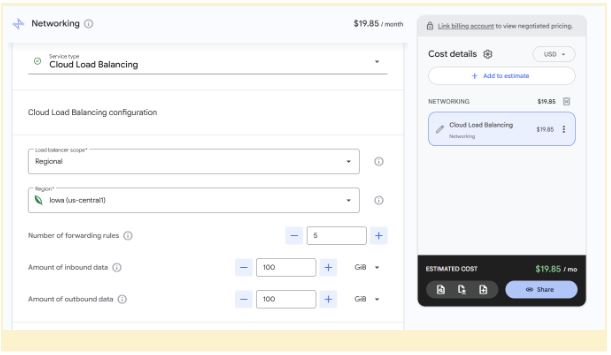
Best for: Startups building on GCP, especially those using GKE for containerized applications.
7. Azure Load Balancer — Best for Microsoft-Centric Startups
For startups already building on Microsoft Azure, Azure Load Balancer provides a cost-effective way to distribute traffic across virtual machines and applications. It operates at Layer 4 (TCP/UDP), making it highly efficient for handling large volumes of traffic with minimal latency.
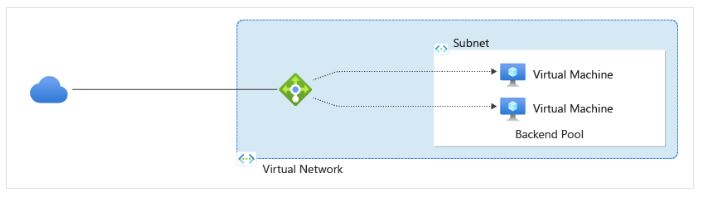
Source: Microsoft Azure
Key Features:
- Layer 4 load balancing for TCP and UDP traffic
- Automatic health probes and failover
- Supports inbound and outbound traffic distribution
- Zone-redundant deployment options
- Integrates with Azure Virtual Machine Scale Sets
Pros:
- Low-cost entry point for Azure-hosted workloads
- Highly scalable with no practical traffic limits for most startups
- Built-in integration with Azure services and monitoring tools
- Supports both internal and public-facing applications
Cons:
- Layer 4 only — lacks advanced Layer 7 routing features
- Requires Azure infrastructure; not cloud-agnostic
- More advanced routing requires Azure Application Gateway
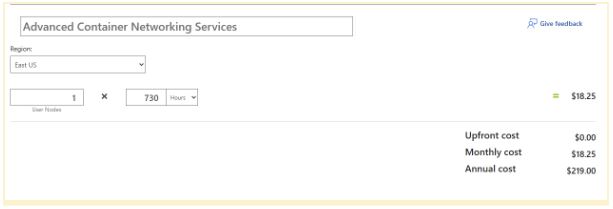
Pricing: Basic Load Balancer is free, while Standard Load Balancer follows a pay-as-you-go model based on rules, processed data, and outbound traffic usage. For many early-stage startups, monthly costs remain relatively low until traffic volumes increase significantly. With advanced AKS, networking services may cost $18.25 (often <$20/month for small workloads).
Best for: Startups running primarily on Azure that need affordable, reliable Layer 4 traffic distribution without investing in a more complex application delivery platform.
8. Amazon Lightsail Load Balancer — Best for Simple AWS Deployments
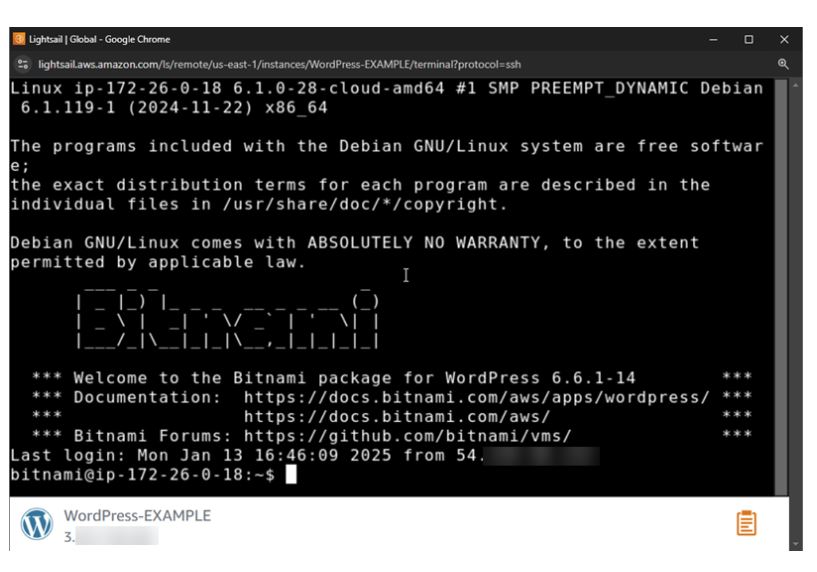
Amazon Lightsail Load Balancer is designed for startups that want a managed load-balancing solution without the complexity of configuring AWS's more advanced networking services. It offers a simplified experience tailored for small web applications and websites running on Lightsail instances.
Source: Amazon Lightsail
Key Features:
- Simple load balancing for Lightsail instances
- Built-in health monitoring and automatic failover
- SSL/TLS certificate management through AWS
- Distributes HTTP and HTTPS traffic across multiple instances
- Easy setup through the Lightsail console
Pros:
- Predictable flat-rate pricing
- Beginner-friendly compared to AWS Application Load Balancer
- Quick deployment with minimal networking knowledge required
- Fully managed by AWS
Cons:
- Supports only Lightsail instances
- Limited routing and customization options
- Not suitable for complex microservices architectures
- Less feature-rich than AWS Application Load Balancer
Pricing: Starts at approximately $18/month per load balancer with predictable monthly billing, making it one of the easiest managed AWS options for startups to budget.
Best for: Small startups, MVPs, and early-stage SaaS products already running on Amazon Lightsail that need basic high availability without the complexity of full AWS networking services.
The 30-Second Startup Decision Rule
|
Situation |
Best Choice |
|---|---|
|
No DevOps Team |
Cloudflare Load Balancing |
|
AWS Startup (scaling SaaS/app) |
AWS Elastic Load Balancing (ALB) |
|
AWS Startup (MVP or simple website) |
Amazon Lightsail Load Balancer |
|
Azure Startup |
Azure Load Balancer |
|
Kubernetes Startup |
Traefik |
Free vs Paid vs Cloud vs Self-Hosted Load Balancing Software: Which is Right For You
There's always that open-source vs managed services debate. It's not just about saving on license fees; it's really about what it costs you in time and stress to keep everything running.
Goodfirms insight: The real price of a load balancer is not just money, it’s the effort to keep your traffic flowing, especially when you are scaling fast.
Open-source tools (HAProxy, NGINX, Traefik) are free to use but require someone to install, configure, update, secure, and monitor them. On a two-person founding team, that overhead is real. If your infrastructure breaks late at night during a launch, you need someone who knows how to fix it.
Managed tools (AWS ALB, Amazon Lightsail Load Balancer, Azure Load Balancer, Cloudflare, and Google Cloud Load Balancing) charge a monthly fee but eliminate the maintenance burden entirely. They are managed by the provider, scale with demand, and offer vendor support when things go wrong.
For most early-stage startups, the honest calculation is:
What is an engineer-hour worth?
If fixing a misconfigured HAProxy config takes:
Three hours, and your engineer's effective hourly rate is $80
That's $240 in hidden cost — more than six months of Cloudflare Load Balancing.
Not all managed services target the same audience. Amazon Lightsail Load Balancer is designed for startups running simple websites and MVPs on Lightsail, while AWS ALB targets growing applications that need advanced routing and microservices support.
Similarly, Azure Load Balancer is a strong fit for startups already invested in the Microsoft Azure ecosystem and looking for native integration with Azure Virtual Machines and AKS clusters.
In practice, most startups make the choice based on infrastructure ownership: If you have a DevOps engineer who actively manages your infrastructure, open-source tools are excellent and significantly reduce recurring costs at scale. If you don't, the monthly cost of managed services such as Cloudflare Load Balancing, AWS ALB, Amazon Lightsail Load Balancer, or Azure Load Balancer is often the cheaper choice once operational complexity is factored in. They scale automatically, integrate natively with cloud provider services, and require little to no infrastructure management. The downside: You depend on the vendor, and costs will climb as your traffic grows.
Self-hosted load balancers (HAProxy, NGINX, Traefik on your own VMs): give you complete control over configuration and cost, but that control comes with responsibility for everything: the uptime, the updates, and the incident response.
For startups managing startup infrastructure management under resource constraints, cloud-based is usually the safer and easier call. Self-hosted starts to look compelling when your traffic volume is large enough that cloud load balancer costs exceed the cost of the dedicated infrastructure to run your own, and when your team has the expertise to manage it.
Here’s the rule of thumb: under 10 million requests a month, managed cloud balancers such as Cloudflare, Amazon Lightsail Load Balancer, AWS ALB, Azure Load Balancer, and Google Cloud Load Balancing usually win on overall cost and convenience. Once you cross that line, hosting your own HAProxy or NGINX cluster on affordable VMs often works out cheaper.
Goodfirms Verdict: For most startups under 5 million monthly requests, infrastructure simplicity usually delivers a higher return than infrastructure optimization. The lowest monthly software cost is not always the lowest total cost once maintenance time is factored in.
How to Choose the Right Load Balancing Software for Your Startup
Work through these questions in order:
What's your hosting environment?
- If you are on AWS and expect to scale, start with ALB.
- If you are running a small website or MVP on AWS Lightsail, Amazon Lightsail Load Balancer is the simpler option.
- If you are on Microsoft Azure, Azure Load Balancer is the natural starting point.
- On GCP, use Google Cloud Load Balancing.
- On a Virtual Private Server (VPS) or multi-cloud setup, Cloudflare or Traefik are provider-agnostic options.
What's your DevOps maturity?
- No dedicated infrastructure person → managed tool
- Strong DevOps capability → open source is viable and cheaper at scale
What's your traffic volume?
Under 5M requests/month, any tool on this list handles it comfortably. For sudden spike scenarios (launches, press coverage), managed tools handle autoscaling better without pre-configuration.
Do you need Kubernetes support?
Traefik and AWS ALB have the strongest native Kubernetes integration. NGINX Ingress Controller is also widely used in the K8S ecosystem.
What are your security requirements?
If you need a Web Application Firewall (WAF), Distributed Denial-of-Service (DDoS) protection, and rate limiting alongside load balancing, Cloudflare bundles all three at a startup-accessible price point.
What's your budget ceiling?
- Under $10/month: Cloudflare.
- Around $18/month: Amazon Lightsail Load Balancer for simple AWS-hosted applications.
- Under $25/month: AWS ALB, Azure Load Balancer (depending on usage), or Google Cloud Load Balancing for cloud-native teams.
- Zero spend: HAProxy or NGINX if you have the technical capability.
For most early-stage startups without dedicated infrastructure engineers, managed load balancers such as Cloudflare Load Balancing, Amazon Lightsail Load Balancer, AWS ALB, Azure Load Balancer, and Google Cloud Load Balancing deliver the best balance between cost, reliability, and operational simplicity.
FAQs - Load Balancing Software
What is the best load-balancing software for startups?
For most startups, AWS ALB, Amazon Lightsail Load Balancer, Azure Load Balancer, and Cloudflare Load Balancing offer the best balance of affordability, reliability, and low maintenance. Teams with DevOps expertise may prefer HAProxy or Traefik to avoid recurring costs.
Is load balancing necessary for SaaS startups under 10,000 users?
Not always, but it helps prevent downtime during traffic spikes, product launches, and marketing campaigns while improving scalability and reliability.
Which load balancer is best for Kubernetes?
Traefik OSS is the most Kubernetes-native option. AWS ALB works well with EKS, Azure Load Balancer integrates with AKS, and NGINX Ingress Controller remains a widely used alternative.
What is the cheapest cloud load balancer?
Cloudflare Load Balancing starts at $5/month, making it the lowest-cost managed option. Amazon Lightsail Load Balancer starts around $18/month, while AWS ALB and Azure Load Balancer typically remain under $25/month for small workloads.
What's the difference between Layer 4 and Layer 7 load balancing?
Layer 4 routes traffic based on IP addresses and ports, while Layer 7 routes based on application-level data such as URLs, headers, and cookies. Most web applications and APIs benefit from Layer 7 routing.
Can I use a CDN instead of a load balancer?
No, a CDN improves performance by caching content closer to users, while a load balancer distributes traffic across multiple servers. Many startups use both together for performance and reliability.
Conclusion
The right load balancing software for your startup is whichever one your team can actually run without distraction. Most early-stage teams don’t need more than a managed service costing under $25 a month. AWS ALB works well for growing AWS-native applications, Amazon Lightsail Load Balancer is ideal for simple websites and MVPs on AWS, Azure Load Balancer fits naturally into Microsoft Azure environments, and Cloudflare keeps things simple for multi-cloud deployments. On the other hand, if your startup really owns its technical infrastructure, open-source tools like HAProxy and Traefik pack a punch with no licensing fees.
If your startup is scaling beyond basic infrastructure management, Goodfirms also maintains verified directories of DevOps Consulting Companies and Cloud Infrastructure Providers to help compare vendors based on reviews, pricing, and expertise.
Bottom line: Start as simply as you can. Choose the tool that fits your traffic and hosting now. Only reach for fancier features when you run into real problems your current setup can’t fix.