Key takeaways
- RPA follows a fixed script. It works best when the process is stable, structured and rarely throws exceptions.
- AI agents work toward a goal. They read messy inputs like emails and PDFs and decide the next step themselves.
- If humans have to fix more than 10 to 15 out of every 100 bot tasks, it's time to add an AI agent.
- You don't have to throw away your bots. Keep the ones that work and use agents only for the tricky steps.
- Agents cost more, so use them only where the problems and rework are costing you the most.
- In any RPA vs AI agents decision, pick the workflow first and the technology second. Score each process before you spend on either.
Think about your finance team's invoice bot. It works fine for months. Then one supplier changes the PDF layout and the bot gets stuck. Someone ends up clearing the queue by hand, again.
If that sounds familiar, you've probably wondered whether RPA vs AI agents is the real fix. You're not alone. Gartner says 40% of enterprise apps will include task-specific AI agents by the end of 2026, up from under 5% in 2025. It also says over 40% of agentic AI projects will get canceled by the end of 2027.
So do you keep your bots, add agents, or switch completely? Let's sort it out step by step.
Looking at tools right now? Check out verified RPA software with real user ratings, pricing and features, and shortlist what fits your team.
What Is RPA?
RPA is software that copies what a person does on a screen. It clicks, types, and copies data between applications. You set up the steps once, and the bot repeats them on thousands of records without getting tired.
The big thing to remember is that RPA is predictable. The same input always gives the same output. That makes it easy to audit, and it also makes it rigid.
Where RPA works well
- Moving data between older systems that have no API
- Pulling the same report from the same portal every morning
- Posting clean, already checked records into an ERP
- Running compliance steps that need an exact, repeatable trail
All of these have the same things in common. The inputs are structured, the rules are fixed and the screens hardly ever change.
Where RPA starts to struggle
A bot only knows the screen it was built on. If a vendor moves a button or adds a field, the script breaks. A Forrester study done for Tricentis found that 45% of organizations saw bots break weekly or more often.
Exceptions are the other problem. When a bot meets a case it wasn’t built for, it stops and sends the task to a person. Over time, more cases pile up in that queue, and bot maintenance takes more time and money. That is where AI agents come in.
What Are AI Agents?
An AI agent is software built around a large language model. You give it a goal, some tools and clear limits. It reads the situation, plans what to do next and uses its tools, like a database, a mailbox or even an RPA bot. After every action it checks the result and adjusts.
Say a vendor invoice arrives as a blurry scan. An agent can read it, match the vendor to your records, spot a possible duplicate and draft an email asking for clarity. Nobody had to script that exact case in advance.
What agents do well
- Reading unstructured data like emails, contracts and scans
- Working through exceptions instead of stopping at them
- Handling several systems in an order that depends on the case
- Coping with interface changes, because they read the screen or API as they go
What to watch out for
Agents decide as they work, so their behavior can vary. You need logs of every action, clear permission levels and a test set you rerun after any model change.
Each action also uses model tokens. At very high volumes, that cost adds up fast.
RPA vs AI Agents Differences: What Sets Them Apart
The main RPA vs AI agents difference is simple. Who decides the next step? With RPA, whoever wrote the script decided long ago. With an agent, the software decides on the spot.
Here's a quick RPA vs AI agents comparison to see the two side by side. After the table, we'll go through the key points one by one.
|
Factor |
RPA |
AI agents |
|---|---|---|
|
How it works |
Follows a set script |
Works toward a goal using reasoning and tools |
|
Best input |
Structured, consistent formats |
Structured and unstructured data |
|
Decisions |
None, every branch is written in advance |
Judgment inside set limits |
|
Exceptions |
Stops and passes to a human |
Works through them, escalates when needed |
|
Predictability |
Fully predictable |
Can vary, needs testing and logs |
|
Setup cost |
Low, bots go live in days |
Higher needs integration and testing |
|
Running cost |
Grows with bot count and screen changes |
Model fees per run, little upkeep from screen changes |
|
Governance |
Simple, audit the script |
Action logs, permission levels, test sets |
|
Best fit |
High volume, stable, fixed rules |
Variable, document-heavy, judgment-heavy |
1. Rules vs judgment
Try drawing the process as a flowchart. If every branch fits on one page and nothing needs interpreting, it's an RPA job. If the chart keeps getting "it depends" boxes, that's judgment work, and agents do better there.
2. Structured vs unstructured input
RPA expects data in a fixed spot, like a spreadsheet column or a form field. Move the field and the bot fails. Agents can pull meaning out of free text, scanned documents and supplier files that look different every time.
Most structured work in a company was automated years ago. What's left is the messy stuff.
3. Exceptions
For a bot, an exception is a dead end that lands in a human queue. For an agent, it's just another case to figure out. Many practitioners say a review rate above 10 to 20 percent means a process has outgrown its bot. Good exception handling is the biggest reason teams start looking at agents.
4. Maintenance and cost
RPA is cheap to start and expensive to keep. A first bot can go live in days, but every interface change means repair work. Agents take longer to set up because of integrations, testing and governance. After that, they handle interface changes much better.
The catch is the cost per run. Paying model fees for something a simple script already does well is a waste of budget.
5. Governance and audit
Auditors can read a bot's script and see exactly what happened. Agents need a bit more. Log every action with the reasoning behind it, split permissions into read, draft and act, and ask for human approval on anything that moves money or edits a customer record.
Goodfirms research backs this up. In a survey of 343 business leaders across 30 countries, 79% said a human approval step is needed before they trust AI with high-stakes calls like hiring, pricing, or financial decisions. Data quality was the top roadblock at 26.8%, ahead of security and budget. As Todd Tyler, founder of AI with Renew, put it in the survey, “AI output is plausible by default, and it’s only verifiably correct once someone checks it.”
RPA vs AI Agents 2027: Where Things Stand
Vendors have noticed the gap. Many RPA companies now add an AI step inside a scripted flow and call it agentic. Mirage Metrics describes this as a script with one smarter step, and says Gartner has used the term "agent washing" for the wider relabeling.
The two worlds are mixing in real life, too. UiPath, for example, lists AI integration next to bot orchestration and monitoring in its RPA features.
Here's a quick tip for vendor demos. Ask them to show an input the workflow has never seen. If it just stops and escalates, you're looking at a script with an AI step stuck on.
When to Keep Your RPA Bots
Plenty of bots should stay exactly as they are. Keep them if most of these apply:
- The process has been stable for a year or more
- Exceptions stay under roughly 10 percent of volume
- The system has no API, so screen automation is the only way in
- Your auditors want a fixed, readable script as proof
- Volume is low, so agent fees would never pay back
When it comes to RPA vs AI agents, swapping a working bot for an agent just for the sake of it adds work and gives you very little back
When to Replace RPA with AI Agents: 5 Signs
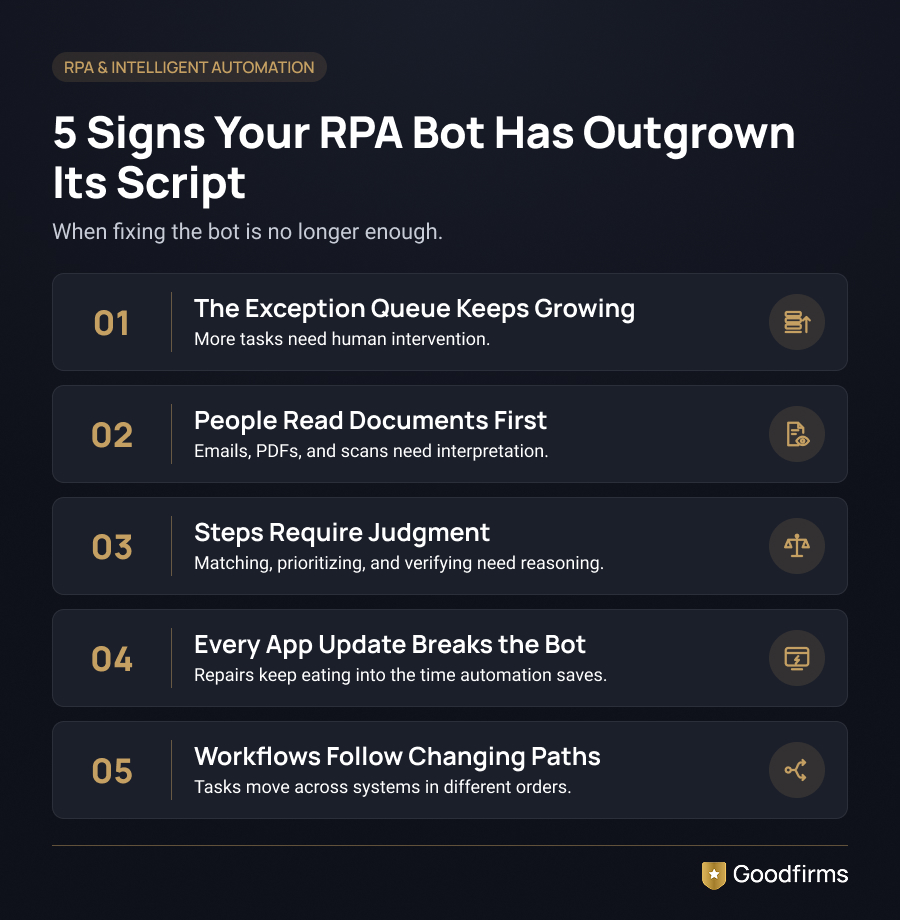
1. The exception queue keeps growing
If the review team keeps growing alongside the bot, the process is telling you something. A healthy bot needs about the same human help in year two as it did in month one.
2. People still read documents before the bot can act
If someone has to read a PDF or an email first, that's agent territory.
3. Judgment has crept into the steps
Matching records with fuzzy rules, ranking priorities or deciding if a document looks genuine all need reasoning.
4. Every app update creates a repair ticket
If your team spends more time fixing bots than the bots save, it's time to rethink the approach.
5. One process touches many systems in a changing order
Scripts are fine with fixed hand-offs. They struggle when the path depends on the case.
One sign usually needs a quick patch. Three or more need a redesign.
RPA vs AI Agents for Business Automation
For small and mid-sized teams, budget and skills matter as much as features. A few well-planned bots, plus workflow tools like Zapier or Make, can cover most structured work. Add an agent only where messy inbound work is eating up hours.
Many AI automation tools now come with free or low-cost plans, and paid plans often start around $10 to $50 per user per month. If you're just getting started, a list of popular AI automation tools for small businesses can help you narrow things down.
RPA vs AI Agents for Enterprise Automation
At the enterprise level, the question moves from one bot to hundreds. Governance, vendor lock-in, and orchestration decide whether the program works.
Choose a setup where you can swap the model without rebuilding every agent. Treat your existing bots as tools that an agent can call. That way, you protect the money you've already spent.
Big vendors are heading this way. Blue Prism serves banking, insurance, healthcare and government clients, while Workato positions itself around running agents across enterprise systems.
RPA vs AI Agents for Accounts Payable Automation
Accounts payable shows the split really well. Here's how a hybrid setup runs:
1. Invoices come in by email in all kinds of formats. An agent reads each one and pulls out the vendor, amount, PO number and line items.
2. The agent checks for duplicates and matches against purchase orders. Odd cases go to a person with a short summary.
3. A bot enters the checked data into the ERP the same way every time.
4. A human approves any payment above a set limit.
If the ERP screen changes, you only fix the posting bot. If a new invoice layout shows up, nobody has to edit a template. Vendors like Tungsten Automation focus on this kind of document and workflow automation, and it should connect with the accounting software your finance team already uses.
The Hybrid Approach
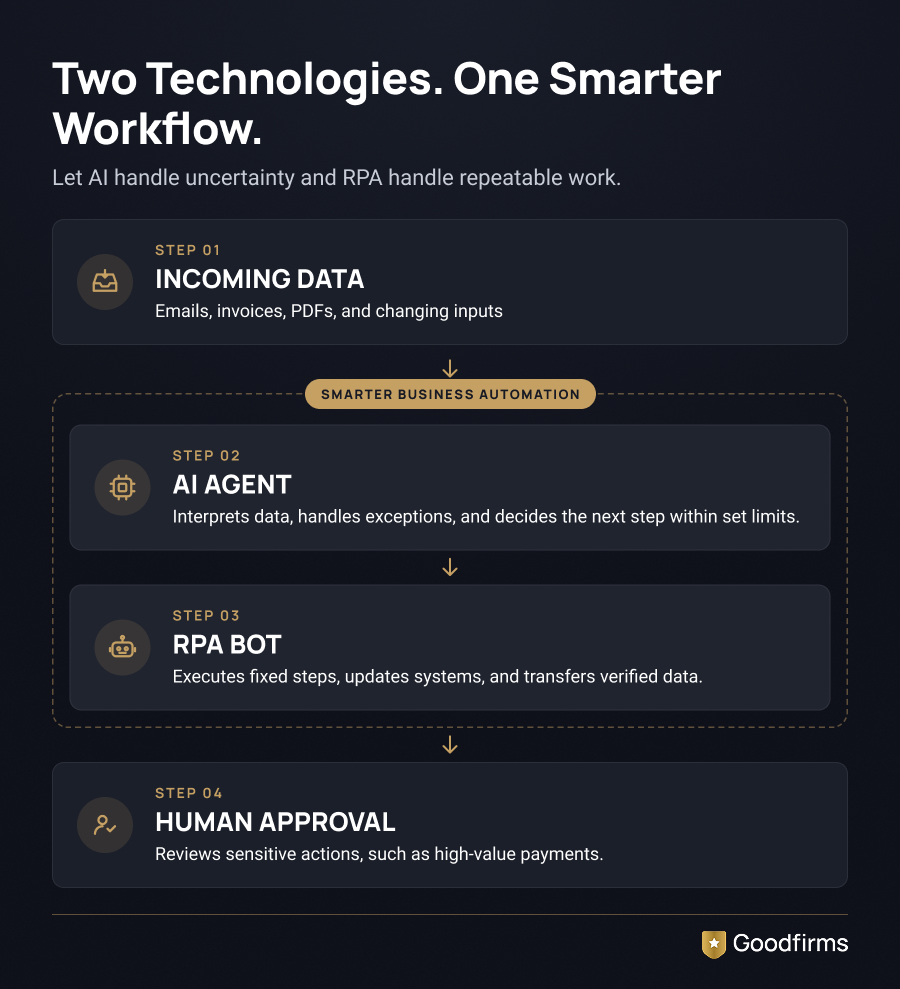
The most practical setup keeps both. The agent sits where a bot would normally fail or hand off to a person. It makes the call and passes back a clean result, and the bot carries on with the fixed steps.
This costs less than a full rebuild and leaves your working automation alone. It's also the easiest way to get into intelligent automation without a big, risky migration.
To explore the agent side, look at the available AI agent platforms. For customer-facing work like call handling, you can also check AI voice agent development companies.
AI Agents vs RPA, Which to Choose? A Five-Question Test
Use these questions for any RPA vs AI agents decision. Answer them for one workflow at a time, never for a whole department.
1. Input variety: Do all inputs follow one template, or does each sender do their own thing? Fixed templates point to RPA. Varied formats point to an agent.
2. Monthly volume: Millions of identical runs favor a bot on cost. Lower volume with higher complexity favors an agent.
3. Change frequency: Do your apps or business rules change often? Frequent change favors agents.
4. Cost of a wrong action: If a mistake moves money or touches patient or customer records, let the agent draft and a human approve.
5. Maintenance capacity: Who fixes things when they break? A team with scripting skills can run bots. Agents also need testing and monitoring skills.
Four RPA answers out of five? Keep the bot.
A split? Go hybrid.
Four agents answer? Build an agent.
How to Move from RPA to AI Agents Without Breaking Things
1. Audit your bots. List each one with its exception rate and monthly repair hours.
2. Pick one process. Choose a workflow with a visible backlog and a clear owner.
3. Fix the plumbing first. If a bot breaks on every screen change, check if an API route exists. Integration software and low-code development platforms can help you build one.
4. Run it in shadow mode. Let the agent work beside the bot for a few weeks and compare results.
5. Set permissions. Decide what the agent can read, draft, and act on. Keep human approval for money and customer records.
6. Measure, then grow. Track handling time, exception rate, and rework before and after. Scale only when the numbers hold up.
This kind of care matters, given the cancellation forecast we mentioned earlier. If your team lacks agent skills, many companies bring in a specialist for the agent layer and keep bot upkeep in-house. You can compare AI development companies with verified client reviews before choosing one.
Conclusion
So, where does your process sit today? If a bot runs clean with few exceptions, leave it alone and spend your budget somewhere else. If people keep rescuing it, that queue is your signal.
Here’s the simple RPA vs AI agents pattern to remember. Use RPA for fixed steps, add agents where judgment starts, and replace bots only when most of a process needs interpreting. Start with one workflow, measure it, and let the numbers guide your next move.
FAQs - RPA vs AI Agents
1. What is the main difference between RPA and AI agents?
RPA repeats a set script and stops when something unexpected shows up. An AI agent works toward a goal, reads different kinds of input and picks its next action. In short, RPA follows instructions, while an agent makes decisions within the limits you set.
2. Will AI agents replace RPA?
For most companies, no. Agents take over the weak spots of RPA, like exception queues and document reading. Bots stay the cheaper and more predictable choice for stable, high-volume steps. Full replacement only makes sense when most of a process needs judgment.
3. RPA vs AI agents: which one is cheaper?
For a stable, high-volume process, RPA usually costs less overall. For a messy, document-heavy process, agents can come out ahead because they remove the manual exception work that bots leave behind, even after setup and model fees.
4. Can AI agents work with existing RPA bots?
Yes. A common setup treats the bot as a tool that the agent can call. The agent decides what should happen, and the bot does the structured steps. You keep the automation you already built.
5. What is agentic RPA?
Agentic RPA usually means a scripted flow with a language model step added, for example, to sort an email before the bot carries on. It fixes the step that kept breaking, but the flow itself stays fixed. A full agent picks its own path.
6. How do I know if my exception rate is too high?
Check if the human review queue has grown since launch. If more than roughly 10 to 15 percent of runs need a person, or the review team has grown alongside the bot, look at adding an agent layer for that process.