
SalesCaptain

4.7 (151 Reviews)|Write a Review|Claimed profile
United States HQFounded 2020

Deployment

Best for

11–50 employees

Overview

About SalesCaptain

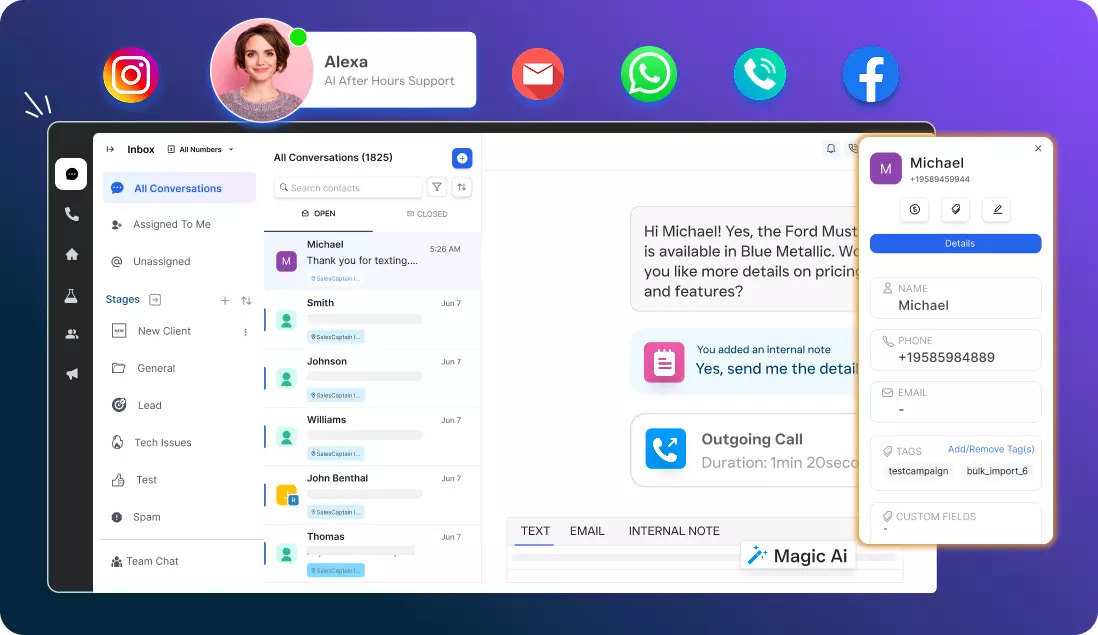
SalesCaptain is an AI-powered customer engagement platform that helps businesses streamline communication, capture leads, and deliver 24/7 support. By unifying phone calls, SMS, emails, web chat, and social media into one shared inbox, it eliminates duplicate work and keeps teams aligned. Its AI phone and chat agents can be set up in minutes and are capable of handling inquiries, qualifying leads, and sending timely reminders or follow-ups, ensuring that no customer opportunity is missed even outside working hours.

Automation features further simplify repetitive tasks like scheduling, notifications, and response management, allowing teams to focus on higher-value interactions. SalesCaptain also offers robust integrations with popular tools such as Zoho, Clio, Shopify, and Zapier, making it easy to connect with existing workflows without disruption. With an intuitive dashboard, quick setup, and flexible features, the platform is designed to fit the needs of small businesses as well as g

At a glance

Software information

Industries served, licensing and the support SalesCaptain provides.

Industries

  • Marketing-advertising
  • Market-research

Licensing

  • Proprietary
  • Monthly Payment
  • Annual Subscription
  • Free trial
  • Free version

Support

  • Email
  • 24x7 Support

Training

  • Webinar
  • Documentation
Languages (2)
EnglishSpanish

What users say

Review Analytics of SalesCaptain

Every review is verified through Goodfirms before it's published.

4.7151 Verified Reviews
Ease of use4.5
Features & functionality4.6
Customer support4.6
Review Summary
Summarized from 151 verified reviews · Updated October 2026
SalesCaptain consolidates calls, texts, chats, and emails into a single inbox, with users consistently praising its unified interface and ease of use. The AI receptionist effectively captures after-hours calls and automates follow-ups, reducing missed leads and manual work. Reviewers highlight improved response times, faster lead conversion, and better team coordination, along with responsive customer support. Some note that advanced reporting and layout customization options could be more robust, but the core features are described as reliable and intuitive for daily operations.
✦ AI-generated summary. May not reflect every review.
Detailed Reviews of SalesCaptain
Sort ByWrite a Review

What reviewers mention most

Aron gibson, Clients Manager at mariansappliance.comVerified Review
Posted on Mar 24, 2026

“Structured Followups”

Overall rating4.0
Ease of use5.0
Features & functionality5.0
Customer support5.0
The majority of jobs in our appliance company begin with a brief phone contact or text. Getting inquiries wasn't the problem; rather, it was accurately tracking them and ensuring that each lead had a clear next step. We gained accountability and visibility thanks to SalesCaptain. We can monitor response times, see who owns each conversation, and avoid duplicate replies or missed follow-ups. Additionally, it helps standardize how we respond to typical situations like availability checks, service quotations, and updates on the status of parts. We now have a defined workflow that keeps the team cohesive and consumers informed, as opposed to depending on memory or sticky notes.
AnonymousVerified Review
Posted on Mar 24, 2026

“Reduced missed calls”

Overall rating5.0
Ease of use5.0
Features & functionality4.0
Customer support5.0
In order for our staff to respond promptly and maintain consistent patient communication, we utilize SalesCaptain to manage incoming calls and SMS in a single shared inbox. Prior to this, delays and repeated inquiries were brought on by missed calls and dispersed messages. We may allocate threads to the appropriate staff member, add notes, view the complete discussion history, and schedule and follow-ups according to a regular procedure with SalesCaptain. To decrease no-shows and increase responsiveness during peak hours, we also automate missed-call texts, appointment reminders, and post-visit notes. All in all, it has improved the organization, speed, and team management of our communication.
Jonah oliver, Customer Support Lead at bartsappliancesrepair.comVerified Review
Posted on Mar 24, 2026

“Organized Leads”

Overall rating5.0
Ease of use5.0
Features & functionality5.0
Customer support4.0
Our appliance sales and servicing company uses SalesCaptain to handle incoming calls and SMS in a single shared inbox and maintain regular follow-ups. Prior to this, missed calls and sporadic texts frequently resulted in lost leads and clients repeating the same information. The entire team can assign ownership, add comments, view the complete discussion history, and respond promptly using SalesCaptain. In order to save time on hectic days, we have automated missed-call texts, appointment confirmations, estimate and schedule follow-ups, and post-service evaluation requests. All things considered, it has sped up response times, decreased the number of dropped questions, and facilitated team handoffs.
AnonymousVerified Review
Posted on Feb 11, 2026

“Unified Inbox”

Overall rating5.0
Ease of use5.0
Features & functionality5.0
Customer support4.0
We sell and service appliances, and the majority of our appointments begin with brief phone calls or texts, frequently from Google, missed after-hours calls, or messages from returning customers. Prior to SalesCaptain, follow-ups relied too heavily on the person answering the phone, and conversations were dispersed. All conversations and SMS are stored in a single inbox with SalesCaptain, allowing our team to view the complete history, designate the appropriate individual, and react promptly without requesting that clients repeat information. Additionally, we use automations for task scheduling confirmations, missed-call messages, estimate follow-ups, and post-service review requests. We have been able to decrease no-shows, increase incoming prospects, and maintain professional contact on busy days thanks to it.
AnonymousVerified Review
Posted on Feb 11, 2026

“Better Retention”

Overall rating5.0
Ease of use5.0
Features & functionality5.0
Customer support4.0
In our medical spa, we utilize SalesCaptain to maintain regular customer communication by text and phone, particularly for follow-ups after visits, missed calls, and new queries. Prior to this, messages were dispersed, making it simple for clients to overlook crucial information or for leads to stall. Our front desk can reply more quickly, maintain smooth handoffs between team members, and view the entire conversation history in one location with SalesCaptain. In order to save a great deal of time and enhance the customer experience without coming across as robotic, we also employ automations for routine operations like missed-call messages, consultation follow-ups, appointment reminders, and review requests. Once configured, it operates consistently throughout the day and assists us in keeping up with discussions that generate income.
Hayden KeithVerified Review
Posted on Feb 6, 2026

“Solid communication hub”

Overall rating5.0
Ease of use5.0
Features & functionality4.0
Customer support5.0
SalesCaptain gave us a cleaner way to manage client conversations without relying on sticky notes, personal phones. We use it to keep inquiries moving from first contact to consult, and to keep past clients from slipping away when they don’t immediately schedule the next visit. The biggest value has been having one place where the team can see context, pick up conversations quickly, and keep the tone consistent. It’s also helped us be more disciplined with reputation outreach asking for feedback at the right moment instead of remembering randomly. Once we set rules for how the team tags/handles conversations, it became a dependable day-to-day system rather than another tool to babysit.
Laura TylerVerified Review
Posted on Feb 6, 2026

“Turn more conversations into booked visits”

Overall rating5.0
Ease of use5.0
Features & functionality5.0
Customer support5.0
We use SalesCaptain to manage calls and two-way texting and to automate follow-ups that would normally fall on the front desk. The biggest impact has been consistency missed calls don’t disappear, leads get timely replies, and post-visit nudges make it easier to get clients to rebook instead of “I’ll book later.” We also use it to request Google reviews in a way that feels structured rather than random. Setup takes a bit of thought timing, templates, and how you want to track outcomes, but once it’s running it saves time day to day and keeps client communication organized across the team.
Jaiden LarsenVerified Review
Posted on Feb 5, 2026

“Communication organized”

Overall rating5.0
Ease of use5.0
Features & functionality5.0
Customer support5.0
Conversations in appliance repair happen quickly: clients call in with urgent problems, then follow up with inquiries, pictures, or availability changes. To ensure that nothing is lost, SalesCaptain assisted us in keeping all of those touchpoints connected. Clean handoffs, which allow another team member to continue a conversation without asking the client to repeat anything, have been the biggest improvement. During hectic days, it saved time and lessened internal uncertainty. Additionally, we found that prompt messaging with clear next steps increased customer responsiveness and kept scheduling on track.
Mavis DavisVerified Review
Posted on Feb 5, 2026

“Recover missed calls”

Overall rating5.0
Ease of use5.0
Features & functionality4.0
Customer support5.0
In our appliance repair and service company, we utilize SalesCaptain to centrally handle client communications via SMS and phone calls. Before SalesCaptain, it was difficult to monitor conversations when several team members were participating, and we would lose leads during busy or after-hours times. We can promptly follow up, confirm appointment windows, gather job specifics, and continue the conversation until the booking is made thanks to the shared inbox and two-way SMS. Because everyone has access to the complete history, it also enhances internal coordination by preventing duplicate responses and saving consumers from having to repeat themselves. Another significant advantage has been review automation; without increasing front desk workload, requests are routinely sent out and our internet reputation has increased.
max RamirezVerified Review
Posted on Feb 5, 2026

“Turn more inquiries into booked appliance jobs”

Overall rating5.0
Ease of use5.0
Features & functionality5.0
Customer support5.0
For our appliance repair company, we utilize SalesCaptain to handle customer texts and calls in one location. In the past, a lead would frequently vanish if we missed a call during busy times or after hours. We can maintain the conversation, finalize work details without back and forth, and follow up by SMS more quickly with SalesCaptain. By preventing duplicate responses and who spoke to this customer confusion, the common inbox also aids in team alignment. Another significant benefit of review automation is that it makes reputation-building consistent rather than relying on someone remembering to inquire. All things considered, it's been a useful tool for increasing response times, recording more service requests, and maintaining orderly client correspondence.

Capabilities

SalesCaptain features

The full feature set, grouped by module.

Artificial Intelligence Software

  • Chatbot
  • Decision Making
  • Virtual Assistant
  • Workflow Automation
  • AI Features

Conversational Marketing Platform

  • Chatbot
  • AI Features

Chatbot Software

  • Analytics and Reporting
  • Easy Integration
  • Multi-Channel Support
  • Personalization
  • Scalability
  • Security and Privacy

AI Agent Builders

  • Analytics & Reporting
  • API & Webhook Support
  • Pre-Built Templates & Customization

Plans

SalesCaptain pricing

Pricing Type
Per User
Free Version
Yes
Payment Frequency
Monthly Payment, Annual Subscription
Preferred Currency
USD ($)
Free Trial
30 Days
Startup Plan
  • AI Phone & Chat Agents
  • Marketplace & Integrations
  • Chat Flow
  • Phone
  • Text
  • Social Texting
  • Automations
  • Marketing Flow
  • Call Flow
  • Chat Flow
  • Leaderboard
  • Call Center
Business Plan$159 / month
  • Premium Integrations
  • Priority Support
  • Multi-Location
  • Multi-Number
Enterprise Plan$300 / month
  • Custom & Premium Integrations

Works with

Integrations

SalesCaptain connects with the tools your team already uses.

Media

Screenshots & video