Table of Contents:
- What Is a Barcode?
- What Are The Types Of Barcodes?
- How Does the Barcoding System Work?
- What Is the Barcoding Inventory System?
- What Are The Essential Components of a Barcoding Inventory System?
- What Can A Barcoding Inventory System Do?
- How To Set Up A Barcoding System?
- How Does A Barcoding Inventory System Work?
- How Can A Barcoding System Increase Your Inventory Accuracy?
- Inventory Management With And Without a Barcoding System
- How Does A Barcode Inventory System Benefit Small Businesses?
- What Are The Latest Trends In The Barcoding Inventory System?
- Factors To Be Considered While Selecting a Barcoding Inventory System For A Small Business
When running any business dealing with products, whether it is eCommerce, retail, or wholesale, managing inventory efficiently becomes the prime concern. Especially if you own a small business, issues arising due to inventory theft or human errors will never let you make a profit and grow your business. To ensure smooth & flawless inventory management & order fulfillment processes in your small-sized retail business, you need a smart barcoding system. A barcoding inventory system can help you make your process of monitoring, managing, and securing your inventory accurate and quick.
In this article, we have included comprehensive information about barcodes and barcoding inventory systems so that you can deploy the best one, helping you sustain and grow your small business exponentially.
A barcode is a machine-readable code consisting of parallel lines of different widths and a number assigned to a particular commodity. It encodes information in a visual pattern that a machine can read and convert into language that the user can understand. A barcode contains information about the product, such as its price, weight, manufacturing and expiry date, name of the manufacturer, make, model, location, etc.

Almost everyone has seen barcode labels printed on the product packages in the supermarket. As soon as you purchase a product from the store, the cashier scans the barcode label on it, and all the information about that product is displayed on the system. The invoice gets printed, and the products purchased by the customer are automatically deducted from the inventory threshold.
As every product has a unique barcode, fewer mistakes and errors occur while selling, fulfilling orders, and managing inventory. Different types of barcode symbologies exist, some of which better suit particular applications than others. Let's have a look at different types of barcodes.
There are many types of barcodes, mainly bifurcated into two types: one-dimensional and two-dimensional. Let's examine the details of each one.
One-Dimensional Barcodes
One-dimensional barcodes, or 1D barcodes, represent data based on the widths and spacings of parallel lines. 1D barcodes include numeric and alphanumeric codes below the parallel lines. The length of this type of barcode depicts the amount of information it holds. There are different types of one-dimensional barcodes as given below:
UPC (Unique Product Codes): This type of barcode is usually found on nearly every retail product. Some of the types of UPC barcodes include:
UPC-A: Consists of 12 numeric characters
UPC-E: Consists of 6 numeric characters
UPC-2: Consists of 2 digits added to UPC for magazines and publications to mention the edition
UPC-5: Consists of 5 digits added to UPC for book publishers to mention the retail price
Many people confuse UPC barcodes with SKUs. UPC barcodes are 12-digit numeric only and are for external recognition of the products. In contrast, SKUs are 8-digit alphanumeric codes that are used for internal purposes (unique to the specific company).
EAN (European Article Numbers): This type of barcode is a UPC type that originated in Europe. Below are some different types of EAN barcodes -
EAN-13: Consists of 13 digits. Below is the sample EAN-13 code generated.
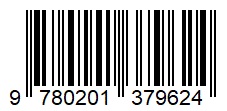
EAN-128: It is an alphanumeric code usually used on shipping labels.
There are many other types of 1D barcodes like
Code 39: This barcode type can encode numbers, letters, and even punctuation. It is mostly used for products in electronics, healthcare, and the government sectors.
Code 128: It is a 128-character set (0-9, a-z, A-Z, and any special characters) globally used for packaging and shipping applications.
Code 93: It is a modified version of Code 39 that includes higher-density printed bars.
USPS IMB: It is an alphanumeric code used by the United States Postal Service to sort and route the mail and parcels.
Interleaved 2 of 5: It is a nine-digit numeric code usually found on shipping cartons and rolls of film.
Two-Dimensional Barcodes
Two-dimensional or 2D barcodes represent data using 2D symbols and shapes. This type of barcode can store information horizontally and vertically on both sides. It also enables encoding up to 7,089 characters, which is substantially more than any 1D barcode can encode. It can store more data in a single code, which results in fewer errors. Some of the most popular types of 2D barcodes are QR codes and PDF417.
QR Code: QR codes have become quite popular due to their quick response. They are often used to open websites or applications using a mobile phone. One of the most prominent examples of QR code usage these days is making payments using the PayTM app. QR is a matrix code that can accommodate more than 7,000 characters.
This is what a QR code looks like.

PDF417: PDF417 is a Portable Data File with a stacked code and can contain around 800 characters. It is used for state-issued IDs, US postage, and transit passes.
GS1 Databar: When space is limited for a barcode to be printed, GS1 Databar is used. Earlier, it was known as Reduced Space Symbology (RSS-14).
Data Matrix: A square-shaped code encodes a huge amount of information in less space. Mostly it is used for electronics and healthcare products.
Aztec: It is used for transit tickets and is a matrix code containing around 3,800 characters.
MaxiCode: MaxiCode is a matrix code containing hexagonal dots. It can store around 90 characters and can be chained in a series of up to eight codes.
The barcode differentiates one item from another in a store, making it easy for store managers to manage inventory, sales, and order fulfillment.
When a product is placed in a warehouse or a stockroom, the worker scans the barcode on the product. After that, the barcode inventory system records the product entry at a particular location. When that product is sold, it is again scanned by the barcode scanner to enter the product's details and price in the customer invoice. The quantity of that product sold is automatically updated in the inventory system.
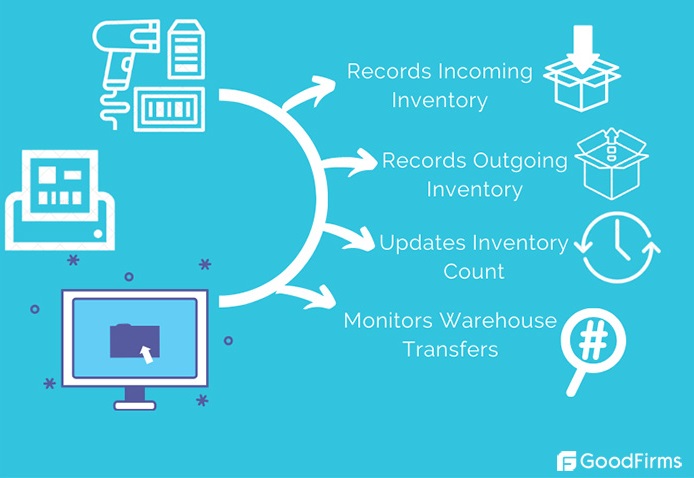
The barcoding system ensures that the right information about the product is recorded in the invoice and that accurate inventory management is performed. The entire sales and order fulfillment process is flawless and quick, and the customer experiences an excellent shopping experience at the same time.
Barcodes cannot work without implementing the right barcoding inventory management system. So, let's dive into the complete information about barcoding inventory management systems that would help you choose the right one for your business.
A barcoding inventory system includes hardware such as barcode scanners and printers, as well as inventory management software that runs on desktops and mobile devices.
The barcoding inventory software allows you to automate the creation of barcode labels.
The barcodes are printed with the help of specialized barcode printers. Those labels are then manually pasted on the products.
While purchasing and selling products, barcode scanners scan the barcodes on the products to record and monitor the inventory accurately. Below are some popular scanners included in barcoding inventory systems these days.
- Laser scanners are among the most popular types of barcode scanners. They use laser technology to read the reflectance of the black-and-white spaces in a barcode.
- Linear Imagers barcode scanners can read only 1D barcodes by capturing the barcode's picture and analyzing the information in the image.
- 2D Area Imagers are similar to linear imagers except that they can read 2D and stacked barcodes. Moreover, this type of barcode scanner can read barcodes in any direction.
Many inventory management systems integrate barcode apps that work on smartphones. In that case, you don't have to include a barcode scanner separately. You can directly scan the barcodes using Smartphones with barcoding apps.
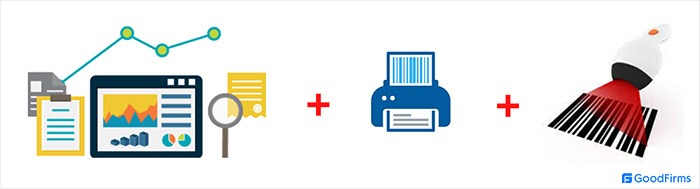
The barcoding inventory system is significantly helpful for accurate inventory management and control. Moreover, you can accelerate the speed of the process of receiving and shipping goods. It gives you the right information about the items in the warehouse and those that have been sold. Printing and scanning barcodes let you track everything that enters and leaves your warehouse. The barcode inventory system plays a major role in eliminating the problems you usually face due to inaccurate inventory counts, such as out-of-stock conditions and lost sales.
Below are some essential components of barcoding inventory systems that help you streamline your supply chain process.
Inventory Management Software
The inventory management software includes features that allow you to import product lists from Excel or any other application, create barcode labels, and print them. Besides creating and printing barcodes, it can also -
-
Update inventory count on a real-time basis
-
Track inventory across multiple warehouses
-
Handle order management
-
Integrate with your accounting system
Barcode Printers
The barcode printers connecting with your desktop or laptop loaded with your inventory management software are used to print the barcodes. The printed labels are then pasted on the packaging of each item for their unique identification.
Barcode Scanners
The barcode scanners scan the barcode on the item packaging while entering or leaving the warehouse to keep track of the inventory count. There are various barcode scanners available, like -
-
Handheld scanners are the most commonly used barcode scanners, available in corded and cordless (wireless) styles. They work with computers to record information about incoming and outgoing inventory.
-
On-counter scanners are installed on the cash counters. They are plane bioptic instruments that can capture any printed 1D or 2D barcodes with high-end speed.
-
Mobile Scanners combine the functionality of a PC and a barcode scanner. One of the best examples of mobile scanners is a Tablet that can be used to scan barcodes and record inventory movements.
-
A Presentation Scanner, also known as an In-Counter Scanner, is used when multiple items must be scanned simultaneously.
-
A fixed-mounted scanner includes sensors that can read the barcodes of the items passing in front of it. It is also a hands-free barcode scanner that allows convenient and high-speed scanning.
-
Wearable Scanners are devices worn on an arm, hand, or finger that use sensors to scan barcodes.
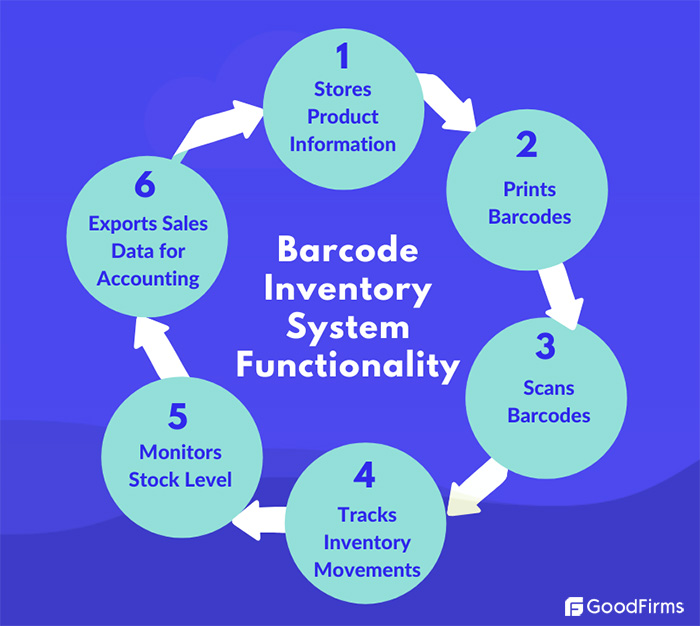
With the help of a computer loaded with inventory management software and paired with a barcode scanner, you can set up your barcoding system. Further, you need to follow the below-mentioned steps -
Step 1: Generating Barcodes
The first thing you need is barcodes. You cannot generate barcodes without feeding product information into your inventory management system. So, you need to import a spreadsheet with the product information into your inventory management system. If you don't have the database of your product information, you can manually enter it into your inventory management system. The inventory management system then generates barcodes for each item based on its details, like color, size, make, model, brand, etc. Using the barcode printer, you can print those generated barcode labels.
Step 2: Labelling the Inventory
Now that you have barcode labels, you must physically paste them on each item in your warehouse for unique identification. This step is the most time-consuming one and requires a considerable amount of human effort. However, once it is done, you will have clear visibility of the quantity of each product item available in your multiple warehouses. The information on the system aligns with the actual stock; thus, all the problems relating to missing items, overselling, and lost sales get solved.
Step 3: Scanning Barcodes
The last and final step is to scan the barcodes of each item in your store so that the system accurately records the stock and inventory available for sale. The barcode scanner helps add items to the system when they enter your warehouse and deduct them from the inventory when they leave your warehouse. If you don't scan the barcode of an item while purchasing or selling it, your system might not show an accurate inventory count, resulting in many accounting errors and mismanagement issues in the business.
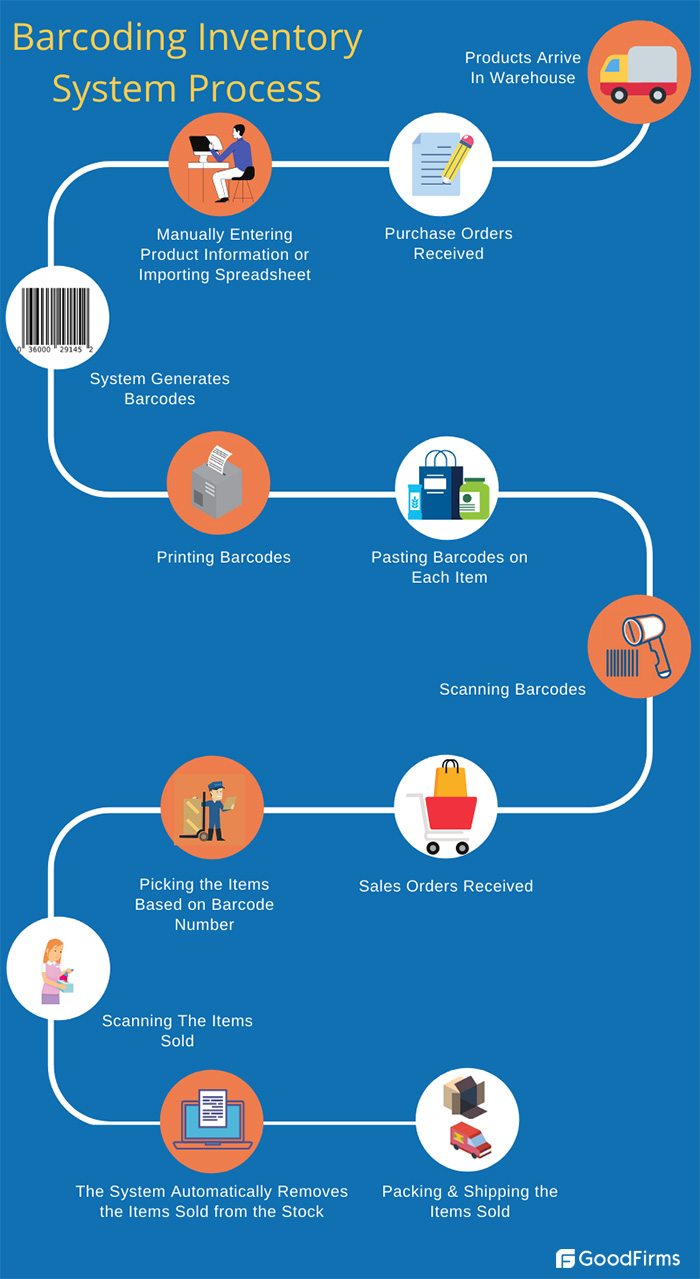
The barcoding system can increase your inventory accuracy by -
Providing Access To The Accurate Inventory Information
When you receive products, you can print and scan the barcodes with the right information using the barcoding system. After selling the products, the system automatically removes the sold items from the stock. Thus, you can be sure that you have access to accurate inventory information in your system.
Creating Purchase and Sales Orders
Your barcoding inventory management system can create purchase orders and sales orders. To ensure accuracy while receiving the orders, you can verify the barcodes with the purchase orders. When selling, the items can be picked and packed easily based on the barcode information mentioned in the sales orders. Following this process, you can be sure that you are shipping the right products to your customers.
Integrating With the Online Store
Your barcoding inventory management system, integrated with your online store, ensures that product quantities are accurately mentioned in your online store. As the barcoding inventory management system is aligned with the actual stock in the warehouse, there are no instances of overselling and disappointing customers by canceling orders for items that are not in stock.
Helping In Right Decision Making
The barcoding inventory system notifies you if your product's quantity exceeds a threshold. This helps you decide when to place the orders with your suppliers at the right time. Moreover, the barcoding inventory system provides accurate information about stock in different warehouses. So, when you receive the order for a particular item, you know which warehouse needs to be contacted to ship it, thus helping you make the right shipping decisions quickly and provide awesome shopping experiences to the customers.
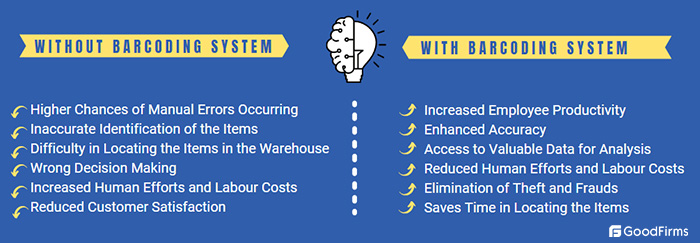
The supply chain is the most significant process in a small business that impacts its profitability. The barcode inventory system is essential in ensuring flawless inventory management so that accurate order fulfillment can be done and customers' expectations are met. To elaborate further, below are some of the significant benefits a barcode inventory system can provide to small businesses.

The first commercial use of barcodes was in 1974 at a store in Ohio. Since then, barcoding technology has come a long way and continues to upgrade to make life easier for businesses and customers. Here are some of the latest trends in barcoding that can impact your decision to select the best barcoding inventory management system.
Increased Adoption of 2D Barcodes
As per the research report, the global 2D barcode reader market size in 2020 was valued at 29 billion and is estimated to reach 40.1 billion in 2025. The reason behind this growth is the enhanced capacity of 2D barcodes for capturing and storing data. By adopting 2D barcodes, businesses can represent complex information like serial numbers and expiration dates through barcode scanning. 2D barcodes have helped businesses increase the efficiency of their stocking, restocking, quick checkouts, and shipping processes.
Barcode Scanning Using Smartphones
A smartphone with a barcode scanning application can work as a barcode scanner. The benefit of scanning barcodes using smartphones is that you don't need to invest in a barcode scanner separately. Your smartphone scans the products and transfers the details of the products to your best inventory management system. Though barcode scanners are not expensive these days, having this out-of-the-box facility of scanning the products using a smartphone can make it a quick and attractive option for your employees.
IoT and Artificial Intelligence
IoT and artificial intelligence have played a significant role in enhancing the buyers' shopping experience. One of the most popular examples is "Amazon Go. " It is a checkout-free store that allows customers to pick the items and leave the store without getting the items scanned, which they have purchased. To shop from the Amazon Go store, the customer needs to have the "Amazon Go" app downloaded on their smartphone, which allows them to scan the QR code while entering the store and download the receipt after they are done shopping and leaving the store. This upcoming trend can provide an excellent shopping experience and impact the barcoding technology shortly.
Voice Recognition
Some barcode scanning apps now allow verbal commands for a hands-free scanning experience. One of the best examples of voice recognition in barcode scanning is Google Glass. By tapping on the device's side or sending out a voice command, "scan," Glass will scan the product's barcode and provide all the information about the product and its price. Barcode scanning using wearable devices loaded with voice recognition technology is transforming the way businesses manage their warehouse and changing the way consumers shop.
When selecting a barcoding inventory system, decisions can be difficult as you need a perfect combination of scanner, printer, and software. The inventory management software is the key component, so picking the best one becomes vital. Going through the list of the best inventory management systems would be the first smart step. Besides that, you need to consider the factors below while choosing a perfect barcoding inventory system that can provide maximum benefits to your business.
Business Requirements
Before you select a barcoding inventory system, ensure that it supports
- The industry/sector your business falls under
- Number of warehouse locations
- Inventory metaphor (Periodic or Perpetual): Your business follows
- Product variants you deal with
- Your chosen barcode symbology
Considering the above aspects would help you select the barcode inventory system that suits your business requirements.
Integrations and Software Support
The barcode inventory system you pick should be able to integrate with the existing systems you are already using, like your accounting software, ERP, CRM, etc. Moreover, your barcoding system should support Microsoft Office and other major software required to feed the product information into the system.
Scalability
The barcoding system you have chosen should be scalable enough to suffice your business needs as it grows. If it doesn't support if you plan to increase your product line or several warehouses, then investing in such a barcoding system can burden your business. Changing a barcoding system frequently can be a hassle and decrease productivity. So, it would be smart to choose a scalable barcoding system from the first time itself.
User Reviews
Based on these user reviews, you can shortlist a simple, well-featured, and user-friendly barcoding system. You can check the reviews posted by users for the barcoding inventory management system on different platforms. Goodfirms is best known for its authentic and legitimate user reviews, which can help you make a genuine selection.
Demo or Free Trial
Many barcoding inventory system vendors offer a demo or a free trial option. You can avail yourself of that facility and know whether that system works according to your business logic. Before investing a considerable amount in a barcoding system, it would be wise to opt for a demo or free trial.
Price
Last but not least, the most important aspect for small businesses is the price of the barcoding system. This becomes the most critical decision, as a cheap barcoding system that does not function correctly can be expensive in the long run. So, you need to choose the barcoding inventory system that includes the features your business requires and fits into your budget simultaneously.
If your budget doesn't permit you to invest in a new software system right now, you can also review the details of the best free and open-source inventory management systems. However, you need to ensure you have enough technical staff and infrastructure to implement the software and make it practically work according to your business needs.
For more information on selecting a barcoding inventory system for small businesses, you can go through the buyer’s guide to inventory management software.
The Key Takeaways
Sometimes the system says that you have the products stored in the warehouse to fulfill a particular order, but you don't have them. In that case, you disappoint the customers, lose them forever, and even harm your business's reputation. You would never prefer to face such a scenario. Deploying the best barcoding inventory management system can minimize operational costs and maximize small business profits.
So, what are you waiting for? Just go through this list of the best barcode inventory systems and best barcode software to make the right choice to take your small business to new heights.