Key takeaways
- Frontend teams are shipping less JavaScript to the client by relying on React Server Components, signals-based reactivity, and modern CSS features that previously required custom scripts.
- Strict TypeScript and AI-assisted coding have become standard daily practice, so the real question now is how rigorously teams enforce and review them, not whether to use them.
- Performance and accessibility both require actual measurement rather than assumption, since INP tracks the full spread of interactions and WCAG 2.2 compliance is now a legal requirement in several markets.
Frontend Development Trends: 2026 at a Glance
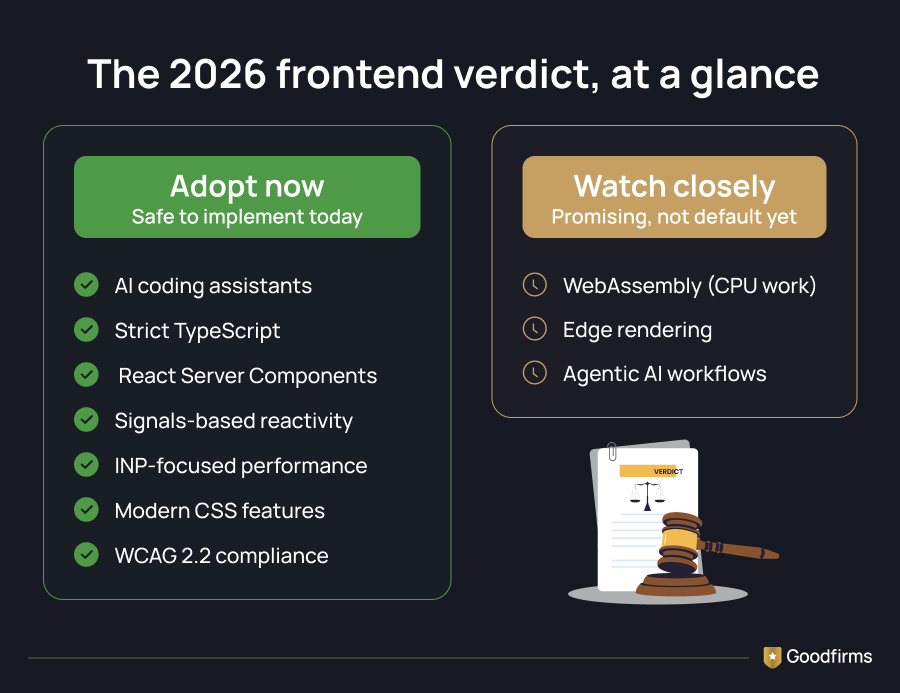
The frontend development trends shaping 2026 can be divided into two categories: adopt now and watch closely.
If you build for the web, you already know the feeling: an app that responds the instant you click something, versus one that seems to fight you at every step. That gap comes down to how closely you're tracking frontend development trends. 2026 has thrown a lot at frontend teams. Some of these have been building for years and just finally hit their tipping point. Others came out of nowhere.
Modern frontend development is increasingly focused on reducing client-side JavaScript, improving performance, and leveraging AI-assisted workflows.
This blog walks through what's actually worth your attention right now, what's still settling, and what you can safely leave on the shelf a little longer. Here's what the data says about where things stand:
Frontend Development Statistics 2026
- 40% of developers now write exclusively in TypeScript (State of JavaScript 2025 Survey)
- 55.8% faster task completion with GitHub Copilot. The Impact of AI on Developer Productivity: Evidence from GitHub Copilot (arXiv)
- 57% of accessibility issues can be identified through automated testing (Deque Accessibility Coverage Report )
- 80% of developers now use AI tools in their development workflows (Stack Overflow Developer Survey 2025)
Evaluating a team to help you build? Compare vetted web development companies with real client reviews on Goodfirms and see who's actually up-to-date on these shifts before you shortlist.
So what's behind these numbers? Let's break it down.
What Are the Biggest Frontend Development Trends and Technologies in 2026?
A few shifts went from "interesting experiment" to "just how we build now" this year. And they all point in the same direction: less JavaScript reaching the browser and more decisions made before the user even clicks.
AI tools are now part of the daily workflow, not a side experiment
AI coding assistants are quickly becoming essential frontend tools for scaffolding components, generating tests, and accelerating development workflows. Combined with modern build systems, these CSS capabilities reduce dependency on traditional frontend tools and third-party libraries.
In a controlled GitHub study of 95 developers, those using Copilot completed a coding task 55% faster than developers working without it.
Teams running strict TypeScript configurations see the biggest gains, since a tighter type system gives the model less room to guess wrong.
The catch is that these tools still struggle with anything architectural: deep component trees, custom state management, or security-sensitive logic like sanitizing user input.
Matt McDonald, a web developer at Figma, put it plainly: a single experienced developer using the right AI-driven framework can now run a team of agents with output comparable to that of 4-5 engineers.
Source: Figma
If you're looking to bring that kind of AI-driven workflow in-house, vibe coding companies on Goodfirms can show you what a properly reviewed, production-ready version of this actually looks like.
The pattern that's emerged is straightforward — lean on AI for the repetitive stuff, and keep a human in the loop for anything that touches your app's core logic.
TypeScript stopped being a choice
The State of JS 2025 survey put it plainly: ‘TypeScript has won’ because 40% of developers now write exclusively in TypeScript, which rose from 34% in 2024 and 28% in 2022. This shows that teams are turning to stricter compiler flags more often and using looser ‘any' types more sparingly in code review, since type safety is more important.
The widespread adoption of TypeScript reflects one of the strongest trends among frontend developers in recent years, with teams prioritizing maintainability and type safety at scale.
TypeScript is a language-level shift. The next one changes where your code physically runs.
React Server Components Are Changing Where Code Runs
React Server Components represent one of the biggest shifts in frontend architecture, moving more rendering logic from the browser to the server.
React Server Components enables you to render data-fetching, static-markup components entirely on the server, so their JavaScript never ships to the browser at all — only the genuinely interactive pieces of your page cross the network.
The result appears directly in the bundle size. Teams migrating data-heavy pages to this model have reported removing a large share of previously client-rendered components from the hydration process entirely, without writing a single extra line of manual code-splitting. Pairing this with React 19's compiler also removes the need for manual memoization, closing off a whole category of performance bugs that used to require careful profiling to catch.
The trade-off is real complexity at the server/client boundary — knowing exactly where state should live takes some getting used to, and debugging a stalled loading state in a nested async component is genuinely trickier than the older page-based routing model.
If you're starting a new project or planning a major rebuild, this is worth adopting. If you're deep in an existing codebase that already works, benchmark first before you commit to the migration — or bring in React.js development companies who've already done the RSC migration elsewhere if you'd rather not learn the trade-offs the hard way.
Where RSC Fits in the Framework Landscape
React Server Components don't exist in isolation — they're baked into Next.js's App Router, which has become the default way most teams actually use RSC in production.
If you're evaluating a fresh build, it's worth knowing there's a real alternative philosophy too: Astro takes the opposite approach, shipping zero JavaScript by default and only hydrating the specific components that need interactivity, which makes it a strong fit for content-heavy sites like blogs, marketing pages, or documentation rather than highly interactive apps.
Neither is "better" outright — Next.js suits teams already invested in React who want RSC's data-fetching model, while Astro suits teams that want to mix frameworks or minimize JavaScript from the start. If you're weighing whether to hire out this work, it's worth knowing what Next.js developers cost in 2026 before you scope the project.
Next.js and Astro represent two of the most influential frontend frameworks shaping modern web applications in 2026.
Teams evaluating new frontend frameworks should consider performance, developer experience, and long-term maintainability.
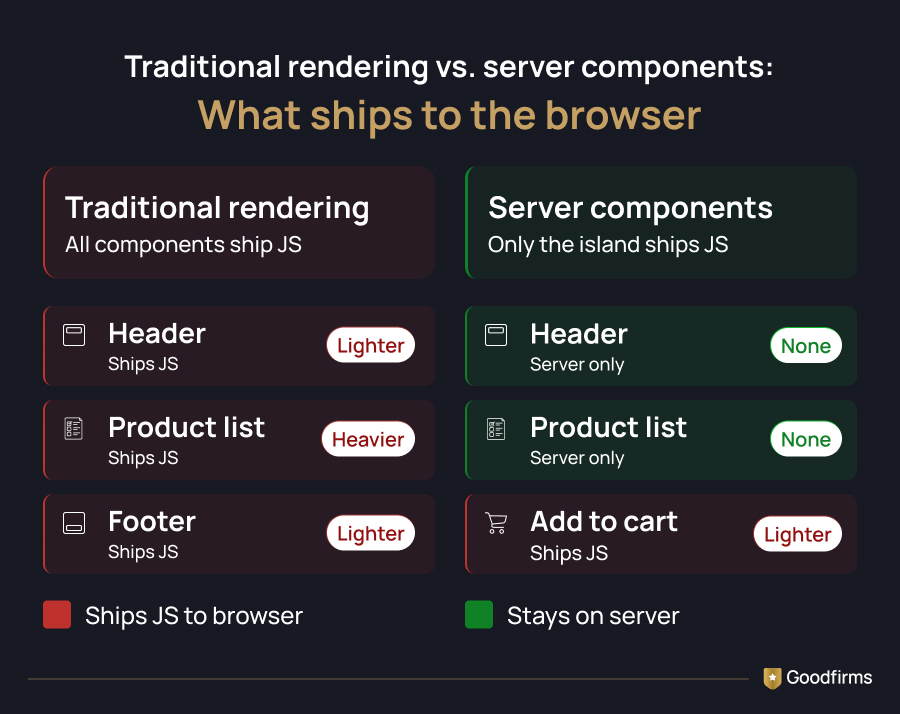
RSC and Astro solve the same underlying problem — less JavaScript reaching the browser — through very different philosophies. That same server-rendered content turns out to matter for a reason unrelated to page speed.
How AI Search Is Influencing Frontend Development
There's a hard technical constraint behind this shift: Vercel's analysis of over 500 million GPTBot fetches found zero evidence of JavaScript execution, and client-rendered content is invisible to roughly 70% of AI crawlers. GPTBot downloads JavaScript files in roughly 11.5% of requests and ClaudeBot in roughly 23.8%, but Cloudflare's crawler data confirms neither actually executes them — they only read whatever's already sitting in the raw HTML response.
That makes server-side rendering a visibility requirement for AI search, not just a performance choice, which lines up neatly with the React Server Components shift covered above: pages that render their real content on the server are readable by ChatGPT, Claude, and Perplexity's crawlers, while a client-rendered single-page app can rank fine on Google while staying completely invisible to every other AI answer engine.
Server-rendering solves the visibility problem. The next shift changes how the browser handles everything that still needs to run on the client.
Signals Are Quietly Replacing the Virtual DOM
Fine-grained reactivity, once a SolidJS specialty, has gone mainstream. Angular now ships its own signal-based primitives; Svelte 5 rewrote its entire reactivity model around what it calls Runes; and Vue.js development companies have been working with ref-based reactivity, operating on similar principles for a while.
The core idea: instead of re-rendering a whole component tree and comparing the result, the framework tracks exactly which piece of the UI depends on which piece of data, and updates only that.
The performance difference is measurable. Benchmarks consistently show fine-grained reactivity systems updating the DOM faster than traditional virtual-DOM comparison methods, and compiled frameworks like Svelte ship noticeably smaller runtime bundles as a result.
For teams already on Angular, turning on the newer signal-based, zoneless mode for new feature work is a low-risk way to start — Angular development companies with recent migration experience can help de-risk that first rollout if you don't want your own team learning it live on production code.
For teams building something brand new where minimizing JavaScript really matters, it's worth evaluating SolidJS or Svelte development companies directly rather than defaulting toReact development companies out of habit.
All of this — RSC, signals, less client-side work — feeds into a single number that Google actually measures.
Core Web Vitals Has a New Favorite Metric: INP
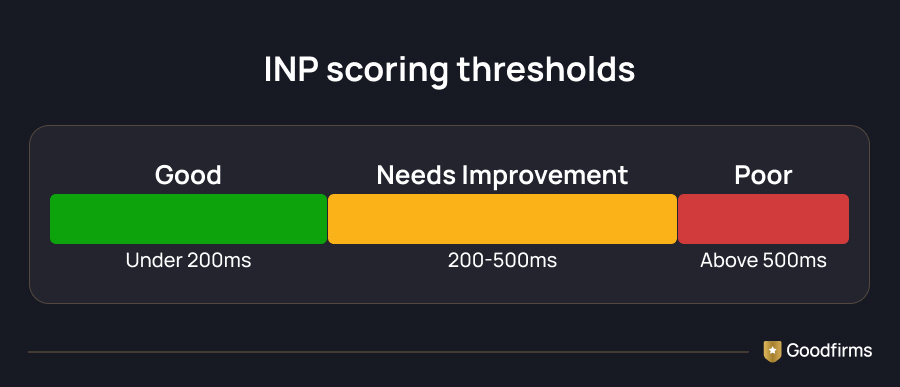
Interaction to Next Paint replaced First Input Delay as the Core Web Vitals responsiveness measure, and it's a stricter test. It doesn't just look at your very first click — it measures the full round trip from input to the next rendered frame, across every interaction in a session, and scores you on the slower end of that distribution.
INP has become one of the most important metrics for frontend performance optimization, giving teams a clearer picture of real user responsiveness.
What actually breaks this metric usually isn't a single giant task — it's a task that sits between a click and the next paint. The fix is rarely a full rewrite: breaking up long-running JavaScript on the main thread, deferring non-critical event handlers, and reducing heavy third-party scripts can meaningfully improve your score within a single sprint. It's worth actually measuring this with real user data rather than guessing, since slow interactions are often buried in parts of your app that nobody profiles by default.
Not every performance win comes from JavaScript, though. Some of the biggest ones this year came from CSS.
Modern CSS Finally Does What JavaScript Used to Handle
Four CSS features have crossed from experimental to safe-to-ship this year, and each one quietly deletes a portion of JavaScript you used to need.
- Container queries let a component respond to the size of its own container, not just the browser viewport — a genuine fix for design systems used across wildly different layouts.
- The: has() selector lets a parent element style itself based on a child's state, replacing much of the manual class-toggling logic that used to live in JavaScript.
- Native CSS nesting means most new projects no longer need a Sass or PostCSS build step just for readable, nested selectors.
- The View Transitions API gives the browser a native way to animate between page states, decoupling the visual transition from the cost of loading the next page.
|
CSS Feature |
What It Replaces |
Browser Support (2026) |
|---|---|---|
|
Container queries |
Media-query-based layout hacks |
Widely supported across major browsers |
|
:has() selector |
JavaScript class-toggling logic |
Widely supported across major browsers |
|
Native CSS nesting |
Sass/PostCSS nesting plugins |
Widely supported across major browsers |
|
View Transitions API |
JS-based animation libraries |
Supported in Chromium and Safari; Firefox behind a flag |
Combined with modern build systems, these CSS capabilities reduce dependency on traditional frontend tools and third-party libraries.
None of these require a framework change — they're just CSS you can start using today, and they tend to make your codebase both lighter and easier to audit for accessibility at the same time.
That accessibility mention is worth pausing on — it isn't just good practice anymore, it's the law in some markets.
Is WCAG 2.2 Compliance Actually Mandatory Now?
This is less a trend and more a legal reality check. Regulations that came into force for digital products serving European users have made WCAG 2.2 compliance mandatory rather than aspirational.Deque's analysis of over 13,000 pages found that automated testing with axe-core catches around 57% of accessibility issues on average, leaving the remaining 43% to manual testing.
However, the remaining violations still require a human to test with a keyboard and a screen reader. Treat automated accessibility scanning the way you'd treat a linter — a useful floor, not a full audit. If accessibility hasn't been part of your process so far, UI/UX design agencies with WCAG experience can help you close the gap in manual testing without having to build that expertise in-house from scratch.
Everything covered so far is safe to adopt today. What's left is close, but not quite there yet.
The Frontend Development Trends Worth Watching, Not Adopting Yet
A few things are genuinely promising but not quite ready for a default recommendation.
WebAssembly, for the right narrow use case
WebAssembly makes sense when you have sustained CPU-heavy work that JavaScript genuinely struggles with — image or video processing, cryptography, or running machine learning models directly in the browser. For anything lighter than that, the extra build complexity and startup cost usually aren't worth it. This is a tool to reach for when a profiler shows JavaScript hitting a wall, not a general performance strategy.
Edge rendering, when your data pattern actually fits it
Running your rendering logic at the edge, closer to the user, can meaningfully cut load times for a global audience — but only when your pages don't depend heavily on centralized session data or server-only APIs. Cold-start delays on edge runtimes can also quietly erase the speed gain you were chasing in the first place. It's worth testing on a case-by-case basis rather than flipping on for your whole app.
Agentic AI coding workflows
Tools that let an AI agent write code, run tests, and fix its own errors are improving fast. However, they still need a senior developer to review the output before anything ships — particularly regarding security and how well the generated code fits your existing architecture.
Everything so far assumes you are building this yourself. Not every team is.
What This Means If You Are Hiring a Frontend Team
If you're not building this in-house and evaluating outside help, these trends can serve as a filter.
A team that's genuinely current in 2026 should be able to speak specifically to where they stand on React Server Components versus the older Pages Router, whether they default to signals-based frameworks or React with the compiler, and how they're handling WCAG 2.2 compliance rather than treating it as an afterthought.
Vague answers to any of those are a signal to keep looking. If you are shortlisting candidates, the answers to these specific questions are a faster way to separate teams that are currently pitching from those still pitching a 2025 stack.
Whether you are building in-house or hiring it out, the same shifts apply — here's how to actually act on them.
The Bottom Line on 2026 Frontend Shifts
None of this year's frontend development trends requires you to throw out your stack and start over. Many of these frontend shifts are also influencing broader web development trends, particularly around performance, accessibility, and AI-assisted coding.
The common thread running through all of them is doing less work on the client — whether that's shipping less JavaScript, blocking the main thread less often, or leaning on the browser's native capabilities rather than a library. Pick the one or two shifts that actually match a real bottleneck in your app, measure before and after, and let the rest stay on your watchlist until they've earned a spot in production.
FAQs- Latest Frontend Development Trends (2026)
Is React still a safe choice for a new project in 2026?
Yes, React is still useful in 2026 for larger teams or apps with complex state management. React Server Components and the newer compiler have addressed two challenges — manual memoization and heavy client bundles. So, smaller, content-focused projects may still be better served by a lighter framework.
Do I need to rebuild my app to boost my INP score?
Usually not. Most INP problems stem from a handful of long-running tasks that block the main thread at the wrong moment, and those can often be fixed by breaking up work and deferring non-critical scripts, without any architectural changes.
Is WebAssembly worth learning for front-end developers?
Only if your work involves sustained, heavy computation in the browser — think media processing or cryptography. Outside of that, it mostly adds build complexity without much payoff.
What's the fastest way to improve accessibility compliance?
Add an automated accessibility checker to your CI pipeline first—it'll catch common issues quickly. From there, manual keyboard and screen-reader testing fills in the gaps that automated tools tend to miss.
Is TypeScript actually required for professional frontend work now?
No official rule says you have to use it — but almost every team already does, so it might as well be required. The real question these days isn't "should we use TypeScript," it's "how strict should we be about it." If you're hiring or building a team in 2026, just assume people know TypeScript. It's not a bonus skill anymore — it's the baseline.