Key takeaways
- Building an OTT platform can cost around $60K to $500K+ — costs scale with platform count, feature complexity, and whether live streaming or multi-region DRM is in scope from day one.
- Infrastructure beats content quality — most OTT platforms fail not from weak content but from skipped TV apps, list-price CDNs, missing DRM, and static home screens.
- Lock in monetization and tech stack early — the SVOD/AVOD/TVOD/hybrid choice and backend architecture decisions get expensive to reverse once real usage data comes in.
- Build for scale before you need it — multi-CDN failover, auto-scaling transcoding, and caching layers should be in place before traffic growth forces the issue, not after.
- Vendor choice determines long-term performance — proven OTT-specific experience, verified project history, and real post-launch support matter more than a polished portfolio or low quote.
OTT app development sounds simple until real users show up. An OTT platform is easy to build; though keeping it running smoothly when thousands of people hit play at the same moment is challenging.
Launching an OTT platform is one of the most powerful app development trends in 2026, but doing it well requires ensuring scalable architecture across devices, cloud-based streaming infrastructure, DRM for content protection, and AI that's woven into how content gets delivered to each viewer.
Currently, most viewers in the U.S. have already tried more OTT platforms than they can name.
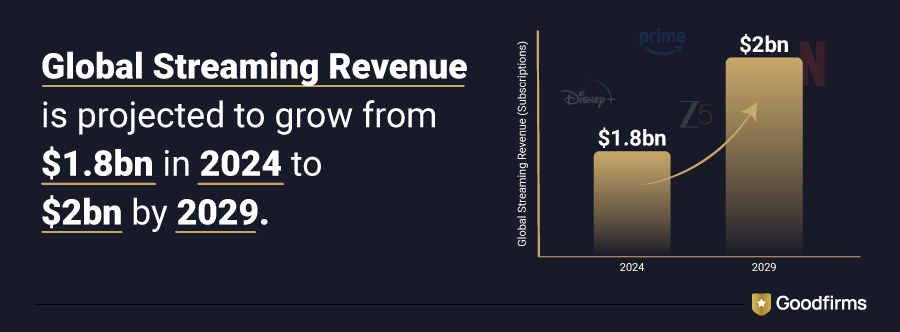
As per Ampere Analysis, Global streaming revenue is projected to grow from $1.8bn in subscriptions in 2024 to $2bn by 2029.
This growth has raised the bar for what counts as a good OTT app. A platform that's merely functional doesn't hold attention for long in a market this crowded. What actually earns repetitive visits is playback that doesn't degrade whether 400 people are watching or 40,000 are streaming the same live moment at once, a catalog that keeps giving viewers a reason to come back, and an experience that carries over cleanly across devices.
Don't leave your platform's success to guesswork. Compare Goodfirms' list of top OTT app development companies — real client reviews, verified project history, and transparent pricing, all in one place.
This guide walks through what OTT app development actually involves: the real cost ranges, the tech stack and integration decisions that are expensive to reverse, the features viewers notice when they're missing, and the mistakes that sink even well-funded platforms.
What Is OTT App Development, Exactly?
OTT app development is the process of building a video streaming application that delivers content directly over the internet, bypassing cable, satellite, or terrestrial broadcast entirely. "OTT" stands for "over-the-top" — over the top of traditional distribution.
A working OTT platform is really five systems stitched together: a content management backend, a video encoding and transcoding pipeline, a content delivery network (CDN) for distribution, a set of front-end apps (mobile, smart TV, web, sometimes set-top box), and a billing and rights-management layer that decides who gets to watch what. Netflix, Disney+, and JioHotstar are the household names.
That's the mechanics of how OTT platforms work. The more interesting question is why so many businesses, well outside traditional media, are building one.
Why Is OTT App Development Trending in 2026?
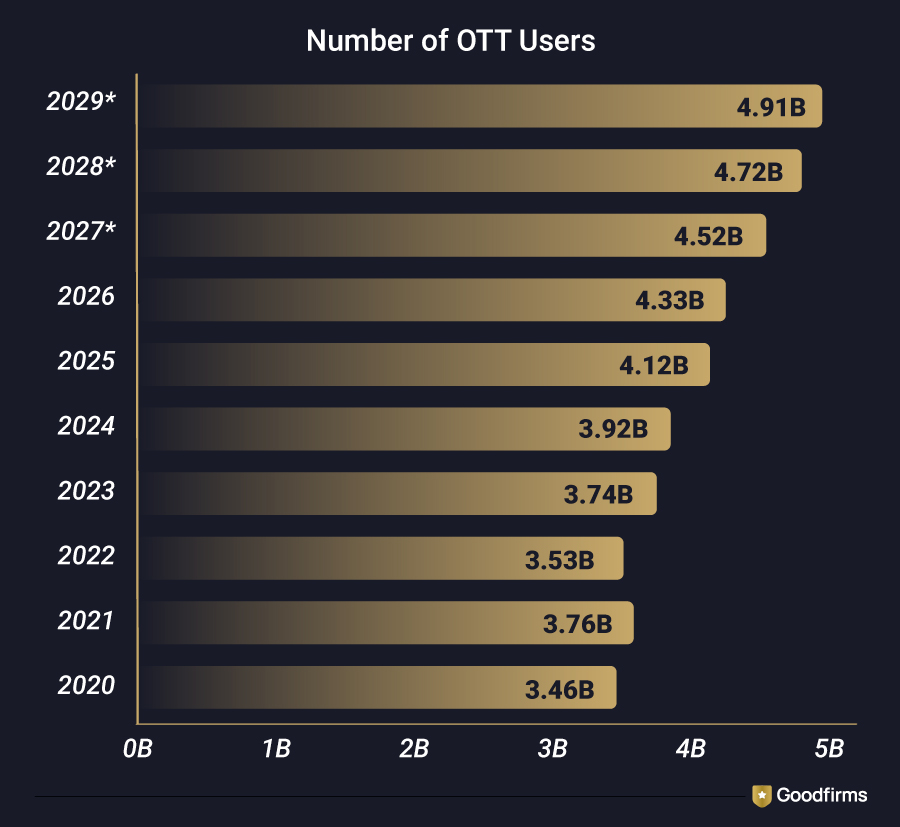
As per a recent report, the number of OTT users worldwide was 4.12 billion in 2025, which is expected to grow to around 5 billion in 2029.
So, yes, the demand for OTT platforms is increasing, and here’s why:
- Smartphones and internet access keep expanding, putting streaming within reach of more people every year.
- Viewers want services built around their own preferences, which means they want to decide what and when to watch.
- Traditional broadcasting keeps losing ground to online video platforms.
- Niche content is having its moment — fitness streaming platforms, religious streaming services, sports video streaming solutions.
The scale of this shift was predicted years ago by the company that helped drive it. Netflix CEO Reed Hastings at that time summed it up this way in a Los Angeles Times article.
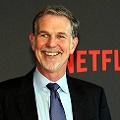
Internet TV will replace linear television. Applications will take the place of traditional channels. Remote controls will disappear, to be supplanted by tablets and smartphones with touch screens.
- Reed Hastings, co-founder and former CEO., Netflix
Precisely, streaming is no longer a trend. It's the default way people watch entertainment, learn, work out, follow sports, and catch live events. This shift is pushing more businesses toward building direct-to-consumer streaming apps. The opportunity isn't just distribution. It's owning the customer relationship, capturing audience insights, and opening new revenue channels. Creator-led businesses, edtech firms, health brands, and sports companies are all building their own platforms now.
The demand is clear. Here's what it actually costs to build one.
How Much Does OTT App Development Cost in 2026?
As per Goodfirms' research, How Much Does It Cost to Develop an App in 2026? Full Development Cost Breakdown, OTT app development can cost anywhere from $60,000 to $500,000+, depending on which devices the platform needs to support, how many features make the initial cut, and which tech stack the team commits to.
Cost by Complexity
|
Complexity Level |
Estimated Cost |
|
Niche, single-platform MVP |
$40,000 to $90,000 |
|
Multi-platform OTT app with moderate to high complexity |
$80,000 to $250,000+ |
Breaking that range down by stage makes it easier to see where the money actually goes and where cutting corners causes the most damage later.
Cost by Development Phase
Below is the cost and phases of OTT app development explained in detail:
Discovery and Planning ($5,000 to $10,000)
This stage covers market research, feature scoping, and locking in the business model before any design or code work starts. Rushing through it is the single most common reason projects end up rebuilding core decisions midway through development.
UI/UX Design ($10,000 to $25,000)
UI/UX design refers to the entire viewing experience across mobile, web, and TV interfaces. A platform that looks polished on a phone but clunky on a smart TV remote loses viewers on whichever device got the design shortcut.
Cost by Platform (The Largest Share of the Budget)
- Mobile app (iOS and Android): $30,000 to $80,000
- Smart TV app (Samsung, LG, and similar): $15,000 to $40,000
- Apple TV or Fire TV app: $10,000 to $35,000 each
Building for every platform on day one usually isn't the right call — launching where the target audience already spends time, then expanding once that traction is proven, stretches the budget further.
Backend and streaming infrastructure ($20,000 to $60,000)
This is the engine behind the app: APIs, video encoding, cloud servers, and CDN setup. Infrastructure that's underbuilt here shows up later as buffering and downtime, not as a line item anyone notices until it fails.
Testing and QA ($5,000 to $15,000)
Every device, screen size, and network condition needs real-world testing — a simulator run alone won't catch what breaks in production. Skipping this step doesn't lower the cost — it just moves the cost to post-launch bug fixes under worse conditions.
Post-launch Support (Recurring)
Launch marks the start of the platform's life, not the end of the budget. Regular updates, performance monitoring, and fixes based on real user behavior need a recurring line item, not a one-time allocation.
For teams weighing where to invest first, prioritizing the platforms an audience already uses — rather than launching across every device at once — tends to stretch a limited budget further without sacrificing the experience that matters most.
After understanding all phases of OTT app development, here are the steps to build a successful one.
Step-By-Step Process to Successful OTT App Development
A streaming platform doesn't come together in one phase — it moves through distinct stages, each one locking in decisions that get expensive to reverse later. Here's how the build actually unfolds, from first concept to first subscriber.
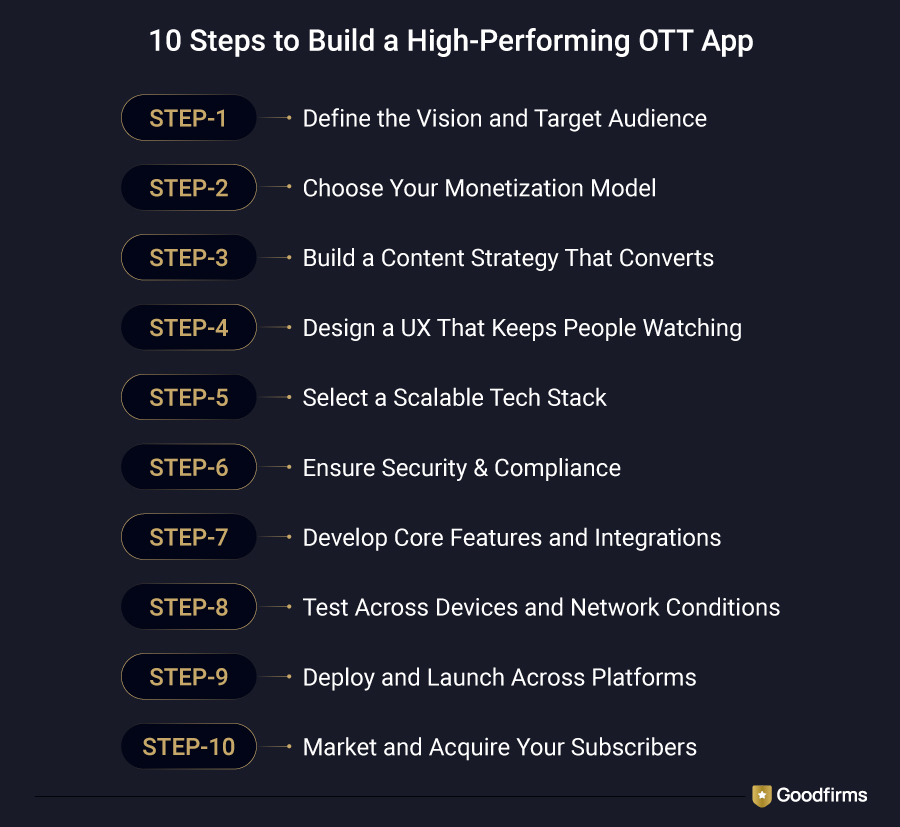
Below is every step explained in detail.
Step 1: Define the Vision and Target Audience
Before any design or code work starts, the audience and content category need to be locked in — a general-entertainment platform, a regional-language service, and a fitness or e-learning app all require different architecture decisions from day one. This step also settles which devices matter most: a platform built primarily for a younger, mobile-first audience prioritizes phone performance, while one built around family viewing needs smart TV support from launch, not as an afterthought.
Step 2: Choose Your Monetization Model
Subscription, advertising, pay-per-view, or a hybrid of the three — this decision shapes the backend architecture, not just the pricing page, since ad-supported platforms need server-side ad insertion built in while subscription platforms need dunning logic for failed payments. Choosing this early avoids rebuilding the billing system mid-project once real usage data shows which model the audience actually responds to.
Choosing a Monetization Model: SVOD, AVOD, TVOD, Hybrid, or FAST
Every OTT platform eventually chooses one of five options for making money. Here's how the models actually compare.
|
Model |
How Revenue Is Earned |
Best Suited For |
Popular Examples |
|
Subscription Video on Demand (SVOD) |
Recurring monthly or annual subscription |
Original content and niche platforms with a loyal, returning audience |
Netflix, Disney+, HBO Max |
|
Advertising-based Video on Demand (AVOD) |
Ad impressions and views (CPM/CPV) |
Large content libraries chasing broad, price-sensitive audiences |
YouTube, Tubi, Pluto TV |
|
Transactional Video on Demand (TVOD) |
One-time purchase per title, rental, or event |
Premieres, live events, and concerts with a clear one-time value |
Apple TV, Amazon Video, PPV sports broadcasts |
|
Hybrid |
Subscription plus ads plus pay-per-view, layered together |
The default starting point for most platforms launching in 2026 |
Hulu, Netflix with Ads, Peacock |
|
Free Ad-Supported Streaming Television (FAST) |
Linear, ad-supported channels with no login required |
Platforms with existing content libraries looking for incremental reach |
Pluto TV, The Roku Channel, Samsung TV+ |
Step 3: Build a Content Strategy That Converts
A content library needs a mix that makes sense for the budget: originals, licensed titles, and creator-sourced content each carry different costs and licensing timelines. The platforms that retain subscribers past the first free month are usually the ones that mapped out a release calendar before launch, so there's always a reason to open the app again next week, not just this one.
Step 4: Design a UX That Keeps People Watching
The interface succeeds or fails on how few taps stand between opening the app and pressing play. Personalized home screens, fast-loading thumbnail carousels, and a search bar that returns results instantly all matter more to retention than visual polish alone — a platform can look impressive and still lose viewers if finding something to watch takes too long.
Step 5: Select a Scalable Tech Stack
Getting the technology stack right early matters more than most teams realize, since backend, frontend, and cloud choices made in month one shape how well the platform performs, scales, and handles cost as viewership grows. Treat them as strategic calls, not technical afterthoughts.
Which Tech Stack Is Best for OTT App Development?
There's no single "correct" tech stack for an OTT platform. The right choice for your OTT platform depends on your team's expertise, content type, platform/device choices, and the amount of live-event traffic your platform needs to handle. Below are the options to choose from.
Frontend
- React or Next.js for the web app, since both handle content-heavy interfaces well without sacrificing load speed
- Flutter or React Native for mobile, letting one codebase cover both iOS and Android instead of maintaining two separate builds
As per Goodfirms’ survey, 90% of businesses quoted React Native and 66% of them quoted Flutter as the top frontend languages that will see the maximum usage in 2026 for mobile app development
Backend
- Node.js, Python (Django or FastAPI), or Java, chosen based on what the existing engineering team already knows well rather than which is objectively "best"
- A microservices architecture so the billing system, recommendation engine, and streaming pipeline can each scale independently, instead of one bottleneck slowing down the whole platform
Video and streaming
- HLS and MPEG-DASH for adaptive bitrate delivery - these two protocols are nearly every production platform that ends up supporting them together for full device coverage
- FFmpeg or a managed service like AWS Elemental for encoding, converting source video into multiple quality renditions, and adaptive streaming depends on
- WebRTC, where sub-second latency actually matters, such as interactive live events, though most VOD and standard live streaming don't need it
Cloud infrastructure and storage
- AWS, Google Cloud, or Azure for compute and object storage, with the choice usually coming down to existing vendor relationships and regional data-residency requirements
Content delivery (CDN)
- A multi-CDN setup — pairing providers like Cloudflare and Akamai rather than relying on one — keeps streaming fast for viewers regardless of location and prevents a regional outage at one provider from taking the whole platform offline
Database and content protection
- PostgreSQL for structured data like billing and user accounts, and MongoDB where content metadata needs more flexible schemas
- Redis for caching, keeping "continue watching" and session data fast even as the user base grows
- Widevine, FairPlay, and PlayReady for DRM — all three are typically required before a licensor will sign a content deal
Smart TV and Connected Devices
- Roku, Amazon Fire TV, Android TV, Samsung Tizen, and LG webOS each require their own SDK and app build, since a smart TV app doesn't simply port over from mobile code
- Most platforms prioritize Roku and Fire TV first, since together they reach the largest connected-TV audience, then expand to other TV platforms once mobile traction validates the content strategy
Step 6: Ensure Security & Compliance
Content theft, credential sharing, and data leaks cost heavily to OTT platforms' real subscribers and real licensing deals. Security has to be part of the initial build, not a patch added after the first incident.
Key security measures
- DRM integration — Widevine, FairPlay, and PlayReady stop unauthorized downloads and playback outside the app
- AES-128 encryption — protects video streams end-to-end, so intercepted traffic can't be reconstructed into watchable content
- Token-based authentication — expiring access tokens stop shared or leaked links from working indefinitely
- Two-factor authentication — adds a second verification layer for admin accounts and payment processing, where a breach does the most damage
Compliance essentials
- GDPR and CCPA compliance — required for any platform serving users in the EU or U.S., covering how user data gets collected, stored, and deleted on request
- Content licensing and copyright clearance — every title needs verified distribution rights before it goes live, since a single unlicensed piece of content can trigger legal action that outlasts the platform's first year
Step 7: Develop Core Features and Integrations
This is where the player, subscription system, search, recommendations, and notification engine actually get built and connected to each other. Below are the must-have features of a successful OTT app, followed by essential integrations.
The Must-Have Features of a Successful OTT App
A successful OTT app isn't judged by how many features it has — it's judged by whether the handful that matter actually work under real traffic. Those features fall into three layers: what viewers touch, what runs the platform behind the scenes, and what separates a decent app from one people stay loyal to.
Viewer-facing features
- Simple sign-up and profile management, including multiple profiles per account for households sharing one subscription
- Fast, filterable search by genre, language, or mood, with results appearing as the user types
- AI-based recommendations built from actual watch history, not just trending titles
- Watchlists and continue-watching sync that carries over the moment someone switches devices
- A consistent experience across phone, web, and smart TV, so the app doesn't feel like three different products
Admin and backend features
- A content management system that makes uploading, tagging, and organizing titles genuinely fast for the content team, not a bare-minimum checkbox
- A subscription and billing dashboard handling plans, renewals, and failed payments without manual intervention
- Analytics that show drop-off points inside individual titles, not just aggregate view counts
- DRM integration covering Widevine, FairPlay, and PlayReady, so licensed content deals don't stall at the negotiation stage
- User management tools that let support staff resolve account and access issues without escalating every ticket
Advanced features that create loyalty
- Live streaming with low-latency delivery for sports, premieres, and time-sensitive events
- Offline downloads for viewers on unreliable or metered connections
- Multi-language audio and subtitle support is built in from the start, not bolted on for one market later
- Push notifications tied to actual viewing behavior — a new episode of something watched, not a blanket blast to the whole user base
Which Integrations Does an OTT Platform Actually Need?
A streaming app is only as strong as the systems plugged into it. The player and interface get most of the attention, but these integrations are what keep the platform running, paid for, and protected day to day.
- Payment gateway needs to support cards, digital wallets, and regional payment methods like UPI, since a checkout flow that only works for one market caps growth before it starts
- Content Delivery Network (CDN) distributes video across servers closer to each viewer, which is what actually keeps buffering low, regardless of where the audience is watching from
- Analytics and tracking surfaces what's actually being watched, where viewers drop off mid-title, and which content is worth commissioning more of, turning guesswork into a content strategy
- DRM (Digital Rights Management) protects licensed and original content from piracy, and is usually a non-negotiable requirement before a licensor will sign a distribution deal
- Push notifications bring lapsed viewers back with relevant nudges, like a new episode of something they've already watched, rather than generic blasts that get ignored or muted
- Social login: lets new users sign up with an existing Google or Apple account instead of a full registration form, which measurably reduces drop-off during onboarding
Step 8: Test Across Devices and Network Conditions
Testing needs to cover the actual range of conditions viewers will hit: different phones, smart TV operating systems, browsers, and network speeds from fiber to spotty mobile data. Load testing that simulates concurrent viewership spikes belongs here as well, particularly for platforms planning live events, since that's the traffic pattern most likely to break something that worked fine in daily testing.
Step 9: Deploy and Launch Across Platforms
Launch means submitting to the Apple App Store, Google Play, and the relevant smart TV app stores (Roku, Amazon Fire TV, and others), each with its own review process and timeline that needs planning in advance. A coordinated launch across platforms, backed by DevOps support for monitoring uptime from hour one, catches problems before they reach enough users to matter.
Step 10: Market and Acquire Your Subscribers
Launch is the start of growth, not the finish line. Paid social campaigns, influencer partnerships, SEO-optimized content, and referral programs all play a role, but the platforms that grow sustainably treat early subscriber feedback as product input, adjusting content and features based on what the first real audience actually watches and abandons.
A platform that's live and working today can still fall behind fast if it ignores where the industry is headed next.
OTT Development Trends Worth Watching in 2026
The platforms staying competitive in 2026 require following the below latest trends that actually help it remain competitive and future-ready.
- AI-driven personalization is now the baseline, not a differentiator. Recommendations built on real viewing behavior, ahead of whatever's simply trending.
- FAST channels (free, ad-supported, no login) are picking up viewers who won't commit to a subscription.
- Cloud-native, auto-scaling architecture is replacing fixed infrastructure built for launch-day traffic alone.
- Edge computing is cutting latency for live streams, especially sports and interactive events.
- Multi-CDN setups are becoming standard, not a scaling afterthought.
- Interactive formats like live polls, shoppable video, and watch parties are opening new paths to engagement and revenue.
Following the right trends gives a platform an edge, but holding onto that edge depends on what happens once real growth hits after launch.
How Do You Scale Your OTT Platform After Launch?
Launch day traffic and month-six traffic behave nothing alike, and platforms that don't plan for that gap tend to buckle right when growth finally arrives. Here's what to put in place once the app is live and viewership starts climbing.
- Set up multi-CDN failover early, not as a "phase two" fix — at tens of thousands of concurrent viewers, one CDN outage can take the whole platform down instead of just one region.
- Move to auto-scaling transcoding infrastructure so encoding capacity expands ahead of a scheduled live event, rather than scrambling to keep up once it starts.
- Add database read replicas and caching layers before the user base grows into them, so features like "continue watching" and recommendations stay fast instead of slowing down as traffic increases.
- Track rebuffering ratio and concurrent-viewer capacity from day one, not just download counts, since those two numbers predict churn far earlier than a quarterly report would.
Even a platform built to scale can stumble at launch if a few avoidable mistakes slip through.
Common Mistakes That Can Fail OTT Launches
Most OTT launches struggle to hold onto viewers past the first few months, and the reasons are rarely about content quality. Here are the mistakes that trip up even well-funded platforms.
Skipping the TV App
More than half of all OTT viewing happens on a living-room screen. Launching with only mobile and web caps the addressable viewing hours per user at roughly 40–50% of what's actually possible.
Defaulting to list-price CDN pricing
This is the most common preventable cost overrun in OTT budgets. Negotiating volume pricing or launching on a leaner provider like Bunny or Cloudflare Stream instead of paying CloudFront's standard rate can free up six figures a year — often enough to fund another engineering hire.
Treating DRM as Optional
Any platform carrying licensed content or premium originals gets pirated within days without multi-DRM protection. Building it in from day one takes 1–2 weeks; retrofitting it into a live platform stretches to 6–10 weeks and disrupts active users.
Relying On Manually Curated Home Screens
Static row ordering holds up fine at launch, but breaks down as the catalog and audience grow. Even basic personalization, like “most-watched by genre” and “continue watching,” needs to ship on day one, not be added later.
Ignoring The In-App Purchase Tax
Apple and Google take 15–30% off the top on subscriptions processed through their app stores, quietly eating into margin every single month. The fix: offer full-price signup through the web, and direct mobile users to subscribe there instead of inside the app. Most established OTT platforms already route signups this way specifically to avoid that cut.
voiding these pitfalls comes down to one factor more than any other: who you build with. Here's how to choose the right OTT app development company.
How to Choose the Right OTT App Development Company?
The vendor a business picks shapes the platform's performance for years, not just its launch date — the decision deserves more scrutiny than a portfolio glance and a price quote.
Proven Ott-Specific Experience
General app-development skills don't automatically transfer to video infrastructure. Look for a team that's already solved DRM integration, adaptive streaming, and multi-CDN failover on a prior project, not one learning those problems on your budget.
Technical Depth In The Right Areas
A partner should speak fluently about HLS and MPEG-DASH, cloud architecture, and the specific DRM systems (Widevine, FairPlay, PlayReady) that licensors require. Vague answers here are a red flag to watch out for.
Verified Project History, Not Just Case Studies.
Public portfolios rarely disclose whether a past "OTT platform" handled 500 concurrent viewers or 500,000. Checking verified client reviews about Goodfirms’ listed top OTT app development companies can help you close that gap before a contract gets signed.
Built-In Scalability, Not Scalability As An Afterthought
Ask directly how the vendor's past platforms handled traffic spikes. A live-event premiere or a viral title? The answer to this question reveals more about their engineering discipline and expertise in this subject.
Real Post-Launch Support
A platform needs monitoring, updates, and fixes long after launch day. A vendor who disappears once the app ships leaves the business exposed, the first time something breaks in production.
Clear Knowledge Transfer
If the build is fully outsourced, insist on documentation and a handoff process — otherwise, even minor future changes stay locked behind that one vendor indefinitely.
That's the full picture from planning to launch — here are quick answers to a few questions that come up along the way.
FAQs - OTT App Development
Before you scope your AI project, here's what most teams want to know.
How long does OTT app development take from start to launch?
A single-platform MVP with core VOD streaming typically takes 3 to 4 months. A multi-platform launch covering iOS, Android, web, and one smart TV app usually takes 5 to 8 months, and that timeline extends further if live streaming or multi-region DRM licensing is part of the initial scope rather than a later addition.
Do I need DRM for an OTT platform if I only own my own content?
Not strictly — DRM exists to satisfy licensors' anti-piracy requirements, so a platform built entirely on self-owned or self-licensed content can launch without it. It's still worth building the integration early if there's any chance of licensing third-party content later, since retrofitting DRM into a live platform is significantly more disruptive than including it from the start.
What's the difference between HLS and MPEG-DASH?
HLS (HTTP Live Streaming), developed by Apple, is required for iOS playback and is the more widely supported format across devices overall. MPEG-DASH is an open standard with broader flexibility for custom implementations and is generally preferred on Android and smart TV platforms. Most production OTT platforms support both rather than picking one, since device coverage matters more than architectural simplicity.
Can I build an OTT app without in-house video engineering expertise?
Yes — this is the primary reason specialized OTT development agencies and white-label platforms exist. The key risk isn't the absence of in-house expertise; it's failing to verify that an outsourced partner has demonstrable experience specifically with video infrastructure, since general app-development experience doesn't automatically transfer to encoding, DRM, and multi-CDN work.
How much does smart TV app development add to the budget?
Each additional smart TV platform (Roku, Amazon Fire TV, Android TV, Samsung Tizen, LG webOS) typically adds $15,000 to $35,000 to a project, since each uses a distinct SDK and submission process rather than sharing code with mobile apps. Most platforms launch with Roku and Fire TV first, since they cover the largest combined connected-TV audience outside markets where Android TV dominates, and add additional TV platforms after mobile traction proves the content strategy works.
What ongoing costs should I expect after launch?
CDN bandwidth and transcoding compute scale directly with viewership and are usually the largest recurring line item, followed by DRM licensing fees, cloud hosting, and customer support staffing. A platform should budget ongoing infrastructure costs as roughly 15 to 25% of MVP build cost per year at moderate traffic levels, rising sharply if live events or 4K streaming are part of the offering.
Bottom line: Building an OTT Platform That Lasts Past Launch Week
The platforms that survive their first year share one trait that has nothing to do with content library size or app polish: they treated infrastructure decisions — CDN redundancy, DRM licensing, load testing for live events — as launch requirements rather than scaling problems to solve later. OTT app development rewards teams that get the unglamorous parts right early, because a beautiful interface sitting on top of an infrastructure that buckles during the first big moment loses the audience it was built to earn.
Whether the next step is scoping an MVP budget, tech stack choices, or shortlisting a mobile app development company with verified OTT project history, the decisions made in the first month of planning are the ones hardest to reverse six months in. Get those right, and the rest of OTT app development becomes execution rather than guesswork.