


A sudden crash of a system could be one of the worst fears of businesses. For instance, Deutsche Welthungerhilfe (WHH), a German charity firm witnessed a cyberattack in which hackers stole and encrypted a significant amount of data. To decrypt the data, hackers demanded 20 BTC. Such incidents, whether they occur due to human errors, viruses or malware, hacker activities, hard drive corruption, power outages, theft, or disasters such as fire or earthquake, point towards the need for companies to keep multiple back-ups at multiple locations for complete data security. Everyone requires some kind of backup in life; even the military can't do without it. Companies need to have a proper back-up strategy to restore the data in case of an adverse happening.
Disk Imaging and Disk Cloning remain two of the most dependable ways to protect business-critical data. But with so many free and open-source options available, knowing which tools are still actively maintained in 2026 is just as important as knowing what they do.
That's why this guide goes beyond features. Every tool below includes a 2026 Status tag — so you know upfront whether you're downloading something actively supported, a functional legacy tool, or a time-limited trial before committing your backup strategy to it.
Here's what each status means:
- Active — regularly updated and fully supported
- Trial Only — free trial available, paid plan required after 30 days
- Available, No Recent Updates — functional but not actively developed
- Legacy — last updated several years ago, limited modern compatibility
What is Disk Imaging/Cloning?
Disk imaging is the computer system process by which an archive is created for a source disk, which can be later used for making more copies of the hard drive. In the Disk imaging process, all the data of a hard disk is copied sector-wise, including hidden files and configurations. This data is copied to another hard drive in a compressed form. It allows more than one image to be reproduced on a hard disk so that users can take back up of more than one computer into the destination disk. The image has to be restored and installed on another computer to start working. Disk imaging software creates an archive of the source disk that can be used to create a back-up copy of the source disk.

Disk Cloning is a process by which one hard drive is copied into other drives to make an exact copy of the source drive. A clone will have all the contents from the source drive, but it is not in a compressed form. Once a clone is formed, users cannot add or change data. A clone is ready to use a disk that can be inserted into any computer, and it will start working. Disk cloning software creates a clone of the source disk into another hard drive.
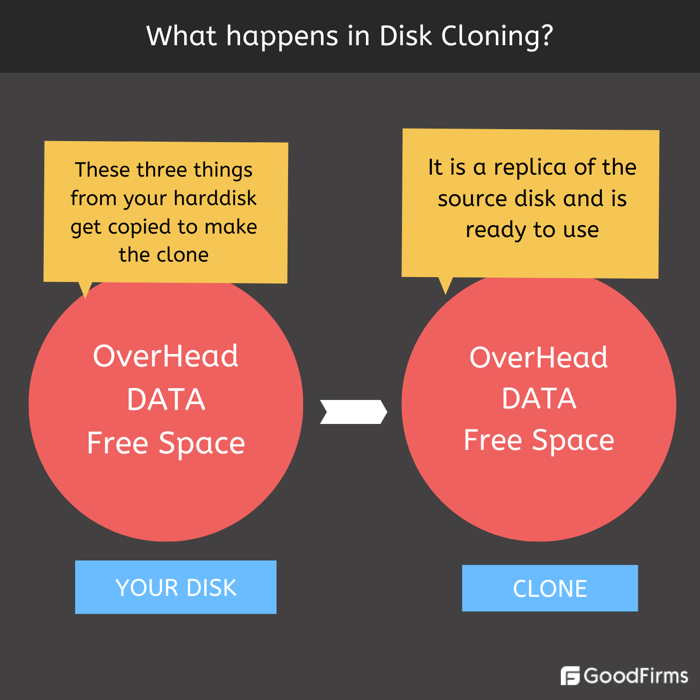
What is the difference between Disk Imaging and Disk Cloning?

Who Uses Disk Imaging Software?
-
Corporate World
Small and medium-sized businesses, large scale companies, and conglomerate corporate organizations use this software for back-up and other purposes. Mostly they prefer a Disk Imaging Software that provides cloud services along with the Disk imaging or cloning service. As these companies have considerable data to monitor and store, they always require a disk imaging solution provider who takes care of the entire data section.
-
Government Institutions
Present-day Governments are creators of bulk data. The data about their various departments, branches, citizens, and sensitive defense data has to be stored carefully with multiple back-ups. These institutions use the service of a Disk imaging solution provider to create a back-up on a large scale.
-
Forensics Department
The use of this software is not only limited to the corporate world, government organizations, individuals, but other entities like forensics departments and data recovery firms also use this software for various purposes. In Forensics, this is mainly used to create a back-up of electronic evidence like computer hard disks, mobile hard drives, CDs, Floppy disks, Camera memory cards, etc. As the original evidence cannot be tampered with in legal proceedings, so forensic experts first create an image and then run all the tests.
4. Data Recovery Firms
Data recovery firms that recover data from even damaged hard disks use high-quality disk imaging software to complete the process. Mostly these firms are employed by Government departments, the forensics department, corporates, and sometimes even individuals reach them to recover their deleted, damaged, or corrupted data.
-
Individuals
Individuals in professions like chartered accountancy, specialist doctors, stockbrokers, real estate consultants, counselors, and others create data that they require to be safe and secure. Deletion or damage to such data can cost them a lot. They utilize Disk imaging and cloning software services to help them create a back-up for their data.

What are the features of Disk Imaging Software?
-
Supports all file formats
A disk imaging software should be able to copy all types of files and extensions. It must also copy files that have a long name.
-
High speed of work
The processes, such as disk imaging and disk cloning, take a lot of time. The kind of data that they back-up is too massive. There are chances of errors also. The software that exhibits a high level of speed to accomplish this task is always preferred.
-
Encryption
Uploading data for back-up to hard drive or cloud servers comes with the risk of intrusion. The hackers and malicious viruses might try to interrupt the service or steal data during the transfer process. Most of the disk image software comes with inbuilt encryption. Encryption protects important data.
-
Boot disk option
The disk image is too big and takes a lot of space. So external hard drives are used to take back up. This back-up has to be loaded back to a computer. This requires a boot disk. The boot disk is a disk or temporary set of files that are needed to install or boot a computer to load an operating system.
-
OS imaging
The term means to capture the images of one system and then to replicate it on others. The whole operating system is copied by IT administrators and is run on others.
-
Disk Cloning
Most of the Disk imaging software can also be deployed for disk cloning. This software will have this feature mentioned outside. Clones disks or partitions of different sizes.
-
Remote Imaging
Sometimes administrators might not have physical access to computers that they want to image. Remote imaging allows imaging a distant computer remotely.
-
Scheduling
Users can schedule and set the regular time intervals at which they want the disk imaging software to start disk imaging automatically. Sometimes users forget to take data back up for many days, and their data is vulnerable to loss or attack. Scheduling will ensure that data back-up keeps happening on its own at regular intervals.
-
Cloud back-up
The disk imaging software has the capacity to upload data to cloud servers directly. A cloud back-up of the disk would upload the source disk data into cloud servers owned either by the disk imaging software company itself or some other third party vendor that provides cloud services. It is a practical solution to put all data into the cloud as generally, the data created by businesses is too huge for the disk drives. This happens in real-time, so in case of a system malfunction, the data is safe, and there is a negligible loss of data. Not all disk imaging software provides this service, but most of them do.
-
Differential Back-up
A disk imaging software should be able to compare two disks together and find the difference. It should then take the back-up of the difference only.
-
Simple Interface
The software should not be too much complicated for users to understand. Intuitive software that is easy to use is preferred.
-
Partition Management
The software manages partition related issues also. It can change the disk volume utilized by each partition of the disk.
-
Incremental Back-up
The disk imaging software should also be able to take incremental back-up. Incremental back-up is an addition to the already existing back-up of a disk. If changes were made to the source disk and additional content was added, then incremental back-up would take only the newly added content for extra back-up. This makes a lot of sense.
Before moving to the list of free and open source software list, let’s take a look at OS Deployer, a top notch disk imaging software with optimum capabilities and features to manage disk imaging seamlessly;
OS Deployer
OS Deployer is a leading and advanced disk imaging solution that offers sophisticated features to onboard multiple computer systems with minimal effort. This robust software solution supports both offline and online image modes to customize and easily create, and store images of computers, OS, and disk partitions in the image repository configured as per the business environment. Businesses can use this OS and disk imaging solution to create backups, shrink partitions, set up image compression level, allocate memory usage, automate driver collection, and perform many more functions with ease.
OS Deployer also offers customizable deployment, flexible boot options, user data migration, automated driver management, and Zero-touch deployment capabilities.
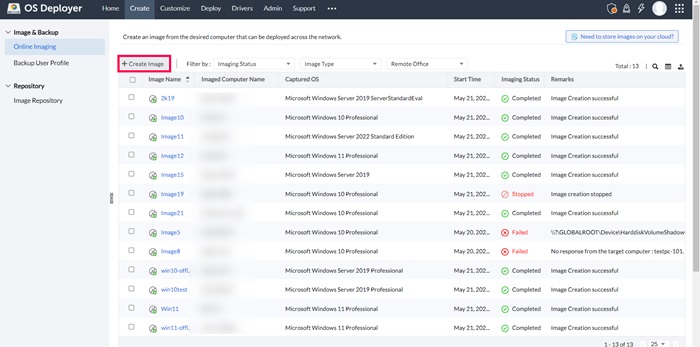
(Source: OS Deployer)
Features:
- Separate online imaging and user profile backup features
- Ability to create images for remote systems and data
- Filters based on imaging status, image type and office are available
- Integrated network and application management tools
- Customizable deployment templates
- Hardware-independent deployment
- Advanced application distribution capabilities
- Zero-touch deployment due to automated booting
This article lists the 9 top free and open-source Disk Imaging Software, along with their 2026 Status:
| Tool | 2026 Status |
|---|---|
| Clonezilla | Active |
| FOG | Active |
| DoClone | Legacy |
| PartClone | Active |
| Mondo Rescue | Limited Maintenance |
| AOMEI Backupper | Active |
| Macrium Reflect | Trial Only |
| Drive Image XML | No Recent Updates |
| EaseUS | Active |
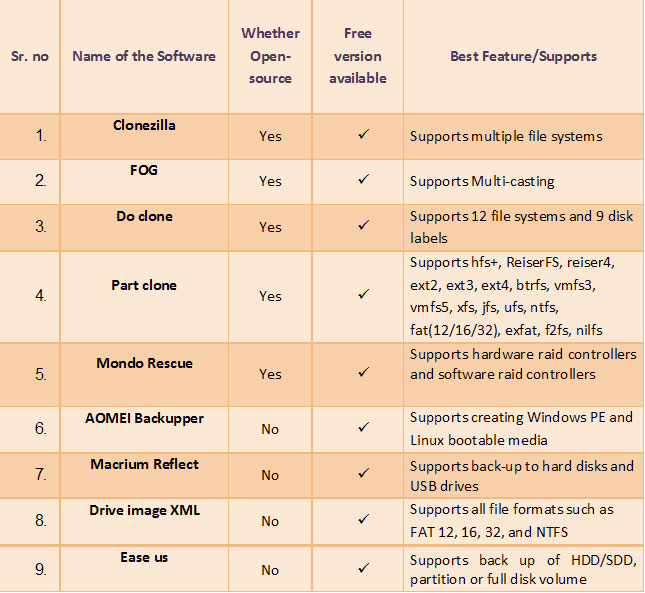
Comparative Table of 9 Best Free and Open Source Disk Imaging Software
1. Clonezilla
Clonezilla is a free and open-source disk imaging software that comes in three versions:
a. Clonezilla live, b. Clonezilla lite server, and c. Clonezilla SE (server edition). Clonezilla live is used for single computer back-up, while the Clonezilla lite server or SE is for bulk computer deployments. Its reported cloning speed is 8GB per minute.
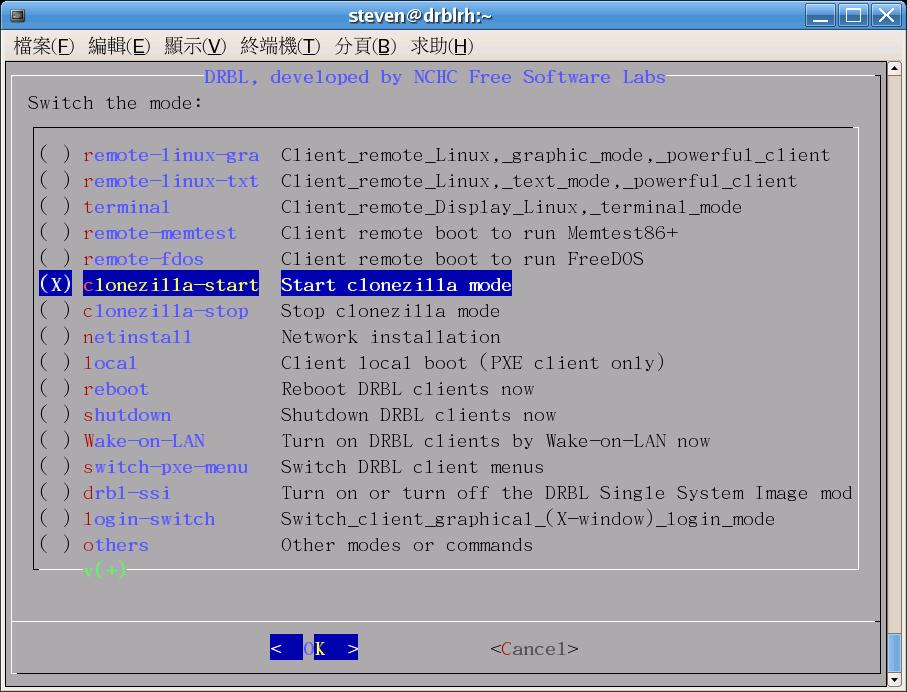
(Source- Clonezilla)
Features:
- Multiple file systems are supported, such as ext2, ext4, ReiserFS,ext3, f2fs and nilfs2 of GNU/Linux, FAT12, FAT16, FAT32, NTFS of MS Windows, etc.
- Supports multiple 32-bit (x86) or 64-bit (x86-64) Operating systems
- GNU/Linux, MS windows, Intel-based Mac OS, FreeBSD, NetBSD, OpenBSD, Minix, VMWare ESX and Chrome OS/Chromium OS
- The Master boot record and GUID partition table formats of hard drives are supported.
- The boot loader can be reinstalled.
- It can be booted on a BIOS or uEFI machine.
- Clonezilla takes all commands and options.
- One image can be restored to multiple local devices.
- AES-256 encryption for data security
- Image encryption with ecryptfs
- Clonezilla SE supports Multicast for massive cloning
- Clonezilla lite server supports Bittorrent (BT) for massive cloning
2026 Status: Active — Latest release February 2026 (v3.3.1-35) with Linux kernel and Partclone updates.
2. FOG
FOG is a free disk imaging solution for Windows. It is an open-source Linux-based tool. It is best implemented with a separate dedicated server for FOG only. It is freeware with a GPL license. It provides more than just imaging; it is a complete network computer cloning and management solution. The latest version is 1.5.10.1698, which comes with better stability and optimized performance.

Features:
- All basic imaging and cloning features.
- Scheduling of imaging tasks with option to automatic shut down the computer
- FOG supports multi-casting.
- Imaging and deploying of the image to other computers
- It provides user support through a community forum.
- Installation of OS is possible using FOG.
- Partition and full disk imaging
- It is also used for disk wiping.
- Provides security through anti-virus
- Ability to remotely perform imaging
- Supports deployment of dual-boot multi-disk image
- Slack and LDAP Plugin supported
2026 Status: Active — Actively maintained with regular community updates and a strong open-source support forum.
3. Do Clone
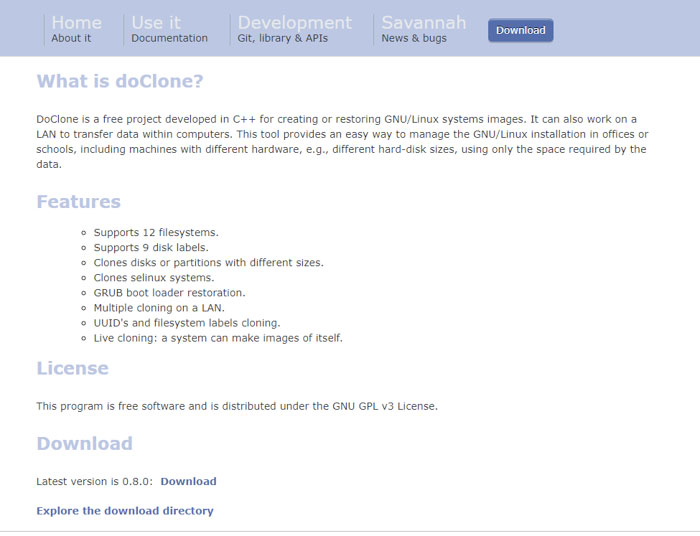
DoClone is a free cloning software written in C++ for disk imaging of GNU/Linux systems. It allows a LAN network to transfer data within computers. This tool is mostly used in offices or schools to manage the GNU/Linux installation.
Note: DoClone's official website remains accessible and the software is still downloadable. However, the last stable release was v0.8.0 in October 2015. It is best suited for legacy GNU/Linux environments and may not compile reliably on modern distributions.
Features:
- It supports 12 file systems.
- It supports 9 disk labels.
- It is compatible with various file formats-ext 2, ext 3, ext 4, FAT 16, FAT 32, and others.
- Live cloning: a system can make images of itself.
- Clones selinux systems.
- Clones disks or partitions of different sizes
- GRUB boot loader restoration.
- Multiple cloning on a LAN.
- UUID's and file system labels cloning.
- It is distributed under the GNU GPL v3 License
- It can create a 40 GB disk and store it in a 20 GB disk.
- Easily restore previously created images
- Supports Unicast/Multicast
- Chain mode to create a computer chain
2026 Status: Legacy — No updates since 2015. Recommended only for experienced users on older Linux systems.
4. Part Clone
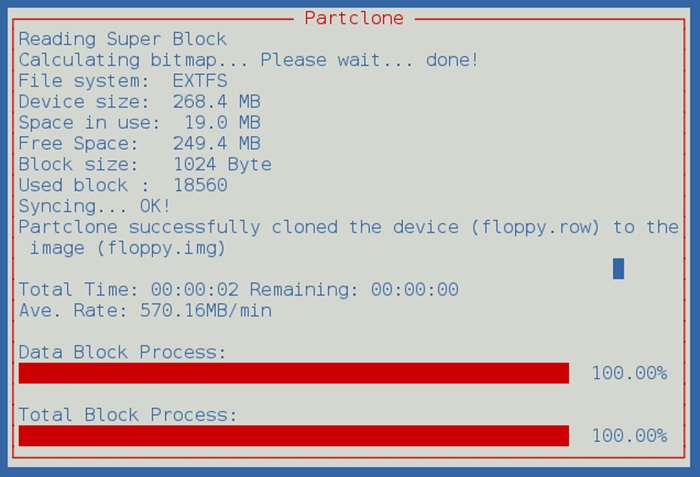
Partclone is a free disk imaging/cloning software that provides imaging and cloning services and partition facilities. Partclone supports a wide range of formats, including hfs+, ReiserFS, Reiser4, Ext2, Ext3, Ext4, Btrfs, VMFS3, VMFS5, XFS, JFS, UFS, NTFS, and Fat(12/16/32). Partclone is a powerful image engine that not only saves or restore image to a partition, but can also clone devices.
Features:
- Partclone provides services to back up and restore partition blocks.
- By using the existing library, it provides for greater compatibility of the file system.
- Its goal is to provide support to all major file systems.
- Supports advanced administrators through pipe, stdin and stdout
- Its rescue mode skips bad blocks and images, only the functional blocks for the partitions.
- The program is a solution to save a bad disk.
- Lists all used blocks as domain files
- It is a fast and smart software.
- All commands are in text mode.
- All back-up blocks are verified by the program to make sure the data are correct.
- Raw copy any file using partclone.dd
- Check image file with partclone.chkimg
- Restore any image made from partclone using partclone.restore
2026 Status: Active — Updated to v0.3.45 in early 2026. Actively developed and widely used as the core engine behind Clonezilla.
5. Mondo Rescue
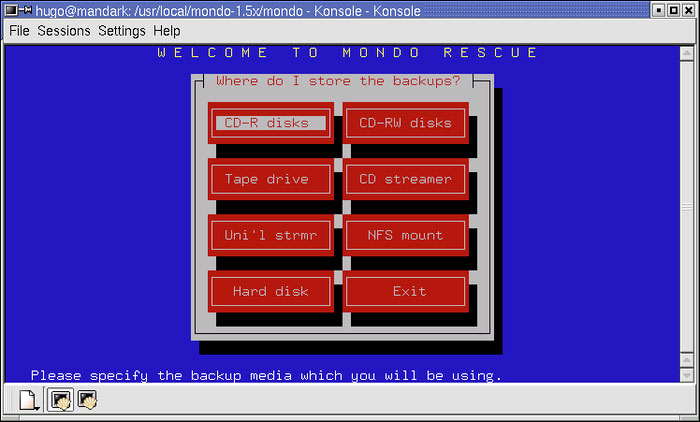
Mondo Rescue is a back-up software licensed under GNU/Linux server. It can recover CD-R, DVD-R[W], CD-RW, NFS, DVD+R[W, or hard disk partitions. It is a useful disaster recovery software, and in case of data loss, it will let you in recovering all of your data. Used by companies such as IBM, Lockheed-Martin, HP, Siemens, the US Dept of Agriculture, and many more, this is a very reliable free data cloning and data recovery software.
Note: Mondo Rescue's website remains live and packages are still available for download. Development stalled for several years but the maintainer resumed limited work in 2024. No new stable release has been published since. Recommended for experienced Linux administrators comfortable working with beta-stage builds.
Features:
- Mondo supports LVM 1/2, ext2, ext3, RAID, ext4, JFS, XFS, ReiserFS, VFAT, and can support additional filesystems
- It supports hardware raid controllers and software raid controllers.
- It supports BIOS and UEFI boot modes.
- Mondo runs on all major Linux distributions (Fedora, RHEL, OpenSUSE, SLES, Mageia, Debian, Ubuntu, Gentoo)
- You may even use it to back-up non-Linux partitions
- All cloning features
- Fast and reliable
- Secure and safe data cloning
- Protected data
- Create back up of multiple files and folders
- Partition management
2026 Status: Minimally Maintained — Use with caution in production environments.
6. AOMEI Backupper
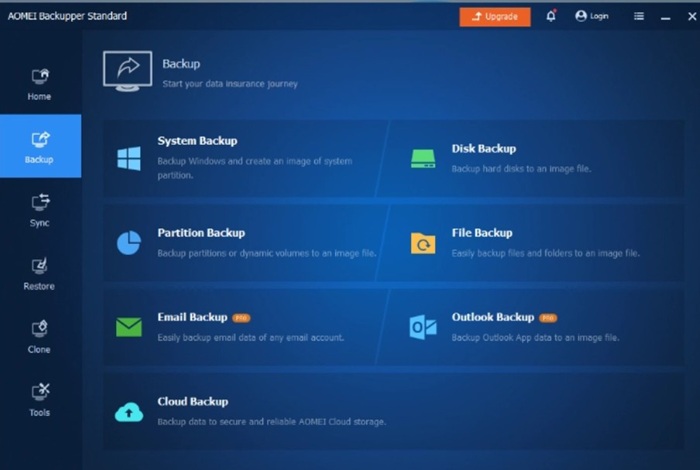
It is a free software for disk imaging and disk cloning. AOMEI Backupper Standard serves your back-up and recovery needs. This simple tool lets you do all disk imaging tasks intuitively. It works with all versions of Windows- Windows 10, Windows 8.1/8, Windows 7, Windows Vista, and XP with free technical support. It allows customization of backup settings, such as setting regular backups, creating incremental backup, splitting backup tasks, enabling email notifications, etc.
Features:
- Create a disk image of your system to keep your operating system and applications safe.
- Back-up/Sync to USB flash drive, network share/NAS, cloud drive.
- It can be used to back-up full hard disks (HDD), SSDs, or partitions.
- Explore, compress, and check back-up image
- Create Windows PE & Linux bootable media
- Schedule back-ups or syncs
- Create scheduled automatic back-ups
- Incremental/differential backups
- Clone a smaller hard disk to a larger one for disk upgrade,
- Clone HDD to SSD for better performance.
- Automatic file sync: The imaging or cloning can be scheduled at regular intervals from a source location to destination daily.
- Also supports USB Plug-in & Event-triggered Backup
- Dynamic disk restore and disk volume clone
- Adjust partition size and add unused space
- Ability to create bootable media
- Supports creation of recovery environment
2026 Status: Active — Standard v8.3 released April 2026. Regularly updated with active customer support.
7. Macrium Reflect
Macrium Reflect X is a powerful disk imaging and cloning solution for Windows, offering fast backup speeds, incremental and differential imaging, direct disk cloning, and ransomware protection via Macrium Image Guardian. The software is available as a 30-day free trial with full feature access. After the trial period, a paid annual subscription is required to continue creating new backups — though the software falls back to restore-only mode, allowing access to previously created backups.
Best for: Windows users who want a polished, reliable imaging tool and are open to a paid plan after evaluating it.
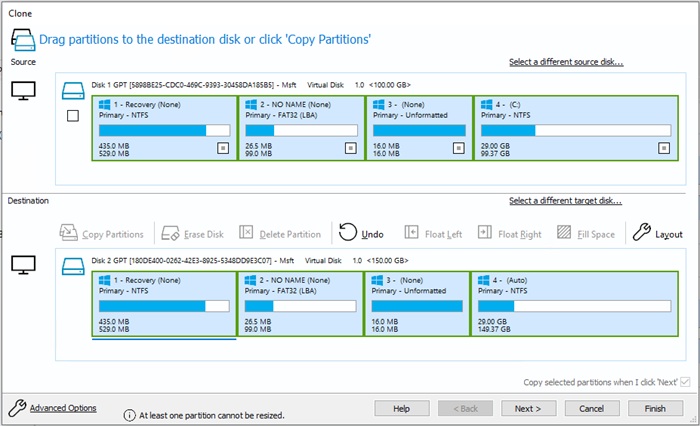
Features:
- Creates an accurate image of the hard disk
- Browse back-up contents in Windows Explorer
- Schedule back-ups
- Boot your back-ups instantly
- Restore non-booting systems
- Differential Images
- Direct disk cloning
- Create images of a live/running Windows OS
- In the paid version, it provides incremental back-ups
- It provides ransomware protection.
- Operating System back-up and restore
- Easy to use software and intuitive interface
- Back-ups whole partitions or individual files and folders
- Removable media imaging and cloning
- Quickly boot backups in Hyper-V/Oracle VirtualBox VM
- File and folder level backup and recovery
- Incremental and differential imaging
- Rapid delta clone and restore
Looking for a permanently free alternative? AOMEI Backupper Standard and Clonezilla are both strong no-cost options covered in this guide.
2026 Status: Trial Only — 30-day free trial available at macrium.com/reflectfree. Paid subscription required after trial.
8. Drive image XML
This free disk imaging software is used for creating reliable imaging and systematic back-ups of your hard drive. It stores images in XML file format. It allows integration with 3rd party tools. Its private version is free for home use. One has to buy an upgraded version for commercial use.
Note: Drive Image XML has not received updates in several years. It remains functional for MBR-partitioned disks but has known limitations with GPT disk layouts, which are standard on most modern Windows systems. Verify your disk partition type before relying on this tool for production backups.
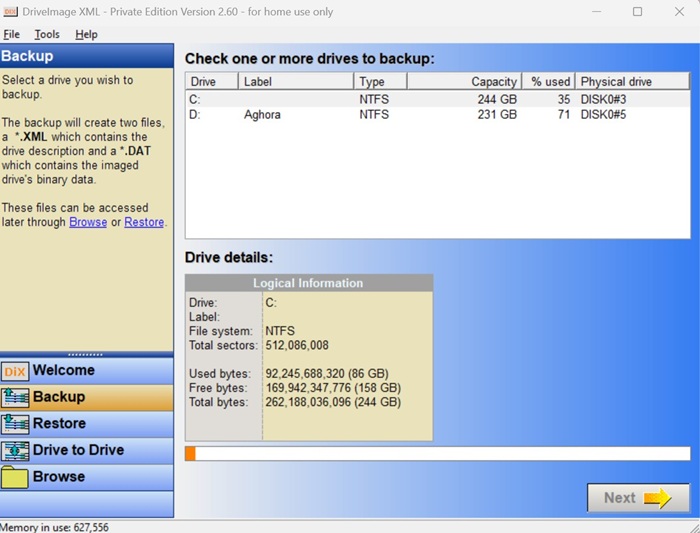
(Source- Drive image XML)
Features:
- All features of Disk imaging are available
- Drive image XML takes back up of logical drives and partitions.
- Users can browse for images and extract files
- It lets the user restore the back-up on the same drive or on other
- The program can work with all file formats such as FAT 12, 16, 32, and NTFS.
- Schedule automatic back-up
- It uses Microsoft's Volume Shadow Services (VSS) to create images.
- It is compatible to work with Windows XP, 2003, Vista, Windows 7, Windows 8, Windows 10.
- Compressed images
- Users can copy directly from drive to drive
2026 Status: Available, No Recent Updates — Functional for MBR environments. GPT disk support is unreliable.
9. Easeus
Easeus is a free disk cloning software that lets you clone your drives, floppy disks, and USBs. In its free version, it provides all system/file/disk back-up & recovery disk cloning options. For more features, one has to upgrade to its paid versions. It is one of the best software in the disk cloning category. Available in 160 countries, Easeus claims to have satisfied 20,000,000 customers to date. Home users, organizations, academic users, IT admins, professionals, technicians, service operators, consultants, and enterprises can use this software.
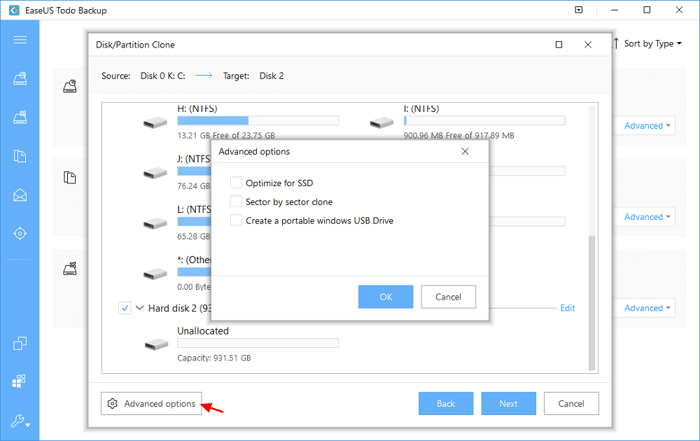
(Source- Easeus)
Features:
- All basic data cloning features
- Back up of HDD/SDD, partition or full disk volume
- It also allows disk imaging
- Disk and partition back-up
- Users can back up the entire OS
- Basic backup scheduling on a daily, weekly or monthly frequency
- It clones disk partition sector by sector
- Recovers deleted data or the whole system if required
- Allows full, incremental and differential back-ups
- Makes boot disk to install OS
- Full system back-up when the system is running
- Block-level disk imaging technology
- View and even edit files during recovery
- Bootable backup for disaster recovery
- WinPE bootable disk for repairing/reinstalling the computer system
- Multi-path backup storage
- AI Smart Backup
2026 Status: Active — Regularly updated with current pricing across 160 countries. Free version available with paid upgrades for advanced features.
Apart from the above free and open source disk imaging software, we have also selected a few top ones that offers enhanced functionalities and capabilities to seamlessly perform disk imaging and restoration functions as follows;
Top Disk Imaging Software
R-Drive Image
R-Drive Image is a top-notch disk imaging software to back up or protect data in case of system crashes, hardware failure, virus attack, etc. This widely used software comes with enhanced features such as advanced drive and file imaging, advanced image restoration, partition manager, scheduler, SMART warnings, and unattended scripts and actions. The software offers an easy-to-use interface with multi-language support to ensure users can use it easily. Individual file backups, cloud integration, support for FTP(s)/SFTP and WebDAV servers, image replications, etc., are also available in this powerful software. Besides a 30-day free trial, the premium plans start from $44.95 per license.
Active@ Disk Image
Active@ Disk Image is another prominent disk imaging solution for Windows systems. It is highly useful in creating exact replicas of a wide range of PC disks, including SSD, HDD, DVD, CD, and Blu-ray. The created images can be used for upgrading PCs, duplicating disks, backups, etc. Bootable disk, scheduled backup, incremental and differential images, image encryption, email notifications, and cloud storage are a few major features of this disk imaging tool. Besides a free version, the premium pricing plans start from $39 per license.
DiskGenius
Since its inception in 2010, DishGenius has been a notable disk imaging software to help businesses manage disk partitions, recover lost data, and back up disks. More than 120 million users rely on this software. Users can preset system shutdown, restart, or hibernation once the process is completed. It supports easy creation of a sector-by-sector copy of a disk, reverse copy, copy report, advanced sector editor, and many more powerful features. The software is available to use in a free plan and premium plans start from $69.90 per pc.
IDrive
Another leading tool that made it to the list of top disk imaging software is IDrive. It is among the most secure disk imaging tools to backup hard disks with the same data and structure. Businesses can easily create image backup of system drives and restore data to local computers through this powerful software. Other notable features include multi-device backup, cloud drive, versioning, Microsoft Office 365 backup, and Dropbox backup. Besides the free version, the paid pricing plans start from $2.95/user per year.
Handy Backup
Handy Backup is a simple and easy-to-use disk imaging software that allows creation of an image-level backup in just a few clicks. Through this software, businesses can back up their disk images to OneDrive, Google Drive, Amazon S3, Dropbox, or local server. This software can fully automate the imaging process. Features like hard disk cloning, versioned backups, backup scheduling, system recovery plug-in, etc., are there to streamline the whole disk imaging and restoring process. The software is available to use for a 30-day free trial, after which the premium plans start from $39 per license.
Conclusion:
Technology moves fast — and so does the software that protects it. What worked as your go-to disk imaging tool three years ago may be legacy software today, unsupported on modern hardware, or incompatible with current partition formats.
That's the reality this guide is built around. Of the 9 tools covered here, some are actively developed and shipping updates in 2026. Others remain functional but haven't seen a commit in years. And at least one has quietly moved from free to trial-only — a change that could catch businesses off guard if they're relying on outdated information.
The good news is that free, reliable, and actively maintained disk imaging solutions absolutely still exist in 2026. Clonezilla, AOMEI Backupper, EaseUS, FOG, and PartClone are all delivering regular updates and broad hardware support. For most businesses, one of these five will cover everything they need.
The bottom line hasn't changed: businesses cannot afford to skip disk imaging and cloning as part of their backup strategy. A single system crash, ransomware attack, or hardware failure without a verified backup is a recoverable situation — without one, it often isn't.
What has changed is the standard you should hold your tools to. Before committing to any disk imaging solution, check its 2026 status, verify it supports your partition format, and confirm it's still receiving security updates. Your backup is only as reliable as the tool creating it.


