Key takeaways
- Frepple adds a finite-capacity planning layer beside your existing ERP, with a free Community edition and a ready-made Odoo connector.
- OpenPro ERP sells MRP, capacity planning, master scheduling and shop floor control as separate modules, with quote-based pricing and source code available on request.
- Axelor offers drag-and-drop finite or infinite capacity planning in a low-code suite, with a free open source edition and paid plans from €35 per user per month.
- ERPNext is a GPL-3.0 ERP with BOMs, work orders and job cards, free to self-host, with Frappe Cloud hosting from $5 a month.
- Odoo MRP suits companies already on Odoo, with core manufacturing free in Community and master production scheduling reserved for paid Enterprise.
- DYNAMIC 3i is the only closed-source tool on the list, with separate capacity planning and production control modules and pricing on request.
- Timefold Solver is an Apache 2.0 engine for very constrained scheduling problems, and building a model takes Java or Kotlin developers.
Looking for free and open source production scheduling software?
You have two paths: pay a team of software developers to build a custom one (perfect fit, but your wallet will feel it), or grab an open source tool and start today with no license fee.
The catch: free tools cost you time and programming skills, because you have to connect them to the systems you already run. So, is it worth the hassle, or can a spreadsheet handle it?
For a small shop with a handful of machines, a spreadsheet often does the job. The trouble starts as the business grows into a mid-sized or large plant, where more machines, orders and planners require scheduling flawlessly.
A spindle motor dies on a Thursday evening, three rush orders are due Monday, and the only person who understands the master spreadsheet is on leave.
Siemens' True Cost of Downtime 2024 report estimates that the world's 500 biggest companies lose almost $1.4 trillion a year to unplanned downtime, roughly 11% of their revenue.
A breakdown like that is expensive, and a spreadsheet won’t save you from it, so if the budget is tight, start with open source production scheduling software right away. The next question is which one?
Compare the top production scheduling software, reviews and pricing on Goodfirms.
How Do the 7 Tools Compare at a Glance?
Frepple and Timefold add scheduling to a system you already run. ERPNext, Axelor and Odoo replace it with an open system. OpenPro ERP and DYNAMIC 3i come as supported packages. The table compares license, forecasting, MRP, finite scheduling, shop floor and full-ERP coverage.
|
Tool |
License |
Forecasting |
MRP |
Finite scheduling |
Shop floor |
Full ERP |
|
Frepple |
MIT (Community) |
✓ |
✓ |
✓ |
✗ |
✗ |
|
OpenPro ERP |
Source code available |
✓ |
✓ |
✓ |
✓ |
✓ |
|
Axelor |
AGPL |
✓ |
✓ |
✓ |
✓ |
✓ |
|
ERPNext |
GPL-3.0 |
Limited |
✓ |
Basic |
✓ |
✓ |
|
Odoo MRP |
LGPL-3.0 (Community) |
Enterprise |
✓ |
✓ |
✓ |
✓ |
|
DYNAMIC 3i |
Commercial |
✓ |
✓ |
✓ |
✓ |
✓ |
|
Timefold Solver |
Apache 2.0 |
✗ |
✗ |
✓ |
✗ |
✗ |
Goodfirms lists 30+ production scheduling tools, and 10+ offer a free plan or free trial.
7 Best Free and Open Source Production Scheduling Software
Below are the key features, best-fit plants, pricing and the programming skills required for each free and open source production scheduling software.
1. Frepple
Frepple is an advanced planning and scheduling tool that works beside the ERP you already run. It pulls items, bills of materials, routings, stock levels and orders in through a REST API, CSV or Excel files, or direct database access, then hands back a production plan that respects material supply and machine capacity. Planners tend to look at it when spreadsheets stop keeping pace with the shop floor. The vendor reports up to 70% less time spent generating plans and 60% fewer stock-outs, though those are its own figures. A ready-made connector exists for Odoo.
Key Features
- Plans that respect material supply and machine capacity at the same time
- Drag jobs around an interactive Gantt chart to reschedule them
- Test the plan against a rush order, a machine breakdown or a missing operator before committing
- Spot bottlenecks early and check open capacity before promising a delivery date
- Demand forecasts, statistical or AI-based, that sales and planning work from together
- Stock level targets worked out for each warehouse and plant
- Ask questions about the plan from an AI assistant such as ChatGPT, Claude or Gemini
Good fit: Manufacturers whose ERP schedules poorly and who want a planning layer on top.
Pricing: The Community edition is free and open source. The Cloud and Enterprise editions are subscriptions priced by the number of active item-and-location pairs, quoted on request. A proof of concept costs between €2,000 and €5,000, and a free 15-day trial is available.
Programming skills: Little coding is needed for the cloud edition or a standard setup. Moving data in from your ERP calls for REST API, CSV or SQL skills, and custom extensions need Python.
Frepple’s Goodfirms profile lists user reviews and pricing worth reading before you scope a proof of concept.
2. OpenPro ERP
OpenPro is a web-based ERP written in PHP that has been on the market since 1998. It is sold in modules, so a manufacturer can begin with financials and manufacturing and add distribution, CRM or e-commerce when the business needs them. The manufacturing side covers material requirements planning, capacity requirements planning, master production scheduling and shop floor control. It runs on Linux or Windows with MySQL, SQL Server, Oracle or DB2, and customers who want to modify the software can ask for the source code.
Key Features
- Material requirements planning, capacity requirements planning and master production scheduling
- Shop floor control with production and inventory tracking
- Financials covering general ledger, payables, receivables, fixed assets, payroll and job costing
- Distribution tools for order entry, purchasing, warehouse management, EDI and demand forecasting
- Document imaging, built-in workflow and a data importer for moving off older accounting systems
- Multi-company, multi-currency and multi-language operation
- Compliance support for FDA 21 CFR Part 11, ISO 9000 and Sarbanes-Oxley
Good fit: Job shops and small to mid-sized manufacturers that want to buy only the modules they need.
Pricing: Quote-based. OpenPro states that an in-house five-user package with financials, supply chain and manufacturing starts under US$5,000. On your own servers the cost is about $1,000 per user plus roughly $1,000 per major module as a one-time fee. The cloud version starts at $44 per user per month. Implementation labor and maintenance are charged separately.
Programming skills: Day-to-day setup is by module and needs no coding. Changing the software itself means working in PHP, since the source code is available to users.
Compare module options and buyer feedback in the OpenPro ERP profile before requesting a quote.
3. Axelor
Axelor is an open source business suite from a French vendor, and its Factory Suite is the part aimed at manufacturing and production. The platform is low-code, with a drag-and-drop Studio for changing screens without writing code. Its production module handles bills of materials of unlimited depth, manufacturing ranges, sales and operations planning, and scheduling under finite or infinite capacity. Axelor counts more than one million users across its ecosystem, and Thyssenkrupp Materials France is among the customers that run production management on it.
Key Features
- Bills of materials with as many levels as you need, version history and a cost sheet at every level
- Manufacturing ranges that define workload and subcontracted steps for each product
- Sales and operations planning, a master production schedule and net requirements that end in suggested replenishment orders
- Schedule by resource or workshop with drag and drop, under finite or infinite capacity
- Live status of each production order, including time spent, missing parts and machines down for maintenance
- Batch and serial numbers that trace each component, with barcode labels you can print
- A tablet and PDA app for operators on the shop floor, and a configurator for made-to-order products
Good fit: Make-to-order and engineer-to-order plants, and companies that want to adapt screens and processes without code.
Pricing: The open source edition is free to download. Commercial plans are Pro at €35 per user per month (from 10 users) and Enterprise at €55 per user per month (from 20 users), which adds built-in AI agents, advanced BI, single sign-on and priority support. A Light User license for shop-floor staff costs €10 per user per month on annual billing. Hosting and integration work are quoted separately.
Programming skills: Screens, processes and reports can be changed with the drag-and-drop Studio without code. Deeper customization needs Java developers.
See how Axelor’s plans and user ratings stack up in its Goodfirms profile.
4. ERPNext
ERPNext is a fully open source ERP maintained by Frappe and licensed under GPL-3.0. Frappe says no feature sits behind a paywall, and there is no per-user fee, so the running cost is hosting or nothing at all if you host it yourself. Its manufacturing module covers multi-level BOMs, production planning, work orders and job cards, subcontracting and quality checks, and it shares one database with accounting, stock, projects and HR. Frappe reports that more than 30,000 companies have adopted it.
Key Features
- Multi-level bill of materials
- Production planning and material resource planning
- Work orders and job cards that track each operation
- Subcontracting management
- Quality inspections, quality assurance plans and non-conformance reporting
- Serial and batch tracking through the stock ledger
- A no-code builder for custom forms, reports, print formats and approval workflows, with a REST API for integrations
Good fit: Small and mid-sized companies that want one open system across finance, stock and production.
Pricing: Free and open source under GPL-3.0. Frappe Cloud hosting starts at $5 per month for a single site, and a 14-day free trial is available. Implementation is done through Frappe's network of more than 200 partners or on your own with the documentation.
Programming skills: Forms, workflows, reports and print formats come from a no-code builder. Custom apps are written in Python on the Frappe framework.
ERPNext’s Goodfirms profile shows how other buyers rate it.
5. Odoo MRP
Odoo Manufacturing is the production app inside Odoo's modular business suite, and it makes the most sense when the rest of the company already runs on Odoo. Orders move from sales to purchasing, stock and accounting without leaving the system. The MRP scheduler explodes multi-level bills of materials, checks component availability and creates manufacturing or purchase orders for whatever is missing. Odoo comes in two editions: a free Community edition with the core manufacturing features, and a paid Enterprise edition that adds the more advanced tools.
Key Features
- Bills of materials with routings and work centers
- An MRP scheduler that creates manufacturing and purchase orders from demand, stock levels and lead times
- Work orders with step-by-step instructions, timers and quality prompts on shop-floor tablets
- Scheduling of work orders across work centers with capacity constraints
- OEE, cycle time, scrap and cost-variance reporting for each work center and product
- Enterprise-edition tools such as master production scheduling, product lifecycle management and quality control
- Direct links to the Inventory, Purchase, Sales and Accounting apps
Good fit: Growing companies that want manufacturing, sales, inventory and accounting in one familiar platform.
Pricing: The Community edition is free. On Odoo's hosted plans, one app is free, and Standard starts at about $24.90 per user per month in the US on a promotional annual rate and renews near $31.10. The Custom plan costs more and adds Studio, multi-company support and the external API. Prices vary by region and change over time, so confirm them on Odoo's pricing page before budgeting.
Programming skills: Standard configuration needs no code. Custom modules are written in Python, and the low-code Studio tool is included only on the paid Custom plan.
Check the Odoo MRP profile for reviews and pricing before deciding between the Community and Enterprise editions.
6. DYNAMIC 3i
DYNAMIC 3i is a commercial ERP from System Dynamics Corporation of Markham, Ontario, built for manufacturers, distributors and wholesalers. It is the only closed-source product on this list, though the vendor describes it as fully customizable. Manufacturing is split into separate modules for bills of materials, forecasting, requirements planning, capacity planning, production control and costing, and each role gets its own dashboards with exports to spreadsheet, PDF or HTML. It runs as a managed cloud service or on your own servers, where it uses thin-client technology over Oracle Application Server.
Key Features
- Multi-level bills of materials with scrap rates, revision history and lot tracking for recalls
- Sales forecasts blended with actual demand, plus a master production schedule
- MRP explosion in simulated or live scenarios, with suggested purchase quantities, work order quantities and start dates
- Capacity planning reports that compare work orders against work center capacity to expose overloads
- Production control with automatic or manual work orders and variance tracking against inventory and BOMs
- Cost control with component, labor and overhead breakdowns and what-if cost modelling
- Optional preventive maintenance and quality control modules
Good fit: Manufacturers and wholesalers that want heavy customization and strong reporting.
Pricing: System Dynamics offers a free needs assessment with a 24-hour callback. Cloud hosting (with a stated 99.99% uptime) and self-hosting are both priced on request, and the self-hosted option is positioned for organizations with more than ten users.
Programming skills: Basic use needs no programming, and the vendor handles customization. Its public pages do not say what skills in-house customization takes, so confirm with System Dynamics.
Read buyer reviews in the DYNAMIC 3i profile before booking a demo.
7. Timefold Solver
Timefold takes a different route from the other six tools: it is a scheduling and routing engine. Your own software supplies the data on inventory, orders and machines, and Timefold returns an optimized plan. Timefold Solver is the open source engine, released under the Apache License 2.0 as the continuation of Red Hat's OptaPlanner by its original creator and team. Developers write the constraints in Java or Kotlin. The company also sells ready-made scheduling APIs, including a Task Scheduling API with a discrete manufacturing use case, which return an optimized plan as JSON.
Key Features
- Hard, medium and soft constraints that are scored against each other
- A constraint streams API for writing business rules
- Construction and local search heuristics
- Real-time planning and pinning of assignments that are already committed
- A solver manager and benchmarker for tuning results
- Java and Kotlin APIs with Quarkus and Spring Boot support
- In the Enterprise edition: multi-threaded solving, nearby selection, score analysis, and scale up to 500,000 jobs, shifts or tasks
Good fit: Teams and planners who need a scheduling engine for very constrained problems.
Pricing: The Community edition of the solver is free under Apache 2.0. The Enterprise Solver and the hosted platform (Spark, Flow and Horizon tiers) are priced by quote, and a free trial of the platform is available.
Programming skills: Building your own model needs Java or Kotlin programming. Teams that only want a result can call the ready-made scheduling APIs with JSON over REST, which takes far less.
Review the Timefold Solver profile on Goodfirms for pricing and buyer feedback before your developers start modeling constraints.
How Do You Choose Between the 7 Tools?
Start with what you already own, because that narrows the list faster than any feature chart.
- You have an ERP and need better schedules: Frepple is built for this job and connects through standard files or an API. Timefold fits if you have developers who can model your constraints.
- You want planning, stock and accounting in one system with source access: ERPNext, Axelor and the Odoo Community edition all qualify, and each lets you host the software yourself.
- You prefer a commercial vendor that supplies the system and the support: OpenPro ERP and DYNAMIC 3i are sold that way, with pricing agreed through the vendor.
- You build software for other companies: Timefold Solver gives you an optimization engine to embed instead of a finished application.
A short proof of concept with your own bills of materials and orders will tell you more than a demo. Frepple and Timefold both advertise that route, and the ERP vendors will usually set up a trial on request.
Goodfirms’ Insight: Plants that already run an ERP should trial Frepple’s free Community edition first, because it adds finite-capacity scheduling without replacing anything. Plants starting from scratch should look at ERPNext first, since it is free to self-host and puts stock, accounting and production in one system. Either way, apply the Two-Year Test before you commit.
If self-hosting is off the table, Goodfirms' ERP software listings and the Prodio profile can be cloud-based options for small manufacturers.
What Is Changing in Production Scheduling Software in 2026?
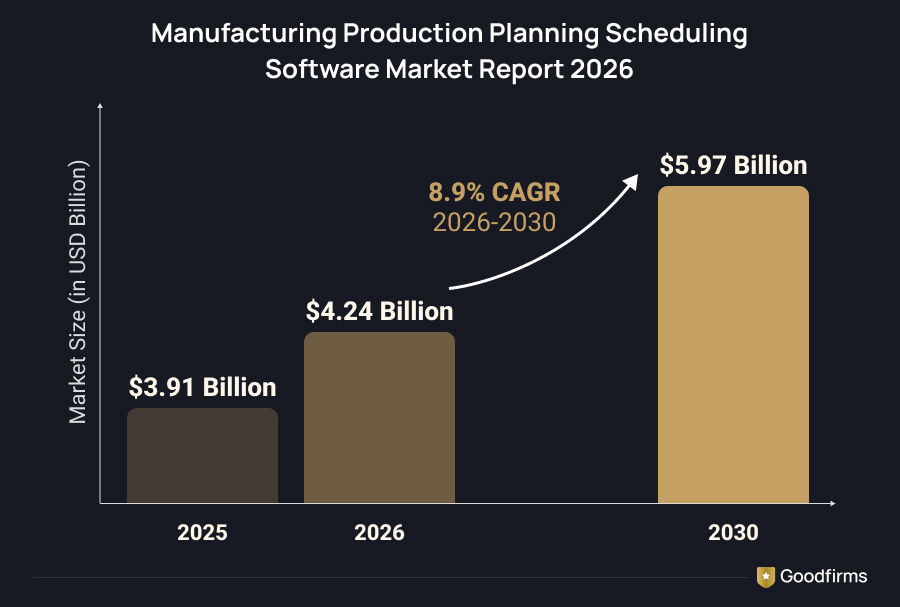
The market for production planning and scheduling software is growing at roughly 9% a year. The Business Research Company values it at $3.91 billion in 2025, $4.24 billion in 2026 and $5.97 billion by 2030, an 8.9% compound annual growth rate. It points to digital transformation, cloud deployment and AI-driven scheduling as the main forces.
AI is entering the same planning work. Goodfirms’ AI Adoption Statistics 2026 survey of 343 business leaders across 30 countries found that 83% run AI across multiple functions, so expect AI-assisted planning in shortlisted tools.
Software still schedules only what a plant has already decided to make. Peter Turla, a time management expert and former NASA rocket designer, split the job in two in a line the Association for Talent Development quotes: “A plan is what, a schedule is when.” In a plant, the plan is the order book and bills of materials, and the scheduler turns them into dates.
Frequently Asked Questions About Production Scheduling Software
Is there free production scheduling software?
Five of the seven tools are free to download and run: Frepple Community, ERPNext, Axelor’s open source edition, Odoo Community and Timefold Solver. OpenPro ERP shares its source code with customers but sells modules by quote, and DYNAMIC 3i is a commercial, closed source ERP. Free licenses still leave hosting, setup and training on the budget, so plan for those costs before comparing prices.
Which tool schedules production without replacing my ERP?
Frepple works beside the ERP a plant already runs. The planner pulls items, bills of materials, routings, stock levels and orders through a REST API, CSV or Excel files, then returns a finite-capacity plan. Odoo shops get a ready-made connector. Timefold Solver also runs apart from an ERP, though developers must build the model and the screens around it.
Can Odoo Community handle production scheduling?
Odoo Community covers the core manufacturing functions: bills of materials, routings and work centers. Master production scheduling, product lifecycle management and quality control sit in the paid Enterprise edition, where the Standard plan starts at about $24.90 per user per month in the US on a promotional annual rate and renews near $31.10. A plant with simple routings can begin on Community and add Frepple through its Odoo connector once scheduling conflicts multiply.
Do I need a developer to use these tools?
Day-to-day setup in ERPNext, Axelor, Odoo and OpenPro happens by module and needs no code. Custom work calls for developers: Python for ERPNext, Odoo and Frepple extensions, Java for Axelor and PHP for OpenPro. Timefold Solver models are written in Java or Kotlin, although its ready-made scheduling APIs accept JSON over REST. System Dynamics handles DYNAMIC 3i customization for its customers.
What data does scheduling software need before installation?
Five datasets decide schedule quality: item masters, bills of materials, routings with run and setup times, work center calendars and open demand such as sales orders. Missing run times produce impossible plans in any software. Plants should clean these files before installation, because a schedule cannot be more accurate than the routings behind it.
When should a plant leave spreadsheets for scheduling software?
The right moment comes when planning depends on one person who understands the master spreadsheet. Other signals include manual re-planning after every rush order or machine breakdown, several jobs competing for the same operators, and delivery dates that keep slipping. Any one of these signals justifies a trial of a free tool such as Frepple or ERPNext before the next breakdown forces the question.
What is the difference between finite and infinite capacity scheduling?
Finite capacity scheduling treats machine, labor and material limits as hard constraints, so the plan only contains work the plant can complete. Infinite capacity scheduling ignores those limits while building the plan and reports overloads afterward, leaving planners to fix them by hand. Frepple and Axelor both offer finite capacity planning, and Axelor lets planners switch between the two modes.
Which free production scheduling software works best for small manufacturers?
ERPNext suits small manufacturers that want finance, stock and production in one system, since it carries no per-user fee and Frappe Cloud hosting starts at $5 a month. Frepple fits small plants that already own an ERP and need a planning layer on top. A shop with only a handful of machines may still manage on a spreadsheet.
Which Free and Open Source Production Scheduling Software Fits?
To make the right choice, apply the Two-Year Test before you commit: pick the tool your team can still maintain in two years. Plants with a weak ERP scheduler get the fastest win from Frepple. Companies that want planning, stock and accounting in one open system can shortlist ERPNext, Axelor or Odoo Community. OpenPro ERP and DYNAMIC 3i fit plants that want a vendor to supply support, with pricing agreed by quote. Timefold Solver rewards teams with Java or Kotlin developers and unusual constraints.
Before committing, load your own bills of materials and open orders into a trial and check whether the plan survives a simulated machine breakdown. The right free and open source production scheduling software re-plans the week without anyone opening the old spreadsheet. If a paid cloud tool suits you better, compare vendors on Goodfirms’ list of top production scheduling software.
|
Licenses, editions and prices were checked against each vendor’s documentation in October 2026, and vendor-reported figures are referenced from below sources which are subject to change: OpenPro ERP: ERP modules, Prices Axelor:Pricing, Production module ERPNext:Pricing Odoo MRP: Odoo Manufacturing, ERP Research pricing DYNAMIC 3i: Overview, Manufacturing modules Timefold:Open source solver, Pricing |
Want to see paid options too? Browse production scheduling software on Goodfirms and compare before you decide.