Key Takeaways
- Free and open source quoting software lets freelancers and small teams send professional quotes without a monthly bill, though the cost shows up as setup time or plan limits instead.
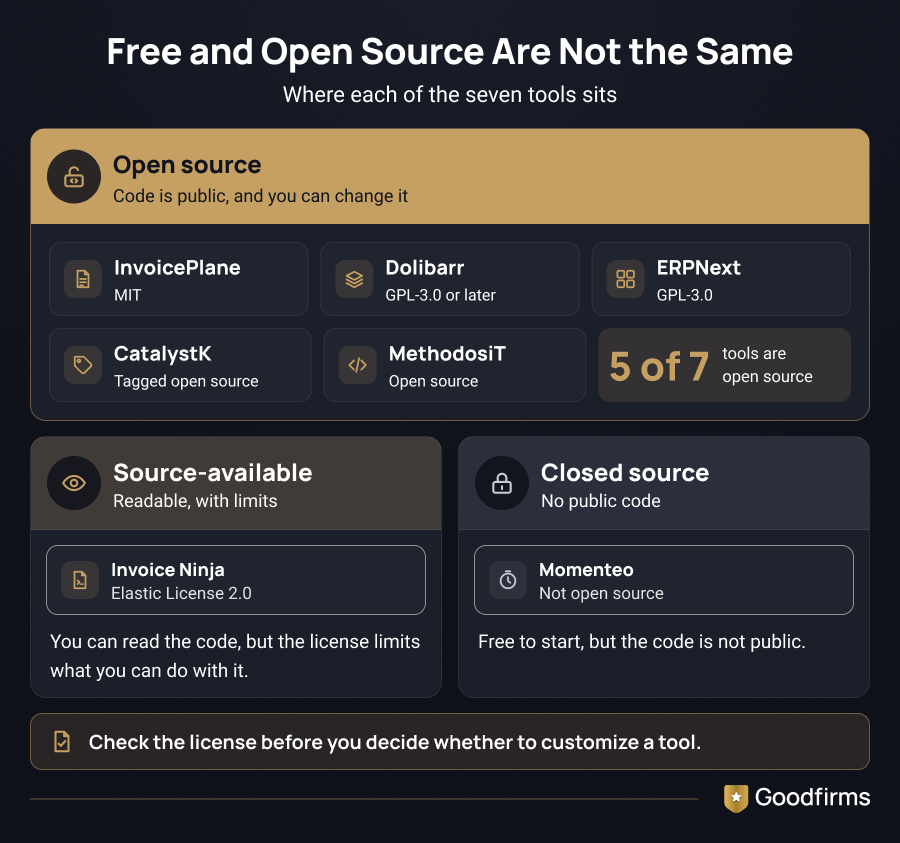
- The seven tools below are InvoicePlane, Dolibarr, ERPNext, Invoice Ninja, CatalystK, MethodosiT, and Momenteo. Five are open source; Invoice Ninja is source-available; and Momenteo is free but closed-source.
- Self-hosted tools carry no license fees, but you handle installation, updates, and backups.
Free and open source quoting software allows you to build, send, and track quotes without paying for a subscription. Freelancers, small shops, or teams that still copy prices between spreadsheets and Word files benefit from such software. A quote is often the first document a prospect sees from you, so a slow or messy one reflects on your business.
This guide explores seven tools worth testing, along with the pros and cons of each, to help you choose among them quickly.
To compare more tools than these seven, filter 50+ quoting software options on Goodfirms by e-signatures, multi-currency, and discount management.
The table below puts all seven tools side by side in terms of cost, licensing, and who each one suits.
7 Free and Open Source Quoting Software Compared at a Glance
|
Tool |
Best for |
Cost |
License |
|---|---|---|---|
|
InvoicePlane |
Freelancers and small businesses seeking simple quotes and invoices |
Free, self-hosted |
Open source (MIT) |
|
Dolibarr |
Businesses wanting quotes inside a full ERP and CRM |
Free, self-hosted |
Open source (GPL-3.0 or later) |
|
ERPNext |
Growing teams wanting quoting plus accounting and inventory |
Free, self-hosted |
Open source (GPL-3.0) |
|
Invoice Ninja |
Freelancers and agencies that bill clients |
Free, self-hosted |
Source-available (Elastic License 2.0) |
|
CatalystK |
Small traders and manufacturers |
Free plan |
Tagged open source |
|
MethodosiT |
Teams wanting a self-hosted quote system |
Free version |
Open source |
|
Momenteo |
Freelancers |
Free plan (2 active clients) |
Not open source |
The breakdowns below add setup effort and weak spots for each tool.
The 7 Best Free and Open Source Quoting Software - Explained in Detail
"Free" and "open source" are not synonymous, so each tool below is labeled. Open source means the code is public and you can change it. Source-available means you can read it, but with limits.
1. InvoicePlane
InvoicePlane is a self-hosted application for managing quotes, invoices, clients, and payments. Clients can approve or reject a quote online, and you can customize the templates for quotes and emails. The project is actively maintained: the latest release on GitHub, version 1.7.2, was released on August 28, 2026.
Features
- Converts quotes to invoices and emails documents to clients
- Generates PDF quotes and invoices from built-in templates
- Recurring invoices for repeating billing cycles
- Client records with contact details, notes, and custom fields
- Payment tracking and a translated, multi-language interface
Pros
- MIT license, so you can modify it freely
- Clients can approve or reject quotes online
- Customizable quote and email templates
Cons
- Needs a web server with PHP and a database
- No deep CRM tools
- Self-hosting makes security your job: version 1.7.2 fixed a critical remote code execution flaw in versions 1.7.0 and 1.7.1.
2. Dolibarr
Dolibarr is an open-source ERP and CRM where quoting is handled in the commercial proposals module. A proposal moves from draft to validated, then to signed or refused, and a signed proposal becomes an order or invoice, either manually or automatically. Customers can sign up online.
Features
- Auto-generates and updates the PDF of each proposal
- Sends quotes by email using predefined email templates
- Converts a proposal into an order, contract, intervention, or invoice, depending on the modules you enable
- Turns prospects into customers automatically when a proposal is signed
- Margin review per proposal when the margin module is on
Pros
- Online signing for proposals
- Automatic conversion to orders and invoices
- PDF and ODT output with your own templates
Cons
- A full suite means more to configure than a simple quote tool
- Self-hosting is on you, and managed cloud options cost money
3. ERPNext
ERPNext is a free ERP under the GPL-3.0 license. It covers accounting, inventory, CRM, and sales in one system. Self-hosting has no license fees and works well for a small company that expects to outgrow a standalone quoting tool.
Features
- Quotes for a customer or a lead, with a valid-till date and statuses such as Draft, Open, Ordered, Lost, and Expired
- Pricing rules that apply discounts to items automatically
- Alternative items that stay out of the quote total
- Sales tax templates, terms and conditions, and payment terms
- Print formats, letterheads, and item images on printed quotes
- Order-to-cash flow from quotation to sales order, delivery note, sales invoice, and payment entry
Pros
- No licensing costs for self-hosting
- Combines quoting with accounting and inventory features
- Community support
Cons
- Requires technical knowledge to set up and maintain the infrastructure
4. Invoice Ninja
Invoice Ninja handles quotes, invoices, expenses, time billing, and online payments. The core platform is free to self-host with no per-user fees. It uses the Elastic License 2.0, which makes it source-available rather than open source.
Features
- Quotes, invoices, and credit notes with customizable templates and branding
- Client portal for viewing invoices, making payments, and accessing documents
- Online payment integrations and reminders for due and overdue invoices
- Expense tracking, plus projects and time tracking for billing hours
- REST API for connecting invoicing and client data to other systems
Pros
- Quotes, invoices, and payments in one place
- No per-user fees when self-hosted
- Suited to freelancers who bill clients
Cons
- Not formally open source
- Self-hosting takes technical knowledge, and removing the branding is an optional paid add-on
5. CatalystK
CatalystK is built for small traders and manufacturers, and it keeps quoting in the same system as CRM, client and supplier ledgers, invoicing, and manufacturing tracking. By using this software, you can add product images to a quote, send it by email or SMS, and set follow-up reminders.
Features
- Quote templates and conversion of a quote into a job in the same system
- Contact, lead, and supplier management
- Calendar, task, and email integration, plus custom dashboards
- GST billing, inventory, and manufacturing on the same platform
Pros
- Quotes with or without images
- Email and SMS delivery with reminders
- Free plan covers core quoting
Cons
- Many modules make the setup slower
- Check which modules the free plan includes
6. MethodosIT
MethodosIT’s quotation management system is a web-based application you install yourself. Goodfirms describes it as open source, and you can run it on your own Windows or Linux machine. It builds PDF quotes from customizable forms and emails them from the app.
Features
- Create, submit, and track quotes and invoices
- Custom reports and auditing information
- Records management and automation for small and midsize businesses
Pros
- Self-hosted control over your data
- Document history with locking and unlocking
- Customizable PDF quote forms
Cons
- You install and maintain it
7. Momenteo
Momenteo is a cloud-based tool for freelancers that manages quotes, invoices, and expenses, and logs work and business travel in a calendar. You track work in a calendar view and send estimates and invoices from the same account. It isn't open source, but there's nothing to install.
Features
- Guided workflow for creating and sending estimates, then converting them to invoices
- Tracking of client messages, including whether they were opened
- Travel expenses calculated from addresses and added to invoices
- Client records with address, currency, and language
- Expense tracking, time tracking with a timer, and a calendar view
Pros
- Free plan includes estimates, invoices, and expenses
- Calendar-style tracking of work and travel
- Paid plans raise the active-client limit
Cons
- The free plan is limited to two active clients
- Built for solo users, so teams will outgrow it
- Online payments through Stripe or PayPal require a paid plan
All seven tools replace the same manual routine: copying an old quote and editing it by hand
What Quoting Software Actually Does
A quote is an offer. It tells a buyer what you'll deliver, what it costs, and how long the price holds. An invoice arrives later, after the work is done, and requests payment.
Quoting software, also called quotation software or quote management software, handles the first job. It pulls prices from a saved catalog, applies your tax and discount rules, produces a branded document, and shows you what happened next.
Without quoting software, quoting often means copying last month’s quote and editing it by hand, which is called quote drift. Each copy carries forward old prices, discounts, and terms, and every edit you forget pushes the quote further from what the job actually costs.
Say last month you quoted $100 a unit with a 10% discount. This month, your supplier raised costs, so the price should be $110. You update the quantity and the customer name, but the old unit price stays. The customer pays $90 per unit instead of $99, and you give away $9 per unit.
Speed matters as much as accuracy, especially when several suppliers receive the same request. Dominik Danninger, Founder and CEO of Packative Notes, explains in an article:

The first responder usually secures the job.
A few features can make quoting faster and reduce errors. You can test most of them before choosing a tool
Features to Check Before You Commit
Test each feature below with a real quote before you pick a tool.
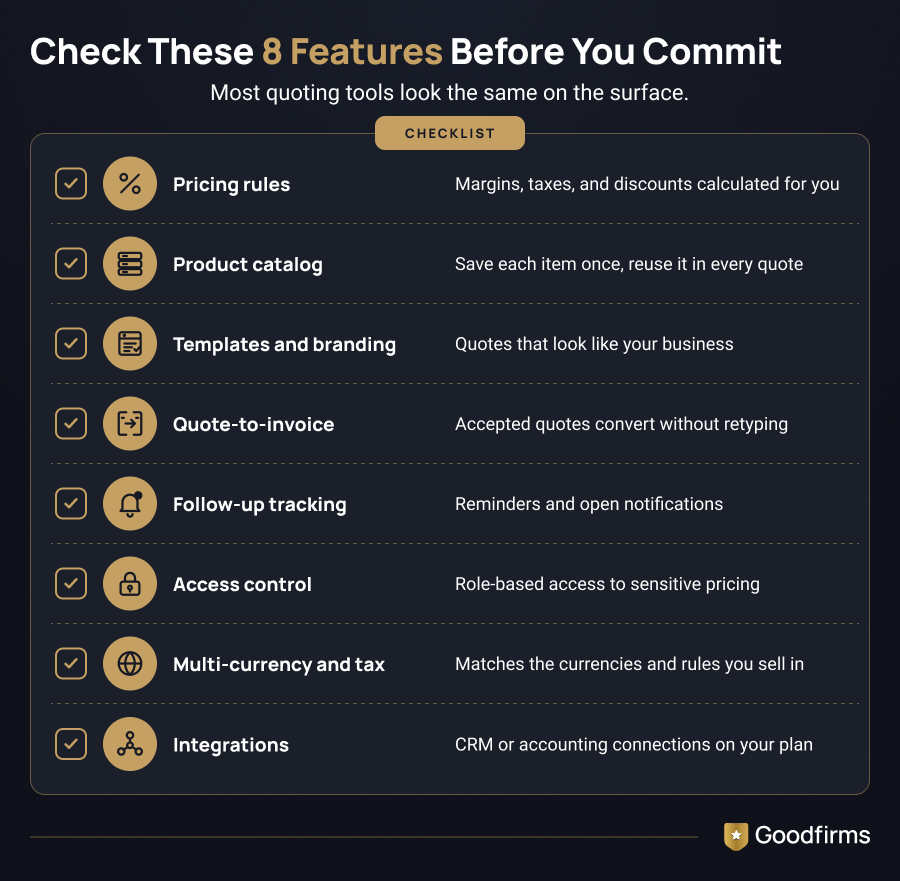
- Pricing rules. The tool should calculate prices based on your margins, taxes, and discounts, so nobody has to type numbers manually. Test it with a quote that has a discount and a tax rate. If you have to work around either one, every future quote will carry the same workaround.
- Product catalog. Save each product or service once, with its description and price, then choose from a list when you build a quote. A saved product catalog cuts repetitive data entry and helps your team use consistent prices across quotes
- Templates and branding. Quotes should look like they came from your business, not from a default form. You should be able to add your logo, adjust the layout, and include technical details or terms if your products need them.
- Quote-to-invoice conversion. An accepted quote should be converted to an invoice without retyping. Retyping is where small errors start, such as a dropped discount line.
- Follow-up tracking. Reminders and open notifications keep warm leads from going cold. Open notifications indicate when a customer is viewing your quote, so you can follow up at the right time.
- Access control. Pricing is sensitive information, so role-based access matters. A sales rep may need to create quotes, but they may not need to see your margins or edit the catalog.
- Multi-currency and tax support. If you sell across borders, confirm the tool handles the currencies and tax rules you work with. This is easy to overlook until your first international customer asks for a quote.
- Integrations. Connections to your CRM or accounting software save you from switching between apps and re-entering customer details. Check that the integration you need is available on the plan you're actually considering, since some sit behind paid tiers.
You can filter by many of these features, including automated quoting, discount management, e-signatures, multi-currency, and quote tracking, on the Goodfirms quoting software page. That makes it easier to build a shortlist before you test anything.
Final Thoughts
Free and open source quoting software can replace manual spreadsheets and make quotes more consistent without licensing fees. Pick the tool that fits your team’s size and technical skills, then run one real quote through it to see where it falls short.
FAQs- 7 Best Free Quoting Software in 2026
What is the difference between free and open source quoting software?
Free means you can use the tool at no cost, while open source means the code is public under a license that lets you modify and share it. A tool can be one without the other: Momenteo is free but closed, and Invoice Ninja is free to self-host but only source-available. Check the license before deciding whether to customize the tool.
Is Invoice Ninja really open source?
Not in the formal sense. Invoice Ninja uses the Elastic License 2.0, which makes it source-available: you can read, modify, and self-host the code for your own business, but you cannot resell it as a hosted service to others. The Open Source Initiative has not approved that license as open source. An optional paid white-label license removes the Invoice Ninja branding from client-facing pages. If a formal open-source license matters to your team, look at InvoicePlane, Dolibarr, or ERPNext instead.
Do I need a developer to self-host a quoting tool?
Not always, but you do need basic server skills. InvoicePlane, for example, runs on a web server with PHP and a database, and a pre-built container image is also available. ERPNext and Dolibarr take more setup because they cover far more than quoting. If nobody on your team can maintain a server, start with a cloud tool like Momenteo, which needs no installation, and revisit self-hosting when you have the time or budget.
Is open source quoting software safe for pricing data?
Self-hosting keeps pricing data on your own server, but updates, access control, and backups become your responsibility. InvoicePlane’s version 1.7.2, for instance, fixed a critical remote code execution flaw in versions 1.7.0 and 1.7.1, and its maintainers tell users to read the changelog before upgrading. Apply updates promptly, restrict access by role, and keep regular backups.
Can free quoting software turn a quote into an invoice?
Yes, many can turn a quote into an invoice. Dolibarr moves a signed proposal into an order or invoice, either manually or automatically, while InvoicePlane and Invoice Ninja handle quotes and invoices in the same application. Even Momenteo sends estimates and invoices from a single account. You need to test this step with one real quote before you commit, because small errors often arise in conversion, such as a dropped discount line.
When should I move from free to paid quoting software?
Consider paid quoting software when you need advanced approval workflows, complex product configurations, or e-signatures for a high volume of quotes. It may also be time to upgrade if your team spends more time working around free-plan limits than preparing quotes. Then, filter the quoting software page on Goodfirms by the features you need, such as e-signatures or discount management, to build a shortlist.


.jpg)