Happy Tracker
Deployment
Best for
Overview
About Happy Tracker
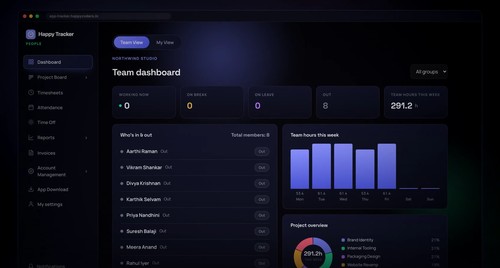
The desktop tracker sits in the menu bar or system tray. You clock in, pick the project and task, and it runs in the background, recording the time, taking periodic screenshots and building a breakdown of what the machine was actually used for. A day comes back as "4h 0m active, 56% productive, by app and by task" rather than a number somebody typed in from memory.
It all lands in one workspace. The project board runs sprints in kanban columns, with comments and attachments. Timesheets fill themselves from tracked time and go for approval. Attendance and time off sit alongside. Reports compare the team on attendance, screen focus and activity. Billable time becomes a PDF invoice.
It is honest about what it is. Members see their own tracked time and their own screenshots. There is no hidden mode, no stealth install and no location tracking. Screenshots are deleted automatically on a retention schedule.
Priced per user per year, not per month. Free for up to 5 users and 3 projects.
At a glance
Software information
Industries served, licensing and the support Happy Tracker provides.
Industries
- Computer-software
- Design
- Marketing-advertising
Licensing
- Proprietary
- Annual Subscription
- Free version
Support
- 24x7 Support
Training
- Documentation
Knowledge Base
Capabilities
Happy Tracker features
The full feature set, grouped by module.
Plans
Happy Tracker pricing
- 5 users
- 3 projects
- Desktop apps for Windows
- macOS and Ubuntu
- 30 users
- 10 projects
- More frequent screenshots than Free
- Screenshot blur
- 100 users
- unlimited projects
- Higher screenshot frequency
- 500 users
- unlimited projects
- Up to 12 screenshots per 10 minutes
Media
Screenshots & video