Lumshot
Bangladesh HQFounded 2026
Deployment
Windows
Best for
1–10 employees
Overview
About Lumshot
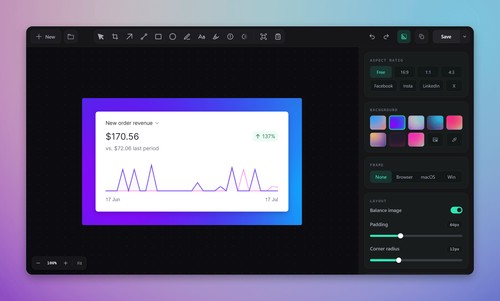
Lumshot is a modern Windows screenshot and visual communication tool built for developers, designers, QA teams, support professionals, and educators. Capture, annotate, extract text with OCR, create Jira issues, and instantly share screenshots from one fast, intuitive app. AI Auto Paste lets you send screenshots directly to ChatGPT, Claude, Cursor, and other supported AI applications without manually uploading images
At a glance
Software information
Industries served, licensing and the support Lumshot provides.
Industries
- Computer-software
- Design
- E-learning
- Graphic-design
- Information-technology-services
Licensing
- Proprietary
- One-Time Payment
- Free version
Support
- Support daysMondayTuesdayWednesdayThursdaySaturdaySundaySupport time09:00 to 20:00 (BST)
Training
- Documentation
Knowledge Base
Languages (1)
English
No reviews submitted yet.
Be the first one to reviewCapabilities
Lumshot features
The full feature set, grouped by module.
Plans
Lumshot pricing
Pricing Type
Flat Rate
Free Version
Yes
Payment Frequency
One-Time Payment
Preferred Currency
USD ($)
Free
$0 forever
- Unlimited screenshots
- Basic annotation tools
- Local exports
- Copy and drag screenshots
- Essential editing features
- Exports may include a Lumshot watermark.
Pro
$29 Lifetime
- Everything in Free
- OCR text extraction
- AI Auto Paste
- Screen recording
- Scrolling capture
- Smart Redaction
- Jira integration
- Future Pro features
Free
- Unlimited screenshots
- Basic annotation tools
- Essential editing tools
- Watermarked exports
Pro$29 / user
- Everything in Free
- OCR text extraction
- AI Auto Paste
- Scrolling capture
- Smart Redaction
- Jira integration
- Future Pro features
Works with
Integrations
Lumshot connects with the tools your team already uses.
Media
Screenshots & video