Key takeaways
- AI search is changing discovery, with 68.01% of U.S. Google searches ending without a click in early 2026. Meanwhile, 49% of U.S. adults have used AI chatbots, and 42% use them to search for information.
- AI referrals are growing: Semrush reported a 206% increase in ChatGPT outbound referral traffic in 2025, making AI-driven visits an important channel to monitor.
- Measure brand mentions, citations, prompt coverage, share of voice, sentiment, AI referral sessions, leads, and conversions.
- Use HubSpot for performance reporting by connecting AI visibility, website traffic, leads, pipeline, and revenue.
- Make agency reporting measurable: Set baseline benchmarks, agree on KPIs, review monthly deliverables, and ensure access to raw data and transparent reporting.
- Account for attribution gaps because not every AI mention or conversion can be directly linked to AI search.
Your brand might be appearing in ChatGPT, Perplexity, or Google AI Overviews, but can you prove that visibility is bringing business results? Traditional SEO reports won't tell you the whole story.
According to Adobe Analytics, AI-driven traffic to U.S. retail websites grew 1,200% between July 2024 and February 2025, highlighting how quickly AI is changing online discovery.
Effective AEO reporting helps businesses measure AI visibility, citations, referral traffic, and conversions. HubSpot brings these performance signals together, but turning them into meaningful reports requires the right metrics and dashboards.
This guide shows you how. If you need expert support, explore top answer engine optimization (AEO) agencies to strengthen your AI search strategy and reporting.
How to Set Up AEO Reporting in HubSpot
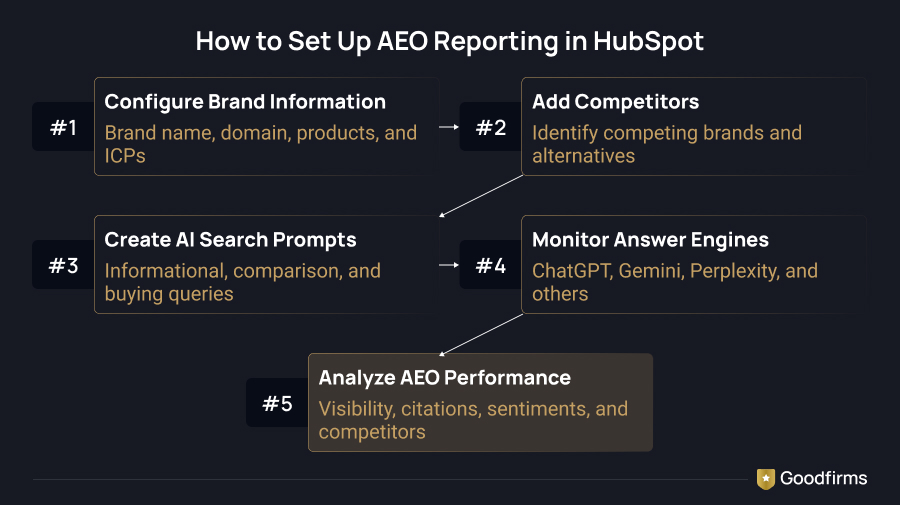
HubSpot's native AEO tool helps businesses monitor how their brands appear across AI-powered answer engines. It brings brand visibility, prompt tracking, competitor comparisons, and citation analysis into one place. Before building AEO dashboards, businesses should configure their brand information, define relevant audiences, and select the AI search prompts they want to monitor. The following steps explain how to set up HubSpot AEO and use its reporting features.
Access and configure HubSpot's native AEO feature
To get started, navigate to Marketing > AEO in your HubSpot account. The feature is available with HubSpot AEO or eligible Marketing Hub Professional and Enterprise subscriptions. Depending on the subscription, access permissions and usage limits may differ. It is considered one of the best marketing automation tools.
Select Get started to begin the setup process. HubSpot then guides you through configuring your brand, competitors, products, ideal customer profiles (ICPs), and prompts.
Add brand information, competitors, products, and ICPs
Enter your brand name, website domain, name variations, and business type (B2B or B2C). Add variations such as abbreviations or alternative spellings so HubSpot can identify brand mentions more accurately.
Next, review the suggested competitors and add relevant alternatives. Select the products or services you want to track and define your ICPs. These details help HubSpot generate AI search prompts based on your offerings and target audience.
Create and organize relevant AI search prompts
HubSpot generates suggested prompts using your business information, products, and ICPs. Review these questions to ensure they reflect how potential customers naturally search for solutions.
Add relevant prompts manually or generate additional suggestions with AI. Group them by product, service, or topic to compare visibility across different areas of your business. For more meaningful AEO reporting, include informational, comparison, and high-intent buying queries.
Monitor brand visibility across supported answer engines
Once prompts are activated, HubSpot tracks them daily across supported answer engines. The standard setup includes ChatGPT, Gemini, and Perplexity, while eligible accounts can enable additional engines, including Claude, Google AI Mode, and Google AI Overviews.
Open the AEO Dashboard to review brand visibility, prompt coverage, and visibility trends. Compare results across answer engines to identify where your brand appears consistently and where it needs better representation.
Analyze citations, sentiment, and competitor performance
Use HubSpot's citation and sentiment reports to understand how AI platforms represent your brand and which sources influence their responses.
- Citation analysis: Identify frequently cited domains, pages, and content channels, including citations from your own website.
- Sentiment analysis: Understand whether AI-generated responses describe your brand positively or negatively.
- Competitor performance: Compare brand visibility and share of voice to identify competitors appearing more frequently in relevant answers.
These insights help businesses identify content gaps, strengthen their owned-domain citations, and prioritize AEO improvements.
Use HubSpot AI referral analytics to track website visits
HubSpot's traffic analytics can complement AEO reporting by showing whether AI platforms generate website visits. Navigate to Reports > Analytics Tools > Traffic Analytics and review the AI Referrals source category.
You can also use the Original Traffic Source and Latest Traffic Source contact properties to identify AI-referred visitors and examine their subsequent interactions. This helps connect AI discovery with website engagement and lead generation.
However, referral analytics captures visits resulting from clicks, not every AI mention or citation. Goodfirms research found that only 14% of marketers track AI search citations, despite 89% of brands already appearing in AI-generated answers. This highlights the need to track both AI visibility and referral traffic.
Which AEO and AI Search Metrics Should You Track?
AEO reporting should go beyond checking whether a brand appears in AI-generated answers. Businesses also need to know how often they are mentioned, which sources AI platforms cite, and whether that visibility brings relevant visitors to their websites.
This matters as AI-assisted discovery becomes more common. According to Pew Research Center's 2026 survey, 49% of U.S. adults have used AI chatbots, up from 33% in 2024. Additionally, 42% use them to search for information. For marketers, this makes tracking AI search visibility an increasingly important part of understanding brand discovery.
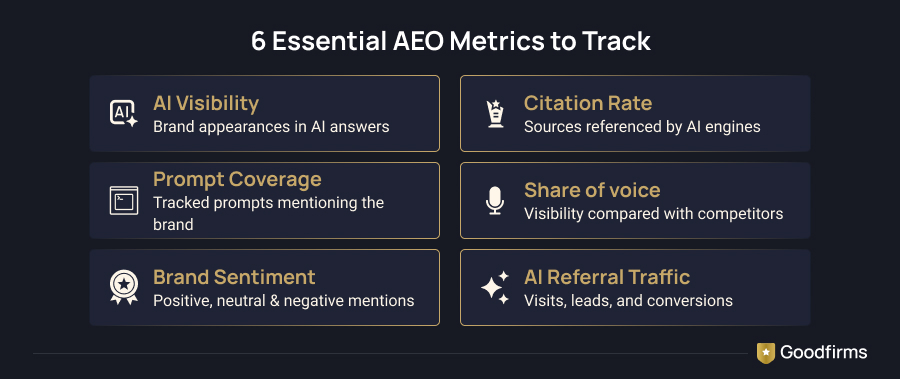
The following AEO metrics can help build a more meaningful picture of AI search performance.
AI visibility and brand mention rate
AI visibility measures how frequently your brand appears in responses generated by platforms such as ChatGPT, Gemini, Perplexity, and Copilot. Brand mention rate shows how often your business is named across a defined set of prompts. Track both to understand whether your brand is gaining visibility for relevant topics and customer queries.
Citation rate and owned-domain citations
A brand mention does not always mean an AI platform has cited its website. Citation rate measures how often your website or other sources are referenced in AI-generated answers. Also monitor owned-domain citations to see whether answer engines use your website as a source.
Prompt coverage and prompt performance
Prompt coverage shows how many of your tracked queries generate a brand mention or citation. Monitor performance across informational, comparison, and purchase-intent prompts to identify topics where your brand is visible and areas that need improvement.
Share of voice and competitor visibility
Share of voice compares your brand's mentions with those of competitors across tracked prompts. HubSpot's AEO reporting includes share-of-voice and competitor visibility analysis, helping you identify where competing brands appear more frequently.
Brand sentiment across answer engines
Check whether AI-generated responses describe your brand positively, negatively, or neutrally. This helps identify inaccurate information, negative associations, and opportunities to improve how your brand is represented.
AI referral traffic and engaged sessions
Track visits from AI platforms, engaged sessions, leads, conversion rates, and pipeline contribution. These metrics connect AI search visibility with measurable business results. However, keep visibility and conversions separate: a brand mention does not automatically generate a website visit or lead.
The key is to evaluate these AEO metrics together. Visibility shows whether your brand is being discovered, citations indicate whether your content is being used as a source, and referral and conversion data help establish its business impact.
Why AEO and AI Search Performance Reporting Matters
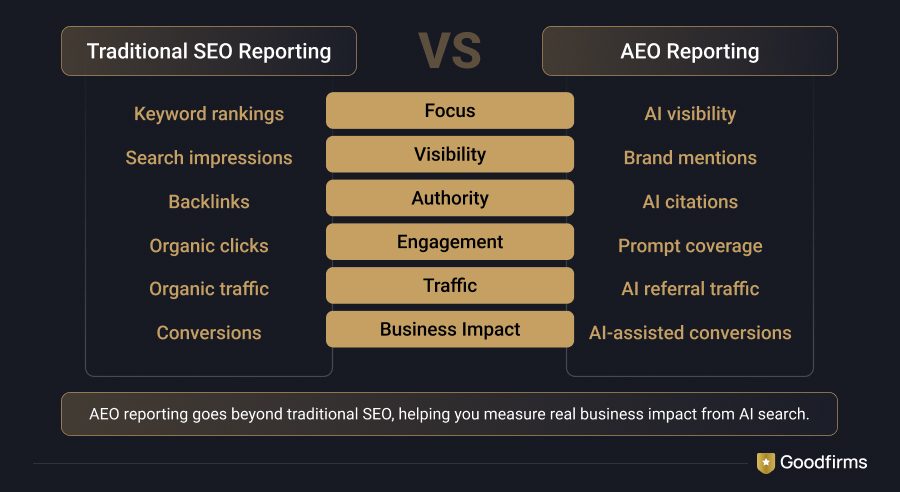
AI-powered search is changing how customers discover brands, research products, and evaluate solutions. As a result, traditional SEO metrics alone cannot provide a complete picture of search performance. Businesses need to measure how often they appear in AI-generated answers, whether their content gets cited, and how this visibility contributes to marketing outcomes.
How AI search is changing traditional SEO measurement
Traditional SEO reporting focuses on keyword rankings, impressions, clicks, and organic traffic. However, AI-generated answers are changing how users discover brands and evaluate information. A 2026 SparkToro study found that 68.01% of U.S. Google searches ended without a click during the first four months of the year. This makes click-based reporting an incomplete measure of search visibility.
Why businesses need to track AI visibility beyond website traffic
A brand can appear in ChatGPT, Gemini, or Google's AI Overviews without receiving a website visit. Tracking AI search visibility, mentions, and citations helps businesses understand whether they are being discovered, even when that discovery does not generate an immediate click.
Connecting AI search performance with marketing and revenue goals
AEO reporting should connect visibility data with referral traffic, leads, and conversions. This helps marketing teams assess whether their AI search strategy supports business goals and gives them clearer evidence to evaluate agency performance.
How to Build AEO Reporting Dashboards in HubSpot
Once AEO tracking is configured, the next step is to organize performance data into dashboards that support marketing decisions. HubSpot provides a dedicated AEO dashboard for brand visibility, citations, prompt performance, and competitor comparisons. Businesses can complement these insights with custom reporting dashboards to monitor AI referral traffic, lead generation, conversions, and agency performance.
AI visibility and brand performance dashboard
Start with HubSpot's native AEO dashboard to monitor how frequently your brand appears in AI-generated responses. Include the following metrics in your reporting:
- Brand visibility score: Percentage of tracked responses that mention your brand.
- Prompt coverage: Number of relevant prompts where your brand appears.
- Share of voice: Your brand's share of mentions compared with competitors.
- Sentiment score: How positively or negatively AI platforms describe your brand.
Use date and answer-engine filters to compare visibility trends across platforms and identify areas that need improvement.
Worked example: Open Marketing > AEO > Dashboard and review the Brand Visibility report. Apply a date filter for the last 30 days and compare results across ChatGPT, Gemini, and Perplexity. Track prompt coverage and brand visibility to identify which answer engines mention your brand most frequently.
AI referral traffic dashboard
Create a separate dashboard to understand whether AI search visibility translates into website visits. Use HubSpot's Traffic Analytics and referral-source data to monitor:
- Sessions from AI platforms such as ChatGPT, Perplexity, and Gemini.
- Landing pages receiving AI referral traffic.
- New visitors and returning visitors from AI sources.
- Engagement and conversion activity from AI-referred sessions.
Compare these results across reporting periods to identify which platforms and pages attract relevant visitors.
Worked example: Create a traffic analytics report showing sessions by referring source. Apply a filter for AI referral traffic and group results by source domain. Track sessions from ChatGPT, Gemini, and Perplexity over the last 30 days to identify which platforms generate the most website visits.
Lead generation and conversion dashboard
AI visibility becomes more meaningful when businesses can connect it with lead generation and sales outcomes. Build a dashboard using HubSpot's contact, deal, and traffic data to track:
- New contacts: Leads generated through AI-referred website visits.
- Form submissions: Conversions from landing pages receiving AI traffic.
- Marketing-qualified leads (MQLs): AI-referred contacts meeting your qualification criteria.
- Deal creation and revenue: Opportunities and closed deals associated with AI-referred contacts.
Use these metrics to understand whether AI search contributes to the sales pipeline rather than evaluating performance through traffic alone.
Worked example: Create a contact report that tracks new contacts by their original or latest traffic source. Filter the report for contacts attributed to AI referral sources and limit the date range to the last 30 days. Measure new contacts and associated deal creation to understand whether AI-referred visitors are progressing into the sales pipeline.
AEO campaign and agency performance dashboard
For businesses working with SEO or AEO agencies, a dedicated dashboard can make performance reviews more transparent. Combine AEO visibility reports with campaign activities and business outcomes to evaluate agency contributions.
Track monthly visibility growth, citation improvements, prompt coverage, content published, optimization activities, and competitor share of voice. Also compare agreed KPIs with actual results to identify gaps in execution.
HubSpot allows teams to organize reports into shared dashboards, apply filters, and schedule recurring reports. This makes it easier for businesses and agencies to review progress, discuss optimization priorities, and maintain accountability.
How to Connect AI Search Visibility With Leads and Revenue
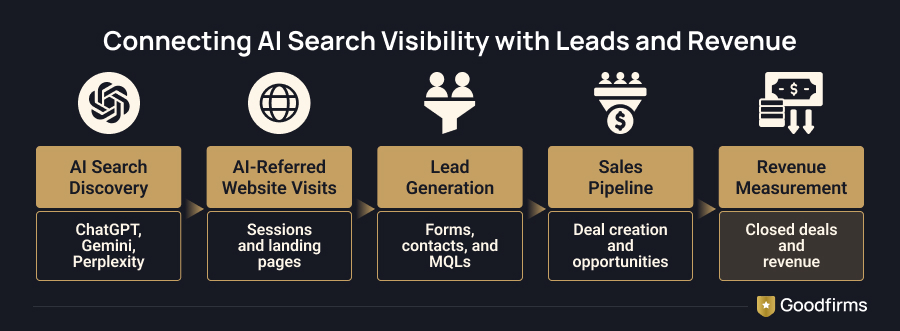
AI search performance reporting should go beyond tracking brand mentions and website visits. Businesses also need to understand whether AI-driven discovery contributes to lead generation, sales opportunities, and revenue. HubSpot helps connect AI referral data with contact records and deal activity, allowing marketing teams to evaluate how AEO efforts support the customer journey.
Track AI-referred visitors and their landing pages
Start by monitoring the AI Referrals channel in HubSpot's Traffic Analytics. It identifies website visits from supported AI platforms, including ChatGPT, Gemini, Perplexity, and Claude.
Review the sessions generated by each platform and identify the landing pages receiving the most visits. This helps businesses understand which content attracts visitors after appearing in AI-generated answers.
Semrush reported a 206% growth in outbound referral traffic from ChatGPT in 2025, highlighting why businesses should monitor this acquisition channel separately.
Connect website activity with contact and deal records
Use HubSpot's Original Traffic Source and Latest Traffic Source properties to identify contacts arriving through AI referrals. Their drill-down properties can also reveal the specific AI platform responsible for the visit.
Associate these contacts with relevant deals to follow their progress through the sales pipeline. This helps teams understand whether AI-referred visitors become qualified prospects and contribute to sales opportunities.
Measure lead generation and conversion rates
Track how AI-referred visitors move from website sessions to meaningful business actions. Focus on:
- Visitor-to-lead rate: Percentage of AI-referred visitors who become contacts.
- Lead qualification rate: Percentage of AI-generated contacts that become marketing-qualified leads.
- Lead-to-customer conversion: Percentage of qualified leads that turn into customers.
- Pipeline and revenue: Deals created and revenue generated from AI-referred contacts.
Compare these metrics with organic search and other acquisition channels to evaluate the quality of AI-driven leads, not just their volume.
Understand assisted conversions and attribution limitations
AI search may influence a buyer's decision even when it is not the final traffic source. For example, someone might discover a brand through ChatGPT, visit its website later through organic search, and eventually become a customer.
Therefore, review first-touch, last-touch, and multi-touch attribution wherever your HubSpot subscription supports them. Remember that AI mentions without clicks, untracked visits, and cross-device interactions may not appear in referral reports. Treat AI-assisted conversions as directional evidence rather than assuming every conversion can be directly attributed to an AI platform.
How to Evaluate AEO Agency Performance Using HubSpot Reports
Evaluating an AEO agency requires more than checking whether brand mentions or AI visibility have increased. Businesses should assess the agency against agreed benchmarks, completed activities, and measurable marketing outcomes. HubSpot reports can bring these signals together, helping teams review progress, identify gaps, and understand whether the agency's work is contributing to business goals.
Establish baseline visibility and performance benchmarks
Before an agency begins, record your existing AEO performance. Capture brand visibility, prompt coverage, share of voice, citations, and sentiment across tracked answer engines. Also document AI referral sessions, leads, and conversions. This baseline gives both teams a reference point for measuring progress and prevents improvements from being judged without context.
Define measurable AEO KPIs and reporting commitments
Agree on a set of KPIs that reflect the campaign's objectives. These may include:
- Visibility: Growth in brand mentions, prompt coverage, and share of voice.
- Citations: Changes in the number of relevant citations and owned-domain references.
- Traffic: Sessions and engagement from AI referral sources.
- Conversions: AI-referred leads, qualified contacts, and deal creation.
Set reporting frequency, measurement methods, targets, and responsibilities in advance. This makes agency performance easier to assess consistently.
Monitor agency deliverables and optimization activities
Visibility results may take time to change, so review the work completed each month alongside performance metrics. Ask the agency to document content updates, technical improvements, prompt research, citation opportunities, and competitor analysis. HubSpot dashboards can help compare these activities with visibility trends and identify whether agreed optimization work is being completed.
Evaluate visibility growth against traffic and conversions
Compare changes in AI visibility with referral sessions, lead generation, and deal activity. For example, more brand mentions may indicate stronger discovery, while increased AI-referred visits can show that users are clicking through to your website. Review both signals, but do not assume that every lead or conversion was directly caused by an AI mention.
Review raw data, reporting transparency, and access
Ensure your team can access the underlying HubSpot reports, filters, date ranges, and source data used in agency updates. Ask for clear explanations of how metrics are calculated and whether results come from HubSpot's native AEO reports, traffic analytics, or external tracking tools. This makes reports easier to verify and reduces dependence on agency-created summaries.
Create a monthly agency performance scorecard
Use a monthly scorecard to bring the key measures into one review. Rate each area against the agreed target and record the evidence, status, and next action.
|
Performance Area |
What to Review |
|---|---|
|
AI Visibility |
Mentions, prompt coverage, share of voice |
|
Citations |
Citation growth and owned-domain references |
|
Traffic |
AI referral sessions and engagement |
|
Conversions |
Leads, qualified contacts, and deals |
|
Deliverables |
Completed content and optimization work |
|
Reporting |
Data access, accuracy, and timely updates |
Use the scorecard to discuss progress, explain missed targets, and agree on priorities for the next reporting period.
Common Mistakes to Avoid When Reporting on AEO Performance
Accurate AEO performance reporting requires more than tracking AI visibility. Avoid these common mistakes to make HubSpot reports more useful and reliable:
- Relying only on AI visibility scores: Track prompt coverage, citations, referral traffic, and conversions alongside brand visibility.
- Confusing mentions with citations: A brand mention does not mean an AI platform has cited its website as a source.
- Treating every AI referral as a qualified lead: Evaluate visitor engagement, lead quality, and conversion activity before judging results.
- Ignoring competitor performance: Monitor competitor visibility and share of voice to understand your brand's position.
- Comparing inconsistent prompts or periods: Use consistent prompts, answer engines, and date ranges for meaningful comparisons.
- Claiming unsupported revenue attribution: Connect AI referral data with CRM records and deals, but acknowledge attribution gaps when reporting business impact.
Best Practices for More Effective AEO Reporting
Effective AEO reporting requires consistent tracking, accurate data, and a clear connection between AI search visibility and business outcomes. Follow these best practices to make your reporting more useful:
- Track metrics consistently: Monitor AI visibility, brand mentions, citations, prompt coverage, and AI share of voice at regular intervals.
- Use multiple data sources: Combine HubSpot analytics, CRM data, and AI search monitoring tools for a broader performance view.
- Benchmark competitors: Compare brand mentions, AI citations, and visibility across competing brands to identify gaps.
- Connect visibility with conversions: Track AI referral traffic, leads, and conversions to understand business impact.
- Maintain transparent agency reporting: Share measurable KPIs, reporting frequency, progress, and optimization recommendations with clients.
FAQs
What is AEO reporting?
AEO reporting is the process of measuring how a brand appears in AI-generated answers across platforms such as ChatGPT, Gemini, and Perplexity. It tracks metrics such as brand mentions, citations, prompt coverage, share of voice, and AI referral traffic. Businesses can use HubSpot alongside AI visibility tools to connect these insights with leads, conversions, and revenue.
How do you measure AEO performance?
AEO performance can be measured by tracking AI visibility, brand mentions, AI citations, prompt coverage, and AI share of voice across platforms like ChatGPT, Perplexity, and Google AI Overviews. Also, monitor AI referral traffic, leads, conversions, and revenue in HubSpot to understand how AI search visibility contributes to business growth. Comparing these metrics over time helps identify performance gaps and optimization opportunities.
Can HubSpot track AI search visibility?
HubSpot can help track the traffic and conversions generated through AI search, but it does not independently measure overall AI search visibility. Metrics such as brand mentions, AI citations, prompt rankings, and share of voice require dedicated AI search monitoring tools. Integrating these insights with HubSpot CRM and analytics provides a more complete view of AEO performance.
What are the most important AEO reporting metrics?
The most important AEO reporting metrics include AI visibility, brand mentions, citation rate, prompt coverage, AI share of voice, and competitor visibility. For business impact, track AI referral traffic, engagement, lead generation, conversions, and revenue. Together, these KPIs help evaluate AI search performance beyond traditional SEO rankings and organic traffic.
Can HubSpot track ChatGPT and Perplexity traffic?
Yes. HubSpot's traffic analytics identifies visits from ChatGPT, Perplexity, and other AI platforms under the AI Referrals traffic source. You can review sessions from individual platforms and connect this data with CRM records to evaluate lead generation and conversions from AI search traffic.
How often should agencies report on AEO performance?
Agencies should monitor AEO performance weekly and share detailed performance reports with clients monthly. Regular reporting helps track changes in AI visibility, brand mentions, citations, and AI referral traffic. Monthly reviews also provide an opportunity to evaluate campaign KPIs, compare competitor visibility, discuss optimization progress, and align AEO strategies with business goals.
Final Words
AEO reporting is becoming essential as AI search changes how businesses gain visibility, attract visitors, and generate leads. Tracking AI visibility, brand mentions, citations, and referral traffic helps marketers understand how their content performs across AI search platforms.
HubSpot brings marketing analytics, CRM data, and conversion tracking together, making it easier to connect AEO performance with business outcomes. However, effective AEO reporting also requires consistent monitoring, accurate attribution, and clear agency accountability.
Businesses looking to improve their reporting processes can work with top HubSpot implementation consultants to configure dashboards, integrate relevant data sources, and build reporting workflows that connect AEO performance with measurable business growth.