If you haven't implemented proactive security measures in your website development workflow, hackers will attack your website and steal everything possible.
Seriously? Yes, seriously.
No, you don't have to take my word for it. According to Statista, cybercrime costs will accelerate in the next four years; from $9.22 trillion in 2024, it might touch $13.82 trillion by 2028. So now you know that businesses shouldn't take cybersecurity for granted.
The worst part is that cybercriminals are coming with AK-47s rather than pistols. In other words, cybercriminals are using advanced, sophisticated technologies to attack websites and apps, rendering traditional website security systems ineffective. This means businesses should wise up and use proactive security measures to counter them.
Okay! I heard you! "What is Proactive Security then?"
Let me answer this question briefly before discussing the proactive security measures businesses can use to prevent hacking your website.
What is Proactive Cybersecurity?
Proactive security means taking active steps to combat vulnerabilities and not taking a "wait and watch approach" until a malware attack occurs. Cybersecurity teams find gaps in your website's security measures in advance and then plug them with appropriate proactive cybersecurity solutions. These solutions also include malware attack prevention strategies that stop malicious software from infiltrating your systems. Since cybersecurity teams are always on their toes, spotting gaps and filling them in, the chances of attacks get minimized.
On the other hand, a reactive approach detects incidents while they are in progress or after they have occurred, and breaches are addressed more often once they have occurred. In short, proactive security focuses on prediction and prevention rather than detection and response.
The Need for Proactive Cybersecurity Measures: Top Cybersecurity Stats for 2025 That You Can’t Ignore
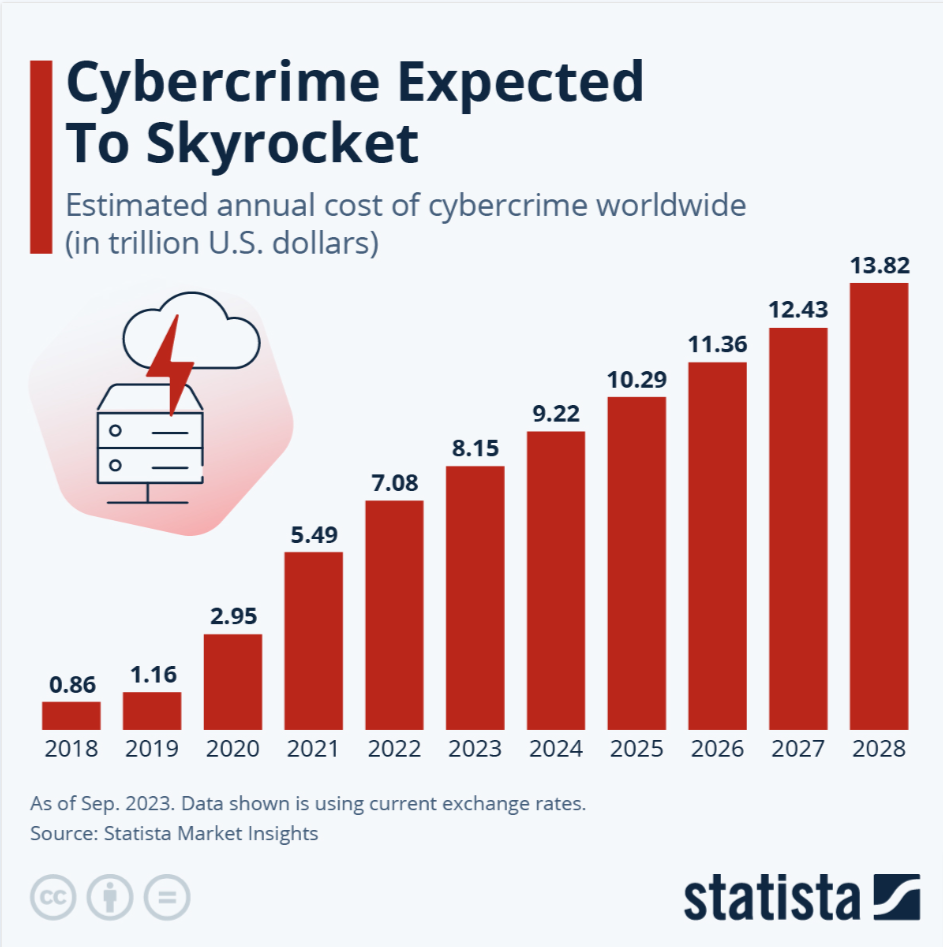
- According to Statista, the cost of cybercrime is expected to accelerate in the next four years, from $9.22 trillion in 2024 to $13.82 trillion by 2028.
- 54% of organizations experienced a cybersecurity breach. (Cisco)
- In February 2024, the IMF revealed that 11 email accounts were compromised due to social engineering attacks. (Techradar)
- On October 9, 2024, the Internet Archive was attacked by two different threat actors, leading to a data breach and a distributed denial-of-service (DDoS) attack by a pro-Palestinian group. The data breach meant the site’s 33 million user data were stolen.
- The average time to detect a security breach in 2024 was 94 days (IBM).
- The average time to contain a breach in 2024 was 64 days (IBM).
- In over half of the cases (70%), organized crime groups carried out the breaches (Verizon).
- The United States has the highest data breach cost, $9.36 million, followed by the Middle East, $8.75 million (IBM).
- Email Phishing scams cost $4.88 million in 2024, a 10% increase from last year. (IBM)
- Ransomware attacks are estimated to reach $265 billion by 2031. (Sprinto)
- Breaches in the healthcare industry, at $9.77 million on average, were considered the costliest. (IBM)
- India ranked second for targeted cyber attacks globally in 2024. (The Times of India)
Hire best cybersecurity companies in India and shield your website from all vulnerabilities.
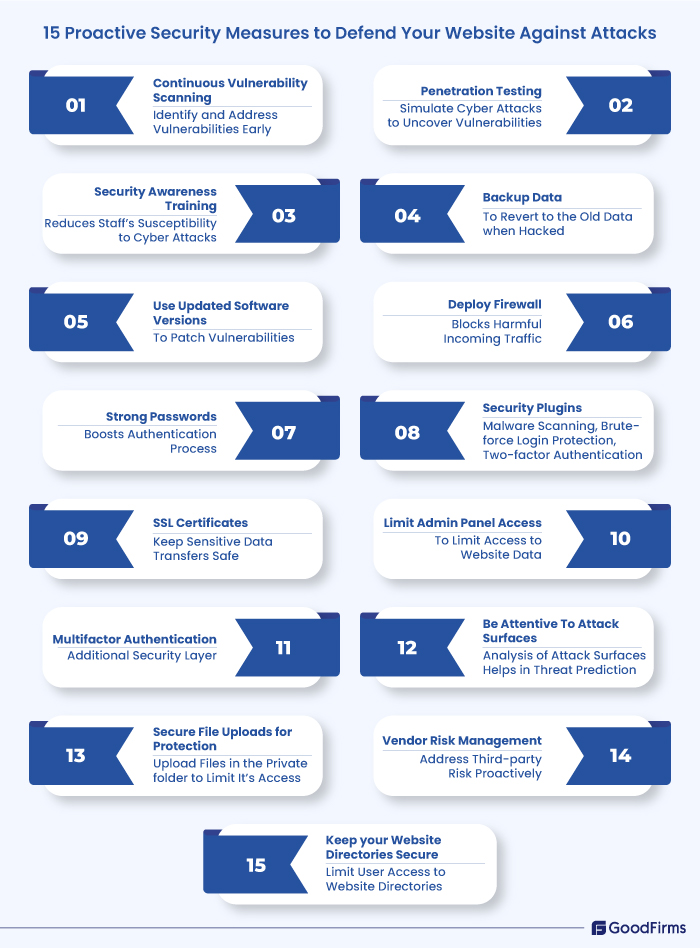
15 Proactive Cybersecurity Measures to Defend Your Website Against Attacks
The examples of proactive cybersecurity given here are not very different from traditional cybersecurity measures that organizations follow; however, the first four measures cited here could make the difference as they can be classified as proactive cybersecurity measures. These include proactive cybersecurity monitoring, penetration testing, cybersecurity awareness training, and full-fledged attention to attack surfaces.
So, without further ado, let’s start:
Proactive Cybersecurity Measures: #1. Proactive Cybersecurity Monitoring
Proactive cybersecurity monitoring involves monitoring a website for vulnerabilities and potential vulnerabilities in real-time. This helps identify and address cybersecurity risks early.
Key features of continuous vulnerability scanning include:
- Real-time alerts when a flaw is detected.
- Automation ensures continuous, scalable, and efficient vulnerability management.
- Integrates with Security Information and Event Management systems (SIEM) systems.
- Monitoring of security metrics and assets to ensure they are in tune with the industry security standards
Three top proactive cybersecurity tools for proactive cybersecurity monitoring include:
Sucuri
This tool offers three key services: Malware removal, Malware monitoring, and Website Protection.
Key tool within this tool - SiteCheck - which website owners use to track various potential security issues, including malware and blacklist status.
Key service - CloudProxy Firewall - protects websites and visitors from attacks.
Quttera
The Quttera team has designed software, tools, scanning technologies, and virus removal systems for businesses of all sizes.
This amazing web scanning tool offers robust security against rapidly evolving malware, such as Trojans, spyware, and phishing attacks. Combined with AI, the tool is powered to nail anomalies and undetected malicious software.
Recently, the tool has earned the reputation of being a global leader in providing security tips to website owners and systems that are highly vulnerable to hacking.
UpGuard Web Scan
It’s a free-risk web scanner, well-equipped to test over 40 vulnerabilities. All that you have to do is enter your website URL to scan symptoms of phishing, XSS attacks, or any other kind of cyber attack.
The bottom line is that the scanner is extremely easy to use, and you can shoot down all kinds of malware like you shoot fish in the barrel. The best part: Once the scan is done, the website owner gets a cybersecurity rating backed by details about every vulnerability detected in the system.
Proactive Cybersecurity Measures: #2. Penetration Testing
Penetration testing happens on the home ground. Simply put, you can rope in your in-house security experts to simulate cyber attacks against your website and then check for yourself what security issues you failed to detect early on.
Because it's a comprehensive security technique, the tester can use top-notch proactive cybersecurity tools to uncover vulnerabilities. However, the tester will likely have access to unauthorized data or perhaps disrupt certain services, which makes this test more complex than SAST (Static Application Security Testing) and DAST (Dynamic Application Security Testing).
Penetration tests are good at uncovering additional risks that automated tools fail to identify.
Proactive Cybersecurity Measures: #3. Security Awareness Training
Your business is secure only if your employees are up-to-date on cybersecurity measures. If Mark on your team is curious about a link he receives in an email and doesn’t think twice before clicking it, it’s obvious he’s unaware that he’s unleashing malware that could hamper your systems.
This is why employee security awareness training seems indispensable.
2024 saw a significant increase in cybersecurity issues, with massive increases in cyberattacks, data breaches, zero-day vulnerabilities, and new threat groups emerging.
Security awareness training keeps your employees abreast of the latest cybersecurity website best practices and the consequences of poor cyber hygiene.
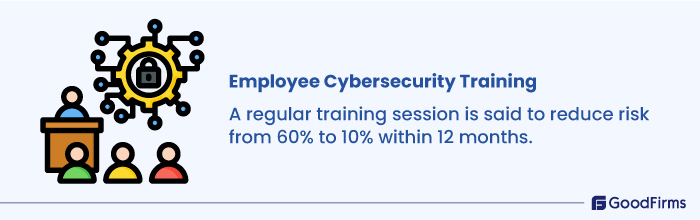
According to a Proofpoint study, 80% of organizations profited from security awareness training, which reduced their staff’s susceptibility to cyber-attacks. A regular training session is said to minimize the risk from 60% to 10% within 12 months.
Proactive Cybersecurity Measures: #4. Be Attentive to Attack Surfaces
Your attack surfaces could be the gateway for hackers to access sensitive data. These attack surfaces could range from your web application systems, software, IOT, and more. In fact, even employees could be part of it, especially those who are vulnerable to social engineering attacks such as whaling and phishing.
There are 3 main types of attack surfaces:
Physical attack surface: This includes organizational assets such as documents, files, and other documents on your business premises that a hacker can access if they can enter your premises.
Digital attack surface: These assets are accessible online but live outside a firewall. They include corporate servers, operating systems, and even forgotten websites and apps that impersonate your company.
Social engineering attack surface: The hackers manipulate employees to reveal sensitive information. Though highly critical, this is one of the least considered attack surfaces.
Attack surface analysis helps you comprehend threat issues in advance, identify security loopholes, and reduce cyber attacks.
Proactive Cybersecurity Measures: #5. Back up Data
Website backups are the norm and are a proactive cybersecurity strategy as they advocate storing data continually.
How does that help?
When hackers inject malicious code into your website data, having a backup will help you restore the old data sans the malicious code.
Fair enough! Then, the next question is: How often should you back up?
The answer to that is as often as you can. In fact, you should back up daily if you are dealing with a lot of code and content. If not, at least get a backup when you make changes on your website to restore the previous version if the revised version doesn’t match your expectations.
Backup Best Practices
- We recommend daily backup for sites with a lot of code and content.
- Other sites can build backups weekly.
- WordPress site users can use plugins - UpdraftPlus, Jetpack Backup, or BackWPup to automate backups.
- Get multiple backups: It is highly recommended that you automate backup at your end, plus get your hosting provider to provide you with backup. You can even hire an agency to handle security needs. However, when hiring an agency, be in touch continuously to ensure they are on track with your backups.
Proactive Cybersecurity Measures: #6. Use Updated Software Versions
Outdated software is a breeding ground for vulnerabilities that hackers could exploit.
Some known vulnerabilities that attack outdated software include O-days and Commonly Exploited vulnerabilities.
O-day Exploits: These are security flaws that the website owner is unaware of; however, the hacker knows about them and would exploit them. 0 days stands for unpreparedness, as the owner has O ZERO time/days to fix the flaw since he’s totally unaware of it.
Commonly Exploited: As the name implies, commonly exploited flaws are those that people, including hackers, are widely aware of. This makes exploiting these flaws much more manageable as ready-made kits (exploit kits) are available to exploit such weaknesses. Besides, hackers can inject malicious code and steal sensitive data through commonly exploited vulnerabilities. Moreover, they can use your website for spamming, phishing, and even launching DDoS attacks.
Example: Outdated versions of WordPress Software are prone to hacks and data breaches. Even WordPress plugins have critical security vulnerabilities that could put the entire website in trouble. Even older CMS versions like Joomla and Drupal are riddled with vulnerabilities.
Using an updated version of your software helps patch vulnerabilities, enhance security, and address critical issues.
Software Version Updates Best Practices:
- Leverage automatic updates for your website’s software, plugins, and themes
- Manually check for updates from time to time, in addition to automatic updates
- Test updates thoroughly before deploying to ensure their compatibility with the existing software version.
- Download updates from official sites only to avoid malicious software.
- Stay up to date on the latest security advisories and vulnerabilities.
Proactive Cybersecurity Measures: #7. Deploy Firewalls
A firewall is a security software that shields your website by filtering and blocking harmful incoming network traffic. Firewalls also scan everything for malicious elements, such as hackers and malware, when they are trying to access a website.
With the onset of Next-generation firewalls, website security has become more robust and fool-proof.
Tip: Next-generation firewalls, or NGFWs, offer top-level security to networks and private data that traditional firewalls cannot match. They interlink traditional firewall technology with network device filtering functions to offer advanced security. Their packet filtering features minutely inspect the incoming and outgoing packet content, not just the headers, enabling the detection and blocking of malicious data or hidden threats within the packet payload.
Proactive Cybersecurity Measures: #8. Implement Strong Password Policies
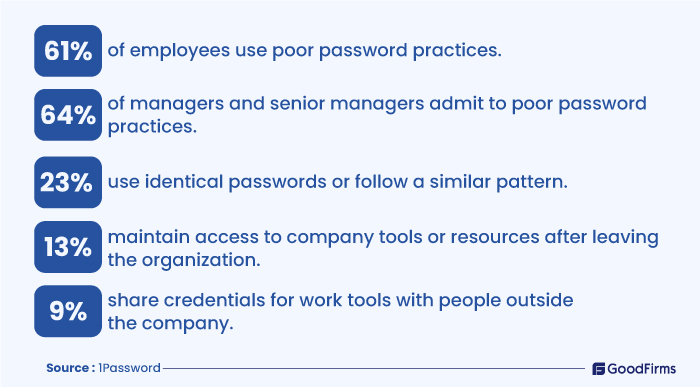
Strong and unique passwords safeguard data. To make your passwords less vulnerable to attacks, they should contain a mix of upper- and lowercase letters, numbers, and symbols.
Once you have a strong password, please save it to a password management system such as Pssbolt or LastPass, set up two-factor authentication, and limit the users accessing it.
Tip: SHA256 is a cryptographic hash function that produces a fixed-size output for any data input. It is generally used to encrypt website passwords to ensure they are not compromised when the server is attacked.
Proactive Cybersecurity Measures: #9. Install Security Plugins
Your website's plugins and themes should be updated regularly. You should have the latest versions, but at the same time, ensure they are trustworthy. Remove unused plugins, as they could become security liabilities if unused.
One popular way of hacking a system is through brute force or dictionary attacks. Website owners should install plugins that restrict such login attempts. So, when anyone tries to log in to your website 5-7 times, the IP address gets blocked. This minimizes the hacking attempts on your website. Several security plugins are available for WordPress site users to protect their WordPress website.
Tip: A strong security plugin like Wordfence can help with vulnerability scans and nip malware in the bud. You can try the free version; however, a premium version is also available for an additional security layer.
Proactive Cybersecurity Measures: #10. Set up SSL Certificate
Sockets Secure Layer (SSL) certificates keep sensitive data transfers safe from hackers, specifically for those sites that transfer login credentials, credit card details, and other personal data. These certificates are known to offer an additional security layer.
It also proves a website's trustworthiness to website visitors, as SSL-certified sites have a lock symbol on the right side of the address bar. At the same time, browsers will mark unsecured websites as unsecured or might block the connection.
There are three types of SSL certificates available: Extended Validation (EV SSL), Organization Validation (OV SSL), and Domain Validation (DV SSL). The website needs to choose the one that best suits its purpose.
Tip: Installing an SSL certificate is crucial if you run an e-commerce site that processes credit card transactions or any other website that collects visitors' data.
Proactive Cybersecurity Measures: #11. Limit Admin Panel Access
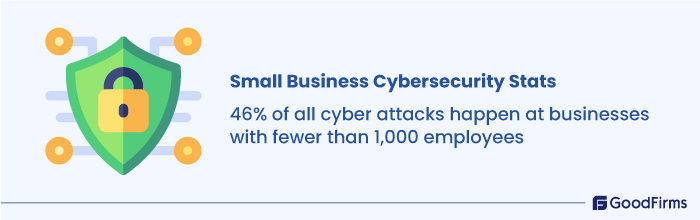
Small businesses have this weird belief that their websites are safe and that hackers won’t be interested in low-budget sites. But then, that’s where they go wrong. Even small businesses are at risk, as hackers might use them as guinea pigs, sharpening their cyberattacking axes by trying their hands on small business sites first before going for larger loot. For context, 46% of all cyberattacks are targetted towards businesses with fewer than 1,000 employees.
- 46% of all cyber attacks happen at businesses with fewer than 1,000 employees.
- 95% of cybersecurity issues at SMBs cost between $826 and $653,587.
- 75% of SMBs fail to continue their operations if they are hit with ransomware.
- 47% of businesses with >50 employees have no cybersecurity budget.
Source: strongdm.com
So, whether you run a small business or a million-dollar website doesn’t matter, just limit your admin panel access. If more than one person has access, use strong passwords and update them often.
However, you don’t have to worry if you run a WordPress site, as you can easily restrict user access. WordPress offers an option to limit admin access to just one IP address, which could be your computer’s IP address. However, to implement the same, your IP must be static. If not, your internet service provider can help you out.
Proactive Cybersecurity Measures: #12. Multifactor Authentication
As per the Multifactor authentication (MFA) method, users who want to access your website should provide two or more verification methods.
For multifactor authentication to work, in addition to username or password, the user could be requested for additional information such as:
- An extra one-time password is sent to the users on their phone or email address.
- Personal security questions to be answered.
- Fingerprint or other biometric data, such as voice or face recognition, could be used.
Multifactor authentication dramatically decreases the chances of cyber-attacks. Implement multifactor authentication to ensure the security of your online sites.
Tip: Use third-party authenticator apps like Google Authenticator or Authy to help with internet security.
Proactive Cybersecurity Measures: #13. Secure File Uploads for Protection
Allowing files to be uploaded to your website's public folder on your server comes with a security risk. The file will look harmless when uploaded and could be accessed by anyone via a URL; however, it may contain malicious code that hackers may want to exploit.
Files in the form of images can also prove risky if uploaded without filling out forms, as they may contain malicious codes disguised as images.
However, you can prevent hackers directly accessing the uploaded files on your website by storing them in a private folder on the server. Such files cannot be accessed through the URL.
Legitimate users can have access to the private folder through the browser using a server-side script, reducing the chance of an attacker executing a malicious file.
The script acts as a watchdog, ensuring attackers don't have access to malicious files.
If you use cloud hosting, things could be far easier. The provider would, more or less, decide whether to permit or deny file uploads based on the visitor's location, detected through the IP address.
You could even block uploads from specific countries.
Tip: It's better to save the files in a private folder than a public folder where the risk of being attacked is far higher.
Proactive Cybersecurity Measures: #14.Vendor Risk Management
If your cybersecurity depends on third-party vendors, then it becomes more important to have vendor risk management in place. This will help address third-party risk proactively rather than relying on reactive practices such as incident response.
Focus on:
- Filter vendors using the right strategies and keep a watch over them throughout your relationship.
- While hiring a cybersecurity team, ensure they are not an operational hassle and don’t affect your compliance with regulations and local legislation.
- The vendor should favor your business objectives.
One shouldn’t leave anything to chance, specifically regarding cybersecurity, so make sure you have your third-party vendors on a scanner.
Proactive Cybersecurity Measures: #15. Keep Your Website Directories Secure
Attackers attack websites for a reason: to access databases or your admin directories. So, when securing your site, your focus should be on both these crucial areas, as hackers continually focus on these two areas to attack every day and search using terms such as “Admin” or “login” for the same.
Tip: Replace the directory names with something “less vulnerable.”
If renaming is a problem, you can limit user access to those files, which will automatically reduce malicious attacks.
Benefits of Proactive Cybersecurity for Your Websites
#1. Regulatory Compliance
Several sectors follow stringent data protection regulations, such as GDPR. By implementing security measures, businesses can easily comply with these regulations and avoid fines and legal issues. Additionally, it enhances the organization’s credibility and builds trust among clients and investors.
#2. 24/7 Monitoring
Continuous monitoring is another big benefit of proactive cybersecurity measures. By leveraging advanced tools to scan your website 24/7, you can predict and prevent threats in real time. Identifying threats before time and addressing them with another layer of security helps maintain the integrity and availability of the website around the clock. Real-time notifications from advanced security tools help reduce potential risks.
#3. Long-term Cost Savings
Security means costs; however, it also means long-term savings, as preventing cyberattacks automatically translates into enormous cost savings associated with loss recovery, legal fees, and more. Security also means lower insurance premiums and operational issues, further cementing the organization’s financial stability.
#4. Builds Customer Trust
Building customer trust is the holy grail of businesses these days. This means it’s difficult to gain customer trust and may take months and years together. A data breach can easily destroy the reputation that you may have taken years to build on. A proactive security strategy is one of the safest ways to build customer trust, especially when you inform them that you care for their security and have set up prompt measures.
#5. Boosts Productivity
Cyberattacks reduce employee productivity by disrupting regular operations. This is where proactive cybersecurity measures help boost productivity and prevent downtime.
When businesses have robust cybersecurity measures in place, businesses can focus on their primary tasks without bothering much about other security issues. This proactive protection ensures smooth operations without disruptions.
#6. Builds Security Resilience
Security resilience stands for a business's ability to withstand cyber attacks over and over again through adaptation. The adaption part includes incident response plans, dynamic security controls, and elaborate cyber security policies to ensure minimal impact of cyberattacks.
Wrapping Up
Implementing these 15 proactive cybersecurity strategies will be enough for businesses to combat ever-evolving and increasingly sophisticated cyber attacks. Proactive cybersecurity measures such as continual vulnerability scanning, penetrating testing, regular backups, strong password policies, and multifactor authentication can significantly reduce security risks. Most importantly, security awareness training for employees, deploying firewalls, and updating software versions help solidify your defenses.
In times like these, when cybercrimes have cost trillions of dollars globally, taking a proactive approach to website security is not just a recommendation but a necessity for protecting businesses and their data against devastating attacks.