Key takeaways:
- Free & Open source cybersecurity tools are trusted by the security teams of enterprises and Fortune 500 companies
- Paid cybersecurity tools offer faster support from deployment to management for businesses without in-house IT expertise
- Most breaches hit small businesses, by 43% of cyberattacks target SMB
- The real cost of free & open source cybersecurity is not licensing, but the time required for setup, maintenance, and updates
- Mixing both is the smartest move for most SMBs running a hybrid stack
- The best cybersecurity software for small businesses depends on the threat profile
Most small businesses approach cybersecurity the same way — either spend nothing because they self-assume they are too small to be targeted, or spend on the first tool a vendor recommends without understanding what it could actually help their business.
Both approaches create serious security gaps. According to the FBI IC3 2024 Annual Report, the agency received 859,532 complaints with losses exceeding $16 billion." Small businesses paid a steep share of that bill — the average data breach now costs SMBs anywhere from $120,000 to $1.24 million. The growing complexity of modern attacks has pushed organizations to look for more transparent and adaptable business cybersecurity solutions.
This guide compares eight free and open source and seven paid cybersecurity tools, explaining their core features, ideal use cases, limitations, and how businesses can choose the right protection strategy in 2026.
Explore Goodfirms curated list of the best cybersecurity software to compare pricing, features, and verified user reviews.
Cybersecurity Software for Small Businesses: Comparison of Free & Open Source vs. Paid
The comparison below breaks down where free/open-source cybersecurity tools and paid cybersecurity software fit best for small businesses in 2026 — including the most widely used tools, their ideal use cases, and why businesses choose one approach over the other.
|
Business Need |
Free & Open Source |
Deployment Ease |
Paid Tool |
Deployment Ease |
Small Business Verdict |
|---|---|---|---|---|---|
|
Network scanning |
Nmap, Wireshark |
Hard |
CrowdStrike, Sophos |
Easy |
Paid wins |
|
Vulnerability assessment |
OpenVAS |
Hard |
ManageEngine Log360 |
Easy |
Paid wins |
|
Password management |
KeePass |
Easy |
Keeper Security |
Easy |
Tie |
|
Threat detection & SIEM |
Wazuh, Security Onion |
Hard |
CrowdStrike, Log360 |
Easy |
Paid wins |
|
Intrusion detection |
Snort |
Hard |
Sophos |
Easy |
Paid wins |
|
Endpoint protection |
Open-source stack |
Hard |
Webroot, Malwarebytes |
Easy |
Paid wins |
|
Penetration testing |
Metasploit |
Hard |
CrowdStrike Falcon |
Easy |
Paid wins |
|
Compliance & auditing |
Wazuh, Security Onion |
Hard |
Netwrix, Log360 |
Easy |
Paid wins |
Not every small business needs the same type of cybersecurity software. Some SMBs prioritize low-cost, customizable free and open-source tools, while others prefer paid cybersecurity platforms that offer easier deployment, automated protection, and vendor-backed support. The right choice often depends on your internal IT expertise, compliance needs, budget, and the level of ongoing management your business can realistically handle.
8 Best Free & Open Source Cybersecurity Software for Small Businesses
Free & Open source cybersecurity tools remain a trusted choice for security professionals and budget-conscious businesses. Many of these solutions are widely adopted by enterprises and security teams because they provide strong visibility, flexibility, and community-driven innovation without licensing costs.
1. Nmap (Network Mapper) — Best for Network Visibility
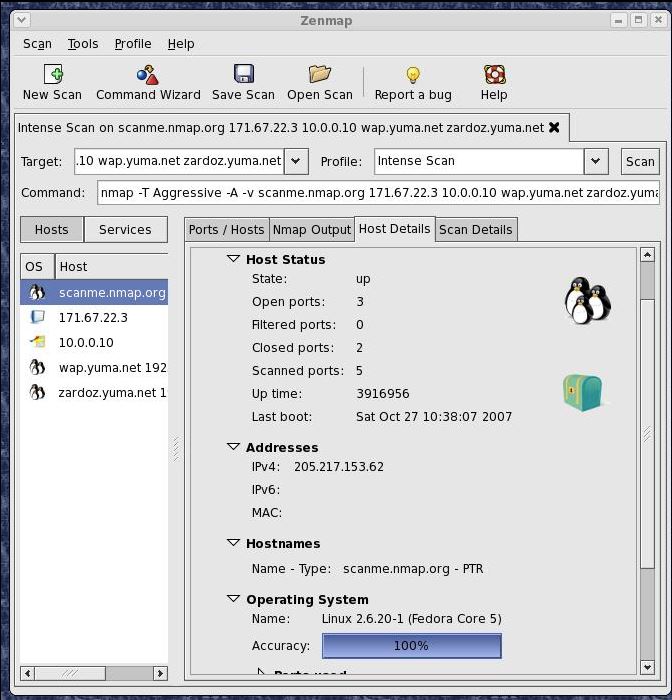
Nmap is a free, open-source network scanner used by security professionals worldwide to discover hosts, open ports, and running services across a network. It's a staple in penetration testing and security audits — and it's already familiar to most IT teams.
Source: Nmap
Key Features:
- Port scanning and host discovery across large networks
- OS and service version detection
- NSE (Nmap Scripting Engine) for custom vulnerability checks
- Runs on Windows, Linux, and macOS
Pros:
- Completely free, no license required
- Highly extensible with scripts
- Widely documented with strong community support
Cons:
- The command-line interface is intimidating for non-technical users
- Requires manual interpretation of results
- No built-in alerting or dashboards
Best for: Businesses with an in-house IT person who runs periodic network audits.
2. OpenVAS — Best Free Vulnerability Scanner
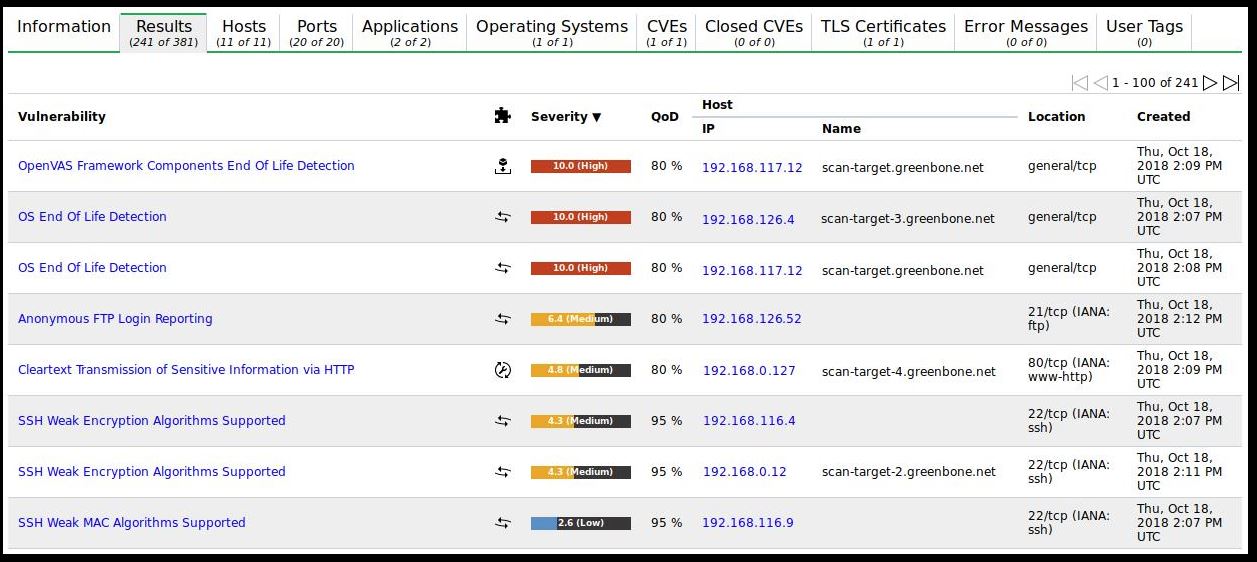
OpenVAS (Open Vulnerability Assessment System) is a full-featured vulnerability scanner that performs both authenticated and unauthenticated testing across internet-facing and internal systems. It's the free and open-source backbone behind several commercial products.
Source: OpenVAS
Key Features:
- Scans for thousands of known vulnerabilities
- Supports scheduling and automated scanning
- Web-based management interface (Greenbone Security Assistant)
- Covers high-level and industrial protocols
Pros:
- Genuinely enterprise-grade scanning capability at zero cost
- Regular vulnerability feed updates
- Detailed, actionable reports
Cons:
- Resource-intensive — needs a dedicated server to run well
- Setup and tuning take time
- False positives require manual review
Best for: SMBs that want vulnerability assessments without paying for Nessus or Qualys.
3. KeePass — Best Free Password Manager
Password reuse and weak credentials are behind a significant share of small business breaches. KeePass is a free, open-source password manager that stores credentials in a locally encrypted database using AES-256, ChaCha20, or Twofish encryption.
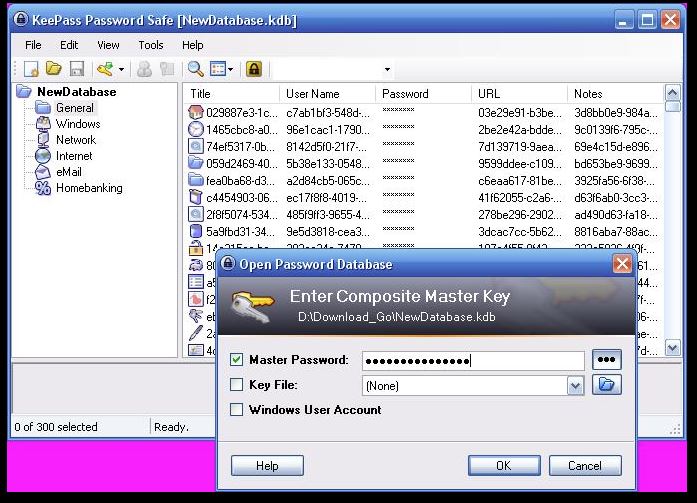
Source: KeePass
Key Features:
- Local encrypted database (no cloud dependency by default)
- Supports plugins for browser integration and sync
- Multi-platform with community-built ports (KeePassXC for Linux/Mac)
- Two-factor authentication support
Pros:
- Zero subscription cost
- Full control over where credentials are stored
- No vendor lock-in
Cons:
- No native cloud sync (requires manual setup)
- User experience is dated compared to paid alternatives
- No central admin console for team management
Best for: Small teams who want credential security without recurring fees and are comfortable with basic setup.
4. Wireshark — Best for Network Traffic Analysis
Wireshark captures and analyzes network packets in real time, making it one of the most powerful tools for identifying suspicious activity, diagnosing network issues, and investigating incidents. It's used in cybersecurity certification courses worldwide.
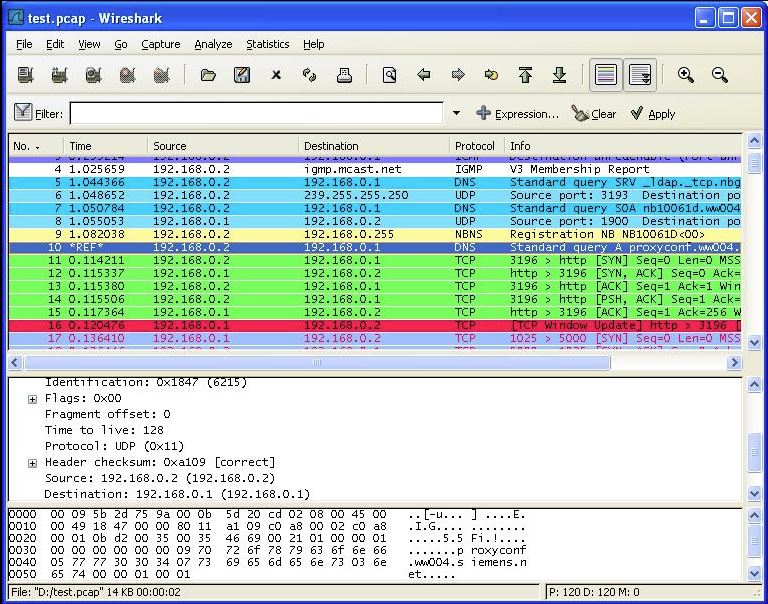
Source: Wireshark
Key Features:
- Live packet capture and deep protocol inspection
- Filters for isolating specific traffic types
- Export capabilities for offline analysis
- Cross-platform: Windows, Linux, macOS
Pros:
- Unmatched depth for network visibility
- Actively maintained open-source project
- Free and widely trusted by security professionals
Cons:
- Steep learning curve for non-specialists
- Raw data output needs skilled interpretation
- Not a prevention tool — purely diagnostic
Best for: IT-savvy SMBs investigating unusual network behavior or verifying security controls.
5. Metasploit (Community Edition) — Best for Penetration Testing
Metasploit is the industry standard for penetration testing. The Community Edition is free and lets businesses simulate real-world attacks on their own systems to identify weaknesses before attackers do.
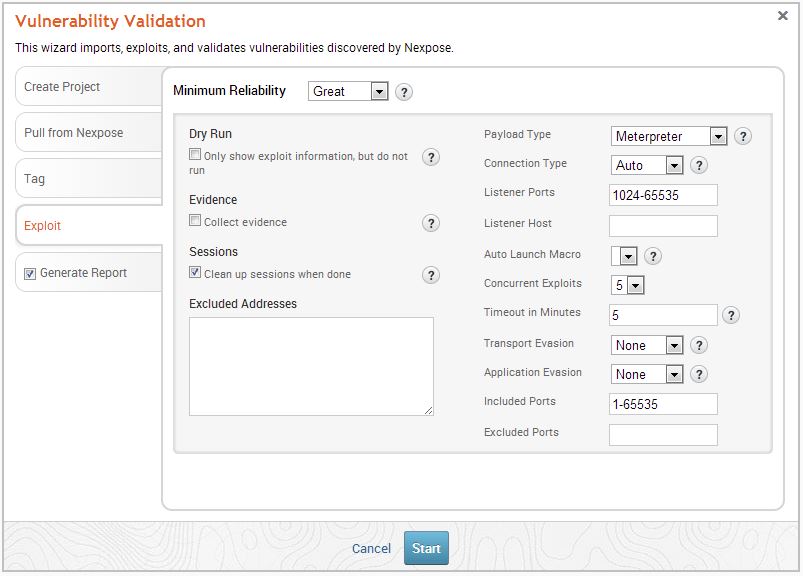
Source: Metasploit
Key Features:
- Library of known exploit modules
- Network discovery and vulnerability verification
- Post-exploitation analysis
- Integration with Nmap and Nessus
Pros:
- Same framework used by professional penetration testers
- Large, active community and extensive documentation
- Free community edition covers core functionality
Cons:
- Requires security expertise to use responsibly
- Pro version needed for advanced reporting and automation
- Not appropriate for daily monitoring — it's a testing tool
Best for: Businesses that conduct periodic security audits or hire external testers who prefer working with Metasploit.
6. Wazuh — Best Free & Open-Source Cybersecurity Software for Threat Detection
Wazuh is a free & open-source security platform that combines SIEM and XDR capabilities for threat detection, log analysis, file integrity monitoring, and endpoint security. It is widely used by businesses that want centralized visibility across cloud, on-premise, and hybrid environments without paying enterprise SIEM licensing costs.
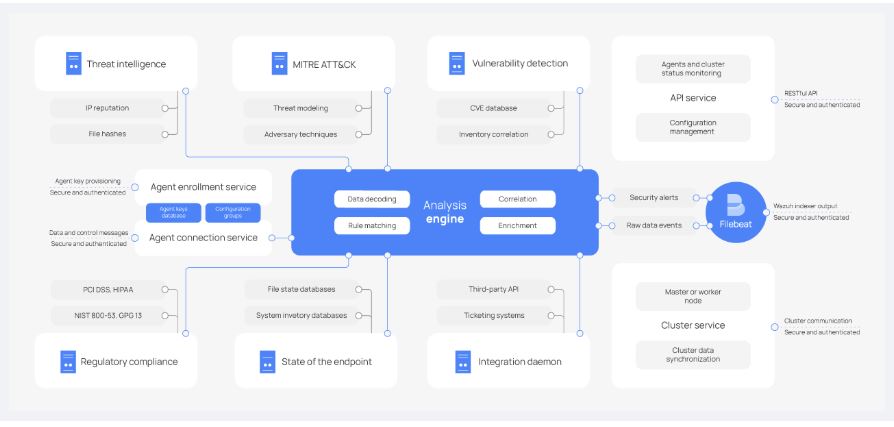
Source: Wazuh
Key Features:
- Real-time threat detection and security monitoring
- Log collection and analysis across endpoints and servers
- File integrity monitoring and vulnerability detection
- Cloud and container security monitoring support
Pros:
- Completely open source with strong community adoption
- Centralized visibility across multiple systems
- Supports compliance monitoring for PCI DSS, HIPAA, and GDPR
Cons:
- Initial deployment and tuning can be complex
- Requires dedicated resources for effective monitoring
- The interface may feel overwhelming for smaller teams
Best for: Businesses that need enterprise-grade threat visibility and centralized security monitoring without high SIEM licensing costs.
7. Snort — Best Free & Open-Source Intrusion Detection Software
Snort is a widely used free and open-source intrusion detection and prevention system (IDS/IPS) designed to monitor network traffic and identify suspicious activity in real time. Developed by Cisco, Snort remains one of the most recognized open-source cybersecurity tools for network threat detection.

Source: Snort
Key Features:
- Real-time traffic analysis and packet logging
- Intrusion detection and intrusion prevention capabilities
- Custom rule creation for threat detection
- Protocol analysis and deep packet inspection
Pros:
- Highly effective for detecting known attack patterns
- Flexible rule-based detection engine
- Large global security community and extensive documentation
Cons:
- Requires networking and security expertise to configure properly
- High traffic environments may require performance tuning
- Generates false positives without careful rule management
Best for: SMBs and IT teams that want affordable intrusion detection and deeper network-level threat visibility.
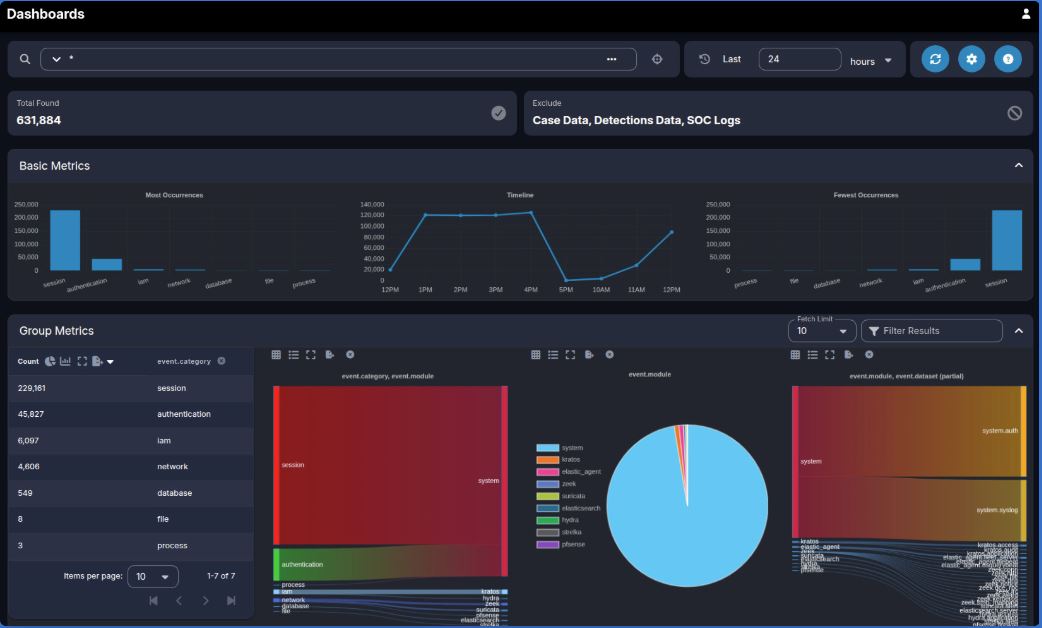
8. Security Onion — Best Free & Open-Source Cybersecurity Platform for Threat Hunting
Security Onion is a free, open-source platform built for network security monitoring, log management, and threat hunting. It combines multiple open-source cybersecurity tools into a single Linux-based distribution, helping organizations monitor suspicious activity across their environments.
Source: Security Onion
Key Features:
- Integrated threat hunting and network monitoring tool
- Centralized log collection and analysis
- Packet capture and intrusion detection capabilities
- Includes tools like Zeek, Suricata, and Elasticsearch
Pros:
- All-in-one platform for security monitoring and investigation
- Strong visibility into network traffic and security events
- Active open-source security community support
Cons:
- Deployment requires Linux and networking knowledge
- Resource-intensive for smaller environments
- Setup and maintenance can be time-consuming for non-technical teams
Best for: Organizations that need advanced network monitoring, threat hunting, and incident investigation without investing in expensive enterprise security platforms.
7 Best Paid Cybersecurity Software for Small Businesses in 2026
For small businesses without dedicated security teams, paid cybersecurity software offers a faster path to protection, management, and support. These platforms typically combine threat detection, automated updates, centralized monitoring, and vendor assistance into a single solution.
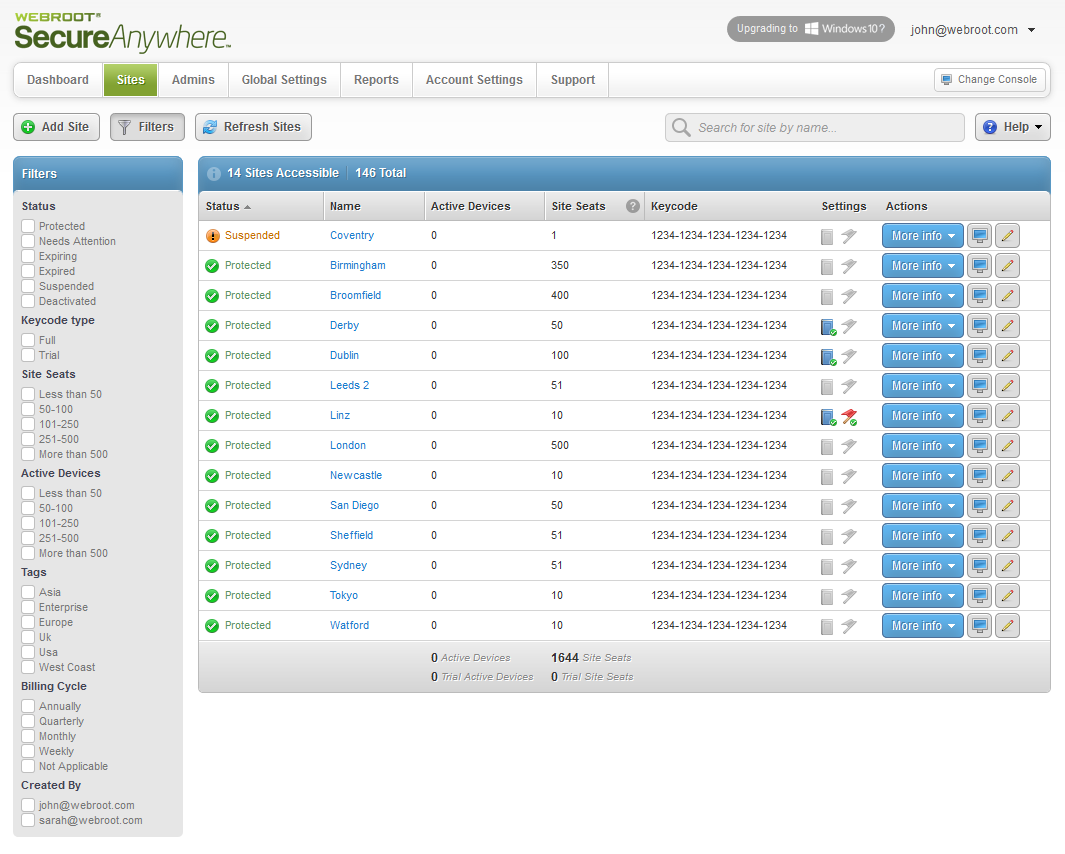
1. Webroot Business Endpoint Protection — Best Lightweight Paid Antivirus
Webroot takes a cloud-first approach to endpoint protection. Rather than maintaining a large local signature database, it sends file identifiers to the cloud for near-instant analysis — meaning scans finish in seconds with almost no system impact.
Source: Webroot-Opentext
Key Features:
- Cloud-based threat intelligence using 95M+ sensor network
- Real-time behavioral monitoring
- Centralized web-based management console
- Automated threat detection and rollback
Pros:
- Extremely lightweight — under 10MB footprint
- Easy deployment across multiple endpoints
- Strong fit for SMBs and MSPs
- Competitive pricing vs. CrowdStrike or SentinelOne
Cons:
- Detection rates can lag behind competitors with local AI engines
- Enterprise pricing lacks full transparency
- Limited customization for advanced use cases
Pricing: Webroot pricing starts around $29.99/year for Essentials, while more advanced plans like Webroot Total Protection start around $89.99/year, depending on the number of devices and identity protection features included. Source
Best for: Small businesses that want reliable, managed endpoint protection without heavy IT overhead.
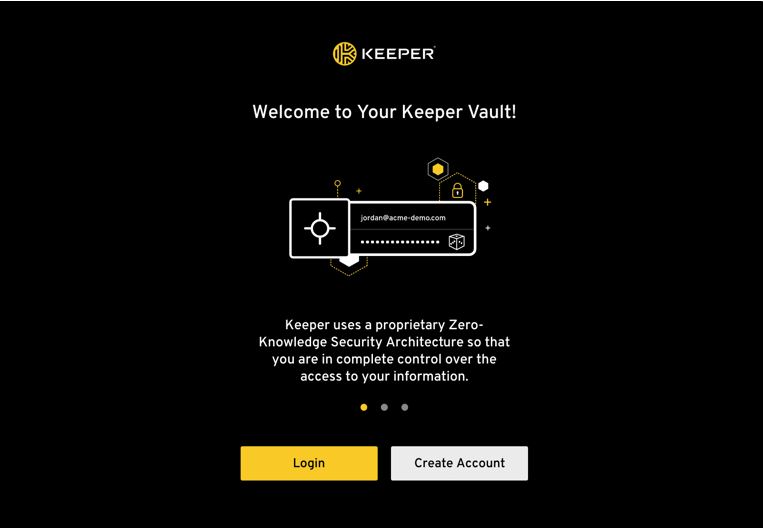
2. Keeper Security — Best Paid Password Manager for Teams
Where KeePass is a solo tool, Keeper is built for teams. It combines a zero-knowledge password manager with privileged access management, dark web monitoring, and a clean admin console — all wrapped in a zero-trust architecture.
Source: Keeper Security
Key Features:
- AES-256 encrypted vault with zero-knowledge model
- Admin console for user provisioning and access control
- Dark web monitoring and breach alerts
- SSO and MFA integrations
Pros:
- Purpose-built for business teams, not individuals
- Verifiable zero-trust security architecture
- Strong audit trails for compliance requirements
Cons:
- Subscription cost adds up for larger teams
- Some advanced features locked behind higher tiers
- Requires onboarding time to realize full value
Pricing: Keeper Business Starter starts around $2/user/month, Keeper Business around $4/user/month, and Keeper Enterprise starts from $6/user/month, with custom quote-based pricing. Source
Best for: Teams handling client data, financial records, or compliance requirements where shared credential management is essential.
Businesses comparing credential management platforms can also explore leading business password management software solutions on Goodfirms
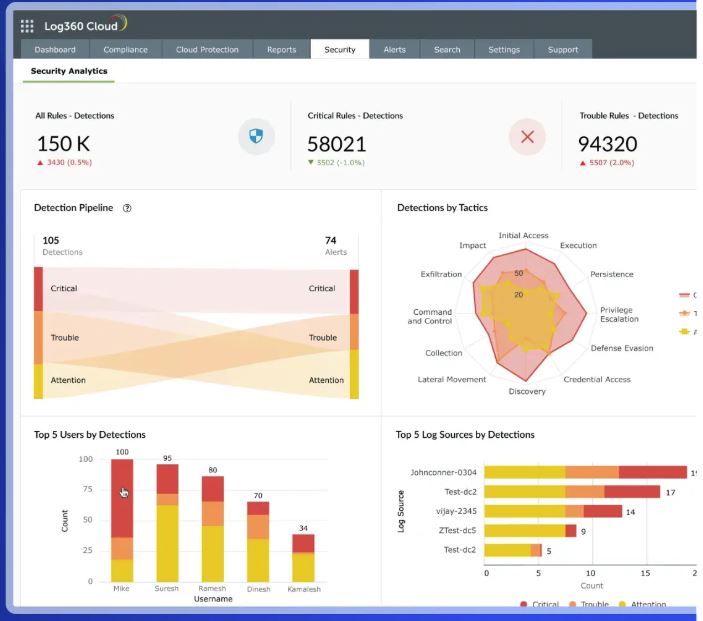
3. ManageEngine Log360 — Best for Log Management and Compliance
ManageEngine Log360 is a SIEM (Security Information and Event Management) tool that aggregates logs from across your IT environment, correlates events, and flags threats — with a free tier for smaller deployments.
Source: ManageEngine Log360
Key Features:
- Log collection from servers, endpoints, cloud, and Active Directory
- Real-time threat detection and alerting
- Compliance reporting for HIPAA, GDPR, PCI DSS
- User behavior analytics
Pros:
- Free tier available for basic log management
- Strong compliance reporting out of the box
- Integrates well with the broader ManageEngine ecosystem
Cons:
- The full-featured version can be complex to configure
- Pricing scales quickly with log volume
- Requires dedicated time to tune alert rules
Pricing: ManageEngine Endpoint Central pricing starts around $795/year for 50 endpoints (Professional Edition), with Enterprise plans starting around $945/year and Security Edition starting around $1,695/year for 50 endpoints. Source
Best for: SMBs in regulated industries (healthcare, finance, legal) that need audit-ready log management.
4. Malwarebytes for Teams — Best Ransomware Protection for Non-Technical Teams
Malwarebytes is purpose-built for businesses that don't have dedicated IT staff. Its team-focused offering combines endpoint protection with ransomware rollback and a simple centralized dashboard that doesn't require security expertise to operate.
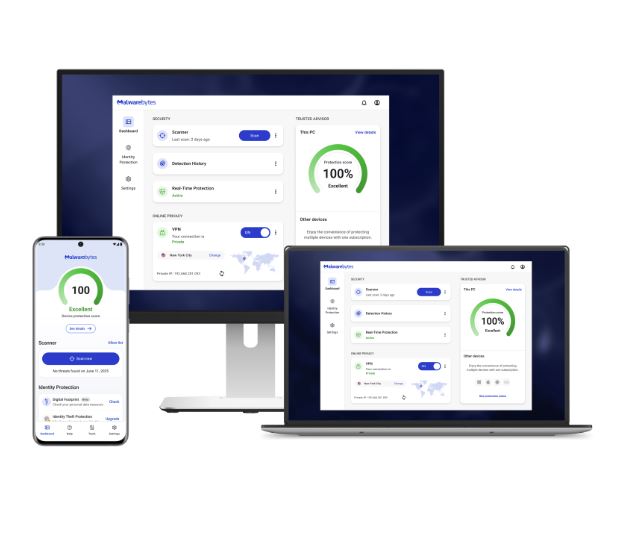
Source: MalwareBytes
Key Features:
- Real-time malware and ransomware detection
- Ransomware rollback to pre-infection state
- Brute force protection for RDP (remote desktop)
- Cloud-based management console
Pros:
- Very easy to deploy and manage with no IT background
- Ransomware rollback is a genuine differentiator for SMBs
- Transparent, straightforward pricing
Cons:
- Lighter on advanced threat hunting than enterprise EDR tools
- Not a full SIEM replacement
- Limited visibility into network-level threats
Pricing: Malwarebytes offers small business-focused pricing, starting around $119.99/year for 3 devices, $399.99/year for 10 devices, and $519.99/year for 20 devices. Source
Best for: Small businesses without IT staff who want reliable day-to-day malware protection
5. Netwrix Auditor (Free Edition) — Best for Access and Change Auditing
Netwrix helps businesses track who has access to what, and what changed — critical for both security and compliance. The free edition covers core auditing functions for Active Directory, file servers, and Windows Server environments.
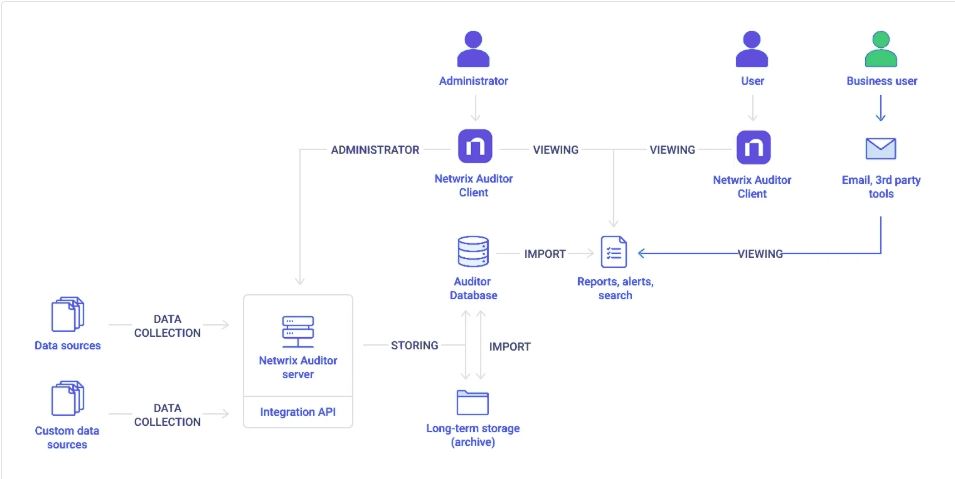
Source: Netwrix
Key Features:
- Monitors user activity and access changes
- Alerts on suspicious behavior and policy violations
- Pre-built reports for compliance frameworks
- Free edition covers core audit scenarios
Pros:
- Free tier provides genuine business value
- Critical for businesses running Windows Server environments
- Reduces insider threat risk through visibility
Cons:
- Free version is limited in scope — paid version required for full coverage
- Best suited for Windows-centric environments
- Report customization requires paid tiers
Pricing: Free edition available; paid plans on quote.
Best for: Small businesses with Windows environments that need to prove access control for audits or compliance.
6. Sophos Intercept X — Best Paid Cybersecurity Software for Small Business Endpoint Protection
Sophos Intercept X combines AI-powered threat prevention, ransomware protection, and endpoint detection and response (EDR) into a single security platform designed for businesses of all sizes. Its cloud-based management console and synchronized security ecosystem make it especially attractive for SMBs that want enterprise-grade protection without managing multiple disconnected tools.
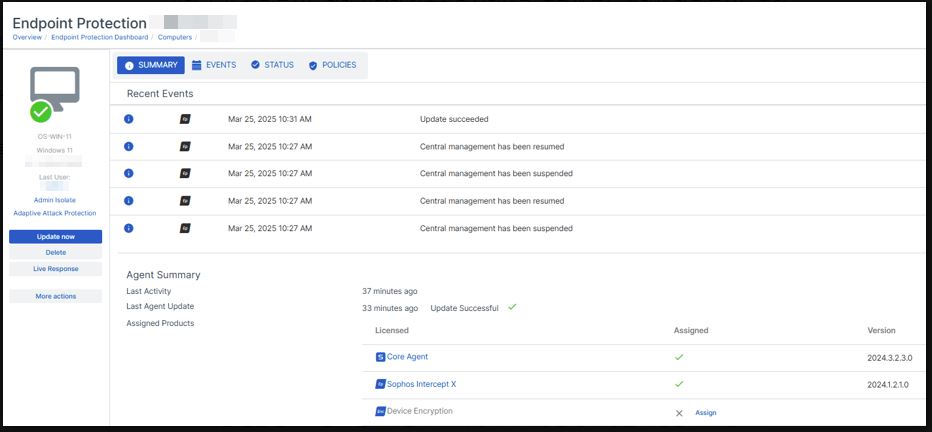
Source: Sophos
Key Features:
- AI-powered malware and ransomware detection
- Endpoint detection and response (EDR) capabilities
- Centralized cloud-based management through Sophos Central
- Anti-exploit and web threat protection
Pros:
- Strong ransomware and exploit prevention capabilities
- Easy centralized management for multiple endpoints
- Integrates well with firewalls and broader Sophos security tools
- Suitable for both SMBs and growing mid-sized businesses
Cons:
- Advanced features may require higher-tier plans
- Initial policy configuration can be complex for smaller teams
- Pricing is less transparent than some SMB-focused competitors
Pricing: Sophos uses quote-based pricing that varies by endpoints, features, and deployment size.
Best for: Small businesses that want enterprise-grade endpoint protection, ransomware defense, and centralized security management without building a large internal security team.
7. CrowdStrike Falcon — Best Enterprise-Grade Cybersecurity Software for Threat Detection
CrowdStrike Falcon is a cloud-native cybersecurity platform built for advanced endpoint protection, threat intelligence, and real-time threat detection. Known for its lightweight agent and AI-driven threat hunting capabilities, CrowdStrike Falcon is widely used by enterprises and fast-growing businesses that require high-level security visibility across distributed environments.
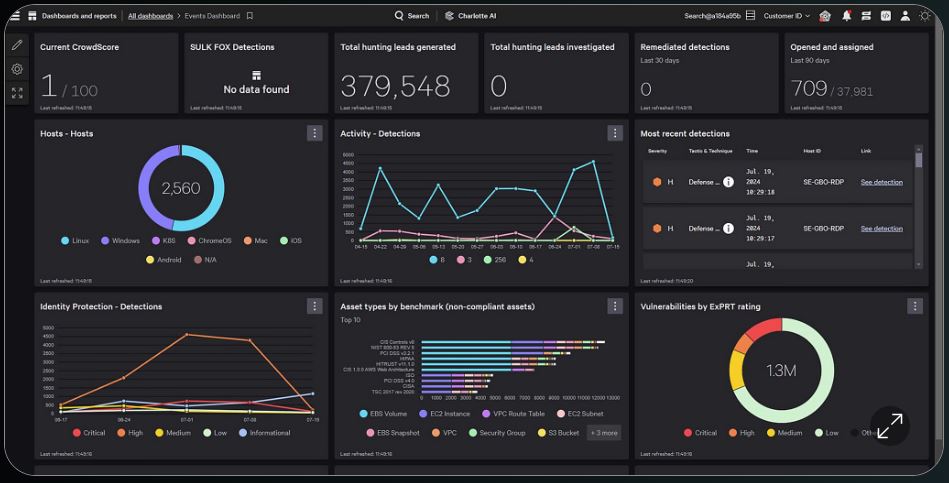
Source: CrowdStrike
Key Features:
- AI-powered endpoint detection and response (EDR/XDR)
- Real-time threat intelligence and threat hunting
- Cloud-native architecture with lightweight endpoint agents
- Managed detection and response (MDR) options available
Pros:
- Strong reputation for advanced threat detection accuracy
- Lightweight deployment with minimal device performance impact
- Excellent visibility across cloud, remote, and hybrid environments
- Rapid incident response and threat intelligence capabilities
Cons:
- Higher pricing compared to SMB-focused cybersecurity tools
- Advanced functionality may exceed the needs of smaller businesses
- Requires security expertise to maximize full platform capabilities
Pricing: CrowdStrike Falcon Go pricing starts around $7.99/device/month or $59.99/device/year, while Falcon Pro starts around $14.99/device/month and Falcon Enterprise around $19.99/device/month. Source
Best for: Mid-sized businesses and enterprises that need advanced threat detection, endpoint visibility, and enterprise-grade cybersecurity operations across distributed environments.
Why Hybrid Cybersecurity Stacks Are Growing Among SMBs
According to CrowdStrike’s 2025 State of SMB Cybersecurity Report, SMBs increasingly need cybersecurity solutions that are affordable, scalable, and easier to manage despite growing threat complexity.
As a result, many SMBs now combine:
- Open-source tools like Nmap or Wireshark for network visibility
- Paid platforms like Malwarebytes or Webroot for endpoint protection
- Cloud-based password managers like Keeper for credential security
For growing businesses, hybrid cybersecurity stacks often provide a better balance of cost, flexibility, and protection than relying entirely on either open-source or paid tools alone.
How to Choose the Best Cybersecurity Software for Small Business
Start with what you can actually maintain. A paid tool you set up and forget is better than an open-source tool installed and never updated. Audit what you have, identify your biggest risk (credentials, endpoints, or network access), and pick one tool that solves that problem well.
If endpoints are your biggest risk, you can start a free trial of ManageEngine Endpoint Central to see how patching and device security work across your own devices before you commit to a paid plan.
Businesses without internal security expertise may also benefit from working with verified cybersecurity service providers for ongoing monitoring and risk management.
When to Choose Cybersecurity Free & OpenSource Tools vs Paid Tools: A Quick Decision Framework
The decision is not open source vs. paid — it's about matching the tool to your actual capacity.
|
Decision Factor |
Choose Free & Open Source Tools If |
Choose Paid Tools If |
Run a Hybrid Stack If |
|---|---|---|---|
|
Technical Expertise |
You have in-house IT or security expertise |
You have limited or no dedicated IT staff |
You have some technical capability, but still need managed protection |
|
Budget |
Budget constraints are strict, and ongoing subscription costs are difficult to justify |
You can allocate a budget for managed protection and vendor support |
You want to optimize cost without sacrificing essential security coverage |
|
Support Needs |
You are comfortable relying on community forums and documentation |
You need vendor-backed support, SLAs, and faster issue resolution |
You want vendor support for critical systems while using open-source tools for visibility and monitoring |
|
Customization |
You need flexibility to modify configurations and workflows |
You prefer standardized deployment with less manual setup |
You want customization in some areas without managing everything manually |
|
Deployment & Maintenance |
Your team can handle setup, updates, patching, and maintenance internally |
You want faster deployment with minimal ongoing management |
You can manage lightweight tools internally while outsourcing complex security operations |
|
Compliance Requirements |
Compliance is not your primary operational challenge |
You need audit logs, reporting, and compliance-ready features for HIPAA, PCI DSS, or SOC 2 |
You need compliance-focused paid tools alongside open-source monitoring utilities |
|
Security Visibility |
You want deeper network visibility and manual control over security operations |
You prefer automated monitoring and simplified dashboards |
You want open-source visibility tools like Nmap or Wireshark alongside paid endpoint protection |
|
Scalability |
Your environment is relatively small and manageable internally |
You need centralized management across growing teams or endpoints |
Your business is growing and requires flexible scaling without enterprise-level costs |
|
Best Fit |
Tech-savvy SMBs and internal IT teams |
Non-technical SMBs and regulated industries |
Growing SMBs that need solid coverage without enterprise-level spending |
FAQs: Cybersecurity Software for Small Business
Is free & open source cybersecurity software safe for small businesses?
Yes, many free & open-source tools are production-grade and used by enterprises worldwide. The key question is whether your team has the capacity to deploy, configure, and maintain them. If not, a paid tool with managed updates may be safer in practice.
What is the best free cybersecurity tool for small businesses?
The best free cybersecurity tool for businesses depends on your needs.
- For password management: KeePass
- For network scanning: Nmap
- For vulnerability assessment: OpenVAS
- For endpoint protection, free tiers from Malwarebytes
- Netwrix can cover basic needs
How much should a small business spend on cybersecurity?
Industry guidance suggests allocating 10–15% of your IT budget to security. For a 10-person business, that could mean $1,500–$3,000/year — enough to run a solid hybrid stack of open-source and one or two paid tools.
Can I use both free & open source and paid tools together?
Absolutely, most effective SMB security stacks are hybrid. Wireshark or Nmap for visibility, a paid endpoint protection tool like Webroot or Malwarebytes for daily defense, and Keeper or KeePass for credentials.
What's the biggest cybersecurity mistake small businesses make?
The biggest cybersecurity mistake small businesses make is treating cybersecurity as a one-time purchase rather than an ongoing practice. Tools only work when maintained, updated, and paired with basic employee awareness training.
Do free and open-source tools get updated regularly?
Popular projects like Nmap, Wireshark, and OpenVAS have active development communities and frequent updates. Lesser-known open-source tools may not always check the project's last commit date before deploying.
What cybersecurity software do most small businesses use?
Most small businesses use a combination of endpoint protection, password management, and network monitoring tools. Popular SMB choices include Malwarebytes, Keeper, Webroot, Nmap, and OpenVAS because they balance cost, ease of deployment, and adequate protection for their environment.
Final Thoughts:
The best cybersecurity strategy for small businesses is rarely all-open-source or all-enterprise software. In practice, most SMBs benefit from combining lightweight paid protection with carefully selected open-source tools that improve visibility, credential security, and network monitoring without dramatically increasing costs.
Start with a free tool in the area of highest risk — credentials, endpoints, or network visibility — get it working, then add a second layer. Small and steady beats comprehensive and ignored.