Key takeaways
- 43% of all cyberattacks target small businesses, and 60% of those shut down within six months.
- Cloudflare is the best overall network security solution for small businesses seeking Zero Trust protection without hardware.
- Sophos Firewall is the best choice for businesses needing enterprise-grade firewall protection.
- Untangle NG Firewall offers one of the most affordable firewall solutions for SMBs.
- Zero Trust access replaces traditional VPNs for small businesses, helping manage remote and hybrid teams.
This guide walks through the best network security software for small businesses in 2026, what each tool actually does, what it costs, and how to figure out which one fits your setup instead of someone else's.
Best Network Security Software At a Glance
|
Need |
Recommended Tool |
|---|---|
|
Best Overall |
Cloudflare |
|
Best Firewall |
Sophos Firewall |
|
Best Budget Firewall |
Untangle NG Firewall |
|
Best Endpoint Protection |
McAfee Total Protection |
|
Best Monitoring |
Site24x7 |
|
Best MSP Solution |
SuperOps.ai |
|
Best Growing Business |
NinjaOne |
43% of all cyberattacks now target small businesses, according to Verizon's Data Breach Investigations Report. Think about that for a second: not the big-name companies with security teams, the small shops running on a laptop and a Wi-Fi router. And roughly 60% of those hit shut down within 6 months of the attack.
So what's actually going wrong? Usually, nothing dramatic. It's a firewall left on default settings, a free antivirus that hasn't been updated in a year, or simply no idea what's happening on the network until something breaks.
Attackers don't need a genius move; they just need an easy target, and small businesses keep handing them one. That's exactly what the right network security software fixes, without needing an enterprise budget or a full IT department to run it.
Compare top-rated Network Security Software on Goodfirms to evaluate pricing, features, deployment options, and verified user reviews before choosing a solution for your business.
What is Network Security Software?
Network security software comprises tools, firewalls, VPNs, and endpoint security that monitor and control traffic entering and leaving a business network to block unauthorized access, malware, and data theft.
Installing antivirus software helps you to protect one device, but network security software protects everything connected to it, every login, every remote employee, every cloud app connected with the network at the same time.
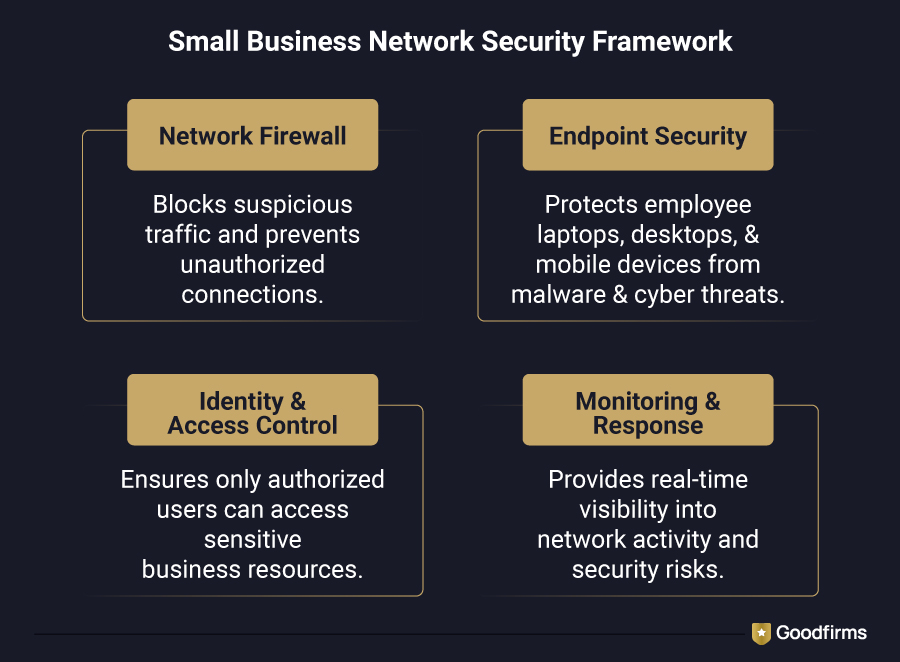
A small business network security software stack typically includes:
- A firewall to filter traffic at the network edge
- Business VPN software or Zero Trust access for remote and hybrid staff
- Network monitoring software to flag unusual traffic early
- Managed network security for businesses without in-house IT
- Endpoint security software to cover individual devices
Enterprise network security software is built for large security teams managing thousands of endpoints. SMB network security solutions are built for the opposite: fast deployment, low maintenance, and no dedicated security staff required.
Network Security Software for Small Businesses Comparison Table
|
Tool |
Category |
Best For |
Key Features |
Starting Price |
|---|---|---|---|---|
|
Site 24*7 |
Network Monitoring |
Small teams needing all-in-one uptime and infrastructure visibility |
Website, server, and network monitoring; cloud and app performance tracking; instant downtime alerts |
From $9/month |
|
SuperOps.ai RMM |
RMM |
MSPs and small IT teams managing client devices remotely |
AI-driven alerting, patch automation, unified RMM + PSA, Splashtop remote access |
From $150/month |
|
NinjaOne |
RMM / Endpoint Management |
Businesses wanting per-device pricing that scales with growth |
Remote monitoring, automated patch management, endpoint security integration, and mobile device management |
$1.50–$3.75 per endpoint/month |
|
McAfee Total Protection |
Endpoint Protection |
Small businesses want a simple, all-in-one device security suite |
Antivirus, built-in VPN, password manager, identity theft protection, firewall |
From $39.99/year (1 device, intro price) |
|
Untangle NG Firewall |
Firewall |
Small businesses want budget-friendly, software-based firewall protection |
Web filtering, application control, VPN (OpenVPN), intrusion prevention, centralized management |
From $25/month |
|
Sophos Firewall (XGS) |
Firewall |
Businesses wanting enterprise-grade next-gen firewall hardware |
Xstream deep packet inspection, TLS inspection, sandboxing, and centralized cloud management |
Hardware from $1037 (XGS 108) + custom subscription |
|
Cloudflare (Zero Trust) |
Cloud Firewall / SASE |
Cloud-first businesses wanting Zero Trust access without hardware |
ZTNA, secure web gateway, DNS filtering, 300+ city edge network |
Free up to 50 users; $7/user/month beyond that |
List of Best Network Security Software for Small Business
This section lists the best network security software that is actually required. This software protects small businesses from firewalls and endpoint threats, and helps catch issues before customers do.
Site24x7
Site24x7 is a cloud-based monitoring platform that gives small businesses visibility into servers, networks, applications, and websites from a single dashboard. Rather than enforcing security policy directly, it acts as the early-warning layer flagging unusual traffic, hardware failures, and downtime before they escalate into bigger problems.
Key Features
- Real-time server, network, and application monitoring
- Instant downtime alerts via email, SMS, and push notifications
- Bandwidth usage and traffic-peak tracking with NetFlow
- Monitoring from 50+ global locations
Pros
- Affordable entry point for small teams
- Single dashboard covers websites, servers, and network devices
- Strong real-user monitoring for web and app performance
Cons
- Pricing plans can feel rigid for teams needing a narrower feature set
- Alert tuning takes some initial setup time
Why It Stands Out in 2026: Site24x7 remains one of the most accessible entry points into network monitoring software for small businesses that can't yet justify a dedicated security operations tool.
SuperOps.ai RMM
SuperOps.ai RMM is a unified RMM and PSA platform built for MSPs and internal IT teams managing multiple devices remotely. Its AI-driven alerting cuts through noise by grouping related issues and surfacing only what genuinely needs attention, a meaningful advantage for small teams without a dedicated security analyst.
Key Features
- AI-powered alert prioritization and noise reduction
- Automated patch management and deployment
- Unified RMM and PSA platform with built-in remote access
- Script generation in plain English for Windows, Mac, and Linux
Pros
- Transparent, published pricing (rare in this category)
- Fast onboarding, minimal training required
- Strong value for small-to-mid MSPs
Cons
- Per-technician plus per-endpoint pricing can get complex at scale
- PSA depth still trails legacy competitors
Why It Stands Out in 2026: SuperOps.ai is one of the clearer examples of AI-powered network security tooling built specifically for growth-stage MSPs rather than retrofitted from an enterprise product.
NinjaOne
NinjaOne unifies endpoint management, patch automation, and remote monitoring into a single platform, used by more than 17,000 IT teams. Its per-device pricing model means costs scale with your actual fleet size rather than the number of technicians managing it.
Key Features
- Remote monitoring and management across Windows, macOS, and Linux
- Automated patch identification, approval, and deployment
- Endpoint security integration (antivirus, anti-malware, device encryption)
- Mobile device management for iOS and Android
Pros
- No per-technician fees, pure per-endpoint pricing
- FedRAMP Moderate Authorized, SOC 2 Type II/III compliant
- Consistently high user satisfaction scores
Cons
- Per-device pricing gets expensive fast for small fleets (under 50 devices sit near the top of the price range)
- Full pricing isn't published and requires a sales quote
Why It Stands Out in 2026: NinjaOne remains one of the most trusted names in managed network security for businesses that expect their device count to grow.
McAfee Total Protection
McAfee Total Protection bundles antivirus, a built-in VPN, a password manager, and identity theft protection into one subscription. For a small business without a dedicated IT security staff, it covers the device-level gap that a firewall alone doesn't reach.
Key Features
- Antivirus, anti-malware, and anti-spyware protection
- Built-in VPN for safe public Wi-Fi use
- Password manager and file encryption
- Identity theft monitoring and coverage (up to $2M on higher tiers)
Pros
- Simple, all-in-one setup for non-technical users
- Competitive first-year pricing
- Unlimited device coverage available on top-tier plans
Cons
- Renewal pricing increases significantly after the first year
- Lacks the network-layer visibility a dedicated firewall provides
Why It Stands Out in 2026: McAfee Total Protection is a reasonable baseline endpoint security solution for small businesses just starting to formalize their security stack.
Untangle NG Firewall
Untangle NG Firewall is a software-based next-gen firewall that filters traffic by IP address, protocol, and port, giving small businesses granular control without high-end hardware costs. It runs on generic hardware, a virtual machine, or a turnkey appliance.
Key Features
- Web filtering, application control, and intrusion prevention
- Built-in VPN support (OpenVPN, IPsec, WireGuard)
- App-store-style modular design adds only the features you need
- Centralized management console
Pros
- Budget-friendly compared to hardware-first competitors
- Flexible deployment (hardware, VM, or appliance)
- Strong small-business user ratings for ease of setup
Cons
- Modular add-ons (web filter, captive portal, AD connector) each carry separate license costs
- Device limits can feel restrictive for growing IoT-heavy networks
Why It Stands Out in 2026: For small businesses that want small-business firewall software without committing to expensive, proprietary hardware, Untangle remains one of the most cost-effective entry points.
Sophos Firewall
Sophos Firewall brings enterprise-grade protection, deep learning threat detection, automatic threat response, and integrated wireless management down to small business-sized hardware and pricing tiers.
Key Features
- Deep learning-based next-gen protection
- Automatic threat response that isolates compromised systems
- Integrated wireless controller for secure Wi-Fi deployment
- Centralized cloud management console
Pros
- Enterprise-grade threat detection at SMB scale
- Strong brand trust, 600,000+ customers worldwide
- Simple bundle-based pricing (appliance + protection tier)
Cons
- Higher upfront hardware cost than software-only competitors
- Full pricing requires a partner/reseller quote
Why It Stands Out in 2026: Sophos Firewall is one of the strongest choices for small businesses seeking top-tier network security software with an upgrade path as they scale.
Cloudflare
Cloudflare's Zero Trust platform delivers Zero Trust Security for SMB without any on-premise hardware. It's built for cloud-first small businesses that need business VPN solutions and secure access without maintaining physical firewall appliances.
Key Features
- Zero Trust Network Access (ZTNA) is replacing traditional VPNs
- Secure web gateway and DNS-layer filtering
- 300+ city global edge network
- Identity- and context-based access policies per application
Pros
- Genuinely usable free tier for up to 50 users
- No hardware costs, fully cloud-based
- Transparent, published per-user pricing
Cons
- DNS query caps (150,000/seat/month) can trigger unexpected seat requirements
- Advanced features (browser isolation, custom DLP) are locked behind the custom-priced Enterprise tier
Why It Stands Out in 2026: Cloudflare is the clearest example of cloud network security software built for small businesses that never want to touch a physical firewall.
Bruce Schneier, a Harvard Kennedy School lecturer and one of cybersecurity's most recognized voices, has spent decades arguing against the industry's obsession with tools over process, famously stating that "security is a process, not a product."

How to Evaluate the top Network Security Software for your Business?
The right network security software can not only be tested with the most features, but it’s also the one that fits how your business actually runs. Here are some factors to consider before you commit to any Network Security Tool for small businesses.
Threat Defense
Check how thoroughly it actually stops attacks, not just logs them. Look for real-time malware blocking, intrusion detection, and DNS-layer filtering rather than tools that only alert you after something's already gotten through.
Access Control
Who gets in, and how easily can you control it? Strong access control means role-based permissions and the ability to instantly revoke a former employee's access without manually disabling it on every device, a core requirement for any business network security software worth paying for.
Automation
Security Software must have manual patching and manual alert triage, which don't scale past a handful of devices. So, when selecting tools, prioritize those that auto-patch, auto-prioritize alerts, and flag anomalies without someone babysitting a dashboard all day.
System Integration
A tool that can adjust to your existing setup costs more than it saves. Check that it plays well with your current stack, meets your wireless network security software needs if your office runs Wi-Fi-connected devices, and scales to OT network security software if you run physical or industrial systems alongside standard IT.
Vendor Support
Small businesses rarely have a dedicated IT security and maintenance team, so support quality matters as much as the product itself. Before you buy, dig into actual network security software reviews from other small business users, not just the vendor's sales page, to see how support holds up once something breaks.
Common Mistakes Small Businesses Make
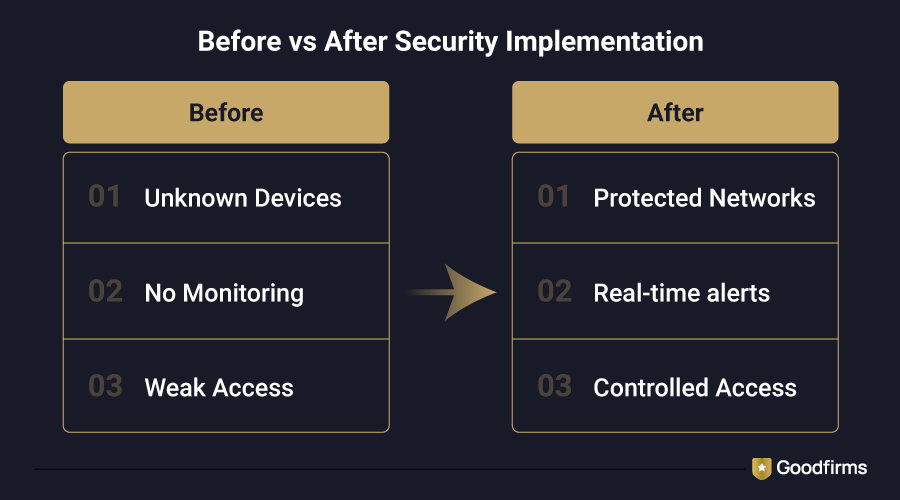
- Buying firewall software and never checking its settings is a common mistake among most small businesses. Most firewalls come with default settings that are not strong enough on their own, and leaving them unchanged gives attackers an easy way in.
- Relying on just one security tool is a mistake, because no single tool can stop every kind of threat. A firewall blocks external attacks, but it does nothing if an employee's laptop already has malware. That’s why businesses need more than one layer of protection.
- Skipping employee security training is a mistake, since one wrong click by an employee can undo good software. Most attacks succeed because a person clicked a bad link or opened a fake email, not because the software failed.
- Another common mistake is ignoring software updates, leaving known security gaps open for attackers to exploit. Updates exist because someone found a weakness, and delaying them gives attackers more time to exploit it.
- Believing a small business is too small to target is a mistake; attackers actually target small businesses, which account for around 43%. Small businesses often have weaker defenses than larger companies, which makes them easier and more attractive targets.
- Leaving remote logins unsecured is a mistake, especially when employees connect from public Wi-Fi or personal devices. Using a proper business VPN or Zero Trust access can close this gap and keep remote work from becoming a security risk.
- Buying complex enterprise network security software without the staff to manage it is a mistake that wastes money. Many features go unused, and the parts that do need attention often get ignored.
Network Security Trends in 2026
With the growing demand for online marketplaces and the digital world, the need for security has also increased. Here are some of the latest network security trends to keep your networks safe.
Zero Trust Security for SMB Becomes the Default
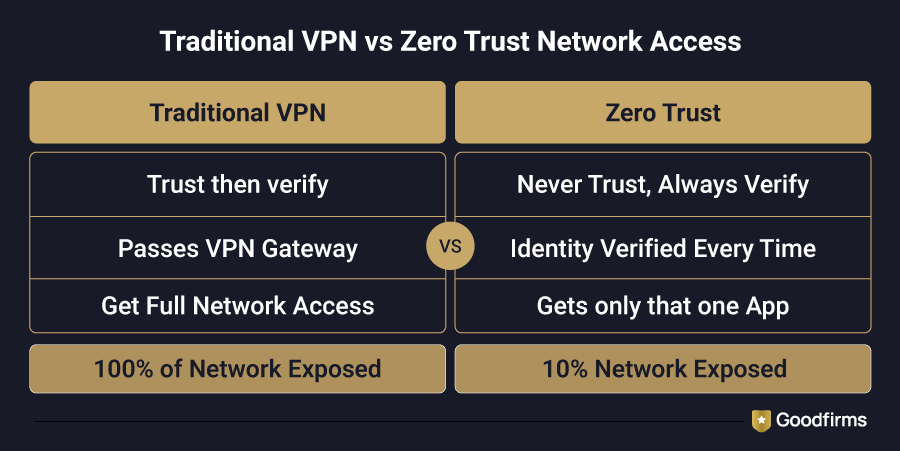
No more automatic trust just because a device is already inside the network. Zero Trust Security for SMB checks every login and every device, every time, regardless of where the connection originates. Remote and hybrid work is the main reason this shift is happening now.
AI-Powered Network Security Goes Mainstream
AI-Powered Network Security has moved out of enterprise-only pricing and into affordable small business network security software as detection costs drop. Vendors are building AI-driven threat detection into entry-level plans rather than gatekeeping it behind expensive enterprise tiers.
Cloud Network Security Software Overtakes Hardware
Cloud Network Security Software is winning over hardware firewalls, since hybrid teams logging in from everywhere make managing a physical appliance more of a hassle than it's worth. Cloud-based protection scales with the business instead of requiring a hardware upgrade every time it grows.
Business VPN Solutions Lose Ground to ZTNA
Business VPN Solutions are quietly being replaced by Zero Trust Network Access in many small business setups. A VPN opens the entire network once someone connects; ZTNA grants access app-by-app, closing a gap most businesses didn't realize they had.
Transparent Pricing Becomes a Competitive Edge
More vendors selling top network security software are publishing pricing upfront instead of forcing a sales call, pushed by smaller buyers who don't want to negotiate for basic numbers. This is also making it easier for businesses to compare network security software tools side by side before committing to a contract.
FAQs - Network Security Software
How does network security software work?
Network security software monitors traffic entering and leaving your network and blocks anything that looks unauthorized or malicious. A firewall checks traffic at the edge, endpoint security software watches individual devices, and monitoring tools flag unusual activity in real time. Together, these layers catch threats before they escalate into breaches.
How much does network security software cost?
Small business network security software costs range from around $9/month for basic monitoring tools to a few hundred dollars/month for a full firewall and endpoint stack. Business network security software with more advanced features, like Zero Trust access or AI-powered threat detection, tends to sit at the higher end of that range. Most vendors offer tiered plans, so cost scales with the number of devices or users you're protecting.
What is the difference between cybersecurity and network security?
Network security specifically protects your network and the traffic flowing through it, including firewalls, VPNs, and DNS filtering. Cybersecurity is the broader umbrella that covers everything from network protection to endpoint security, application security, and data protection. Businesses comparing options beyond network-layer tools often move on to cybersecurity software such as antivirus suites, identity protection, and application security platforms.
What are the different types of network security?
The main types include small business firewall software (filtering traffic at the network edge), endpoint security software (protecting individual devices), network monitoring software (watching for unusual activity), and Zero Trust security (verifying every login instead of trusting anything already inside the network). Most small businesses need a mix of these rather than just one.
Which is the best network security software?
There's no single best network security software for a small business; it depends on your setup. If you want cloud-based, hardware-free protection, Cloudflare is a good fit. If you need a budget firewall, Untangle NG Firewall is a strong pick. For businesses seeking enterprise-grade protection at SMB pricing, Sophos Firewall is one of the top network security solutions available.
Final Thoughts
Here's the thing about network security software: none of it works if it just sits there. The businesses that actually avoid becoming a statistic aren't the ones with the fanciest firewall; they're the ones that set it up properly, keep it updated, and train their people not to click the obvious phishing email.
Start small if you need to. A solid firewall and basic endpoint protection go further than most business owners expect. Add Zero Trust access, monitoring, and managed security as the business grows and the stakes get higher. What matters most is starting now, not waiting until after the six-figure breach headline is about your business instead of someone else's.
Still deciding between options? Ensure to evaluate the right software based on your business requirements.