Key takeaways
- ClickUp packs in more features than the others, but they are quite expensive and probably need extra training and effort to get everyone on board.
- Monday.com feels much friendlier, where team members can easily jump in and start using it right away without much hassle.
- Asana handles complex projects really well, especially if you are juggling deadlines, dependencies, or different teams.
- All three platforms already have AI built in, but ClickUp goes a step further. It uses data from the workspace to offer more relevant insights and recommendations.
- No matter which tool you pick, user reviews keep saying the same thing: getting team members trained and genuinely engaging matters way more than simply having a huge list of features.
Here's a pattern that repeats itself in organizations of all sizes: a team spends two weeks evaluating project management software, picks one, and then quietly stops using it within 60 days.
It's not a unique problem. Research from ProofHub shows that 70% of projects fail at least partly due to poor planning and management practices — and the tools meant to solve that problem often go unused. According to MosaicApp's analysis of PM software adoption, only 23% of organizations currently use dedicated project management software, despite the market growing steadily.
"Buying the software is the easy part. Getting your team to actually use it — that's where most projects slowly fall apart."
This comparison focuses on that gap. We looked at how ClickUp, Monday, and Asana perform in real-world use, drawing on verified reviews from Goodfirms project management software listings for all three platforms.
Browse the Goodfirms Project Management Software directory to compare verified reviews, pricing, features, and integrations before investing in a new platform.
ClickUp vs Monday vs Asana: A Quick Comparison Chart
|
Feature |
ClickUp |
Monday |
Asana |
|---|---|---|---|
|
Best for |
All-in-one power users |
Visual, ops-heavy teams |
Structured task management |
|
Starting price |
Free / $7/user/month |
$9/user/month |
Free / $10.99/user/month |
|
Free plan |
Yes — unlimited users |
2 seats only |
Up to 10 users |
|
Mid-market |
$12/user/month |
$12/user/month |
$24.99/user/month |
|
Enterprise |
$25–$40/user/month; AI/compliance increases costs |
$19/user/month |
$35-$45/user/month |
|
Set up time to be productive |
2–3 weeks |
1–2 days |
3–5 days |
|
AI features |
ClickUp Brain (context-aware) |
Monday AI (workflow automation) |
Asana AI (goal & risk-focused) |
|
Avg. rating on Goodfirms |
4.7 / 5 |
4.6 / 5 |
4.6 / 5 |
Source: ClickUp, Monday, Asana
Note: Ratings are based on publicly available Goodfirms review data as of 2026 and may change over time.
How We Evaluated ClickUp, Monday, and Asana?
This comparison combines publicly available product documentation, pricing information, feature releases, and verified user reviews available on Goodfirms as of May 2026. Each platform was evaluated on usability, adoption speed, collaboration capabilities, AI functionality, automation, integrations, and overall value for money.
What Should You Look for in Project Management Software in 2026?
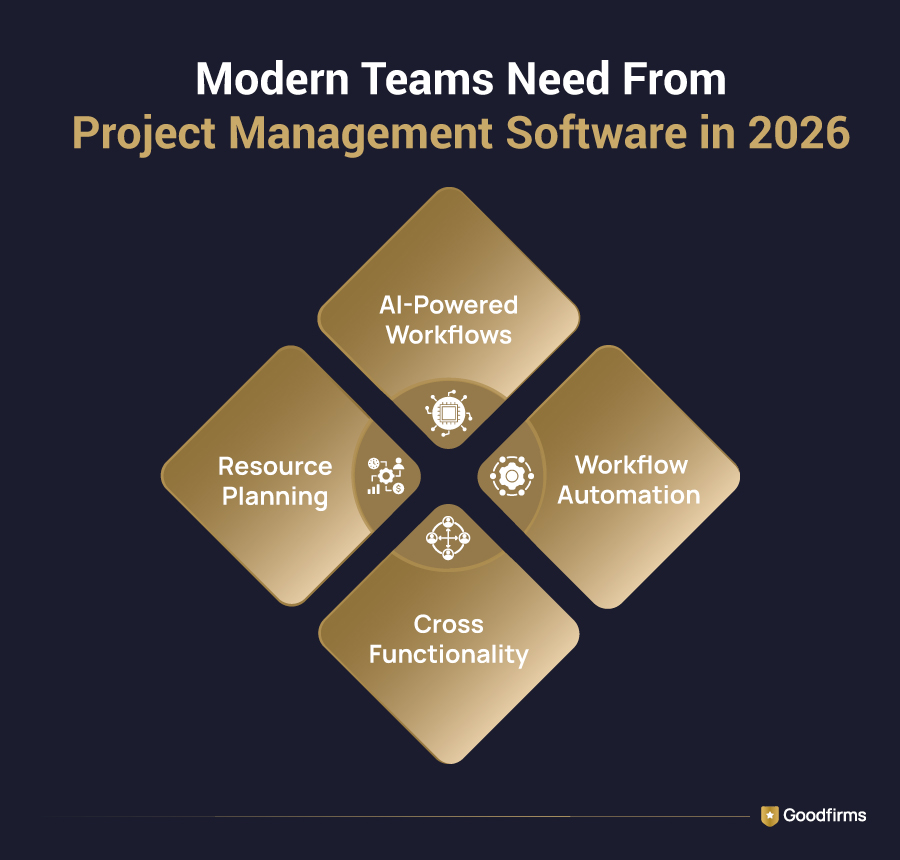
The project management software requirements shifted in 2023, such as task assignment, due dates, and a Kanban board. But in 2026, teams expect their tools to reduce decision overhead and not just track work, but also surface what's stuck, who's overloaded, and what's at risk.
Here's What That Means Across Four Dimensions That Matter Most:
1. AI That Uses Your Real Data
Every platform markets AI heavily right now. The gap between marketing and reality is significant.
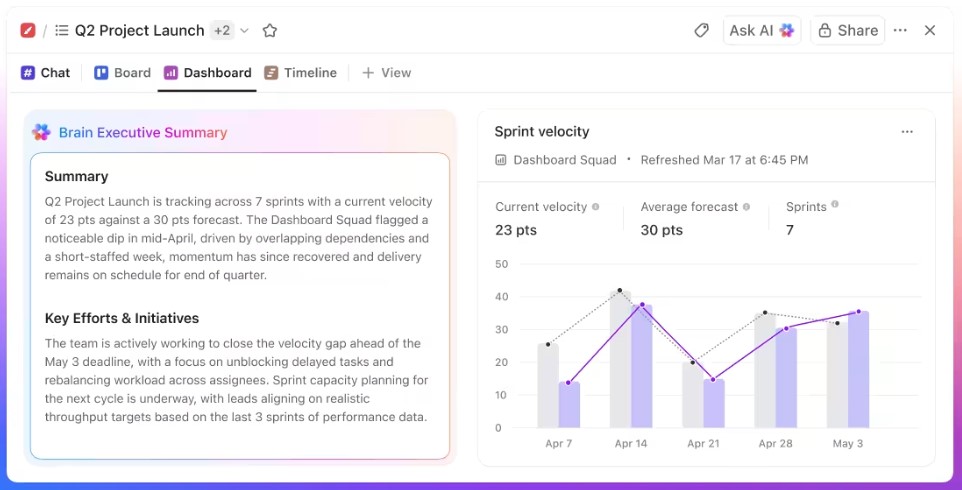
- ClickUp Brain: is embedded across the workspace — it can summarize a project's current status, generate subtasks from a plain-text goal, and flag overdue items in natural language. Crucially, it draws on your actual tasks, docs, and comments rather than producing generic output.
- Monday AI: focuses on automating workflow steps — if this status changes, trigger that action, send that notification. It's more rule-based than generative, which makes it reliable but less flexible for ad-hoc use.
- Asana AI: It is strongest for goal and capacity alignment. It can identify which projects are at risk of missing OKRs and flag team members approaching overload. Less useful for day-to-day task generation, more useful for quarterly planning reviews.
The practical difference is that ClickUp's AI is deeply integrated into workspace data, while Monday and Asana focus more heavily on workflow automation and project-risk analysis.
2. Cross-Functional Visibility
Marketing, engineering, finance, and ops rarely share a single tool — but they need to see each other's work at critical handoff points.
- Asana: handles this through portfolios and goals. A VP can see every team's project status rolled up against company objectives without needing to open individual boards. This is Asana's clearest structural advantage over the other two.
- ClickUp: attempts to be the single source of truth for everything, using a hierarchy of Spaces, Folders, Lists, and Tasks that can mirror your org chart exactly. When it's configured well, it eliminates the need for cross-tool visibility entirely. When it's not, it creates a different kind of chaos.
- Monday: keeps things visual and immediate. Its dashboard builder lets non-technical stakeholders see status at a glance without needing to understand the underlying data structure. This is why operations and client services teams consistently rate it highest for stakeholder communication.
3. Workflow Automation
Automation is only useful if someone on your team actually builds the rules. The three platforms differ significantly in the effort required.
- Monday: Its automation builder is the most approachable — it uses plain-language conditionals ("when status changes to Done, notify the client") with a visual trigger-action UI. Most ops teams build their first working automation within 30 minutes.
- ClickUp: Its automation is more powerful and more complex. It supports nested conditions, cross-list triggers, and custom webhooks — but building anything beyond simple status triggers requires someone comfortable with conditional logic.
- Asana: It sits in the middle. Its rules engine is straightforward for standard workflows (assign a task when moved to a column, send a notification when the deadline passes) and handles most marketing and product team needs without heavy configuration.
4. Resource Planning
Three years ago, workload management was an enterprise add-on. In 2026, it's a baseline expectation — and the three tools handle it very differently.
- Monday: includes workload views in its Standard plan, showing who's assigned to what and flagging overallocation visually. It's the most accessible entry point for teams new to capacity planning.
- ClickUp: offers time estimates and workload tracking from its Business plan ($12/user/month) upward. The reporting is detailed once configured, but the initial setup requires deliberate effort.
- Asana: Its resource management sits behind its business tier ($24.99/user/month) — the most expensive threshold of the three. For teams that need it and can afford it, it's the most nuanced implementation, particularly for agencies managing billable hours across client work.
ClickUp: The Right Choice for Teams That Want One Tool for Everything
Source: Goodfirms
What ClickUp does well
The customization depth is genuinely unmatched. You can build a fully functional CRM, a content production calendar, a sprint board, an HR onboarding workflow, and a client portal — all inside one workspace, all linked together. The free plan supports unlimited users and tasks, making it the most accessible starting point for bootstrapped teams. ClickUp Brain, introduced at scale in 2024 and significantly improved through 2025, is the most capable AI assistant in this category for users who have populated their workspace with real data.
The integration library exceeds 1,000 connections, and native time tracking (built in, not an add-on) is a meaningful cost saving for agencies and consultancies.
ClickUp in Practice: Real User Feedback
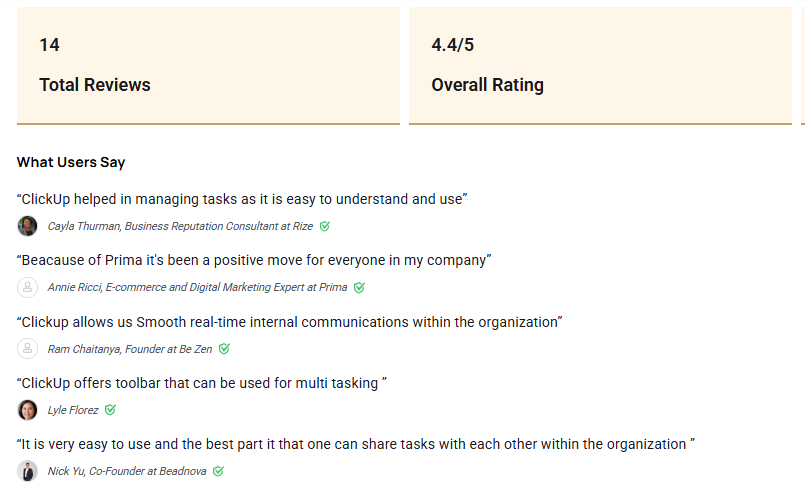
Offers a very big bang for its buck -At ChillyBin Web Design we have trialed and tried most of the leading project management solutions on the market over the past 10 years. We are currently using ClickUp and are extremely satisfied on its offering, the price point is great for our 10 person team and the feature set is outstanding, supporting multiple views, custom fields, and different workspaces and projects as well as guest users so some of our clients are able to check their projects progress. — Shaan Nicol, CEO & Founder at ChillyBin Web Design
Source: ClickUp
Where ClickUp Struggles
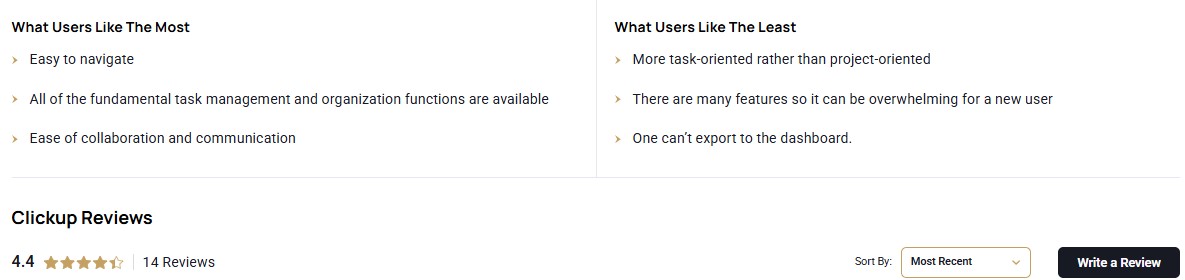
New users face a steep learning curve that the platform doesn't always help them navigate. There is no single "correct" way to structure a ClickUp workspace, which means teams without a dedicated systems-thinker often build inconsistently and end up with an unusable tangle within two months. The mobile app has improved, but still lags behind the desktop experience for complex task management. And because everything is customizable, there's no opinionated default.
A 15-person team on ClickUp's Business plan pays $105/month — roughly half what Monday charges for comparable functionality."
Who Should Choose ClickUp?
Product and engineering teams that want tasks, docs, sprint tracking, and roadmaps in one place. Agencies managing multiple client projects that want to consolidate tooling costs.
Growing startups with at least one person who genuinely enjoys building systems and will own the workspace setup.
Skip ClickUp if: Your team is non-technical, you need to be productive within a day, or you have nobody willing to own configuration and maintenance.
Looking for more user perspectives? Explore the Goodfirms ClickUp review profile to see verified customer ratings, pros and cons, and recent user feedback.
Monday: The Right Choice for Teams That Value Adoption Over Depth
Source: Goodfirms
What Monday Does Well
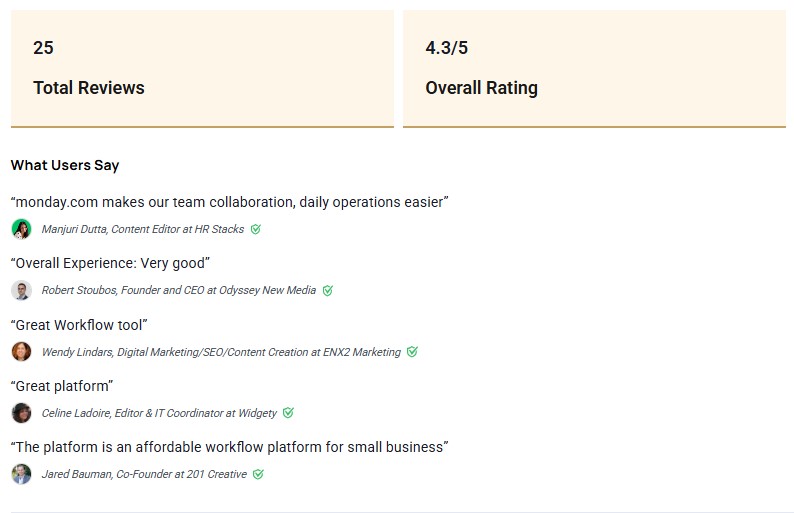
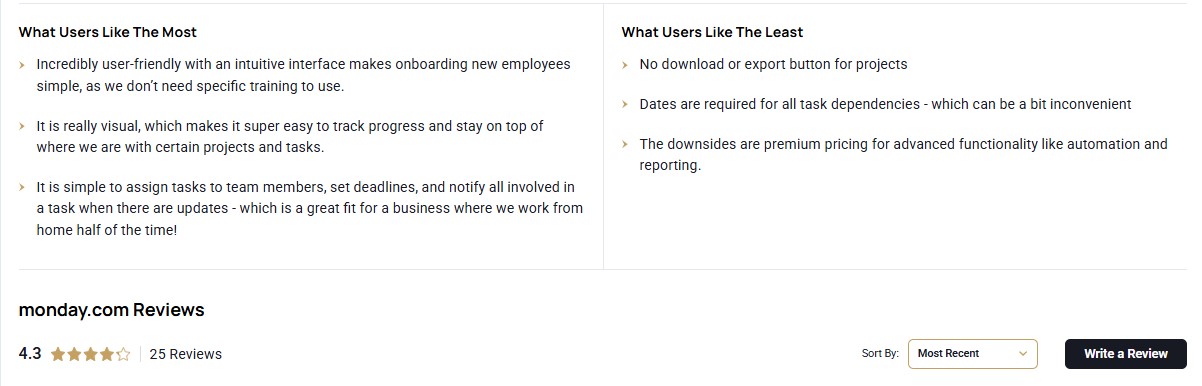
The visual board interface is the most immediately intuitive of the three. Status columns, color-coded priorities, and drag-and-drop updates require zero training for most users. The onboarding flow is guided and opinionated in a way that gets teams functional fast.
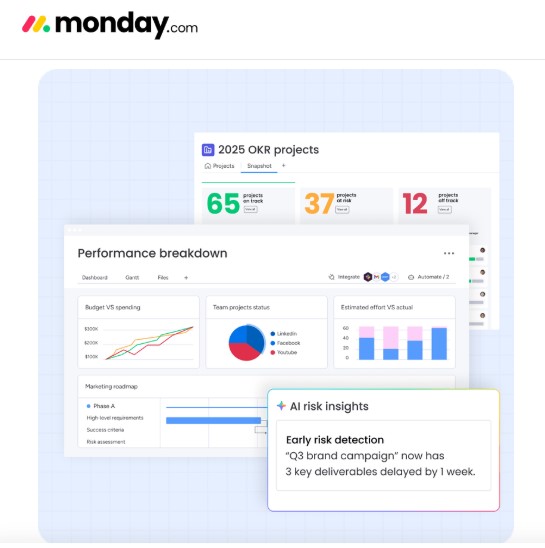
Monday's dashboard builder is the best in class for executive reporting — non-technical stakeholders can pull a high-level project overview in minutes without needing to understand how the underlying data is structured. Its integration library (200+ connections) covers all the major business tools, with particularly clean Salesforce and HubSpot connections that make it a natural fit for sales and client-services teams.
Monday in Practice: Real User Feedback
Monday.com has given our employees faster and easier access to their tasks. Since we Choice Mutual started using monday.com, we have been able to centralize the work of a multitude of projects. Monday.com means that employees can easily access their tasks from anywhere and then gives the rest of the team progress updates. This has been incredibly useful in helping us meet deadlines. We can see where people might need assistance in completing more complicated assignments, and it allows for all team members to pitch in when needed. – Anthony Martin, Founder and CEO at Choice Mutual
Source: Monday
Where Monday Struggles
Pricing is the platform's most significant weakness. The free plan is limited to two seats — effectively useless for real teams — and costs escalate quickly as you add users.
A 15-person team on the Pro plan crosses $285/month (19X15), compared to roughly $180/month (12X15) on ClickUp's Business plan, while still accessing many comparable project management and collaboration features.
Deep task hierarchies (subtasks nested within subtasks) feel constrained compared to ClickUp or Asana. Time tracking is an add-on, not a native feature. And for teams that need complex dependencies or detailed resource management, Monday's visual simplicity starts to feel like a ceiling rather than a feature.
Source: Goodfirms
Who Should Choose Monday?
Operations teams, marketing agencies, and non-technical business units whose biggest challenge is getting people to log into the tool consistently. Client services teams that need clean, presentable dashboards for external stakeholders. Teams that have failed with other tools before and need a fresh start with a low-friction interface.
Skip Monday if: You are budget-sensitive with a team larger than 10, you need deep task nesting, or your team's primary challenge is complexity rather than adoption.
For additional customer experiences and ratings, visit the Goodfirms Monday review profile and compare feedback from teams using the platform in real-world environments.
Asana: The Right Choice for Teams That Need Structured Accountability
Source: Goodfirms
What Asana does well
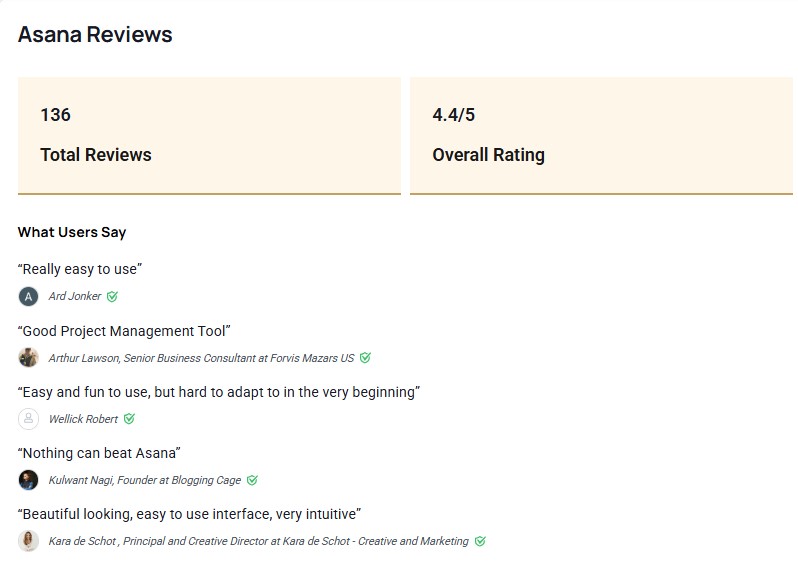
Task dependencies are first-class features in Asana, not afterthoughts. Timeline view, portfolios, and goal tracking are built into the core product logic — not bolted-on modules. When a blocker slips, Asana surfaces the downstream impact automatically, giving project leads time to adjust before a deadline is missed.
The goal-tracking feature connects individual tasks to team-level OKRs and company objectives in a way that neither ClickUp nor Monday replicates at the same depth. For organizations running quarterly OKR cycles, this alone justifies the higher price tier.
Adoption is also faster than ClickUp. New team members grasp Asana's structure within hours — tasks have owners, due dates, and statuses, and the logic is familiar enough that most users don't need a training session.
Asana AI is the most mature for risk detection — it surfaces tasks at risk of missing deadlines and identifies team members approaching capacity before those issues become crises.
Asana in Practice: Real User Feedback
Asana has systematized the workflow for more productivity - Our company, EarthWeb, has been using the Asana software for the past two years, and we are using this workflow management software daily to update the four sets of tasks. Asana, I believe, is the best workflow software that could exist for a blog-oriented website. With Asana, we assign different projects to our team of editors, and then they divide those projects into multiple stages and work concurrently with their managers, subordinates, and company executives - Bobby Lawson, Technology editor/publisher at EarthWeb
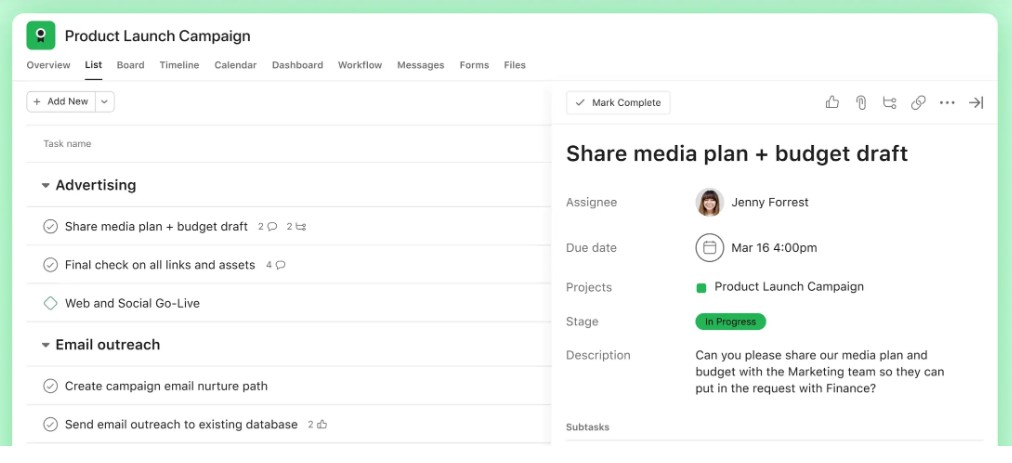
Source: Asana
Where Asana Struggles
The most useful features — timelines, portfolios, workload management — sit behind paid tiers, and the jump from free to paid ($10.99/user/month) is significant. Unlike ClickUp, there are no native docs, chat, or whiteboards — Asana is a focused task management tool, not an all-in-one platform, and you will still need companion tools for knowledge management and async communication.
A 15-person team on Asana's Starter plan costs $157.50/month ($10.99 × 15), while the Advanced plan reaches $373.50/month ($24.99 × 15) — compared to roughly $180/month on ClickUp's Business plan for the same team size.
The interface, while clean and functional, is more utilitarian than Monday's. Teams accustomed to a visual, board-first experience may find it feels dense at first.
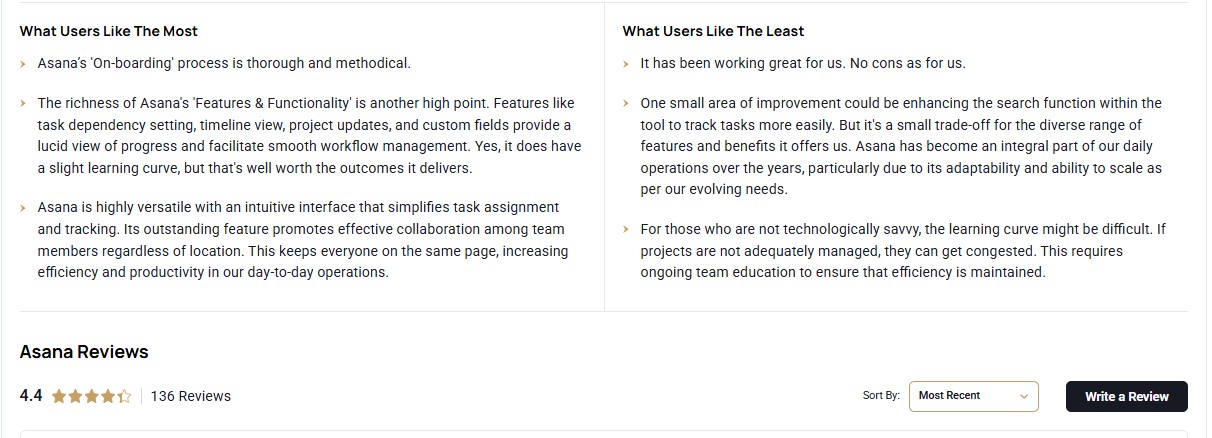
Source: Goodfirms
Who Should Choose Asana?
Marketing teams running multi-channel campaigns with multiple contributors and hard deadlines. Product teams managing roadmaps across engineering, design, and QA. Any organization — from 5 to 500 people — that needs clear ownership, dependency tracking, and connection between day-to-day tasks and strategic goals.
Skip Asana if: You need an all-in-one platform, your team is primarily visual thinkers, or your budget won't support the business tier, where the most valuable features live.
You can also review verified customer ratings and experiences in the Asana review profile listed on Goodfirms to better understand how different teams use the platform.
Which Tool for Which Team: Decision Guide
You are a startup founder tired of paying for five separate tools → ClickUp is the best option for you
The free plan is genuinely functional for teams under 10 members. Consolidating docs, tasks, and goals into one workspace can eliminate Notion, Toggl, and your Trello board in a single move — if you are willing to spend a week setting it up properly.
You run an operations team, and two previous tool rollouts have failed → Monday is the right option for you
The visual interface removes the activation energy barrier that kills most deployments. Book a two-hour setup session with your team on day one, build your first board together, and you will have real buy-in before the week is out.
You manage a 25-person marketing team running multi-channel campaigns → Asana is the one for you
The combination of task dependencies, timeline view, and goal tracking handles campaign complexity better than either competitor. Upgrade to the Business tier to unlock workload management — it's worth the cost if your team is routinely missing handoffs.
You are a product team that wants engineers and PMs in one place. → ClickUp or Asana
-
ClickUp: if you want a single tool for everything, including specs and sprint tracking.
-
Asana: if your primary need is roadmap clarity and goal alignment, and your engineers already live in Jira or Linear.
You are an enterprise evaluating for 200+ users: →
- Asana: for OKR-driven organizations.
- Monday: for divisions where executive reporting and stakeholder dashboards drive adoption decisions.
Both have enterprise SSO, advanced permissions, and dedicated support — request a guided pilot rather than a standard demo.
Goodfirms Insight: Based on an analysis of verified reviews across ClickUp, Monday, and Asana listings on Goodfirms, a recurring trend is that teams rarely switch tools because of missing features. Most migrations stem from adoption challenges rather than capability gaps.
Adoption Reality Check: The Factor Most Comparisons Ignore
Across user reviews and implementation experiences, one pattern appears repeatedly:
- The team that does the evaluation is not the team that does the work.
- The person who picks the tool is usually a project manager or operations lead who is comfortable with software and excited about features.
- The people who need to use the tool daily are often not in the room for that decision — and when the tool hits their inbox as a "we're switching to this on Monday" email, resistance follows.
The Three Platforms - Monday, Asana, and ClickUp Manage this Risk Very Differently
- Monday: reduces onboarding resistance better than the other two. Its visual grid is familiar enough that most people connect it immediately to spreadsheets they already use. Resistance is lower because the learning gap is smaller.
- Asana: reduces resistance through familiarity with the concept. Tasks, owners, due dates — the model is intuitive even if the interface is new. The structure is rigid enough that there's no "how should I set this up?" paralysis.
- ClickUp: requires a deliberate change management effort. If you are choosing ClickUp for a team larger than 15, assign one person as the workspace owner, give them two weeks before launch to build templates and automations, and run a live walkthrough — not a recorded video — for the full team on day one.
FAQ’s - ClickUp vs Monday vs Asana
Is ClickUp better than Asana in 2026?
It depends on what you need and who's doing the setup. ClickUp delivers more features per dollar and has the strongest AI assistant of the three. Asana is more structured, faster to adopt, and meaningfully better for connecting team-level work to company goals. For teams with a dedicated systems administrator willing to own configuration, ClickUp is the better long-term investment. For teams that need structured accountability without heavy setup, Asana is more reliable.
Is Monday easier to use than ClickUp?
Yes, significantly. Monday's visual board interface has the lowest learning curve of the three. Most non-technical users can navigate their first board within an hour without any training. ClickUp's flexibility is its strength and its weakness — the same depth that enables advanced use cases also creates a steeper onboarding experience. If adoption speed is your primary concern, Monday is the clear choice.
Which project management software is best for startups in 2026?
ClickUp, primarily because of its free plan. Unlimited users, unlimited tasks, and native docs make it possible to replace multiple tools on a zero budget. The caveat is that you need at least one person willing to own a workspace setup. If your team is small and non-technical, Asana's free plan (up to 10 users) is a lower-friction starting point.
Which platform has the best free plan?
ClickUp's free plan is the most generous by a significant margin — unlimited users and tasks with reasonable storage limits. Asana's free plan supports up to 10 users with core task management features. Monday's free plan (2 seats) is practically unusable for real teams and exists mainly to let individuals evaluate the interface.
Is Asana worth the cost in 2026?
For teams that genuinely need portfolio management, dependency tracking, objectives, key results, and alignment, yes. The Business tier at $24.99/user/month is the most expensive of the three, but teams using those features consistently report fewer missed handoffs and clearer accountability. If you are only using Asana as a basic task list, the free or entry tier is sufficient — don't pay for Business features you won't use.
Which platform has the best AI features?
ClickUp Brain is currently the most practical AI implementation across all three platforms. It pulls context from your actual workspace data — tasks, docs, comments, and deadlines — rather than requiring you to prompt it from scratch. Monday AI and Asana AI are more narrowly focused: Monday AI on workflow automation triggers, Asana AI on risk detection and capacity flagging. If AI-assisted productivity is a priority, ClickUp is the strongest choice.
What is the best alternative to Monday?
ClickUp is the closest alternative for teams that want visual project management alongside deeper customization. Notion is worth evaluating if your team is document-first and tasks are secondary. Asana is a better choice if structured accountability and dependency tracking matter more than visual simplicity.
Conclusion:
The best project management software is rarely the one with the longest feature list. It is the one your team will actually use six months after implementation. Choose ClickUp if consolidation and customization matter most. Choose Monday if adoption speed is your biggest challenge. Choose Asana if accountability, dependencies, and goal alignment drive project success. Start by identifying your team's biggest bottleneck, then select the platform designed to solve it.