There’s a story David Foster Wallace used to tell about two young fish swimming along when an older fish passes by and casually asks them how the water is.
The two fish swim on. Then one turns to the other and asks:
“What the hell is water?”
Funny? Yes.
But also terribly familiar.
The point is that the things surrounding us every single day can become so familiar that we stop noticing them.
And that happens with digital products too.
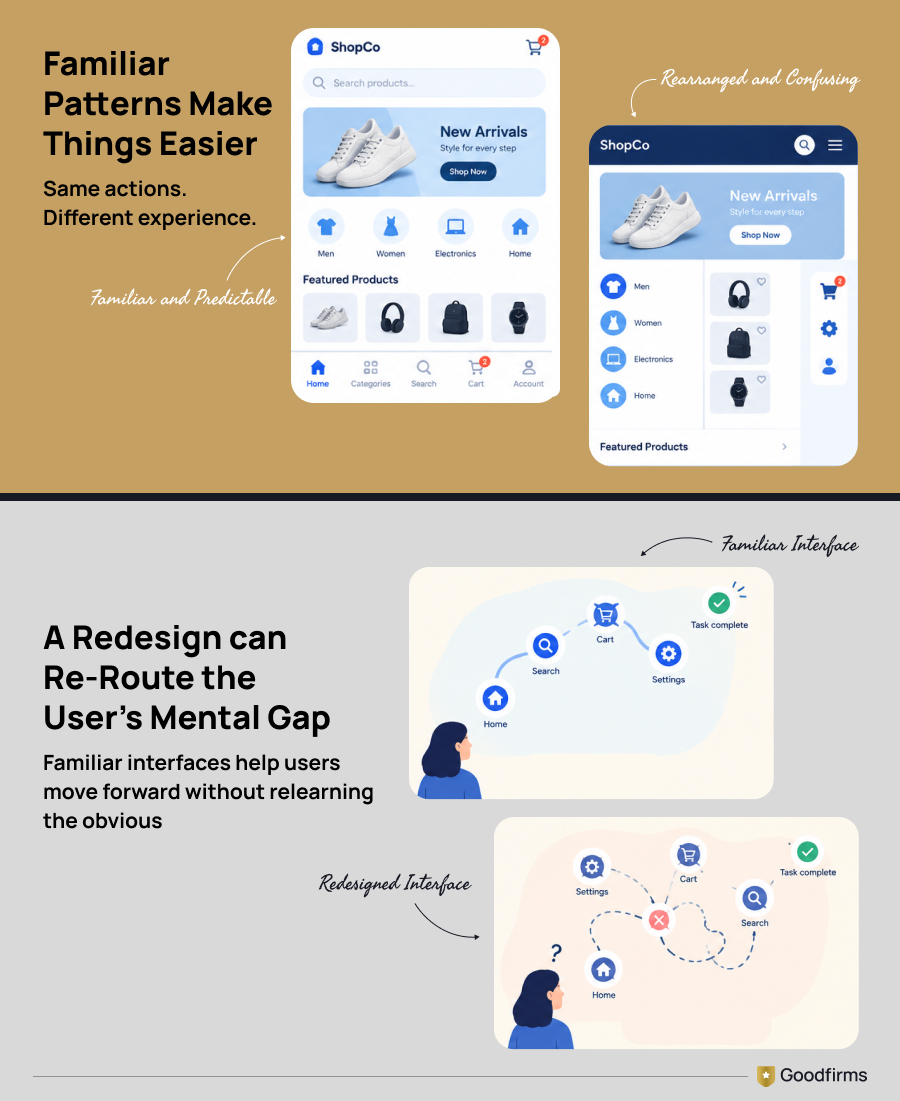
You probably don't stop to admire the shopping cart sitting in the top-right corner of an e-commerce website.
You don't marvel at the magnifying-glass icon before clicking it to search.
You don't stare at the company logo in the upper-left corner, wondering what will happen when you click it.
You just know.
The interface disappears. The task takes over.
That, right there, is the power of familiarity.
And it explains why product designers sometimes get themselves into trouble when they decide everything users already understand is suddenly too boring, too old, or too predictable.
It also explains why marketers keep showing up in front of the same audiences.
Because familiar things require less figuring out.
And things that require less figuring out often feel easier to deal with.
Welcome to the familiarity principle.
Familiarity reduces friction. The right design partner helps you know when to preserve it—and when to break it. Explore leading product design companies on Goodfirms.
What Is the Familiarity Principle?
The familiarity principle describes our tendency to feel more comfortable with things, people, patterns, or experiences we recognize.
In psychology, this idea is closely related to the mere exposure effect: repeated exposure to something can, under certain conditions, increase our preference for it.
Product design adds another layer.
Users don't arrive at your website or app as blank slates. They bring years of experience from other interfaces.
- A trash-can icon means delete.
- A gear usually means settings.
- A magnifying glass means search.
A cart means—well, if it suddenly opened your privacy settings instead of items selected, you'd probably wonder what the designer had for breakfast.
Apple puts the idea rather neatly: familiarity means building on what people already know. Consistent behavior and placement help people predict what will happen next. Apple Developer
So familiarity in product design isn't merely about making something look familiar. It's about making it behave in ways users already understand.
That distinction matters.
Why Does the Familiarity Principle Work?
Our brains have enough to do.
Passwords. Deadlines. Emails.
Did I switch off the iron panic attacks halfway to work?
The last thing users want is to spend unnecessary mental energy decoding a checkout page because someone decided the humble shopping cart needed an artistic reinvention.
Familiarity gives people a shortcut.
Instead of:
What is this? What does it do? Where do I click?
The brain gets to say: Oh. I've seen this before.
That's one reason established design conventions are so powerful.
Nielsen Norman Group's well-known Jakob's Law makes the point rather bluntly: users spend most of their time on websites other than yours, so they develop expectations based on how those other sites work. Nielsen Norman Group
In other words:
Your users have been training for your website long before they arrived.
Don't make them start from kindergarten.
Familiarity Principle vs. Mere Exposure Effect: Same Thing?
Not quite.
They overlap heavily, which is probably why you'll often see the terms used together.
But I wouldn't stuff them into the same suitcase.
The mere exposure effect is about repeated exposure
Psychologist Robert Zajonc helped popularize research showing that simply encountering something repeatedly can influence how positively people respond to it.
His studies used unfamiliar stimuli precisely because researchers wanted to see what repeated exposure itself could do.
So:
I've seen this several times, and as it becomes familiar to me, my response toward it may become more positive.
That's the classic mere-exposure territory.
Familiarity in design can come from learned conventions
Nobody has to repeatedly expose you to your particular e-commerce website before you understand its shopping cart.
You've learned the pattern elsewhere.
Same with:
- hamburger menus
- search icons
- password-eye icons
- swipe gestures
- play buttons
- progress bars
- checkout flows
- tab navigation
Product designers borrow from this accumulated knowledge.
So while mere exposure can create familiarity, familiarity can also come from years of experience with established patterns.
Small difference.
Big design implication.
The Familiarity Principle Is Everywhere in Product Design
Here's a fun experiment.
Open a completely unfamiliar e-commerce website.
Without consciously thinking, where would you look for the cart? Probably somewhere near the upper-right corner.
How about the company logo? Upper-left.
Search? Top area of the page, probably accompanied by a magnifying glass.
None of these rules were delivered to humanity on stone tablets. We learned them because enough websites behaved that way for long enough. Eventually, convention became expectation.
Nielsen Norman Group has described this as external consistency: people carry expectations learned from other products into yours. Nielsen Norman Group
Which brings me to one of my favorite pieces of product-design advice.
#1. Don't Make Users Learn What They Already Know
I know! I know!
"But shouldn't our product be different?"
Of course it should.
Your value proposition should be different. Your brand can be different. Your visual personality can be different. Your solution had better offer something worth choosing.
But does your checkout button really need to behave differently?
Probably not.
There's a difference between differentiation and confusion dressed up as creativity.
Consider these familiar patterns:
| Familiar pattern | What users normally expect |
|---|---|
| Magnifying glass | Search |
| Shopping cart/bag | Purchases |
| Trash can | Delete |
| Gear | Settings |
| Underlined text | Link |
| Eye icon in password field | Show/hide password |
| Logo in upper-left | Homepage |
| Progress indicator | Steps remaining |
Users aren't coming to your product to admire how cleverly you've reinterpreted Delete. They've got a job to do.
Help them do it.
Even Apple makes this point in its current design guidance: for common actions, there is little reason to reinvent familiar metaphors if the alternative makes people stop and decode the interface. Apple Developer
Familiar doesn't mean copy-paste
Before someone runs off and creates an Amazon clone, no.
That's not the argument. Study the conventions. Keep what helps users predict behavior.
Then differentiate where differentiation actually provides value.
Think:
Familiar skeleton. Distinct personality.
That's a much healthier product-design equation.
2. Design Around the User's Task, Not the Designer's Boredom
Here's an uncomfortable truth.
Designers see the interface far more than customers do.
They've discussed it.
Reviewed it.
Zoomed in on it at 200%.
Argued about six shades of blue.
Looked at the same navigation bar until they probably dream about it.
Then one morning, someone says:
“It feels dated.”
Does it?
Or are you simply tired of looking at it?
There is an important difference.
Users don't visit your website to appreciate your website.
They arrive to:
- buy something,
- compare something,
- book something,
- read something,
- find something,
- fix something.
That doesn't mean you should never redesign.
Far from it.
Bad accessibility, confusing navigation, weak conversions, outdated technology, poor mobile performance, or a mismatch with the business can all justify substantial changes.
But “we're bored with it” isn't a usability problem.
Users care about whether the interface helps them complete their task.
Remember the water.
What feels invisible to them might be invisible because it works.
#3. If You Redesign, Don't Frighten the Fish
This brings us to what I once called the elephant redesigning approach.
Yes, I made that up.
But hear me out.
You've heard the old question:
How do you eat an elephant?
One bite at a time.
Large product changes often deserve the same treatment.
If users have spent years learning where everything lives, radically rearranging the interface overnight can remove knowledge they've already paid for with their time.
Suddenly:
"Where did that button go?"
"Why doesn't this work anymore?"
"How do I do the thing I did yesterday?"
It doesn't mean every redesign should happen pixel by pixel.
It means existing user knowledge is an asset.
Treat it like one.
Instead of asking only:
What will the new interface look like?
ask:
What does the existing user already know—and which pieces of that knowledge are we about to invalidate?
That is a far more useful redesign question.
Test the dangerous changes first
Pay particular attention when changing:
- primary navigation
- checkout
- frequently used workflows
- feature names
- settings locations
- form behavior
- core icons
- account controls.
These are places where novelty can carry a learning cost.
Small visual refresh?
Users may barely notice.
Move the button they use fifty times a day?
Oh, they'll notice.
Case study: Snapchat's 2018 Redesign
Snapchat's 2018 redesign changed where users found Stories and mixed them with direct messages.
The issue wasn't just the new look. Users' existing mental map of Snapchat stopped working.
TechCrunch reported that 83% of reviews of the redesign in selected App Stores were one or two stars. More than 800,000 users had also signed a petition asking Snapchat to reverse the update, with that number later passing 1.2 million.
Users had already paid the learning cost. Snapchat changed the map.
5. Familiarity vs. Novelty: Where Should Designers Break Convention?
This is the question that interests me more. Because great products aren't built by copying everything people already know. But they aren't built to confuse users for sport either.
The trick is knowing where familiarity earns its keep.
Here's a simple framework:
|
Product area |
Lean toward |
|---|---|
| Navigation | Familiarity |
|
Search |
Familiarity |
| Login/signup | Familiarity |
| Checkout/payment | Familiarity |
| Common icons | Familiarity |
| Error handling | Familiarity |
| Core terminology | Usually familiarity |
| Visual identity | Familiarity + differentiation |
| Brand experience | Room for novelty |
| New feature concepts | Novelty, but teach clearly |
| Delight/micro-interactions | More room for experimentation |
My rule of thumb?
Don't spend users' mental energy where there is no payoff.
If understanding your experimental navigation gives them absolutely nothing in return, why make them learn it?
Save innovation for places where it improves the experience.
Familiarity Works in Marketing Too, But Please Don't Turn It Into Spam
Product designers aren't the only people borrowing from familiarity. Marketers practically live there.
Consider a brand you know well. Its logo appears in your LinkedIn feed. You scroll. Then again on Google.Then, inside an industry report. Then someone mentions it in a conversation. Then, three weeks later, you land on its website.
By now, you're not meeting a stranger. You're meeting something you've encountered before. That doesn't automatically mean you'll buy from it. And it certainly doesn't mean exposure can rescue a terrible product.
But repeated, relevant presence can create brand recognition. And recognition makes the next interaction less cold.
The trouble starts when marketers translate this into: More exposure = more sales.
That's how inboxes end up looking like hostage situations.
6. Retargeting Uses Familiarity, but Relevance Still Matters
Retargeting is perhaps one of the clearest marketing applications.
Someone visits your site.
Doesn't convert.
Later, they encounter your brand again.
And again.
Instead of appearing completely unfamiliar the next time they see you, your brand has context:
I've seen this company before. That's potentially valuable.
But notice my wording.
Potentially.
Because no amount of familiarity makes an irrelevant offer relevant. And repeated exposure to an annoying ad is still repeated exposure to an annoying ad. So stop treating retargeting as digital stalking with a media budget.
The better question isn't:
How often can we show this?
It's:
Does seeing this again help the customer move forward?
Big difference.
7. Consistency Builds Familiarity Faster Than Volume
Brands sometimes try to build familiarity by simply appearing everywhere.
LinkedIn.
Instagram.
YouTube.
Email.
Search.
Webinars.
Podcasts.
Three posts before breakfast. There's nothing inherently wrong with frequency.
But if the brand looks and sounds like a completely different company every time, you're making recognition harder than it needs to be.
Familiarity also comes from consistency.
The same visual language. The same positioning. The same recognizable tone. The same core promise.
Not identical content. Recognizable content.
There's a distinction.
Think of a person you know well. They don't repeat the same sentence every time you meet them.
Yet you recognize them immediately. Your brand should work similarly.
8. Repeat the Idea, Not Necessarily the Post
This is where the old marketing advice around repetition often goes sideways. You don't need to repost the exact same pitch endlessly. Repeat the idea through different expressions.
Say you sell project-management software and your core message is: Teams shouldn't need six tools to know whether work is on track.
That idea can become:
- a customer story
- a comparison
- a short video
- original research
- a LinkedIn post
- an infographic
- a product demo
- a newsletter
- a calculator
Same territory. Different entry points.
That's how brands build familiarity without sounding like someone stuck on repeat.
9. Social Proof Doesn't Create Familiarity, but It Can Reinforce It
Social proof gets bundled into familiarity discussions a lot, but they're not identical psychological effects.
Let's separate them.
Familiarity says:
I've encountered this before.
Social proof says:
Other people appear to trust this.
Put them together, though, and they can reinforce one another.
Imagine you're considering two unfamiliar products.
One has recognizable customers, detailed reviews, credible testimonials, and real case studies.
The other basically says:
“Trust us. We're amazing.”
Which one requires the bigger leap?
Exactly.
So instead of shouting louder about yourself, show evidence.
Useful social proof can include:
- customer reviews
- specific testimonials
- case studies
- customer logos
- independently verified ratings
- expert commentary
- user-generated content.
But don't use testimonials as decoration.
"Great company!!!" tells me almost nothing.
A customer explaining what problem they had, what changed, and what result they saw?
Now we're talking.
10. Familiarity Needs Quality Interactions, Not Just Frequent Ones
Here's the bit marketers conveniently forget.
Every repeated interaction teaches people something about the brand.
Good experience? You strengthen a useful association.
Irrelevant notification? Association.
Spammy email? Association.
Clickbait headline that doesn't deliver? Association.
Terrible support interaction? Oh, definitely an association.
Familiarity isn't automatically positive. If someone's previous five experiences with your company were irritating, the sixth encounter isn't arriving with a clean slate.
So yes, show up. But how you show up matters more than simply being seen.
Otherwise, congratulations—you've successfully made people familiar with the idea of avoiding you.
A Quick Familiarity Audit for Product Teams
Before launching a product, redesign, or major feature, run through this:
| Question | Yes/No |
|---|---|
| Are common actions using recognizable icons or labels? | |
| Does navigation behave the way users are likely to expect? | |
| Are similar actions presented consistently? | |
| Have we changed terminology that users already understand? | |
| Are we making users relearn a frequent workflow? | |
| Is breaking the convention giving users something valuable in return? | |
| Have major interaction changes been usability-tested? | |
| Can existing users still complete important tasks without hunting around? |
The key question is this one:
If we're breaking a familiar pattern, what does the user gain?
If nobody in the room has a decent answer, perhaps put the clever idea back in the drawer.
A Familiarity Audit for Marketers
Same principle. Different department.
Ask:
| Question | Yes/No |
|---|---|
| Is our positioning recognizable across channels? | |
| Are visual brand elements consistent? | |
| Are we repeating our core message without repeating identical content? | |
|
Is frequency based on relevance rather than “because we can”? |
|
| Are repeated interactions actually useful? | |
| Does our social proof contain specifics? | |
| Are we building recognition or merely adding noise? |
That last one deserves a Post-it on somebody's monitor.
The Familiarity Principle Is Not an Excuse to Stop Innovating
Innovation gets all the applause. Familiarity rarely does.
Nobody launches a product and proudly announces:
“LOOK! Our search icon is exactly where you expected it!”
And yet those invisible decisions often determine whether the product feels effortless or exhausting.
This doesn't mean innovation is the enemy. Far from it.
New interactions become tomorrow's conventions. But the best innovations usually offer enough value to justify asking users to learn something new.
That's the trade.
If you're going to break familiarity, give people something worthwhile in return.
Otherwise, you're not innovating.
You're moving the furniture around and making everyone look for the sofa.
Familiarity Breeds Comfort, but Don't Get Too Comfortable
Let's swim back to David Foster Wallace's fish for a minute.
The most familiar things can become almost invisible. That's exactly why good interfaces often disappear behind the task.
You don't think about where the cart is.
You shop.
You don't analyze the search icon.
You search.
You don't admire the navigation architecture.
You find what you came for.
Product designers can use that accumulated user knowledge rather than fighting it. Marketers can use repeated, consistent exposure to become recognizable rather than perpetually introducing themselves.
But there is a catch.
Familiarity is useful when it reduces friction. It becomes dangerous when it turns into repetition without relevance, convention without improvement, or consistency without thought.
So don't ask:
“Should we make this familiar or innovative?”
Ask:
“Where does familiarity make life easier for the user—and where is breaking it genuinely worth the learning cost?”
That's the more interesting question. And probably the more useful one too.