Key takeaways
- The 10 recruiting tools are split across five hiring stages, like core ATS, AI screening, AI sourcing and interviewing, agency CRM, and strategy-linked HR, so the right pick depends on which stage is actually causing you problems.
- The cost of this recruiting software ranges from $3/user/month to $199/month, with different tiers.
- Metahire is the only provider in this comparison with a free ongoing version; the other listed providers either offer trials or require paid plans.
- EU-based hiring teams should confirm a recruiting tool’s AI Act compliance before signing, as not following compliance can lead to penalties of up to €15 million.
- A recruiting tool pays for itself fastest when it fixes your specific bottleneck - sourcing, screening, or scheduling, rather than the one with the longest feature list.
Recruiters who onboard skilled and qualified employees quickly share one thing in common: they respond to candidates quickly and run every applicant through automated, systematic screening steps.
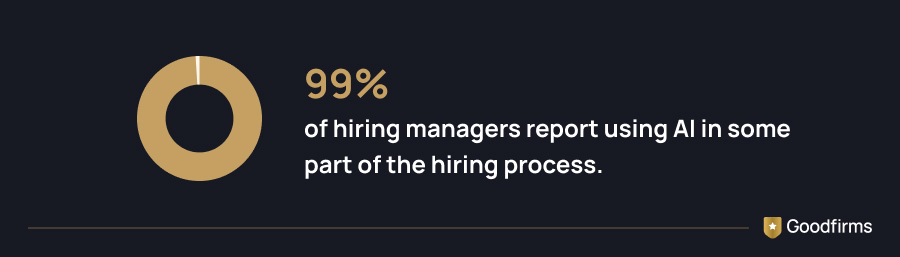
That kind of speed and consistency has become achievable at scale in 2026, thanks to the rising adoption of AI software across recruitment and HR.
 (Source: cvvic)
That surge in AI adoption sits on top of an already well-established base: Goodfirms' Digital Business Knowledge Survey found 54.4% of organizations now run dedicated HR software for new hiring requests.
At that level of adoption, it is clear that obsolete tools and legacy systems can’t help you close the hiring gaps that lead to more open roles and fewer quality candidates being onboarded.
Therefore, it is essential to understand which recruiting tools are useful across the hiring funnel, from applicant tracking to strategy planning after onboarding employees.
Browse the complete list of recruiting software on Goodfirms to compare verified options by pricing, features, and user ratings.
This article lists the top 10 recruiting software tools useful at every stage of the hiring process, along with their features and pricing details, enabling you to make the right selection for your recruitment needs.
Before we get into the details of each tool, here's a quick side-by-side look at all ten platforms — pricing, free trials, and what each one is best suited for — so you can jump straight to the ones worth a closer look.
Recruiting Software Comparison: All 10 Tools Side by Side
Comparing the best recruiting tools below reflects useful information that can help you select the best one for your specific needs and budget.
|
Software |
Best For |
Starting Price |
Free Trial |
Free Version |
|---|---|---|---|---|
|
Sage HR |
All-in-one HR + recruiting for small teams |
$8.19/Month |
30 Days |
No |
|
RECRU |
European staffing agencies |
$22.22/User/Month |
14 Days |
No |
|
Recruit CRM |
Executive search & recruitment agencies |
$27.15/User/Month |
14 Days |
No |
|
Eddy |
Local, field-based U.S. businesses |
$199/Month |
No |
No |
|
Reccopilot |
Automated end-to-end hiring |
$49/Month |
14 Days |
No |
|
JobArch |
Multilingual AI resume ranking |
$39/Month |
30 Days |
No |
|
Metahire |
Collaborative, bias-reduced hiring |
Contact Vendor |
14 Days |
Yes |
|
Hirevox |
AI voice interviewing at scale |
Contact Vendor |
No |
No |
|
Spark.work |
HR tied to strategy execution |
$3/User/Month |
No |
No |
|
CV-Transformer |
Agency CV formatting automation |
$198.86/Month |
7 Days |
No |
With those ten options laid out, the next step is understanding where each one actually earns its place in your hiring workflow, because not every tool is meant to solve the same problem.
The Recruiting Software Stack for 2026
The recruiting teams that move fastest in 2026 combine purpose-built software across five stages: core applicant tracking, AI-powered screening, AI sourcing and interviewing, agency-grade recruiting CRM, and connected HR strategy.
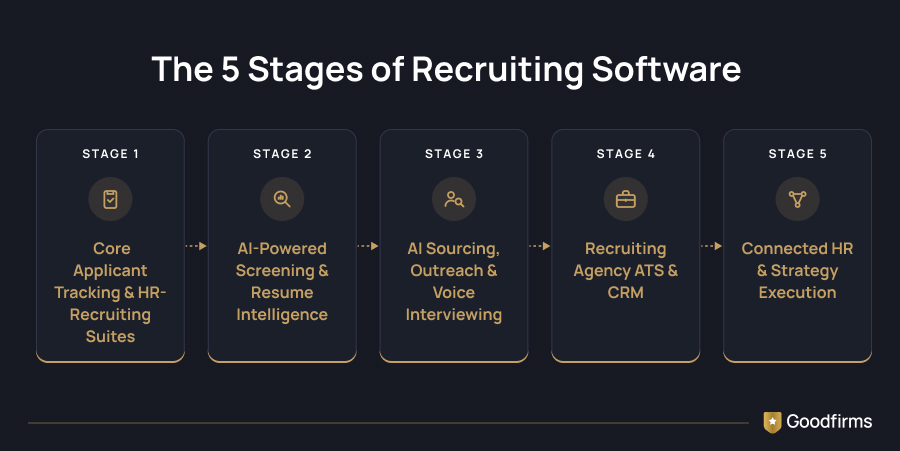
Below are the best recruiting software that lead each stage, based on their verified feature sets, pricing, and user reviews.
Stage 1: Core Applicant Tracking & HR-Recruiting Suites
Small and mid-sized businesses rarely need standalone applicant tracking software. They need recruiting built right into the same HR system that already handles their payroll and time-off requests. The best recruiting tools are built for exactly that. Below is information on Sage HR and Eddy, the strongest all-in-one picks for teams that need to automate and improve their applicant tracking process.
1. Sage HR
Sage HR runs applicant tracking, interview scheduling, onboarding, and resume parsing inside the same platform that already handles leave requests, shift scheduling, and payslips for small and mid-sized teams. Because recruiting sits next to the rest of the employee lifecycle, a new hire's offer letter, onboarding checklist, and HR record are already connected the moment they accept, with no second system to set up.
|
Starting Price |
$8.19/Month (Includes VAT) |
|---|---|
|
Free Version |
No |
|
Free Trial |
30 Days |
Why does Sage HR stand out?
- A centralized employee database keeps every record secure, current, and reachable in one place
- Mobile app lets staff and managers handle leave, expenses, and approvals from anywhere
- Custom workflow builder (Recipes) automates routine HR tasks in plain, sentence-style logic
- Self-service leave and absence tracking simplifies requests, approvals, and pattern monitoring
- Payroll add-ons connect HR and pay data for accurate, on-time processing
Sage HR suits growing teams of up to 250 people, blending everyday HR admin with scalable, cloud-based flexibility.
Key Insight: Sage HR carries a 5.0 average rating from its verified reviews, with users most consistently pointing to remote-work flexibility and pricing value as its biggest strengths.
Read verified user reviews for Sage HR on Goodfirms.
2. Eddy
Eddy targets businesses that operate outside a typical office, like construction crews, clinics, and multi-location retail, especially where standard HR software falls short. It covers job posting, applicant tracking, and interview scheduling, then rolls straight into onboarding and payroll for the people who get hired, with integrations into ZipRecruiter, LinkedIn, Glassdoor, and Talent.com for sourcing.
|
Starting Price |
$6/Person for Payroll $199/Month for Hiring |
|---|---|
|
Free Version |
No |
|
Free Trial |
No |
Where does Eddy fit best?
- Applicant tracking system posts jobs, screens candidates, and manages hiring pipelines with ease
- Includes Onboarding tools that let new hires e-sign forms and complete tasks before day one
- Full-service payroll handles wages, tax filings, and deductions automatically
- Time tracking software logs hours, breaks, PTO, and overtime for compliance
- Document management stores licenses, certifications, and contracts, with alerts for renewals
For frontline and field-based teams especially, Eddy keeps hiring, pay, and people operations inside one mobile-friendly system, so managers without desk access can still move a strong candidate through the pipeline.
What the reviews suggest: Eddy holds a 5.0 rating from its verified reviews to date, where one of the reviewers specifically praised the lack of a learning curve, while noting the interface felt slightly clunkier than working through a browser.
Read verified user reviews for Eddy on Goodfirms.
Stage 2: AI-Powered Screening & Resume Intelligence
Screening is where recruiters spend their maximum hours, and it is the stage AI has moved into most aggressively. JobArch and CV-Transformer both apply machine learning to the resume itself, ranking candidates or reformatting their applications before a human ever opens the file.
3. JobArch
JobArch's core strength is language-independent AI ranking: it reads professional experience inside a resume, compares it against the job posting's requirements, and scores candidate fit even when the resume and the job listing are written in different languages. That makes it a practical pick for recruiters hiring across borders, where keyword-only ATS filters typically miss qualified applicants.
|
Starting Price |
$39/Month |
|---|---|
|
Free Version |
No |
|
Free Trial |
30 Days |
What JobArch does best?
- AI-based CV matching ranks candidates automatically against job requirements
- Two-way multiposting publishes job ads across top boards and social channels instantly
- Searchable resume database lets recruiters unlock and reuse past candidate profiles
- Built-in assessment tools include skills tests and custom screening questions
- CRM and reporting module tracks pipelines, agenda, and hiring performance in one view
SMEs and staffing agencies use JobArch to cut time-to-hire without losing control of the recruitment cycle — CV matching, sourcing, and reporting all sit inside one intuitive dashboard.
Read verified user reviews for JobArch on Goodfirms
4. CV-Transformer
Recruitment agencies strive to present a client with a clean, professionally formatted CV quickly. CV-Transformer parses any incoming resume format, extracts the key information, and rebuilds it into a consistent, agency-branded layout, with integrations into Salesforce CRM, Greenhouse, JobAdder, and Bullhorn so the reformatted CV lands straight back inside the recruiter's existing pipeline.
|
Starting Price |
$198.86/Month |
|---|---|
|
Free Version |
No |
|
Free Trial |
7 Days |
CV-Transformer's standout capabilities
- Includes drag-and-drop custom templates alongside a large library of pre-made layouts
- AI CV interpretation extracts candidate data automatically from any PDF, Word, or image file
- One-click anonymization redacts names, photos, and contact details to reduce bias and meet compliance needs
- Native ATS integrations sync candidates and attachments directly with Greenhouse, JobAdder, Salesforce, and more
- Weblink sharing lets recruiters send trackable proposal links and see when clients view or download them
What used to take a recruiter an hour of manual reformatting, CV-Transformer turns into a client-ready, branded proposal in minutes — built specifically for recruitment and staffing agencies.
Read verified user reviews for CV-Transformer on Goodfirms
Stage 3: AI Sourcing, Outreach & Voice Interviewing
The most active layer of an automated recruiting system goes beyond screening candidates who apply. It finds them first, then runs the initial conversation before a recruiter gets involved. Reccopilot and Hirevox both operate as autonomous recruiting agents, working the pipeline rather than just storing it.
5. Reccopilot
Reccopilot is popularly known as a virtual hiring assistant, and the feature list backs that up: it posts and promotes job listings, chases candidates over email and calls, and screens applicants automatically instead of leaving that follow-up work to a recruiter's already-full calendar. It integrates with BambooHR and Google Calendar, and offers a 14-day free trial period.
|
Starting Price |
$49/Month |
|---|---|
|
Free Version |
No |
|
Free Trial |
14 Days |
What makes Reccopilot useful?
- AI-powered job creation and promotion refine job descriptions and auto-post them across job boards and social platforms
- AI-powered screening and assessments scan and rank every resume by fit, then trigger assessments for top candidates
- Automated candidate engagement sends timely follow-ups and personalized responses across email, SMS, and WhatsApp
- Intelligent talent pool management continuously resurfaces relevant past applicants from the existing database
- AI-driven analytics and reporting give real-time visibility into hiring performance, funnel health, and recruiter productivity
Where a traditional ATS just stores resumes, Reccopilot works the entire hiring cycle end to end, from writing the job requirement to sending the offer letter.
Worth Noting: Reccopilot's verified reviews give it a 5.0 rating, with the reviewers calling out its budget-friendly customization and faster support response time as standout strengths — though they noted more template options would help.
Read verified user reviews for Reccopilot on Goodfirms
6. Hirevox
Hirevox pushes furthest into automation of the group: it reaches candidates across email, WhatsApp, and LinkedIn, then conducts voice-powered assessments that evaluate a candidate's skills, experience, and role fit before a recruiter joins the process. For high-volume roles where the bottleneck is simply getting enough qualified candidates on the phone, that first-pass voice screening compresses days of scheduling into an automated conversation.
|
Starting Price |
Contact Vendor |
|---|---|
|
Free Version |
No |
|
Free Trial |
No |
Hirevox's key capabilities
- Multi-channel candidate outreach automates first contact and follow-ups across email, WhatsApp, and LinkedIn
- Voice-powered assessments evaluate each candidate's skills, experience, and role fit through structured conversations
- AI scoring and shortlisting surfaces only the top 1% of candidates who are genuinely ready to interview
- Detailed interview reports summarize candidate strengths, weaknesses, and fit for quick recruiter review
- ATS integrations sync outreach, screening, and scoring data directly into a team's existing recruiting workflow
For high-volume hiring teams, Hirevox handles the first-round conversation automatically, so live interview time only goes to candidates who've already cleared a structured screen.
Read verified user reviews for Hirevox on Goodfirms.
Stage 4: Recruiting Agency ATS & CRM
Recruitment agencies or businesses hiring staff need something beyond a corporate ATS: a system that tracks both the candidate pipeline and the client relationship at once. RECRU, Recruit CRM, and Metahire are all built specifically around agency and third-party recruiting workflows.
7. RECRU
RECRU was built by a team that spent eight years placing candidates across Europe and has personally mediated more than 20,000 job contracts, and that hands-on agency experience is baked into how the product works. It handles job orders, candidate pipelines, and client communication in one view, backed by phone, chat, and on-site training for recruiting teams that want more support than a typical SaaS rollout offers.
|
Starting Price |
$22.22/User/Month |
|---|---|
|
Free Version |
No |
|
Free Trial |
14 Days |
Where does RECRU have an edge?
- One-click multiposting publishes job ads across dozens of job boards while AI drafts the job description and syncs every applicant automatically
- AI-powered LinkedIn sourcing finds matching profiles from a plain-language description, no Boolean search required
- AI voicebot screens calls and screens dozens of candidates in minutes, testing skills, availability, and motivation automatically
- Workflow automation handles repetitive tasks like communication, CV screening, GDPR compliance, and testing from a single custom-built flow
- Reporting & analytics dashboard turns hiring activity into data-driven insights for tracking pipeline performance
Sourcing, screening, and pipeline movement all run automatically inside RECRU, freeing recruiters to spend their time on conversations and final hiring calls instead of admin work. That efficiency is exactly what stood out to the people who built the platform:

Best product fo recruiting, with exellent plugin for Linkedin, and connection to 2000 job portals.
What Stands Out: On Goodfirms' own feature matrix, RECRU is tracked against 11 core recruiting features — including collaborative recruiting, recruitment automation, and recruitment marketing — plus 10 applicant-tracking features and 13 HR features, one of the broader feature footprints in this list. It currently holds a 5.0 average rating across its verified reviews on Goodfirms.
Read verified user reviews for RECRU on Goodfirms.
8. Recruit CRM
Recruit CRM is a purpose-built solution for recruitment and executive search businesses, combining an AI-powered ATS with a full recruiting CRM in one interface. It integrates with Zapier, Gmail, Outlook, HubSpot CRM, Zoho, and Office 365, which matters for agencies juggling client communication across several channels at once, and users consistently point to its pipeline visibility as the standout feature over generic ATS tools.
|
Starting Price |
$27.15/User/Month |
|---|---|
|
Free Version |
No |
|
Free Trial |
14 Days |
Recruit CRM's strongest features
- AI agents handle resume formatting, candidate submissions, and email replies instantly, cutting hours of manual work every week
- Custom Field Parsing Agent extracts and populates candidate data from resumes automatically, keeping profiles structured and consistent
- Job multiposting publishes open roles across 5,000+ job boards from a single dashboard
- Bill & Pay tool simplifies invoicing, timesheets, and payroll management for contract staffing firms
- Fully customizable workflows and pipelines let agencies tailor the ATS + CRM to their exact recruiting process
Recruitment agencies in over 100 countries run their candidate sourcing, resume parsing, and pipeline management through Recruit CRM's combined ATS-and-CRM platform, built specifically for recruitment and executive search firms.
A Closer Look: Goodfirms' feature matrix tracks Recruit CRM against 13 recruiting-focused features — including assessments, reference checking, and resume parsing — alongside 8 dedicated applicant-tracking features, and the platform holds a 5.0 average rating on Goodfirms, consistent with its use by recruitment agencies in over 100 countries. That breadth of features shows up directly in how customers describe their day-to-day experience with the platform:

We use Recruit CRM. It’s a hiring manager’s dream software. The biggest thing I noticed right off the bat is how easy it is to import candidates from outside the CRM, particularly on LinkedIn. Thanks to the intuitive design and seamless interface, you can schedule interviews and move candidates through the pipeline with ease.
Read verified user reviews for Recruit CRM on Goodfirms.
9. Metahire
Metahire's pitch is collaborative recruiting: instead of a recruiter working a requisition alone, the platform pulls hiring managers and the wider team into the same pipeline, backed by automated tools meant to engage and grow talent pools with less bias built into the process. It is one of the few tools in this group offering a genuinely free version alongside its per-feature pricing.
|
Starting Price |
Contact Vendor |
|---|---|
|
Free Version |
Yes |
|
Free Trial |
14 Days |
What Metahire brings to the hiring process?
- Skill assessments identify candidate strengths using data-driven, science-backed evaluation methods
- AI-powered resume screening and ranking sorts through hundreds of applicants to surface top performers within days
- Automated candidate communication handles follow-ups, reference checks, and scheduling without manual intervention
- Robotic video interviews assess candidates at scale without recruiter time on every first-round call
- Advanced analytics and reporting give hiring teams visibility into pipeline performance and collaboration across the hiring team
Rather than leaving hiring decisions to resume-only judgment, Metahire pulls in data-driven, less-biased screening tools and gets the wider business collaborating with HR on every requisition.
Read verified user reviews for Metahire on Goodfirms
Stage 5: Connected HR & Strategy Execution
The final layer belongs to platforms that treat recruiting as one input into a bigger operating system, not a standalone function. For growing companies trying to tie headcount decisions to business strategy rather than just filling requisitions, Spark.work is the strongest option in this list.
10. Spark.work
Spark.work unites HR management with strategy execution, centralizing employee data, leave, and attendance while connecting recruiting activity directly to company-wide goals rather than treating it as an isolated HR task. On Goodfirms' feature matrix for recruiting software, it supports all 15 tracked features, more than any other product in this group, spanning applicant tracking, AI features, recruitment marketing, and self-service portals in one system.
|
Starting Price |
$3/User/Month |
|---|---|
|
Free Version |
No |
|
Free Trial |
No |
Spark.work's core capabilities
- Applicant Tracking System streamlines hiring from job posting to onboarding with smart, automated workflows
- Recruitment AI Agent finds and recommends the best candidates using predictive insights to shorten time-to-hire
- HR Data & Reporting turns real-time people data into unified, reliable insights for faster decisions
- Strategy Management connects OKRs, KPIs, and Strategy Maps so hiring and HR work tie directly to company goals
- Employee Self-Service lets staff manage their own data, requests, and documents without going through HR
Recruiting activity inside Spark.work feeds directly into company-wide goal tracking instead of sitting isolated — the platform is a combination of resource management software, ATS, performance, and strategy tools into one system.
Read verified user reviews for Spark.work on Goodfirms.
With the full lineup covered, the harder part is matching a tool to your team's actual hiring reality rather than its feature list. A few key questions make that decision much easier.
How to Choose the Right Recruiting Software for Your Team
The right platform depends less on feature count and more on where your hiring process actually breaks down today. Four questions narrow the list fast.
- What is your hiring volume? A five-person team hiring twice a year needs Sage HR or Eddy, not an enterprise CRM. An agency running 40 active requisitions needs Recruit CRM or RECRU's pipeline depth.
- Are you hiring in-house or placing candidates for clients? In-house teams need an applicant tracking software that connects to onboarding and payroll. Agencies need a CRM that tracks client relationships alongside candidates, which is exactly the gap RECRU, Recruit CRM, and Metahire fill.
- Where is the bottleneck: sourcing, screening, or scheduling? If job posts get few applicants, look at Reccopilot's automated sourcing. If resumes pile up unread, JobArch or CV-Transformer clears that backlog. If interview scheduling eats recruiter hours, Hirevox's voice-AI first-pass interviews remove that step entirely.
- What is your compliance exposure? Any organization hiring in the European Union should confirm a vendor's compliance with the EU AI Act's high-risk classification for recruitment AI before signing, given the €15 million maximum penalty for non-compliance.
Choosing the right recruiting software is important, and following the above steps can help you do that. A single wrong hire can cost a company months of lost productivity and morale, while the right one can shape a team's trajectory for years.
The tools in this guide can clear the noise faster, surface the right people sooner, and cut the busywork that used to eat a recruiter's week, but the judgment call on who actually gets hired still belongs to the team on the other end of the pipeline.
Even with a clear shortlist in hand, a few practical questions tend to come up before teams commit to any platform. The answers below cover the ones recruiters ask most often.
Frequently Asked Questions About Recruiting Software
Most of these concerns fade once a team has used a platform for a few hiring cycles, but they're worth weighing carefully before that first contract gets signed.
Is candidate data secure inside recruiting software?
Most platforms in this space store resumes, contact details, and interview notes in encrypted cloud databases with role-based access controls, so only approved team members can view a candidate's file. Reputable vendors also publish compliance documentation covering data retention, encryption standards, and breach protocols, which is worth reviewing before any team uploads sensitive applicant information at scale.
How disruptive is switching from spreadsheets to recruiting software?
Teams moving off spreadsheets usually feel the shift within the first week, since candidate data that once lived across scattered sheets and inboxes lands in one searchable pipeline. The bigger adjustment is behavioral: recruiters have to log activity inside the tool consistently, or the pipeline stops reflecting reality, and the switch loses much of its value.
Can recruiting software connect with existing payroll and calendar tools?
Yes, most modern platforms offer native or API-based integrations with common calendar apps, email clients, and payroll systems, so interview bookings and new-hire records sync automatically once an offer is accepted. Before signing up, it helps to confirm a vendor supports the specific combination of tools your team already relies on daily.
Does recruiting software work well for hiring on mobile devices?
Many platforms now offer dedicated mobile apps that let recruiters review applications, message candidates, and approve interview slots without sitting at a desk. This matters most for field-heavy industries like retail, healthcare, or logistics, where hiring managers rarely have laptop access and need to act on strong candidates the moment they apply.
How does recruiting software affect the candidate's experience?
Faster response times, clearer application status updates, and consistent communication all shape how candidates perceive a company during hiring. Automated acknowledgment emails and structured interview scheduling reduce the silence that frustrates applicants most, while a disorganized or slow process, software or not, tends to push strong candidates toward employers who respond first.
Can recruiting software help reduce hiring bias?
Some platforms include anonymized resume review, structured scorecards, and standardized interview questions specifically to limit the influence of unconscious bias during screening. These features work best when a team commits to using them consistently across every requisition, since occasional or selective use tends to undercut the fairness benefits the software is designed to provide.
How do teams measure the ROI of recruiting software?
Common indicators include the drop in time-to-fill, the reduction in cost-per-hire, and the hours recruiters reclaim from manual screening and scheduling each week. Tracking these numbers for a few months before and after adoption gives a clearer picture than vendor-reported averages, since actual gains vary by hiring volume, team size, and how deeply the tool gets adopted.
Is recruiting software suitable for hiring across multiple countries?
Platforms with multilingual resume parsing, localized job board integrations, and region-specific compliance settings tend to handle cross-border hiring more smoothly than single-market tools. Teams hiring internationally should also confirm how a vendor handles data residency requirements, since candidate information laws differ significantly between regions like the EU, the US, and APAC.
The details above cover what each platform does well and where it fits. The part that matters most, though, is choosing based on what your team actually needs, not what looks best on a features page.
Final Words: Closing the Hiring Gap Starts With Choosing the Best Recruiting Software in 2026
The right recruiting software isn't the one with the longest feature list; it's the one built for the exact spot where candidates are getting stuck, whether that's sourcing, screening, or communication. A recruiting tool chosen because it fixes that specific friction point will earn its cost back in weeks; one chosen because it looked impressive in a demo usually gets abandoned within a quarter. Every recruiting software mentioned in this guide leads to authentic and verified user reviews by Goodfirms. So before signing a contract, it's worth reading what current customers say firsthand about that particular software. And if none of these ten fit your exact workflow, you can go through this complete list of recruiting software featuring a plethora of options across every budget and team size.