Key takeaways
- Split-payment demo tests separate real marketplace software from relabeled eCommerce platforms with a convincing demo.
- Off-the-shelf marketplace software vs. custom decision hinges on workflow complexity and vendor model, not just available budget.
- The total cost of marketplace software at scale matters more than the advertised starting price once vendor volume grows.
- Mobile-first platforms win since over half of shoppers now buy through eCommerce apps.
- Confirm data portability before signing a contract, not after years of vendor data lock-in.
Planning to launch your eCommerce marketplace? Smart move. Multi-vendor eCommerce is redefining the industry in 2026, and demand isn't slowing down.
But here's where it gets tricky.
A successful multi-vendor business doesn't run on ambition alone. It runs on exceptional marketplace software that makes this possible - clean vendor data, accurate payouts, no-code scalability, smarter search, and accurate fraud prevention.
Compare 150+ vetted marketplace platforms on Goodfirms and pick the one that actually fits your business.
Now, these qualities in a marketplace software are non-negotiable to compete in an industry where Amazon captures close to 40.5% of total online sales, right?
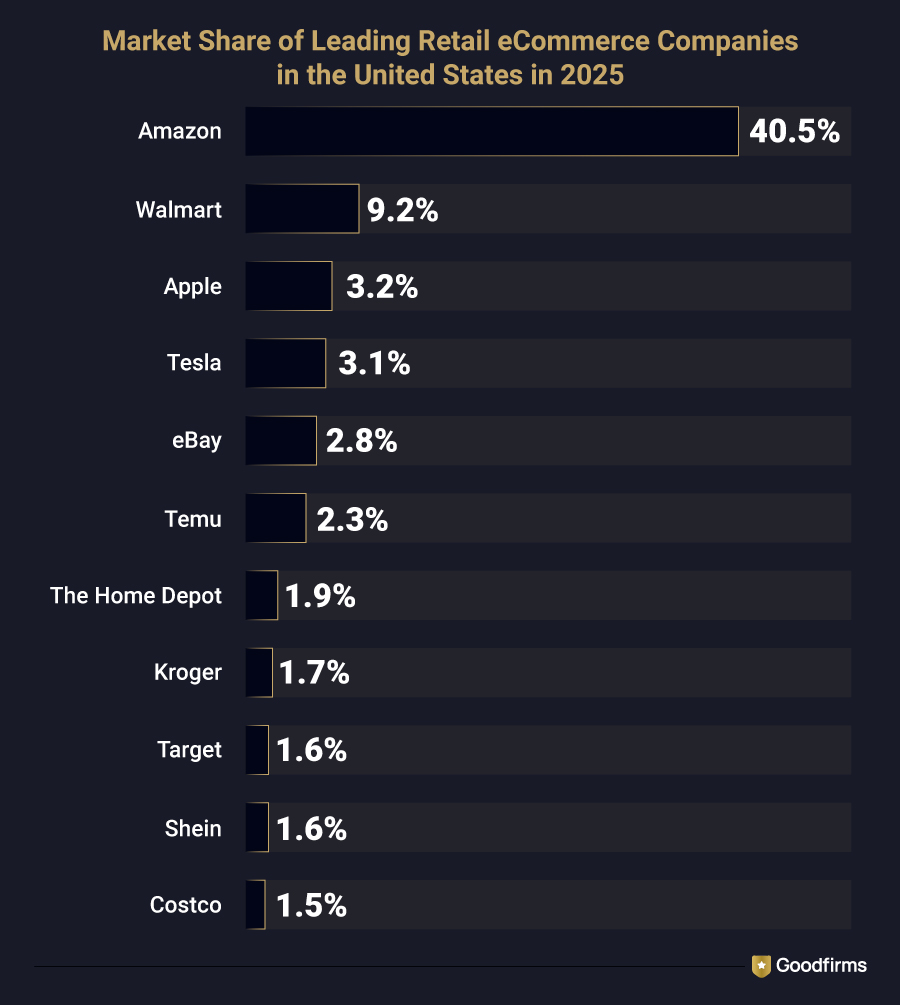
(Source: Statista)
To gain success and set new benchmarks in the eCommerce industry, your marketplace software needs to onboard vendors without friction, keep payouts and commissions accurate as you scale, and help buyers find the right product even in a catalog of thousands.
This guide compares the best marketplace software for 2026, weighing what actually holds up over time: scalability, vendor management, customization, integrations, and total cost as the business grows.
Before weighing your options, it's worth understanding what sets marketplace software apart in the first place.
What Is Marketplace Software and What Does It Actually Do?
Marketplace software is the application layer that enables a business to host, list, and manage products or services from multiple independent sellers on a single platform. Where a standard e-commerce platform runs one storefront for one merchant, marketplace software runs many storefronts under one roof, splits payments between the operator and each vendor, and gives every party, admin, seller, and buyer, a dashboard built for their role. This is exactly the shift Bezos (Founder and Executive Chairman of Amazon.com) describes: working backward from what customers need, even if it means selling far beyond your own inventory.
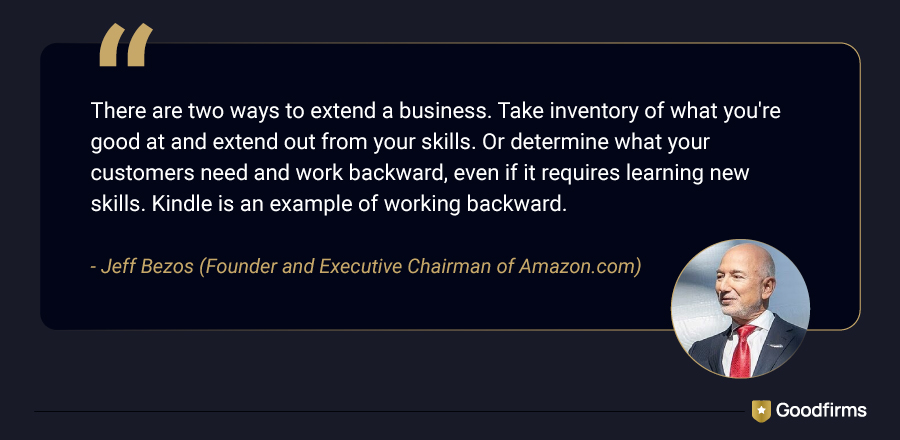
(Source: brainyquote.com)
That's the job of an ideal marketplace software that supports the following core capabilities:
-
Vendor onboarding and verification with document checks and approval workflows.
-
Split payment processing that automates commission deduction and vendor payouts (Stripe Connect and Razorpay Route are the two most common rails behind this).
-
Multi-vendor cart and checkout, so a buyer can order from three sellers in a single transaction.
-
Commission and fee management with rules that can differ by category, vendor tier, or region.
-
Built-in search and filtering strong enough to handle inconsistent product naming across hundreds of sellers.
-
Dispute resolution and refund tools that do not require the operator to manually track every case.
-
Analytics for GMV, vendor performance, and buyer behavior in one dashboard.
-
Software missing two or more of these usually ends up needing a plugin stack bolted on after launch, which is where a lot of marketplace budgets quietly go over.
Key Insight: Buyers frequently shop for marketplace software using the same checklist they would use for a regular online store: payment gateway, product catalog, and checkout flow. These three functions exist in both categories — eCommerce platform and marketplace software — so a demo can look convincing without ever testing the part that actually differentiates them: the split-payment logic between hundreds of independent sellers. Call it the split-payment test: if a vendor can't demo commission deduction and payout splitting across at least two live vendor accounts, in real time, it hasn't actually proven it's marketplace software — no matter how polished the catalog and checkout look.
What Are the Different Types of Marketplace Software?
When it comes to building a marketplace, businesses really have two paths to choose from: off-the-shelf marketplace software (pre-built marketplace software) or a custom-built platform. Let’s have a look at brief information on these types of marketplace software and how they differ.
Off-the-shelf marketplace software is pre-built. Vendor onboarding, split payments, catalog management, and buyer checkout all come ready to configure, not code. Platforms like CS-Cart Multi-Vendor, Yo!Kart, and Sharetribe fall here. You pick a plan, set up branding and payment gateways, and launch, often within weeks.
Custom-built marketplace software is engineered from the ground up by eCommerce development companies. These types of software are built on a heavily modified open-source base like Shuup, around a workflow no pre-built platform was designed to handle. There's no ceiling on customizations it can offer. Every feature, from vendor dashboards to commission logic, gets built and tested from scratch.
Here's a closer look at what separates the two, factor by factor.
Off-the-Shelf Marketplace Software vs Custom Development : A Quick Comparison
|
Factor |
Off-the-shelf Marketplace Software |
Custom Built Marketplace Software |
|---|---|---|
|
Estimated Launch time |
2–12 weeks |
4–12 months |
|
Upfront cost |
A few hundred to a few thousand dollars, plus a monthly or annual fee |
$60,000–$300,000+, depending on scope and team location |
|
Technical skill needed |
Low to moderate; most platforms are config-based |
High; requires a dedicated development team |
|
Customization ceiling |
Limited to the vendor's roadmap and available plugins |
Effectively unlimited |
|
Best fit |
Standard vendor models: multi-vendor retail, service booking, rentals |
Complex B2B workflows, regulated industries, or hybrid models (booking + inventory + subscriptions) |
|
Ongoing maintenance |
Handled by the software vendor |
Owned entirely by the business's dev team or agency |
|
Risk of lock-in |
Higher, migrating off a proprietary platform later can be costly |
Low; the business owns the codebase outright |
|
Time to first revenue |
Fast, ideal for validating demand before heavy investment |
Slower, but built to scale without hitting a platform ceiling later |
The right column to weigh next is the one that actually fits your business.
Off-the-Shelf or Custom Marketplace Software: Which Fits Your Business?
The right choice depends on how standard your workflow is, not your budget.
Off-the-shelf software fits established patterns - multi-vendor retail, service-booking, or rental marketplaces. CS-Cart Multi-Vendor, Yo! Kart and WooCommerce cover these well, getting a platform live in weeks, not months.
Custom-built software fits workflows that off-the-shelf platforms weren't designed for - complex B2B approval chains, regulated industries, or hybrid booking-plus-inventory models. Enterprise platforms like VTEX and Spryker often integrate directly with existing ERP/CRM systems rather than replacing them, a sign that the workflow is too specific for a generic build.
Budgets differ sharply:
- Off-the-shelf/no-code: a few hundred to a few thousand dollars upfront, plus a monthly/annual fee
- Custom development: $60,000–$300,000+, as per Goodfirms' eCommerce Marketplace Development Cost in 2026 guide, taking four to twelve months
The cost gap reflects what each path solves. Paying custom rates for a workflow off-the-shelf software already handles is the most common way marketplace budgets get wasted before demand is even proven.
A useful tip before deciding: if three competitors in your space are already running on the same off-the-shelf platform successfully, that is strong evidence your workflow is standard enough not to need custom code. If none are, that is the signal to budget for custom development instead.
Now that you know which type of marketplace software to look for, here are the options worth considering.
Which Are the Top 10 Marketplace Software for 2026?
Picking a platform from a crowded market is complicated. To make that job easier for you, we have listed the top 10 marketplace software pulled directly from Goodfirms' marketplace software directory, ranked by real buyer reviews, market presence, and feature depth. Each one is broken down by price, free trial availability, and what actual users say about it, helping you to compare and make the right decision.
The Best Marketplace Software Compared
|
Marketplace Software |
Best For |
Deployment |
Starting Price |
Free Trial |
|---|---|---|---|---|
|
Shopify |
Single-vendor sellers scaling into multi-vendor or enterprise marketplaces |
Cloud, web + mobile |
$39/month |
14 days |
|
WooCommerce |
WordPress owners adding a marketplace plugin |
Open source, web-based |
Free (core) |
Available |
|
Yo!Kart |
Startups launching a dedicated marketplace |
Self-hosted, web + mobile |
$1,249 one-time |
Not available |
|
BigCommerce |
Growing retailers wanting an open app ecosystem |
Cloud, cross-platform |
Contact vendor |
Not published |
|
Zielcommerce |
Bespoke, custom-shaped marketplace builds |
Cloud, cross-platform |
Contact vendor |
Not available |
|
VTEX |
Enterprise omnichannel commerce |
Cloud, web-based |
Contact vendor |
Not available |
|
Yelo |
On-demand service and delivery marketplaces |
Cloud, web + mobile |
$5,999/year |
14 days |
|
Spryker |
B2B and D2C enterprises wanting composable commerce |
Cloud, web-based |
Contact vendor |
Not available |
|
Vendasta |
Agencies reselling digital solutions to local businesses |
Cloud, web-based |
$99/month |
14 days |
|
CS-Cart Multi-Vendor |
Entrepreneurs launching a self-hosted marketplace MVP |
Self-hosted, web-based |
$1,250/year |
30 days |
The Best Marketplace Software Explained in Detail
Let’s have a look at each of these software in detail to have a clear understanding about which one suits your business and budget.
1. Shopify
Shopify runs single-vendor stores natively, reaching multi-vendor capability through marketplace apps like Webkul, and lets sellers design, launch, and manage stores across multiple sales channels from one dashboard. It scales from a single storefront on the standard plan into a high-volume enterprise operation on Shopify Plus, so a growing multi-vendor business never has to migrate platforms as order volume climbs.
Do I Need a Technical Team to Manage My Marketplace Powered by Shopify?
Not for a standard single-vendor store — the dashboard handles most day-to-day tasks. But adding multi-vendor apps like Webkul, or moving to Shopify Plus for custom checkout flows, is easier with a developer or Shopify Partner on call.
How Much Does it Cost to Build a Marketplace Using Shopify?
Shopify plans now run Basic at $39/month, Grow at $105/month, and Advanced at $399/month, with a discount for annual billing. Adding a marketplace app like Webkul, plus themes and apps, typically pushes monthly costs higher; Shopify Plus starts around $2,300–$2,500/month for enterprise-scale needs. Shopify doesn’t offer a free version, but it offers a free trial of 14 days which can help you try and test the platform without paying anything.
| Subscription Cost: | Free Version: | Free Trial: |
| Starts from $39/Month | No | Yes (14 Days) |
Read: Customer Reviews about Shopify
2. WooCommerce
WooCommerce is the free, open-source ecommerce engine behind millions of WordPress stores, and it can help you go from a single storefront to a full multi-vendor marketplace once paired with a plugin such as Dokan for vendor dashboards and commission splits. Because the core platform stays free and every feature comes from a plugin, the customization ceiling is set by how many plugins a business is willing to stack, not by a vendor's roadmap — the trade-off custom eCommerce development is built to remove.
Do I Need a Technical Team to Manage My Marketplace Powered by WooCommerce?
Yes, at least a small one. WooCommerce runs on WordPress, so hosting, plugin installation, and updates require some technical comfort. A WordPress-savvy developer or agency on retainer helps with setup, security, and custom features.
How Much Does it Cost to Build a Marketplace Using WooCommerce?
WooCommerce itself is free to install on WordPress, but building a real marketplace means paying for hosting, a premium theme, and a multi-vendor plugin like Dokan, whose paid tiers typically run somewhere in the range of $149–$999+ per year depending on features. Payment gateway fees and any additional extensions add further costs on top. WooCommerce doesn't charge a platform subscription, and most of its extensions offer a way to try before you commit.
| Subscription Cost: | Free Version: | Free Trial: |
| $0-$70/Month; Dokan (multi-vendor plugin for WordPress) - $149–$999+ | Yes | Yes |
Read: Customer Reviews about WooCommerce
3. Yo!Kart
Yo!Kart is purpose-built for an Amazon or eBay-style marketplace from day one, shipping with multi-vendor storefronts, commission management, and a mobile app builder included at no extra cost. Because the multi-vendor storefront, commission engine, and mobile app builder ship in one license, a B2B or B2C marketplace launches without stitching together separate plugins or third-party apps.
Do I Need a Technical Team to Manage My Marketplace Powered by Yo!Kart?
For initial deployment, yes — it's self-hosted, so server setup needs technical support. Once live, vendors and orders are manageable through the admin panel, but custom features and scaling still call for an eCommerce developer on hand.
How Much Does it Cost to Build a Marketplace Using Yo!Kart?
Yo!Kart is sold as a one-time license starting from $1,249, which includes the multi-vendor storefront, commission management, and a mobile app builder out of the box. Since it's self-hosted, you'll also need to budget separately for server hosting and any custom development. Yo!Kart doesn't offer a free version or a free trial, so you're committing to the license upfront.
| Subscription Cost: | Free Version: | Free Trial: |
| Starts from $1,249 One-time | No | N/A |
Read: Customer Reviews About Yo!Kart
4. BigCommerce
BigCommerce pairs an open architecture with a large app ecosystem, letting brands handle large product catalogs and high traffic loads without slowing checkout down. That open architecture keeps page speed and uptime steady even as catalog size and traffic climb during peak sales periods — the two things that most often break marketplace-style storefronts at scale.
Do I Need a Technical Team to Manage My Marketplace Powered by BigCommerce?
Not for basic operations; it's hosted, so infrastructure and security are managed for you. But building true multi-vendor functionality or fixing server response issues on large catalogs can require involving the team of eCommerce developers.
How Much Does it Cost to Build a Marketplace Using BigCommerce?
BigCommerce's own subscription runs $29 to $299 a month on annual billing across its Core, Growth, and Scale tiers, but that's just the storefront — turning it into an actual multi-vendor marketplace means layering on a separate app. Webkul's Multi-Vendor Marketplace add-on, for instance, starts around $10/month, though more advanced global marketplace toolsets can climb well past $300/month depending on what you need. Put together, most businesses should budget somewhere between $40 and $600 a month just to get a functioning marketplace live on
| Subscription Cost: | Free Version: | Free Trial: |
| Contact vendor | No | N/A |
Read: Customer Reviews About BigCommerce
5. Zielcommerce
Zielcommerce builds bespoke marketplace platforms around versatile revenue models rather than one fixed template, giving marketplace owners control over commission structure, currencies, and multilingual support. That bespoke build means the business model shapes the platform, not the other way around, which matters most for revenue structures no off-the-shelf template was designed to handle.
Do I Need a Technical Team to Manage My Marketplace Powered by Zielcommerce?
Somewhat — it's a custom-built solution, so initial configuration happens closely with the team of eCommerce developers. Day-to-day admin is straightforward afterward, but deeper changes usually route back through a technical partnership with professionals.
How Much Does it Cost to Build a Marketplace Using Zielcommerce?
Zielcommerce is fully customizable marketplace software, so there is no fixed price published for the same. The cost of building a marketplace using Zielcommerce depends on your specific commission structure, currencies, and multilingual requirements; you'll need to contact the vendor directly for a quote. As a bespoke build, costs typically scale with the complexity of what you're asking for. Zielcommerce doesn't offer a free version or a free trial.
| Subscription Cost: | Free Version: | Free Trial: |
| Contact vendor | No | N/A |
Read: Customer Reviews About Zielcommerce
6. VTEX
VTEX is a cloud-based omnichannel commerce platform recognized on Gartner's Magic Quadrant for Digital Commerce, built for brands running marketplace, retail, and order management off one shared backend. Multiple sales channels run off that one shared backend, giving operations teams a single view of inventory, orders, and vendors instead of reconciling separate systems for each channel.
Do I Need a Technical Team to Manage My Marketplace Powered by VTEX?
Yes, particularly at launch. VTEX suits enterprise-scale operations, and getting past its learning curve usually needs onboarding support from VTEX or an implementation partner, even though daily use is manageable afterward.
How Much Does it Cost to Build a Marketplace Using VTEX?
VTEX is priced on a contact-vendor basis, since it's built for enterprise-scale omnichannel operations and costs vary based on transaction volume, number of channels, and implementation scope. Most brands also budget for onboarding or implementation-partner support alongside the platform fee. VTEX doesn't offer a free version or a free trial.
| Subscription Cost: | Free Version: | Free Trial: |
| Contact vendor | No | N/A |
Read: Customer Reviews About VTEX
7. Yelo
Yelo, built by JungleWorks, is designed for on-demand marketplaces, the kind of platform behind food delivery and local service apps, with ordering websites, customer and merchant apps, and delivery management bundled in. Because the ordering website, customer app, merchant app, and delivery logistics ship bundled together, an on-demand marketplace can go live within 24 hours instead of assembling each piece separately.
Do I Need a Technical Team to Manage My Marketplace Powered by Yelo?
Mostly no for daily operations, since it's designed to be user-friendly. But configuring the ordering website, apps, and delivery logistics to your business model benefits from technical support or JungleWorks' onboarding help.
How Much Does it Cost to Build a Marketplace Using Yelo?
Yelo starts from $5,999 for its pro plan, $9,999 for its premium plan, and $24,999 for its enterprise plan. Higher tiers cost more as you add features or scale order volume. Yelo doesn’t have a free plan, but it offers a 14-day free trial to test the platform before committing.
| Subscription Cost: | Free Version: | Free Trial: |
| Starts from $5,999/Year | No | Yes (14 Days) |
Read: Customer Reviews About Yelo
8. Spryker
Spryker is a composable commerce OS built for B2B, D2C, and enterprise sellers who need to assemble a marketplace from modular components instead of a fixed template. Every component can be swapped or extended independently, which lets a marketplace's business logic get built precisely, module by module, rather than bent to fit a fixed template.
Do I Need a Technical Team to Manage My Marketplace Powered by Spryker?
Yes, definitely. Spryker's composable architecture means assembling a marketplace from modular components, and reviewers consistently note a steep learning curve. It's best suited to businesses with in-house developers or an implementation partner.
How Much Does it Cost to Build a Marketplace Using Spryker?
Spryker doesn't publish set pricing and requires you to contact the vendor directly, since it's a composable platform where costs depend on which modules you assemble and how much custom development your team takes on. Given its steep learning curve, implementation costs often extend beyond the platform fee itself. Spryker doesn't offer a free version or a free trial.
| Subscription Cost: | Free Version: | Free Trial: |
| Contact vendor | No | N/A |
Read: Customer Reviews About Spryker
9. Vendasta
Vendasta is an end-to-end management platform for selling digital solutions to local businesses, letting agencies consolidate their tech stack, acquire clients, and bill and fulfill projects from one account. Agencies resell a wide range of digital products through that white-label marketplace without building or hosting a single one of those services internally.
Do I Need a Technical Team to Manage My Marketplace Powered by Vendasta?
Not strictly, for daily use through the dashboard. But since Vendasta spans sales, fulfillment, AI tools, and reporting, having at least one dedicated person for onboarding and integrations helps you to make the best out of it.
How Much Does it Cost to Build a Marketplace Using Vendasta?
Vendasta starts from $99 per month for agencies looking to resell digital products through its white-label marketplace, with costs scaling based on the number of client accounts and products you manage. Vendasta doesn't offer a free version, but it does offer a 14-day free trial to test the platform before you commit.
| Subscription Cost: | Free Version: | Free Trial: |
| Starts from $99/Month | No | Yes (14 Days) |
Read: Customer Reviews About Vendasta
10. CS-Cart Multi-Vendor
CS-Cart Multi-Vendor allows entrepreneurs and enterprises to create their own marketplaces, launching a marketplace MVP in as little as a month before scaling further. Its open-source foundation gives store owners direct control over features and customization as vendor count grows, at a lower ongoing cost than most SaaS alternatives on this list.
Do I Need a Technical Team to Manage My Marketplace Powered by CS-Cart Multi-Vendor?
For setup, yes — it's self-hosted and open-source, so hosting and installation need technical support. Once running, vendor and order management is manageable by non-technical staff through the admin panel.
How Much Does it Cost to Build a Marketplace Using CS-Cart Multi-Vendor?
CS-Cart Multi-Vendor is priced as an annual license starting around $1,250 for the Standard edition, with Plus and Ultimate tiers rising to roughly $1,449 and $2,999 per year, or lifetime versions available as one-time payments starting near $3,590. Since it's self-hosted, hosting, themes, and any custom development sit on top of that license fee. CS-Cart doesn't offer a free version, but it does provide a 30-day free trial to test the platform first.
| Subscription Cost: | Free Version: | Free Trial: |
| Starts from $1,250/Year | No | Yes (30 Days) |
Read: Customer Reviews About CS-Cart Multi-Vendor
Six factors decide whether any of these ten actually hold up once real transaction volume hits.
Which Factors Matter Most When Choosing the Best Marketplace Software?
Beyond feature checklists, six factors decide whether a marketplace platform holds up once real transaction volume hits it.
1. Vendor payout speed and payment rail support. Split payments are the single hardest technical problem in marketplace software. Confirm which payment processor the platform integrates natively (Stripe Connect and PayPal for Marketplaces are the two most widely supported) before assuming multi-currency payouts will just work. Run the split-payment test initially before signing anything. If a vendor can't show it live, treat that as a red flag, not a formality
2. Total cost at scale, not the sticker price. A $39/month SaaS plan looks attractive until transaction fees, per-vendor charges, and premium plugin costs are added at 200 active sellers. Ask every shortlisted vendor for pricing at your expected 12-month vendor and order volume, not just the entry tier.
3. Mobile performance. As per Goodfirms' research on eCommerce apps, 54.5% of shoppers use eCommerce apps to buy online, so a marketplace platform with a desktop-first buyer experience is already losing conversions before checkout even starts. Marketplace software like Shopify, Yo!Kart, and Yelo ship native mobile apps as part of the core platform.
4. Migration and lock-in risk. Confirm upfront whether product, vendor, and order data can be exported in a standard format. Proprietary SaaS platforms vary widely here, and this becomes expensive to discover only after two years of vendor data sitting inside a system that will not let it out cleanly.
5. Support for your specific vendor model. A platform built for product-based multi-vendor stores will not naturally handle a service-booking or rental workflow well, even if the marketing page says it can. Ask for a reference customer running the same vendor model before signing.
6. Search quality and vendor trust tools. Once a catalog passes a few hundred listings from different sellers, generic keyword search starts returning irrelevant results, and inconsistent product titles across vendors make the problem worse. Platforms that support semantic search add-ons such as Algolia, alongside built-in review moderation and fraud flags, save an operator from bolting these on manually later. Marketplace-specific fraud patterns, fake reviews, account takeovers, and listing manipulation are different from single-seller e-commerce fraud, so generic e-commerce fraud tools rarely cover them well.
Selecting the Best Marketplace Software: FAQs
Still weighing platform, pricing, or migration risk? These answers cover the questions marketplace buyers ask most before committing to a platform.
What is the best marketplace software for someone with no coding experience?
Sharetribe and Arcadier are both built for non-technical founders, using visual configuration instead of code to set up vendor management, listings, and payments. Most first-time marketplace operators can get a working storefront live within two to eight weeks on either platform without hiring a developer.
How much does marketplace software cost in 2026?
Pricing spans a wide range depending on deployment type. SaaS platforms like Shopify start around $39 per month, and one-time licensed software like Yo!Kart starts near $1,249, and enterprise platforms like VTEX and Spryker are priced on a contract-vendor basis, with custom quotes scaling for high-volume, enterprise-grade operations.
Can a business switch marketplace software after launch without losing data?
Switching is possible but not simple. Product catalogs, vendor records, and order history need to be exported in a standard format, such as CSV or through an API, before migration. This is worth confirming with a vendor before signing a contract, not after two years of data has accumulated inside a closed system.
Does marketplace software support multiple currencies and languages out of the box?
Most established platforms do. CS-Cart Multi-Vendor, Yo!Kart, and Arcadier all ship with multi-currency and multi-language support built in, which matters immediately for any marketplace planning to sell across borders rather than in a single country.
What is the real difference between marketplace software and e-commerce software?
E-commerce software runs a single seller's storefront and inventory. Marketplace software manages multiple independent sellers on one platform, splits payment between the operator and each vendor automatically, and gives every seller their own dashboard. The two overlap in checkout and catalog tools but diverge completely in vendor and payout management.
How long does it take to launch with ready-made marketplace software?
A SaaS-based build like Sharetribe can go live in two to eight weeks. Self-hosted, readymade software such as CS-Cart or Yo! Kart typically takes four to twelve weeks once branding, payment integration, and vendor onboarding flows are configured. Custom development runs considerably longer, often four to twelve months.
Is open-source marketplace software safe for handling live payments?
Yes, provided payments route through a certified processor rather than custom-built payment code. Shuup, for example, is open source but relies on established gateways for the actual transaction handling, which keeps PCI compliance with the payment provider rather than the marketplace operator.
Conclusion: Picking Marketplace Software is all About Business Fit
The best marketplace software for 2026 comes down to matching platform capability with vendor complexity, payout requirements, and growth plans. Off-the-shelf options like Shopify, WooCommerce, and CS-Cart Multi-Vendor suit standard vendor models needing fast, budget-friendly launches. Custom software development builds through platforms like Zielcommerce or Spryker, fit regulated industries and complex B2B workflows requiring full control. Before committing, businesses should evaluate payout speed, mobile performance, and data portability against their 12-month vendor volume. At the end of the day, the best marketplace software platform isn't the one with the longest feature list; it's the one built exactly as per your eCommerce business model.