
Google Meet
17 Reviews
Secure video conferencing for everyone
Google Meet is a video-communication service developed by Google. It is one of two apps that constitute the replacement for Google Hangouts, the other being Google Chat. Google Meet is empowering individuals to be more productive by providing them with a secure and privacy-focused video conferencing platform that can be used to connect with colleagues, clients, and friends from all over the world. Google Meet also offers a variety of features that can help individuals communicate and collaborate more effectively, such as breakout rooms, polling, and whiteboarding. Google Meet offers noise cancellation, which helps to reduce background noise during video calls. This can be helpful for calls that are taking place in noisy environments also offers a low-light mode, which helps to improve the quality of video calls in low-light environments. This can be helpful for calls that are taking place at night or in dimly lit rooms and real-time captions, which can be helpful for people who are de
2017
United States
- Computer-hardware
- Computer-networking
- Computer-software
- Education-management
- Higher-education
- Information-services
- Information-technology-services
- Marketing-advertising
- English
Industries
-
Computer-hardware
-
Computer-networking
-
Computer-software
-
Education-management
-
Higher-education
-
Information-services
-
Information-technology-services
-
Marketing-advertising
Licensing & Deployment
-
Proprietary
-
Cloud Hosted
-
Web-based
-
iPhone/iPad
-
Android
Support
-
Email
-
Chat
-
24x7 Support
Knowledge Base
-
Video Guides
Media
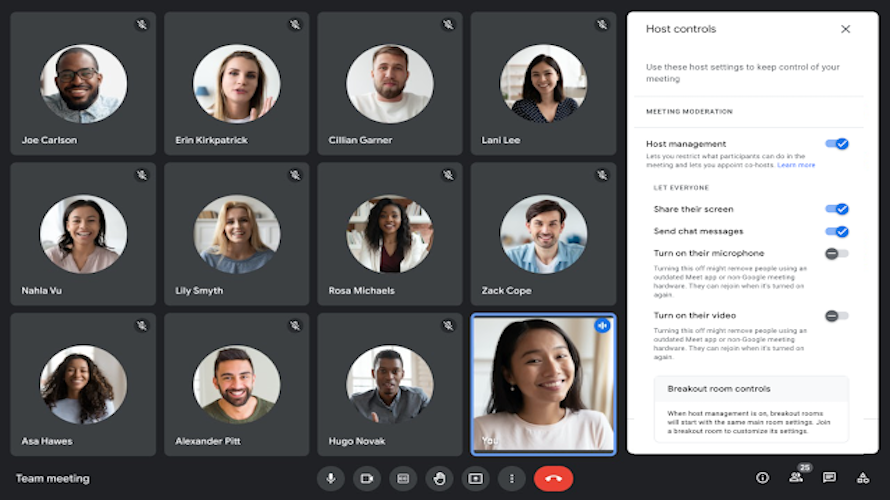
Google Meet Core Features
Focus of Web Conferencing Feature
- Group Collaboration
- Mobile Access
- Presentation Streaming
- Presentation Tools
- Real Time Chat
- Screen Sharing
- Two-Way Audio & Video
- Video Conferencing
Google Meet Pricing
Pricing Type
-
Free
Preferred Currency
-
USD ($)
Payment Frequency
-
Monthly Payment
-
Quote Based
Google Meet Reviews
- 17
- Total Reviews
- 4.4/5
- Overall Rating
- 0
- Recent Reviews
What Users Say
great platform for large web meetings.

Bnasayu Trawabi , Senior Marketing Manager at Abservetech Private Limited
Easy in Use

Yulia Petrenko , Digital Marketing Specialist at Icon Partners
"Google Meet: Seamlessly Connecting, Collaborating, and Conferencing for Enhanced Virtual Interactio

Khuraim Nasir , Social Media Marketing. at Upwork
The platform is known for its reliability, smooth experience

Eric Rogers , Digital Marketer at OpenXcell
Seamless Video Conferencing with Google Meet - A User's Perspective

Amna Ghaffor , social media marketing,Seo content writer, social media consultant, at content arcade
What Users Like The Most
- Meetings for research projects benefit from Google Meet's high-quality video and audio. Discussions and presentations about our research study can be facilitated by using Google Meet's collaboration tools, which include screen sharing and whiteboarding. When reviewing materials or making up for missed meetings, our research team members can benefit from Google Meet's ability to record and replay meetings.
- 1) User friendly interface 2) Reliable Video and Audio Quality 3) Seamless integration
- While the no-cost version allows for meetings with up to 100 participants, there is a time limit of 60 minutes per meeting. This might be a drawback for longer discussions or sessions.The user-friendly interface ensures a quick and easy sign-up process, especially for those already familiar with Google's ecosystem.
What Users Like The Least
- Other video conferencing solutions offer capabilities like breakout rooms and live chat that Google Meet does not, such as these. Calls dropping and poor audio quality are just two examples of the Google Meet's technological problems.
- 1) Limited Customization 2) Video quality issues upon large meetings
- You can talk our 1 hour limitation you can't not share screen for editing
Google Meet Reviews
17 Reviews
- Relevance
- Most Recent
- Rating: high to low
- Rating: low to high