Timerfly
Deployment
Best for
Overview
About Timerfly
Know who's working, without chasing anyone. Timerfly's small Windows and Mac app records attendance, work hours, apps and websites automatically.
✅ Late, left early and absent marked against each person's own schedule
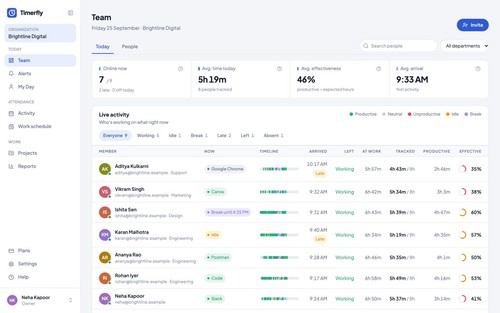
✅ Live team view: working, idle, on a break or absent
✅ Productive, neutral and unproductive time, by your rules
✅ Night shifts past midnight counted as one working day
✅ Leave, holidays and offline work with manager approval
✅ Monthly payroll attendance Excel and daily/weekly report emails
✅ Alerts on email, Slack or Telegram
✅ Projects with task timers and read-only report links for clients
✅ Fair by design: own-data view, optional blurred screenshots, no keystroke logging
From ₹159 per person a month. 14-day free trial, no card needed.
At a glance
Software information
Industries served, licensing and the support Timerfly provides.
Industries
- Information-technology-services
- Bpo
- Outsourcing-offshoring
- Accounting
- Marketing-advertising
Licensing
- Proprietary
- Monthly Payment
- Annual Subscription
- Free trial
Support
- Support daysMondayTuesdayWednesdayThursdayFridaySaturdaySundaySupport time08:00 to 10:00 (IST)
Training
- Documentation
Knowledge Base
Capabilities
Timerfly features
The full feature set, grouped by module.
Employee Monitoring
- Alerts
- Employee Activity
- Idle Time
- Productivity Evaluation
- Screen Activity
- Task Management
Attendance Tracking Software
- Alerts/Notifications
- Calendar Management
- Dashboard
- Employee Scheduling
- Leave Management
- Reporting & Analytics
- Requests & Approvals
- Time Tracking
Plans
Timerfly pricing
- Automatic app and website tracking
- Live team dashboard
- Attendance with late and absent marks
- Projects and task timers
- Alerts by email and Slack and Telegram
- Leave and offline time with approval
- Rules and screenshot blur per department
- Sign-in only from office IP addresses
- Public API and webhooks and priority support
Works with
Integrations
Timerfly connects with the tools your team already uses.
Media
Screenshots & video