Key takeaways
- ClickUp is a strong all-around monday.com alternative for small teams, particularly for teams looking for broad functionality without immediately paying for every member.
- Trello and Zoho Projects are the most budget-friendly options, with free plans that comfortably support teams of 5 to 10 people.
- Basecamp and ClickUp are the two real answers for teams that want to avoid per-seat pricing altogether.
- Teamwork.com is the better fit for small agencies and client-facing teams, thanks to its free plan built around client projects.
- The right alternative depends on workflow and team size, not on which tool has the longest feature list.
What if your project management tool is creating more work than it is removing? For a small team, every extra setup step, paid seat, and unused feature can quickly become a burden. That is why finding the right monday.com alternatives for small teams is less about replacing one tool and more about finding a better fit.
Best monday.com Alternatives for Small Teams at a Glance
The best choice depends on what your team values most: simplicity, affordability, customization, or advanced project controls.
|
monday.com Alternative |
Best For |
Starting Price |
|---|---|---|
|
ClickUp |
Overall value and all-in-one project management |
Free / $7 per user/month |
|
Trello |
Simple, visual project management |
Free / $5 per user/month |
|
Asana |
Structured workflows and project planning |
Free / $10.99 per user/month |
|
Zoho Projects |
Budget-conscious small teams |
Free / $4 per user/month |
|
Teamwork.com |
Agencies and client projects |
Free / $9.99 per user/month |
|
Basecamp |
Flat-rate pricing and simplicity |
$25/month |
|
Notion |
Projects and documentation together |
Free / $10 per user/month |
|
Airtable |
Customized, database-driven workflows |
Free / $20 per user/month |
Paid prices are based on annual billing and may vary by plan, billing cycle, or feature requirements.
A free plan may be enough for a five-person team managing straightforward tasks, while an agency or growing startup may need deeper automation, reporting, or client collaboration. The real question is not which tool has the most features, but which ones your team will actually use.
If your needs extend beyond project boards to include approvals, recurring processes, and cross-team coordination, exploring workflow management software can help you find a platform that fits how your business works.
Why Are Small Teams Looking for monday.com Alternatives?
monday.com gives teams flexibility through customizable boards, workflows, automations, and multiple project views. For small teams, however, that flexibility can sometimes mean paying for features or capacity they do not fully use. The bigger concern is finding a project management software that fits both the team's workflow and budget.
The Cost Can Grow Faster Than the Team
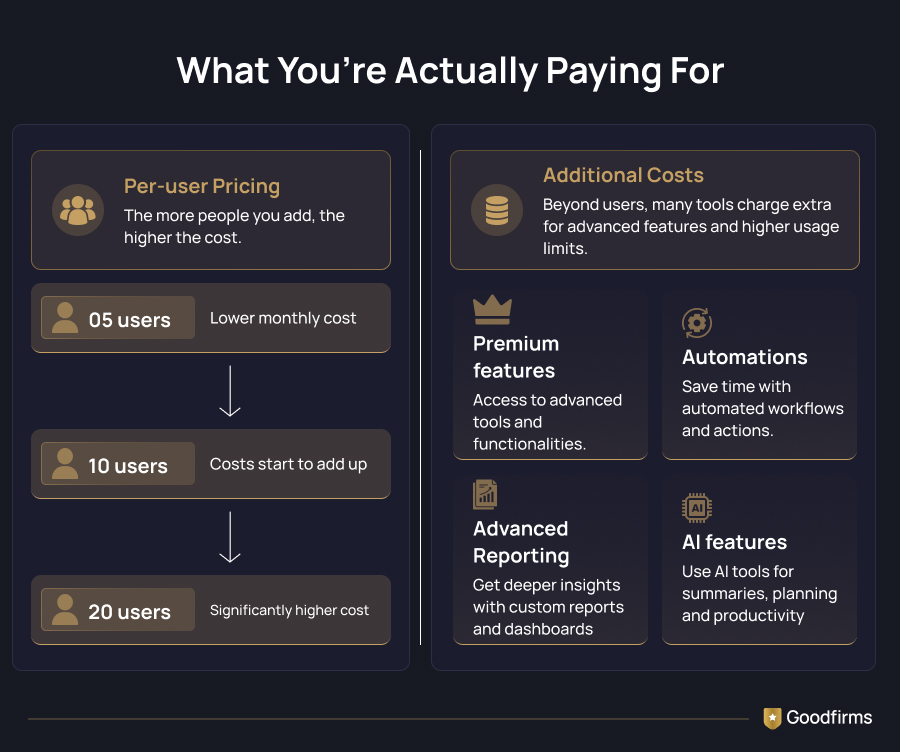
For a five-person team, every paid seat matters. monday.com's seat-based pricing can make unused capacity an unnecessary expense, particularly for businesses that are still closely managing recurring software costs. The better question is not simply how much monday.com costs, but how much of the platform the team will actually use.
More Features Do Not Always Mean Better Productivity
Small teams also have limited time to configure and maintain software. When employees manage projects, clients, reviews, and daily operations at once, a complicated system can add friction rather than remove it. Simpler tools may therefore work better for teams with straightforward workflows, while others may need stronger documentation, automation, or client collaboration
The Best Workflow Depends on the Team
A startup may prioritize flexibility, an agency may need time tracking and resource planning, and a marketing team may need content calendars and approvals. This is why alternatives differ: Trello focuses on simple visual work, while Asana offers more structured workflows, making Trello vs Asana a useful comparison for teams weighing simplicity against structure.
Ultimately, the right alternative provides the features a small team needs without unnecessary cost or complexity.
How We Evaluated These monday.com Alternatives
The best monday.com alternative for a small team is not necessarily the one with the most features. It is the one that solves everyday project management needs without adding unnecessary cost, complexity, or administration. We evaluated these tools with the needs of small businesses, startups, agencies, and teams of fewer than 10 people in mind.
Our comparison focused on:
- Pricing: Actual cost for small teams, including free-plan limits, per-user pricing, and affordable options for teams of 5 users.
- Core features: Task management, deadlines, project views, dependencies, collaboration, automation, and reporting.
- Ease of use: How quickly a team can adopt the software and start managing work.
- Workflow fit: Whether the platform works for marketing, creative, software, client-service, or general business workflows.
- Scalability: Whether it remains practical as projects and team sizes grow.
- Free-plan value: What teams can realistically accomplish before needing to upgrade.
This approach helps separate genuinely useful monday.com alternatives for small teams from tools that may look attractive on features but become expensive or complicated as a small team starts using them.
Best monday.com Alternatives for Small Teams
The best monday.com alternative depends on what a small team is trying to solve. Some teams need to reduce software costs, while others need simpler task management software, stronger workflow automation, better client collaboration, or a more flexible way to organize projects.
The following tools stand out for different small-team needs. Each one is evaluated based on its core capabilities, pricing approach, ease of adoption, free-plan value, and suitability for teams with fewer than 10 people.
1. ClickUp: Best Overall monday.com Alternative for Small Teams
ClickUp is one of the closest alternatives to monday.com for teams that want a comprehensive project management platform without stitching together multiple tools. For teams comparing ClickUp vs Monday, the main difference is how much flexibility and functionality they need at their current size.
Its Free Forever plan is particularly attractive to small teams because it supports unlimited members and tasks. Teams that need more advanced capabilities can move to paid plans designed for growing teams. ClickUp itself positions its Unlimited plan as an option for small teams.
Key features:
- Task and project management: Create tasks, assign owners, set priorities and due dates, add custom fields, and organize work into projects and lists.
- Multiple project views: Switch between views such as List, Board, Calendar, Gantt, and other workspace-specific views to match different workflows.
- Docs and knowledge management: Create collaborative documents alongside projects instead of keeping project briefs, notes, and plans in separate tools.
- Goals and progress tracking: Connect tasks and projects with goals to monitor progress toward broader team objectives.
- Time tracking: Record time spent on work, making the platform useful for teams that need visibility into effort and project costs.
- Automations: Automate repetitive actions such as task assignments, status changes, and notifications.
- Dashboards and reporting: Create visual dashboards to monitor project progress, workload, and other performance indicators.
- Integrations: Connect ClickUp with other workplace applications so teams can keep more of their workflow connected.
- AI capabilities: ClickUp includes AI-powered capabilities across its plans, although availability and usage limits vary by plan.
Best for: Startups, small businesses, and teams looking for an all-in-one project management platform with room to grow.
Where it may fall short: Its extensive customization can create a learning curve. A five-person team that only needs basic task tracking may find ClickUp more configurable than necessary.
Pricing:
- Free - includes unlimited tasks, unlimited members, 60 MB storage, collaborative docs, Kanban boards, calendar view
- Unlimited: $7/user/month (billed yearly) - adds unlimited storage, unlimited integrations, Gantt charts, goals, custom fields
- Business: $12/user/month (billed yearly) - includes Google SSO, timesheets, workload management, mind maps, custom permissions
- Enterprise: Custom pricing - adds white-labeling, enterprise API, dedicated success manager
Pricing accurate as of September 2026. Visit ClickUp pricing for current details.
2. Trello: Best for Simple Project Management
Trello is a strong choice as a monday.com alternative for small teams that want a straightforward visual system for organizing work. Its card-and-board approach makes it easy to understand without extensive onboarding, which can be valuable for teams without a dedicated project manager.
The Free plan supports up to 10 collaborators per Workspace and includes unlimited cards and up to 10 boards.
Key features:
- Kanban boards: Organize projects visually by moving cards between lists such as To Do, In Progress, Review, and Done.
- Task cards: Add descriptions, checklists, attachments, members, labels, and due dates to individual tasks.
- Unlimited cards: The Free plan lets teams create unlimited cards to track their work.
- Multiple boards: Free Workspaces can have up to 10 boards, allowing teams to separate projects or workflows.
- Power-Ups: Extend boards with integrations and additional functionality.
- Automation: Automate repetitive board actions and common workflows through Trello's automation capabilities.
- Inbox: Capture tasks and ideas before organizing them into the appropriate boards.
- Mobile apps: Access boards and update tasks from iOS and Android devices.
- Workspace collaboration: Assign work, add due dates, and keep project activity visible to the team.
Best for: Small teams that want a simple project management tool with minimal setup.
Where it may fall short: Teams handling complex dependencies, detailed resource planning, or advanced reporting may eventually need a more structured platform.
Pricing:
- Free - includes unlimited cards, 250 Workspace commands per month, Unlimited storage (10MB/file), 2-factor authentication, 10 boards per Workspace
- Standard: $5/user/month (billed annually) - adds unlimited boards, AI, Unlimited storage (250MB/file), 1,000 Workspace commands, Collapsible lists
- Premium: $10/user/month (billed annually) - includes Workspace views, Admin and security features, simple data export, observers, AI
- Enterprise: $210/user/month (annual price per user) - this is the Est. cost for 50 users, which includes unlimited boards, Multi-board guests, Free SSO, and user provisioning with Atlassian Guard
Pricing accurate as of September 2026. Visit Trello pricing for current details.
3. Asana: Best for Structured Workflows
Asana is well-suited to small teams that need more structure for projects, responsibilities, deadlines, and recurring workflows. It supports list, board, and calendar views on its free Personal plan, while paid Starter adds Timeline and Gantt views, reporting, forms, custom fields, and unlimited automations.
One important consideration for small teams is its current free-plan limit: Asana Personal supports up to two users. Teams with more members need a paid plan.
Key features:
- Task management: Break projects into tasks, assign responsibilities, set deadlines, and track progress.
- List and board views: Choose between structured task lists and Kanban-style boards.
- Calendar: View tasks and deadlines on a calendar to understand upcoming work.
- Timeline and Gantt: Paid plans provide visual project scheduling and dependency tracking.
- Forms: Collect project requests and information through forms that feed directly into projects.
- Custom fields: Add information such as priority, budget, status, or approval stage to tasks.
- Workflow automation: Automate repetitive assignments, notifications, and status changes.
- Reporting dashboards: Monitor project progress through visual reports and metrics.
- Integrations: Connect with tools such as Slack, Google Drive, Zoom, and other workplace applications.
- AI features: Current paid plans include AI capabilities for tasks such as summaries, smart fields, and workflow support.
- External collaboration: Starter includes unlimited free guests, allowing teams to collaborate with external people without adding them to the paid seat count.
Best for: Small marketing, operations, and cross-functional teams that need structured project workflows.
Where it may fall short: The current free plan is limited to two users, making it less attractive as a completely free project management solution for a five-person team.
Pricing:
- Personal (free)- provides access to 2 users, unlimited tasks and projects, Unlimited storage, 100MB max per file, 100+ free integrations
- Starter: $10.99/user/month (billed annually) - Asana AI, custom fields, Unlimited free guests, reporting dashboards, unlimited automations
- Advanced: $24.99/user/month (billed annually) - includes unlimited portfolios, Connect Salesforce, Tableau, Power BI support, Asana AI, forms branching
- Enterprise: contact sales team - includes SAML authentication, User provisioning (SCIM), view-only licenses, universal resource management, Asana AI
Pricing accurate as of September 2026. Visit Asana pricing for current details.
4. Zoho Projects: Best Budget-Friendly Alternative
Zoho Projects is worth considering for small businesses and startups looking for affordable project management software with more structure than a basic task board. It covers project planning, task management, dependencies, time tracking, automation, and reporting while fitting naturally into the wider Zoho ecosystem.
Key features:
- Task management: Create tasks and subtasks, assign owners, set priorities, and track deadlines.
- Milestones: Group related tasks around major project outcomes and deadlines.
- Dependencies: Define relationships between tasks to indicate which tasks must be completed before another task can begin.
- Gantt charts: Visualize project schedules, task relationships, and progress.
- Time tracking: Record time spent on tasks and projects.
- Timesheets: Maintain a more detailed record of project-related work.
- Workflow automation: Automate repetitive project actions and routine processes.
- Custom views and statuses: Adapt projects to different workflows rather than forcing every team into the same structure.
- Integrations: Connect project work with other business tools, particularly within the Zoho ecosystem.
- Mobile access: Manage tasks and project updates from mobile devices.
Best for: Budget-conscious startups and small businesses that need structured project management without moving to a large enterprise platform.
Where it may fall short: Teams looking for an extremely simple interface may prefer Trello, while teams needing highly sophisticated customization may find some alternatives more flexible.
Pricing:
- Personal (free) up to 5 users - includes whiteboards, subtasks, 100MB max per file, 100+ free integrations
- Premium: $4/user/month (billed annually) - Smart AI Capabilities with Zia, unlimited projects, Workflow Actions (5000 executions/month), Time Logs and Timesheets, Project Custom Modules
- Enterprise: $9/user/month (billed annually) - includes 10 Read-Only Users, Workflow Actions (50000 executions/month), 3 business calendars and holiday lists, Single Sign-On (SSO)
- Ultimate: $14/user/month (billed annually) - includes 100 resources, 15 GB storage per user, Workflow Actions (500000 executions/month), 20 business calendars, Unlimited Custom Dashboards
Pricing accurate as of September 2026. Visit Zoho Projects pricing for current details.
5. Teamwork.com: Best for Small Agencies and Client Work
Teamwork.com is particularly relevant to small agencies, consultants, and other service businesses because its project management capabilities are designed around client work. It combines project planning tool features with time tracking, client organization, and reporting features.
Its Free plan supports up to five users and five projects, making it a strong option for teams of five that want to get started without immediately paying for a subscription.
Key features:
- Task management: Organize client work into tasks, lists, and projects with clear ownership and deadlines.
- Multiple project views: Use List, Board, Gantt, and Table views depending on the type of work.
- Time tracking: Log time against projects and tasks.
- Billable time: Track work that needs to be billed back to clients.
- Client organization: Keep client-related projects and information structured within the platform.
- Project templates: Reuse established project structures rather than rebuilding recurring client workflows.
- Automations: Automate repetitive project actions.
- Gantt planning: Map project schedules and dependencies visually.
- Collaboration: Keep project communication connected to the work being managed.
- Reporting: Gain visibility into project progress and time-related information.
Best for: Small agencies, consultants, and client-service businesses managing several projects simultaneously.
Where it may fall short: Internal teams that do not manage client work may not benefit enough from its service-business orientation.
Pricing:
- Free - includes up to 5 projects, log time, 100 automations, maximum 5 users, Connect chat tools
- Basics: $9.99/user/month (billed yearly) - Work with Gantt, Table, List & Board views, Start projects with unlimited templates, US & EU data hosting, Time Logs and Timesheets, Project Custom Modules
- Accelerate: $24.99/user/month (billed yearly) - provides connect HubSpot & QuickBooks, Reduce admin with 20,000 automations, Route work requests with smart forms
- Optimize: custom pricing - includes creating quotes, Scale workflows with 100,000 automations, turn CRM pipeline into projects, connect to Salesforce and NetSuite
Pricing accurate as of September 2026. Visit Teamwork.com pricing for current details.
6. Basecamp: Best for Flat-Rate Pricing
Basecamp takes a deliberately simpler approach to project management. Instead of trying to provide every possible planning feature, it focuses on keeping projects, communication, tasks, schedules, and files together.
Its pricing structure also makes it interesting for teams looking for a monday.com alternative without per-seat pricing.
Key features:
- To-dos: Create and assign tasks with deadlines and responsibilities.
- Message boards: Keep project discussions organized instead of spreading them across separate chat threads.
- Schedules: Track important dates, deadlines, and events.
- File sharing: Keep project documents and files accessible within the relevant project.
- Project communication: Centralize updates, announcements, and discussions.
- Automatic check-ins: Collect recurring updates from team members.
- Client access: Provide clients with visibility into relevant project information as needed.
- Flat-rate plans: Paid plans can accommodate multiple users without the same per-user pricing structure used by many agile project management platforms.
- Simple project organization: Keep communication and project work in one place without extensive configuration.
Best for: Small teams that prioritize simplicity, communication, and predictable pricing.
Where it may fall short: Teams that need advanced dashboards, detailed dependencies, complex resource planning, or extensive workflow customization may find Basecamp too basic.
Pricing:
- Free - includes 1 project, 1GB storage space, 5 users max, ChatGPT and Claude AI connectors
- Freelancer: $25 (billed monthly) - get 5 GB storage, 20 users max, 24/7/365 support, ChatGPT and Claude AI connectors, up to 3 active projects
- Studio: $59 (billed monthly) - 10 active projects, unlimited users, 25 GB storage, project templates
- Pro: $99 (billed yearly) - 25 active projects, unlimited tools, project templates, time tracking
- Unlimited: $299/month (billed annually) - Extended 45-day free trial, personalized onboarding, enhanced admin features, Annual billing + extra payment options
Pricing accurate as of September 2026. Visit Basecamp pricing for current details.
7. Notion: Best for Project Management and Documentation
Notion is a flexible alternative for small teams that want their project information, documentation, knowledge base, and tasks in one workspace. Rather than functioning purely as a traditional project management application, it lets teams build their own system around pages and databases.
Key features:
- Project databases: Create structured databases for projects, tasks, content calendars, clients, or other workflows.
- Multiple database views: Display the same information as tables, boards, calendars, timelines, or other views.
- Tasks and subtasks: Break larger projects into manageable pieces and connect related work.
- Dependencies: Link tasks and establish relationships within project workflows.
- Wikis: Build a central knowledge base for company information, processes, and documentation.
- Collaborative documents: Create briefs, meeting notes, project plans, and other documents alongside project data.
- Templates: Reuse predefined structures for recurring projects and workflows.
- Forms: Collect information and requests and connect them to workspace databases.
- Notion Calendar: Connect schedules and deadlines with calendar-based planning.
- AI capabilities: Use Notion AI for tasks such as summarizing, writing, and working with information stored in the workspace.
Best for: Startups and small teams that want project management closely integrated with documentation and knowledge management.
Where it may fall short: Teams that want a ready-made project management workflow may need to spend more time building and maintaining their Notion setup.
Pricing:
- Free - includes basic forms, basic sites, Trial of Notion AI, Notion calendar
- Plus: $10/per member/month - Unlimited charts, Unlimited collaborative blocks, unlimited file uploads, basic connections, custom forms
- Business:$20/per member/month - Notion agent, AI Meeting Notes, SAML SSO, Granular database permissions, private teamspaces
- Enterprise: custom pricing - Zero data retention with LLM providers, advanced security &controls, audit log, Customer success manager, Security & Compliance connections (DLP, SIEM)
Pricing accurate as of September 2026. Visit Notion pricing for current details.
8. Airtable: Best for Highly Customized Workflows
Airtable combines database functionality with spreadsheet-style usability and flexible project workflows. It can be particularly useful when a small team needs to manage structured information alongside its projects, for example, content, campaigns, products, clients, or inventory.
Key features:
- Relational databases: Connect related information across projects, tasks, clients, products, or other records.
- Custom fields: Structure information using different field types instead of relying only on text and status columns.
- Multiple views: Present the same underlying data through grid, calendar, Kanban, timeline, and other views.
- Interfaces: Build simplified interfaces for different team members or workflows.
- Automations: Trigger actions when records are created, updated, or meet specific conditions.
- Forms: Collect requests and information directly into Airtable databases.
- Filtering and grouping: Create focused views for different projects, teams, or work stages.
- Integrations: Connect Airtable with other business applications and workflow tools.
- AI capabilities: Use AI-powered features to work with and organize information within databases.
Best for: Small teams that need database-driven project management and highly customized workflows.
Where it may fall short: Airtable can require more setup and database thinking than a small team needs for straightforward task management. Teams simply looking for a quick Kanban board may find Trello easier to adopt.
Pricing:
- Free - includes unlimited bases, 500 AI credits per editor, 1,000 records per base, 1 GB of attachments per base, 100 automation runs
- Team: $20/per seat/month (billed annually) - 15,000 AI credits, 50,000 records per base, 25,000 automation runs, 20 GB of attachments per base, Gantt and timeline view
- Business: $45/per seat/month (billed annually) - 20,000 AI credits per user, 125,000 records per base, 100,000 automation runs, 100 GB of attachments, SAML-based single sign-on, verified data
- Enterprise Scale: custom pricing - 1,000 GB of attachments per base, 500,000 records per base, 25,000 AI credits per paid user, enterprise hub and API, Audit logs and DLP, AI Admin Controls
Pricing accurate as of September 2026. Visit Airtable pricing for current details.
Which monday.com Alternative Is Best for Your Small Team?
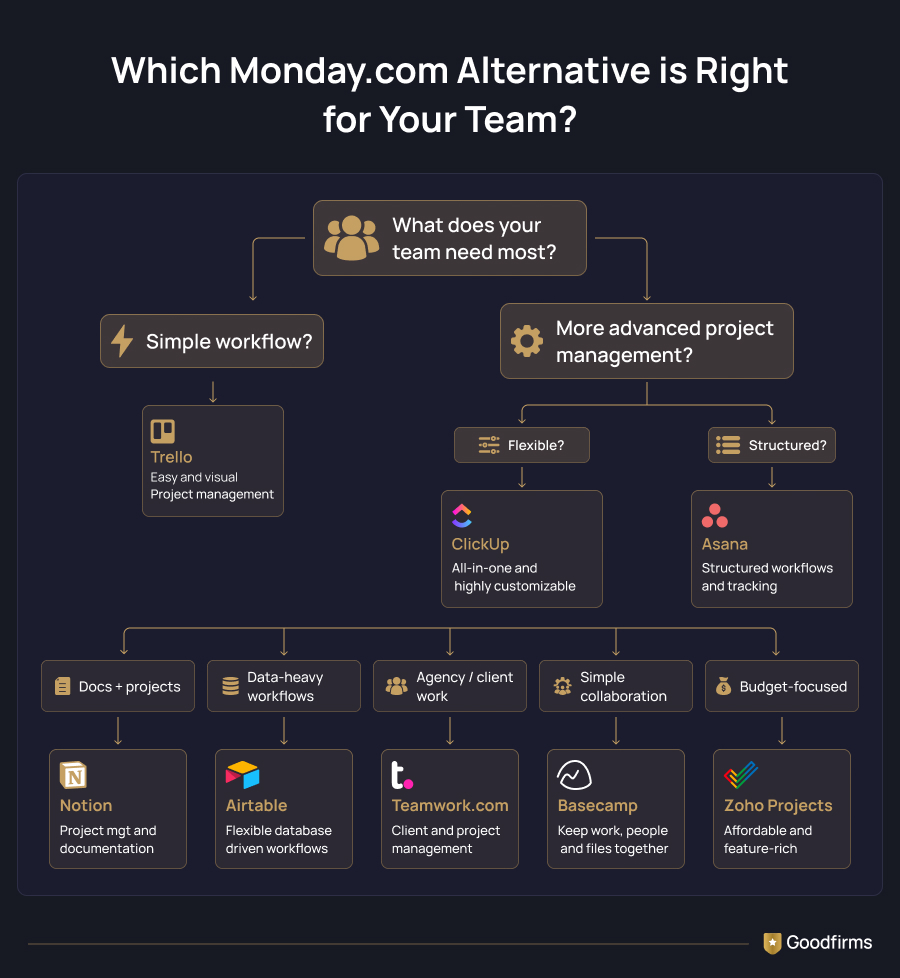
There is no single best monday.com alternative for every small team. The right choice depends on your budget, workflow, and the level of project management your team actually needs.
|
If your priority is… |
Consider |
|---|---|
|
Best Overall Value |
ClickUp |
|
Simple project management |
Trello |
|
Structured project workflows |
Asana |
|
Low-cost project management |
Zoho Projects |
|
Agency and client work |
Teamwork.com |
|
No per-seat pricing |
Basecamp |
|
Projects + documentation |
Notion |
|
Highly customized workflows |
Airtable |
For most small teams, simplicity and value matter more than having every available feature. Choose a platform that fits your current workflow, is easy to adopt, and can support your team as it grows.
Cheapest monday.com Alternatives for a 5-Person Team
For a small team, the cheapest monday.com alternative depends on how much the free plan covers. Trello, ClickUp, and Zoho Projects are strong low-cost options, while Basecamp offers flat-rate pricing.
|
Tool |
Approx. cost for 5 users |
Best For |
|---|---|---|
|
Trello |
$0 (Free up to 10 collaborators) |
Simple Project Management |
|
ClickUp |
$0 on Free / $7 on Unlimited |
Feature-rich project management |
|
Zoho Projects |
$0 (Free up to 5 users) |
Budget-conscious teams |
|
Basecamp |
$25/month |
Flat-rate pricing |
|
monday.com Basic |
$45/month (billed annually) |
General project management |
Trello's free plan supports up to 10 collaborators, ClickUp allows unlimited members, and Zoho Projects supports up to five users. For teams needing more features, ClickUp's Unlimited plan costs $7 per user monthly with annual billing, compared with $9 per seat for monday.com's Basic plan.
The cheapest option is not always the best value. Before switching, compare the features included at each price level and whether the plan can support your team's workflow as it grows.
How to Choose Project Management Software for a Small Team
Choosing a monday.com alternative is less about finding the platform with the longest feature list and more about finding one that fits the way your team already works. Before switching, consider these factors:
- Team size and pricing: Check the actual cost for your current team size, not just the advertised starting price. Look at free-plan limits, minimum seats, and whether adding users will significantly increase the monthly bill.
- Type of work: A marketing team may need content calendars and approvals, while a software team may prioritize dependencies, sprints, and integrations. Choose a tool that supports your core workflow without requiring extensive customization.
- Ease of adoption: Small teams rarely have a dedicated project administrator. A platform that takes too long to configure can create more work than it removes. Prioritize clear interfaces, simple workflows, and features your team will use regularly.
- Essential project features: Make a shortlist of must-have capabilities such as task management, deadlines, dependencies, project views, file sharing, automation, time tracking, or reporting. Avoid paying for advanced features that do not solve an actual problem
- Room to grow: Your current needs may be simple, but the tool should not become a limitation as projects, clients, or team members increase. Check how pricing and feature availability change when you move beyond the free or entry-level plan.
- Migration effort: Switching platforms incurs costs beyond the subscription. Consider how easily you can move existing tasks, files, workflows, and project information before committing to an alternative.
The best monday.com alternative is ultimately the one your team can afford, adopt, and consistently use. For a small team, a simpler platform that supports everyday work can often deliver more value than a feature-heavy system that requires constant configuration.
FAQs
What is the best monday.com alternative for small teams?
ClickUp is a strong monday.com alternative for small teams because its free plan supports unlimited members and tasks. Trello suits simpler workflows, while Zoho Projects is a good option for teams prioritizing affordable project management.
Is there a free alternative to monday.com?
Yes. ClickUp, Trello, and Zoho Projects offer free plans suitable for small teams. ClickUp supports unlimited members, Trello allows up to 10 collaborators per Workspace, and Zoho Projects supports up to five users on its free plan.
What is the cheapest monday.com alternative for a small team?
Trello, ClickUp, and Zoho Projects can be the cheapest alternatives to monday.com because their free plans support small teams. If you need paid features, compare total team pricing rather than advertised starting prices to find the best value.
Which monday.com alternative is best for a 5-person team?
ClickUp, Trello, Zoho Projects, and Teamwork.com are suitable alternatives to monday.com for a five-person team. ClickUp offers broad functionality, Trello keeps project management simple, while Zoho Projects and Teamwork.com provide affordable options for specific team needs.
Which monday.com alternative has unlimited users?
ClickUp offers unlimited members on its Free Forever plan, while Basecamp uses flat-rate pricing for its paid plans rather than charging per user. Both can suit growing teams looking to avoid traditional per-seat costs.
Is ClickUp better than monday.com for small teams?
ClickUp can be better for small teams that prioritize value and a broad feature set. monday.com may be preferable for teams wanting its visual interface and customizable workflows. The better choice depends on budget, workflow, and required features.
What Is the Best monday.com Alternative?
For most small teams, ClickUp is the strongest alternative to monday.com for balancing features, flexibility, and cost. Trello and Zoho Projects are better for simpler or budget-focused needs, while Basecamp suits teams seeking flat-rate pricing.
Before making the switch, compare your team size, workflow, and must-have features. If structured scheduling and resource management are priorities, explore project planning software that can support your team as it grows.