Key takeaways
- HelpDeskZ is a no-cost, PHP-based ticketing system best suited for small teams comfortable with basic server administration.
- UVdesk is the only free open source tool on this list with native eCommerce integrations for Amazon, eBay, Etsy, and WooCommerce.
- Faveo is the right pick for teams that need ITIL-aligned workflows without paying enterprise licensing fees.
- osTicket is the most battle-tested open source option, with the largest community and the most straightforward installation path.
- FreeScout replicates the Help Scout shared inbox experience at zero licensing cost, making agent onboarding faster than most open source alternatives.
- Liberum is the leanest tool on this list — minimal setup, no database server required, built for small internal teams with basic ticket tracking needs.
Customer service software has become one of the broadest categories in business technology — covering everything from live chat and CRM to ticketing systems, knowledge bases, and AI-powered virtual agents. Help desk software sits inside that umbrella, handling the structured side of support: logging requests, routing them to the right person, tracking resolution, and making sure nothing falls through the cracks.
This raises a fair question with startups and small businesses: Does providing this level of customer support require subscribing to an expensive help desk software?
Absolutely, not. There are free and open source help desk software tools available that can handle your customer service tasks just as well as platforms with price tags attached to them.
From ticket routing to resolution tracking, the six free and open source tools in this guide cover what most support teams actually need to make the right calls and decisions.
Not sure which help desk tool fits your team? Browse Goodfirms' curated best help desk software listings to compare options side by side.
Before diving into these free and open source help desk tools and understanding which one would best suit your business requirements, it becomes integral to know what is changing in the global help desk software industry, so that the choice you make stays relevant for several years ahead.
What is Changing in the Global Help Desk Software Industry?
As per Future Market Insights, the global help desk software market stands at $14.3 billion in 2025 and is forecast to reach $41.3 billion by 2026.
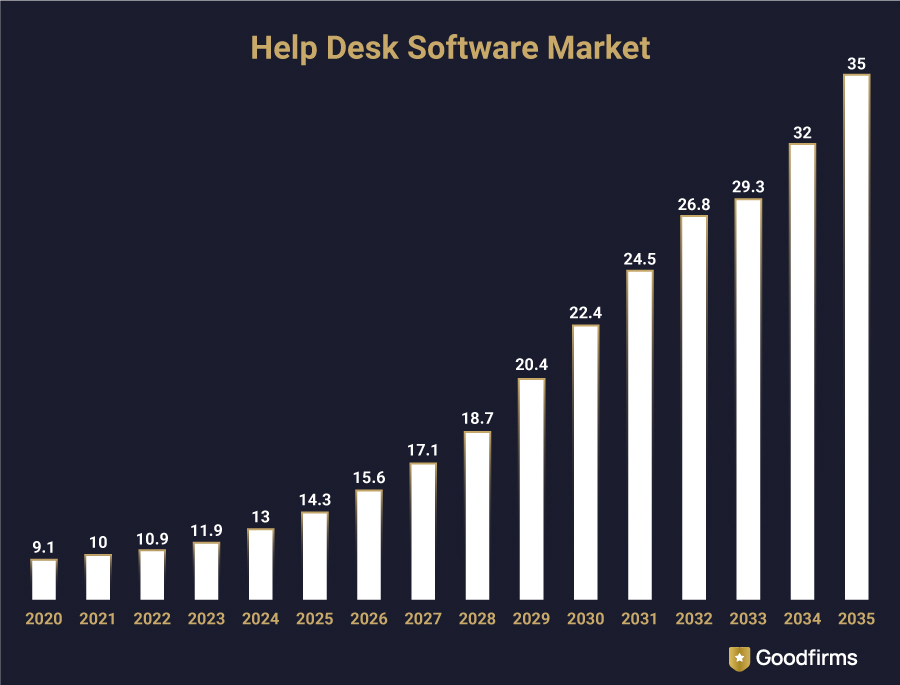
AI is driving most of this growth — changing what customers now expect from businesses when it comes to “basic” support.
91% of service and support leaders now report executive pressure to implement AI in their support workflows.
40% of Enterprise Apps Will Feature Task-Specific AI Agents by 2026, Up from Less Than 5% in 2025.
These numbers clearly depict that customers who get used to instant answers are obviously not going back to waiting 48 hours for an email reply.
The good news is that keeping up with these expectations does not always require an expensive AI-powered platform. The six free and open source tools below sit at that intersection — capable enough to meet modern support demands, free enough to fit businesses low on budget.
The 6 Free and Open Source Help Desk Software Tools
Open source help desk software gives you full access to the source code, the freedom to self-host on your own server, and no per-agent licensing fees. The trade-off is that the setup requires technical effort. These six tools handle that trade-off differently, and understanding where each one sits on the effort-versus-capability spectrum is something that is explained below.
Before we look into the details about the 6 free and open source help desk software tools, let’s have a look at their features comparison chart at a glance.
Comparing the 6 Free and Open Source Help Desk Tools
The table below puts the six tools side by side across the features that matter most when choosing a self-hosted solution. Use it as a starting point, not a final verdict — the right tool depends on your team size, technical comfort, and the specific support channels you run.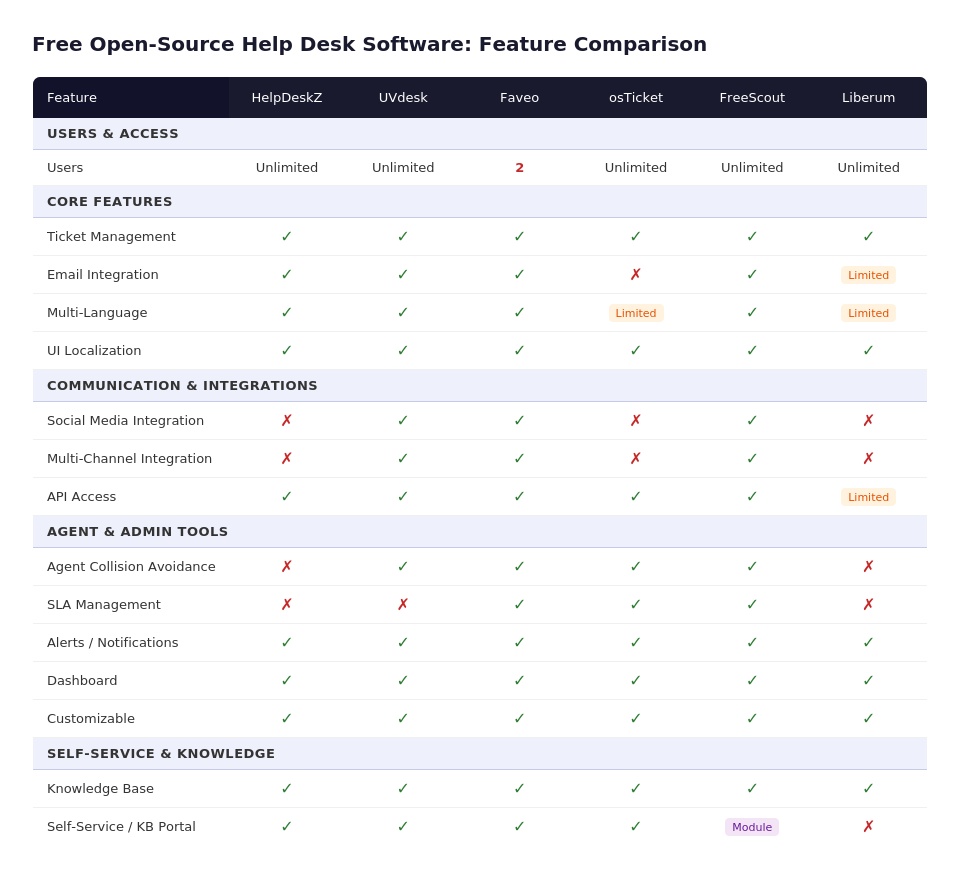
Now let’s start with knowing each of these free and open source help desk software tools in detail.
HelpDeskZ
HelpDeskZ is a PHP-based ticketing system that covers the core of what most small support teams need: email-to-ticket conversion, canned responses, and a knowledge base — without a licensing fee or cloud dependency. It has been used by independent software vendors, web hosting companies, and small IT teams that want a self-hosted alternative to commercial platforms. The interface is functional rather than polished, but teams comfortable with basic server administration get a working system up within a day.
Key Features
- Email-to-ticket conversion with automated ticket assignment
- Canned responses for faster replies on recurring queries
- Knowledge base with article categorization and search
- Custom fields and forms for ticket submission pages
- Staff performance tracking and basic reporting dashboard
- Multi-department support with separate email addresses per department
- Multi-language support
Pricing: Free and open source
Excellent solution. It works great with access to all major functions. I am able to manage the tickets with such ease using this one. At some point, I felt that this help desk solution is very much needed for the support system. - Elvira Keller
Read More Verified Users’ Reviews About HelpDeskZ on Goodfirms
2. UVdesk
UVdesk is a community edition help desk platform built on Symfony that stands out from the others on this list because of its eCommerce integrations. It connects natively with Amazon, eBay, Etsy, Magento, and WooCommerce — pulling order data directly into the ticket view so support agents can see what a customer ordered without switching tabs. For online stores running support at volume, that context reduces average handling time noticeably.
Key Features
- eCommerce integrations: Amazon, eBay, Etsy, Magento, WooCommerce
- Multi-channel ticket management: email, social, and marketplace queries in one inbox Ticket workflow automation with condition-based triggers
- Customer and agent privilege management with role-based access
- Support center with searchable knowledge base and FAQ pages
- App marketplace for extending functionality
- Multi-language and multi-brand support
Pricing: Free community edition. Paid cloud plans available from $11/agent/month.
So far this solution has been a great tool for working in the company. it allows me to follow current tasks as it keeps me updated on incoming new tickets and customer responses. Overall, this solution is great for what my company and I looking for and need. - Queenie Johnston
Read More Verified Users’ Reviews About UVdesk on Goodfirms
3. Faveo Helpdesk
Faveo is built for businesses that want a structured ITIL-aligned help desk without paying enterprise licensing fees. It offers incident tracking, service request workflows, change management, and a self-service portal — all deployable on your own server. The open source community edition covers enough ground for teams running support alongside basic IT operations. Faveo also has a paid cloud version for teams that want managed hosting without the self-setup overhead.
Key Features
- ITIL-aligned ticket management: incident, problem, and change workflows
- Service level agreement (SLA) management with escalation rules
- Self-service portal with knowledge base and FAQ section
- Email-to-ticket conversion with automated routing
- Role-based access control and agent group management
- Reports and analytics dashboard for ticket volume and resolution metrics
- Multi-language support with active localization community
Pricing: Free self-hosted community edition. Paid plans start at $15/month.
Faveo is an end-to-end helpdesk solution, with the ability to add features over time, the system is constantly being updated, this generates a reliable and friendly product. In my opinion and use I am totally satisfied. - Osvaldo Cal.
Read More Verified Users’ Reviews About Faveo Helpdesk on Goodfirms
4. osTicket
osTicket has been around since 2003 and remains one of the most widely deployed open source help desk platforms in the world. Its longevity reflects genuine utility: it converts emails, web forms, and phone calls into tickets, routes them by department and agent skill, and tracks every interaction through to resolution. The feature set is not flashy, but it is thorough — and the user base is large enough that community support answers most configuration questions quickly.
Key Features
- Multi-channel ticket intake: email, web form, phone, and API
- Custom ticket fields and forms per help topic
- Dynamic ticket routing by department, topic, and agent availability
- SLA management with overdue ticket alerts and escalation
- Agent collision detection to prevent duplicate responses
- Customer-facing ticket portal with full interaction history
- Rich reporting with ticket aging, volume, and resolution metrics
Pricing: Free self-hosted. Hosted cloud version starts at $12/agent/month.
All its features are as amazing as its customer support and I enjoy using them, especially its Mobile user support, Dashboards, Social media integration, user, role, and assessment management. Their team is open to suggestions and is quick to respond. It seamlessly integrates inquiries from email, phone, and the web. - Eden Dinwiddie
Read More Verified Users’ Reviews About os Ticket on Goodfirms
5. FreeScout
FreeScout was built as a self-hosted alternative to Zendesk and Help Scout — it intentionally mirrors the shared inbox experience those platforms offer, at zero licensing cost. Teams that have used Help Scout find the interface immediately familiar: conversations, not tickets. That framing makes it easier to onboard non-technical support staff. The module system extends functionality incrementally, so teams only add what they actually need rather than configuring a system built for someone else's use case.
Key Features
- Shared inbox with conversation threading — Help Scout-style interface
- Email integration with multiple mailbox support
- Collision detection and private notes between agents
- Module-based extensibility: live chat, WhatsApp, reports, and more
- Canned responses and saved replies for high-volume queues
- Customer satisfaction ratings (CSAT) via module
- Multi-language support and GDPR-compliant data management
Pricing: Free self-hosted. Paid modules available individually.
Switching our support workflow over to FreeScout has been one of the best moves we’ve made. We were looking for a solid shared inbox solution that wouldn't drain our budget with per-user monthly fees, and this completely fit the bill. The interface is super clean and feels just like a regular email inbox, meaning our team didn't need any formal training to get started—they just logged in and hit the ground running. - Anonymous
Read More Verified Users’ Reviews About Liberum on Goodfirms
6. Liberum Help Desk
Liberum is the most minimal tool on this list — deliberately so. It is a lightweight, single-file ASP-based help desk solution designed for small teams that need basic ticket tracking without the overhead of a full-featured platform. Setup takes minutes rather than hours, and the absence of advanced configuration options is, for its target users, a feature rather than a gap. Teams running support for a small internal user base or a single product line will find it covers the essentials without excess.
Key Features
- Simple ticket creation and tracking for small teams
- Email notifications for ticket updates
- Basic user management and agent assignment
- Priority levels and status tracking
- Minimal setup with no database server required
- Suitable for internal IT support in small organizations
Pricing: Free and Open Source
Great software!! I just started working with this help desk solution. and I must say that this one is a nice tool to fulfill all purposes with amazing features, mainly email integration, Service Level Agreement (SLA) management, and Knowledge Base. it is super-fast to submit a ticket here. - Elmer Ortega
Read More Verified Users’ Reviews About Liberum on Goodfirms
These free and open source tools ask something in return: setup time, server management, and ongoing maintenance. For teams where those costs outweigh the licensing savings, the three paid platforms below offer a different trade-off — one that may be worth it depending on where your team spends its time.
Open source works well when your team has the technical capacity to set it up and maintain it. Not every team does, and that is a legitimate reason to look at paid alternatives. Below are the three best help desk software tools (alternatives to free and open source help desk software), offering a free version or trial subscriptions. If you can extend your budget to a certain extent, one of these options can definitely be an asset to your team.
The Best Help Desk Software Tools with Free Version/Trial Subscription
Most help desk software trials last 14 days and start the clock before your team is even set up. This guide covers the platforms that give you enough time, features, and support to make a real decision — whether that's a free tier with no expiry or a trial structured around actual evaluation, not a sales deadline.
1. Freshdesk
Freshdesk is one of the most widely adopted cloud-based help desk platforms globally, built for teams that want to go from signup to live support in hours rather than days. Its AI assistant Freddy handles ticket categorization, auto-suggests responses, and surfaces related knowledge base articles before an agent types a word. For businesses scaling support across email, phone, chat, and social simultaneously, Freshdesk's omnichannel inbox is the feature that eliminates the most manual overhead.
Key Features
- Omnichannel inbox combining email, phone, live chat, and social into one view
- Freddy AI software for ticket classification, response suggestions, and agent assist
- Automated ticket routing, priority scoring, and SLA management
- Self-service portal with a customizable knowledge base 100+ integrations including Salesforce, Slack, Jira, and Shopify Collision detection — prevents two agents from working the same ticket simultaneously
Pricing: Starts at $15/agent/month (Growth plan). | Free Trial: 21-day free trial on paid plans. Free tier available permanently. Free plan available for up to 2 agents.
At LearnWorlds, we use FreshDesk. We have been using this software for almost 10 years. FreshDesk supports an omnichannel functionality that combines ticketing software, calls, and chats under the same account. - George Kollias, Head of Content Marketing at LearnWorlds.
Read verified user reviews about Freshdesk on Goodfirms
2. ManageEngine ServiceDesk Plus
ManageEngine ServiceDesk Plus is built for IT teams running structured ITSM workflows — incident management, change management, asset tracking, and CMDB — under one roof. Unlike lighter-weight support tools, it follows ITIL-aligned processes, making it well-suited to enterprises managing complex IT environments where accountability trails and change request approvals matter. It also offers both cloud-hosted and on-premise deployment options, which gives regulated industries more control over where data lives.
Key Features
- ITIL-aligned modules: incident, problem, change, and release management
- Built-in IT asset management with auto-discovery and CMDB
- AI-powered virtual agent Zia for first-level ticket resolution
- SLA management with automated escalation workflows
- Self-service portal with knowledge base and approval workflows
- Deployment flexibility: cloud or on-premise installation
Pricing: Starts at $10/technician/month (Standard plan).| Free Trial: 30-day free trial. Free version available for up to 5 technicians and 500 nodes.
Read verified user reviews about ManageEngine ServiceDesk Plus on Goodfirms
3. SuperOps.ai RMM
SuperOps.ai RMM targets managed service providers (MSPs) who run support, RMM (remote monitoring and management), and project delivery from one platform. It brings PSA and RMM together in a way that eliminates the dual-tool setup most MSPs rely on — reducing context-switching, contract mismatches, and billing gaps that compound over time. AI-assisted ticket triaging and smart alert deduplication are the features MSP engineers cite most in user reviews for reducing alert fatigue.
Key Features
- Unified PSA and RMM platform built specifically for MSPs
- AI-powered ticket triaging and smart alert deduplication
- Automated patch management and endpoint monitoring
- Contract and billing management tied directly to service delivery
- SLA tracking with built-in escalation rules
- Client-facing self-service portal with branded experience
Pricing: Starts at $79/month for up to 2 technicians (Starter plan).| Free Trial: 21-day free trial with full feature access.
Read verified user reviews about SuperOps MSPsuite on Goodfirms:
Key Takeaway: Now, here's the thing about all three tools above: they are excellent at what they do, but they all come with an invoice. For teams where budget is the constraint — not capability — the six free and open source help desk software tools mentioned above change the calculation entirely.
The help desk tools covered so far — free, open source, and paid — solve specific problems for specific team types. But some platforms have earned their place across so many industries and team sizes that they come up in almost every shortlist, regardless of budget. These are the ones worth knowing before you make a final call.
The Most Popular Help Desk Software
Each of the five platforms below has a free plan or trial available, a proven track record across multiple industries, and a user base large enough that documentation, integrations, and community support are rarely a problem. They differ significantly in pricing, interface philosophy, and the type of team they suit best — so the right one depends on your support volume, team structure, and the channels your customers actually use.
1. Zoho Desk
Zoho Desk brings context-aware ticketing to customer support teams, pulling customer history, sentiment, and interaction data into every ticket view. Its AI assistant Zia handles ticket tagging, anomaly detection, and response suggestions. Starts at $7/agent/month. Free plan available for up to 3 agents.
2. HelpDesk
HelpDesk by LiveChat keeps the interface deliberately simple — a shared inbox where tickets from email, chat, and forms land in one place without overwhelming agents with configuration options. Automated workflows handle routing and tagging in the background. Starts at $29/agent/month. 14-day free trial available.
3. Zendesk Support
Zendesk Support is built for scale — handling high ticket volumes across email, chat, voice, and social from a single workspace. Its AI features cover automated triage, macro suggestions, and intelligent routing. A platform teams grow into rather than out of. Starts at $19/agent/month.
4. Help Scout
Help Scout frames every support interaction as a conversation, not a ticket number — making it the preferred choice for teams where tone and relationship matter as much as resolution speed. Shared inboxes, Docs knowledge base, and live chat included. Starts at $22/agent/month. Free trial available.
5. Hiver
Hiver turns Gmail into a fully functional help desk — no new interface to learn, no migration headache. Teams already living in Google Workspace get shared inboxes, collision detection, and SLA tracking without leaving the email client they already use. Starts at $19/agent/month. 7-day free trial available.
The five platforms above work well across most standard support environments. Where they start to show limits is in industries where ticketing alone isn't enough — where compliance requirements, asset tracking, order context, or patient data handling changes what "good support software" actually means. That's where industry-specific tools earn their place.
Top Help Desk Software for Different Industries
The tools below are grouped by industry, but the logic behind each choice goes beyond surface-level fit. Each one was selected because it handles the specific operational pressures of that sector — whether that's production uptime in manufacturing, regulatory sensitivity in healthcare, audit trails in finance, or order-volume throughput in retail and eCommerce.
Help Desk Software for the Manufacturing Industry
The manufacturing industry is rapidly deploying modern help desk tools to automate manual and time-consuming tasks, view centralized information, manage tickets, communicate production schedules, etc. Every manufacturer, from small to big, can use the below listed top help desk software to support both internal and external support functions besides ensuring constant uptime and production.
1. HappyFox
HappyFox handles high-volume support queues with structured ticket management, smart rules, and an asset management module built in. Its no-code automation builder lets non-technical teams configure complex workflows without developer involvement. Used widely in IT and operations support. Starts at $29/agent/month. Free trial available.
2. HelpSpot
HelpSpot is a straightforward, self-hosted help desk built for teams that want full data control without the complexity of enterprise platforms. It handles email-based ticketing, knowledge base management, and reporting cleanly. A practical choice for mid-sized teams running support on their own infrastructure. Starts at $569/year for 5 agents.
Help Desk Software for the Healthcare Industry
Help desk software optimized for the healthcare industry can do wonders in providing proper, timely assistance to patients, observing regulatory requirements, enhancing internal operations, and ensuring improved patient engagement. Designed with features such as automation, asset management, insights, etc., help desk software for the healthcare industry helps to resolve tickets in a timelier manner, offering prioritized support. Patient support service, workflow management, and facilities management are just easier with such tools. The following top help desk software for healthcare organizations contributes to a smoother workflow, improved communication, and better patient care.
1. SolarWinds Web Help Desk
SolarWinds Web Help Desk connects IT ticketing directly to asset management and network monitoring — making it a natural fit for IT teams already using SolarWinds infrastructure tools. Automated ticket routing, SLA tracking, and change management are built in. Starts at $409/technician one-time license fee.
2. WowDesk
WowDesk centralizes customer interactions from email, phone, social media, and live chat into a single ticketing workspace. Its customer satisfaction scoring, SLA management, and multilingual support make it a practical option for growing teams handling support across multiple regions. Starts at $30/agent/month. Free trial available.
3. ServiceTonic
ServiceTonic is an ITIL-aligned help desk platform available as both cloud-hosted and on-premise deployments. It covers incident, problem, change, and service request management with a no-code configuration interface. A solid option for IT teams wanting structured workflows without heavy implementation costs. Starts at $20/agent/month.
Help Desk Software for the Finance Industry
The security-dependent finance industry can seamlessly benefit from the help desk software systems designed specifically for finance services management. It helps in meeting clients’ expectations, reducing churn, providing smooth guidance to the customers, and eliminating support-related challenges. Financial institutions, banks, brokerages, credit unions, etc., can use the below-discussed top help desk software for the finance industry to streamline ticketing, enhance security, and improve compliance for efficient customer support that fosters trust and builds stronger client relationships.
1. iSupport
iSupport is a configurable help desk and IT service management platform with both incident tracking and asset management built into the same system. It supports on-premise deployment, giving IT-heavy organizations full control over data residency. Starts at $20/agent/month. 30-day free trial available.
2. OneDesk
OneDesk combines help desk ticketing with project management in one platform — letting teams handle customer support requests and internal work items side by side without switching tools. A practical fit for product and professional services teams running both functions simultaneously. Starts at $11.99/agent/month. Free trial available.
3. Deskpro
Deskpro handles customer support across email, live chat, voice, and social with a highly configurable interface that adapts to complex team structures. Available as cloud-hosted or on-premise. Its reporting depth and custom app integrations make it a strong fit for mid-market and enterprise teams. Starts at $29/agent/month.
Help Desk Software for the Retail and eCommerce Industry
The retail and eCommerce industry deals with a lot of customer queries on a regular basis, which becomes hectic if not handled properly. In such a scenario, an ecommerce help desk software comes in handy that can help retailers and eCommerce firms in streamlining the communication, quickly resolving the concerns, improving customer satisfaction, measuring agent productivity, making data-driven decisions, etc., enabling better help desk support and omnichannel experience.
1. eDesk
eDesk is built specifically for eCommerce support teams — pulling orders, tracking data, and customer history from Amazon, eBay, Shopify, and 200+ other channels directly into the ticket view. Agents get the full order context without switching tabs. Starts at $89/month for 2 agents. Free trial available.
2. ProProfs Help Desk
ProProfs Help Desk keeps shared inbox management straightforward — email tickets, internal notes, canned responses, and basic reporting without the configuration overhead of larger platforms. A practical entry point for small teams moving off spreadsheets and shared email accounts. Starts at $19.99/agent/month. Free plan available.
3.DeskXpand
DeskXpand covers omnichannel ticketing across email, chat, social, and phone with a clean interface designed to reduce agent switching time between channels. Its automation rules handle ticket assignment, priority tagging, and escalation without manual intervention. Starts at $25/agent/month. 14-day free trial available.
Choosing the right help desk software for your industry is one part of the decision. The other part is knowing where the category itself is heading, because a platform that fits your business today but is falling behind on AI, omnichannel, and self-service capability will cost more to replace soon. Therefore, knowing the latest trends in help desk software becomes integral.
Latest Trends in Help Desk Software
The five shifts below are not predictions — they are already built into the platforms covered in this guide and actively changing how support teams are measured, staffed, and budgeted. Understanding them helps you evaluate any help desk tool on a longer timeline than the next billing cycle.
AI-Assisted Triage is Mainstream
The majority of mid-market help desk platforms now include AI-powered ticket routing, auto-categorization, and response drafting. According to Salesforce's State of Service report, 81% of service representatives say that AI frees them to focus on more complex cases
From a customer experience and reputation standpoint, AI tools are becoming useful when they remove repetitive tasks customers never notice but teams deal with constantly. Businesses handling large volumes of reviews, support conversations, and customer interactions are applying AI to improve response speed and issue prioritization. - Aaron Whittaker (VP of Demand Generation & Marketing at Thrive Internet Marketing Agency.)
Faster Resolution Times Are the New KPI
Average handle time has replaced customer satisfaction scores as the primary operational metric for many IT teams. Zendesk's 2024 CX Trends report found that 86% of customers expect immediate service.
Also, you can go through Goodfirms’ article - Why Your Help Desk Might Be Costing Your Customers and How to Fix It? to know how modern help desk systems allow faster resolutions and stronger customer retention.
Contextual Agent Views Are Standard
Help desk tools now pull CRM data, order history, and prior tickets into a unified agent workspace. Freshdesk, Zoho Desk, and ServiceNow all offer this natively. According to a recent report, CRM-based forecasting achieve 42% better accuracy than spreadsheet-reliant teams.
Omnichannel Consolidation Is Accelerating
Email, live chat, WhatsApp, and social media queries are now managed from a single dashboard in most leading platforms — a capability previously limited to enterprise-tier tools. AmplifAI reports that companies using omnichannel support retain 89% of customers.
Self-Service Portals Are Reducing Ticket Volume
More businesses are investing in knowledge bases and integrating chatbot software into their helpdesk tool to deflect routine queries before they become tickets.
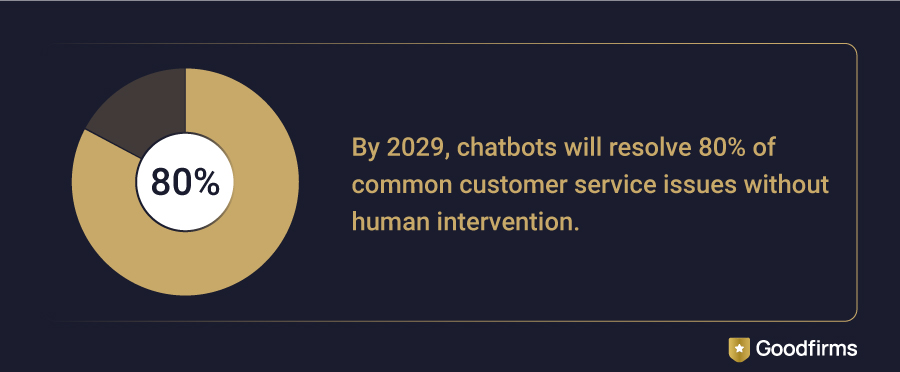 (Source: Gartner)
Knowing the market size, the tools available, and where the category is heading gives you context. What it doesn't give you is a decision. The six open source tools in this guide are genuinely different from each other — and picking the wrong one doesn't just waste setup time, it means rebuilding on a different platform six months later when the gaps become obvious. So, here are some tips that can help you make the right choice.
How to Choose the Right Free and Open Source Help Desk Software for Your Team?
Details about each help desk software tool, whether free and open source or cloud-based with a free trial mentioned in this guide can't answer which one fits your team, because that depends on the four variables below. You can consider each one before you commit to an installation.
1. Team Size and Technical Capacity
Liberum works for a 2-3 person team with minimal setup expectations. osTicket and UVdesk scale to dozens of agents. FreeScout fits teams that have used Help Scout before and want a self-hosted equivalent without retraining. If nobody on your team has administered a PHP or Laravel app before, the learning curve across these tools varies significantly.
2. Hosting Environment
All six tools are self-hosted. That means you need a server, a domain, and someone who can configure it. HelpDeskZ, osTicket, and Faveo have the clearest installation documentation. FreeScout has an active GitHub community. If managed hosting is the preference, UVdesk and osTicket both offer cloud versions with a monthly fee.
3. Support Channel Mix
Running eCommerce support with order queries from Amazon or Etsy? UVdesk is the only tool on this list with native marketplace integrations. Managing an internal IT help desk? Faveo's ITIL-aligned workflows and Liberum's simplicity each suit different ends of that requirement. General customer support across email and web forms? osTicket and HelpDeskZ handle it well.
4. Long-term Scalability
Open source tools do not charge per agent, which makes them attractive as team sizes grow. But scaling them also means managing your own upgrades, performance tuning, and security patches. Teams that grow past 20 agents often revisit whether a paid tool's managed hosting cost is cheaper than the internal time spent maintaining a self-hosted system. That calculation is worth doing before committing.
Those four variables narrow the field considerably. What tends to remain after that are specific questions — about the difference between free and open source, about security, about what happens when the team grows. The answers below cover what comes up most consistently from teams at the evaluation stage.
Frequently Asked Questions About Help Desk Software Tools
What is the difference between free and open source help desk software and a free plan from a paid tool?
Free plans from paid tools like Freshdesk come with agent or feature limits. Open source tools have no licensing fee and no artificial caps — but they require self-hosting and technical setup. Open source means you own the installation, control the data, and can modify the code. A free plan means you are using a vendor's hosted system under their terms, with limits that encourage upgrading.
Which of the six open source tools is easiest to set up?
osTicket and HelpDeskZ have the most straightforward installation documentation and the largest community forums, making them the least friction-heavy options for teams without dedicated DevOps support. FreeScout is close behind, particularly for teams deploying on a standard LAMP stack or using a managed server environment.
Can open source help desk software support multiple brands or departments?
Yes, with varying depth. UVdesk and Faveo both support multi-brand and multi-department setups natively. osTicket handles multiple departments with separate email routing. FreeScout supports multiple mailboxes per installation. Liberum is the exception — it is designed for single-team use and does not have multi-brand functionality.
Is open source help desk software secure enough for customer data?
Security depends on how the software is deployed and maintained, not just what it is. Open source tools receive community-contributed security patches, but it is your responsibility to apply them. Organizations handling sensitive customer data should ensure SSL is configured, access controls are set correctly, and updates are applied promptly. Self-hosting introduces more configuration responsibility than a managed SaaS product.
Why do some of the paid tools on this list offer free trials instead of a free version?
Freshdesk, ManageEngine, and SuperOps are commercial products that use free trials as part of their sales funnel. A free trial gives you full feature access for a limited time, after which a paid subscription is required. The distinction matters: a free open source tool stays free indefinitely and gives you full control over the installation. A free trial is a starting point toward a purchase decision.
Do any of the six open source tools support AI or automation features?
Not natively at the same depth as commercial platforms. UVdesk has workflow automation via condition-based triggers. Faveo and osTicket support automated ticket routing and escalation. HelpDeskZ covers canned responses and auto-assignment. For AI-assisted ticket classification or smart response suggestions at the level that Freshdesk or ManageEngine offer, the open source tools in this list require third-party integration or custom development.
Conclusion: Which Help Desk Software Should You Choose?
The right help desk tool comes down to one question: Does your team have the capacity to self-host? If yes, osTicket and HelpDeskZ cover most standard support needs, UVdesk handles eCommerce, Faveo suits ITIL-aligned IT teams, FreeScout fits teams migrating from Help Scout, and Liberum works for the smallest setups. If self-hosting isn't viable, Freshdesk, ManageEngine, and SuperOps each offer structured free trials worth evaluating.
One factor worth weighing, regardless of which tool you choose: Artificial Intelligence is no longer a premium add-on. Freddy in Freshdesk, Zia in ManageEngine, and smart triaging in SuperOps are already handling ticket classification, response suggestions, and alert deduplication at the entry tier. Teams that ignore this when shortlisting a platform today will feel the gap within a year, as customer expectations around response speed continue to reset upward.
The modern help desk tools are ready — the decision gets straightforward once you know where your team sits on that single axis.