Mobile apps often request access to features like your camera, contacts, location, and other permissions. While these permissions can enhance app functionality, they also raise concerns about privacy and data usage. Allowing access to app permissions without understanding its context might result in you leaking your sensitive data to unauthorized third parties. Undoubtedly, a few valuable permissions are required for the effective functioning and operational efficiency of the apps and the service provider. These permissions help businesses to operate effectively but also unintentionally raise concerns of data leakage if there is a lack of responsible permission management.
This research survey from Goodfirms titled, “Why Do Apps Keep Asking for Permissions? What You Really Need to Know about Data Control,” aims to explore why apps ask for user-data permissions, how users respond, what risks or benefits are involved, what both users and developers can do to manage them responsibly, and how to have safer permission management.
The research findings generated by this survey is sure to help readers gain a high-level insight into the role of mobile app development companies in data privacy and security, apart from AI’s role, user's role, and user-data regulatories.
We sincerely thank our research partners who took their valuable time, and participated in this survey.
Table of Contents:
- Introduction: Why Do Apps Keep Asking for Permissions?
- Why App Permissions Matter?
- Survey Participants Summary
- Does It Bother You When Your Mobile App Asks For Data-Collection Permissions From You?
- Do You Think Apps Are Asking Permissions To Purely Access Your Personal Data?
- Do You Allow Apps To Use Your Data?
- Do You Think User-Data Privacy And Security Is Solely the App Development Company’s Responsibility?
- Are All Requested Permissions Necessary For the App’s Functionality?
- Which Of The Following Are the Commonly Requested Permissions That You Come Across From Your Mobile Apps:
- Do You Think Allowing Permissions On the App Can Compromise Your Data?
- What According To You Are The User-Data Security Threats Of Granting Permissions To Mobile Apps? Tick Top 5 Of The Given Options:
- Will You Avoid Downloading Apps that Request “Too Many” Permissions?
- What Type Of User-Data Security Measures Should the Developers Leverage Before Launching An App?
- Can You Share a Few Safety Tips For the Users To Avoid Data Vulnerabilities While Using An App?
- Do You Think There Should Be Limits To How Much Personal Data Can Be Collected?
- Safer Permission Management For Mobile Apps:
- App Permissions Survey Summary: Key Takeaways:
- Final Thoughts: Data Control Is in Your Hands
- References
Introduction: Why Do Apps Keep Asking for Permissions?
Mobile apps - both Android and iOS-based seek different types of permissions from the users. These include install-time permissions, runtime permissions, and other special permissions during the usage of an application. Although apps are developed with a clear scope of data and actions restriction, several times these are selected with the user consent and the system grants permission to the apps. The protection level for each permission is defined by the developers, users, and the system.
Install-time permissions are normal and they have no major repercussions. Runtime permissions and special permissions are prone to data safety threats and they most often are the dangerous permissions.
Permissions are not only to enable the system to function smoothly, but they also restrict other apps to interact with the components of the already installed apps.
Between the apps and the phone hardware, there is a middle gate keeper - the operating system that actually displays a prompt to the user asking for permissions to either grant or deny.
Why App Permissions Matter?
Mobile app permissions are basically settings that the user sets to decide what data the apps can access, and process. It is a way of controlling and regulating your personal details. These permissions are basically to access the device's camera, photos, videos, microphone, location, contact list, and other storage data, among other features. Apps take permissions to function properly and to the full extent. For example, apps like WhatsApp need access to camera and microphone to enable voice and video calling. If this is disabled, then the users will not be able to leverage voice call and video call features.
- Permission for Location is used to track, target and tag.Location permissions are often requested to show local data. Apps like Google maps and weather apps request such permissions to deliver more personalized and convenient facilities to the users.
- Potential Risk: Data privacy breaches, identity theft, and even physical safety threats are some of the potential risks of sharing location data.
- Permission for Microphone could be to activate features that require capturing audio input including, voice recording, voice calls, voice search, and voice activated commands. Voice recording apps, voice assistant apps, dictation software, video conferencing apps, messaging apps, are a few types of mobile apps that seek permissions to access the microphone.
- Potential Risk: Data breach, unethical use of microphone to record user’s activities, privacy violations.
- Permissions to access contacts are basically to help the app merge contacts across apps. Social media apps like Facebook, Instagram etc., request this permission to help users find friends quickly instantly, and connect with them.
- Potential Risk: Contact details are used for marketing, spam, or worse.
- Permissions for storage access are basically for the apps to read, save, or upload files like photos, videos, and documents. This helps apps function properly. For example a photo editor app may require access to your images to edit the photos. However, if an unrelated app asks for storage permission, it could be a privacy concern.
- Potential Risk: May collect files, photos, or private data which the spammers may have access to.
The Most Permission‑Intensive Apps include;
Facebook is one of the popular social media apps that reportedly requests for 60+ permissions (1) in total and a few are said to be risky. WhatsApp, another top social networking app is said to be taking over 60 permissions. Ecommerce apps also request permissions to access location, contact details, files and media and other data that may be risky as the data can be used for tracking and advertising. Antivirus or cleaner apps request permissions to access system settings, phone information, storage, and more. Fitness/Health Tracking apps like Google Fit, Samsung Health, Fitbit, etc.,request permissions to track your activity, and they have sensors. Driving/Navigation apps like Google Maps, Waze, etc., request permissions to access your location, motion, background activity, etc. to suggest accordingly and personalize your activities.
The following sections are the responses that Goodfirms received from its research participants to understand the purpose of app permissions and what users should know about data control, security, and privacy.
Survey Participants Summary
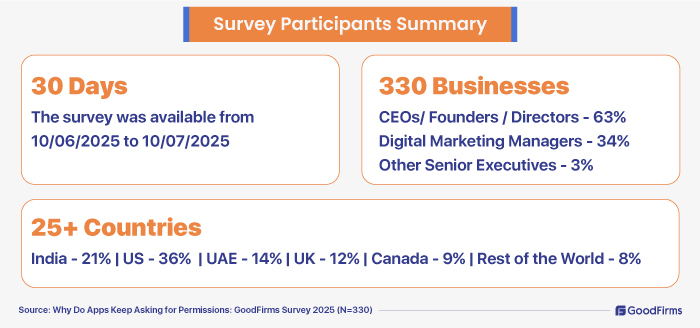
30 days
The survey was available from 10/06/2025 to 10/07/2025
330 Businesses
Goodfirms surveyed 330 businesses worldwide to discuss the purpose of app permissions, and what the readers should be aware of data control. The survey was conducted for 30 days, from 10/06/2025 to 10/07/2025. The survey participants included CEOs/ Founders / Directors - 63%, digital marketing managers - 34%, and other senior executives - 3%.
Goodfirms’ survey respondents are from 25+ countries including India - 21%, US - 36%, UAE - 14%, UK - 12%, Canada - 9%, 8% - Rest of the world.
1. Does It Bother You When Your Mobile App Asks For Data-Collection Permissions From You?
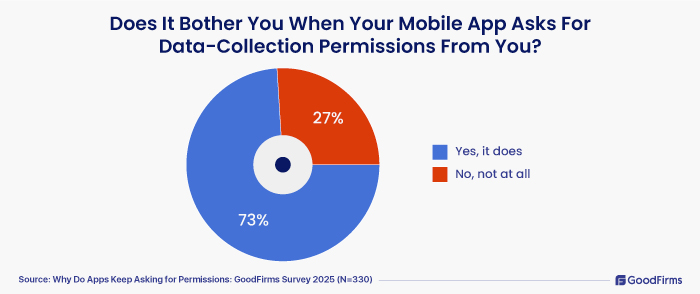
73% of the survey participants mentioned that it does bother them when mobile apps ask for data-collection permissions. The remaining 27% were fine with the app permissions.
2. Do You Think Apps Are Asking Permissions To Purely Access Your Personal Data?
Mobile phones with multiple apps, microphones and virtual assistants can listen to users’ conversations and send push notifications as per the discussions. Many times, this leads to a question of whether mobile phones are listening to every conversation. This is precisely why users should be concerned about their data control and privacy settings. Here, Goodfirms attempted to check with the survey participants on their inputs about apps requesting permissions and to understand whether it is purely to access personal data.
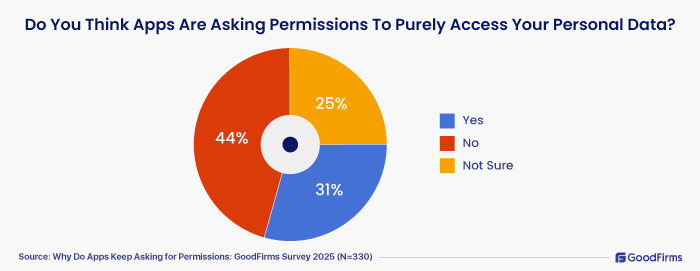
- 31% of the survey respondents ticked “Yes” as they are clear that apps ask permissions to purely access the personal data.
- 44% of the research participants ticked “No” due to the fact that they understand that the permissions requested by the apps are not just to access personal data, but to process and prepare the app for further functionalities.
- 25% of the participants indicated that they are not sure, as they are seeing both the pros and cons of mobile app permission requests.
3. Do You Allow Apps To Use Your Data?
Rising awareness of reliability, data breaches, and privacy issues is forcing many to think twice before they allow apps to use their data. Social media apps are the most data-hungry apps, says a study (2). Here, Goodfirms attempted to question this to the survey participants and find out the current trend. Users are more likely to enable access for basic requirements to keep the app functioning.
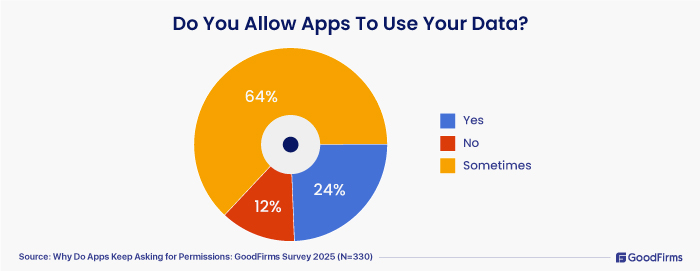
- When questioned whether they would allow their apps to use their data, around 64% of the survey participants mentioned “sometime.” In the sense, they will allow apps to use some form of their personal data, but with conditions. This could be based on their judgement. They can allow it if need be, and they may decline if they find it unnecessary. More and more users are getting cautious, especially with apps that do not have clean guidelines, or privacy policies. There is an increasing demand from the users for transparency and control over their data.
- Around 24% of the survey respondents agreed that they allow apps to use their data.
- 12% of respondents clearly indicated that they will not allow their apps to use their data, and they decline the permissions requests. The reason could be privacy concerns, reliability issues, unclear permission requests, data misuse, and better privacy settings on their phones. So, user-data privacy and security is not solely the app development company’s responsibility. It's a shared responsibility.
4. Do You Think User-Data Privacy And Security Is Solely the App Development Company’s Responsibility?
Mobile apps are designed and developed by reliable app developers, freelance app developers, an in-house development team, or outsourced developers. Although development follows secure coding, transparent privacy and security guidelines, compliance, etc., the endpoint control lies in the hands of the users. Safe permission, reliable apps, and mindfully vetting permission requests are for the users to follow.
In an attempt to understand this better, Goodfirms raised this question to the survey participants and here are the response for the same;
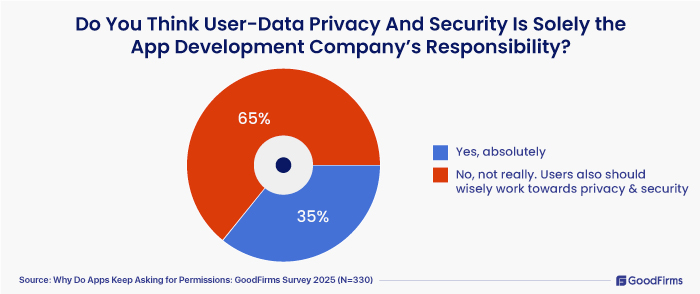
- Yes, absolutely said 35% of the survey participants
- No, not really. Users also should wisely work towards privacy and security said 65% survey respondents.
Users should be able to understand the permission scope, review the installation process thoroughly, vet post-installation permissions properly, and avoid risky permissions. This is more often required while installing unheard-of and not-so-reputed apps. Developers should also ensure they follow a transparent permission design with fine-grained permission controls. Apps should be able to explain the purpose of permissions and avoid intrusive requests. App stores should also follow a rigorous vetting process to ensure that users are not troubled.
5. Are All Requested Permissions Necessary For the App’s Functionality?
Although there are nearly 900 permissions total that apps ask currently, “there are nearly 91 “dangerous” permissions (3) that could affect user privacy or core phone functions,” says a study conducted by the Cybernews research team.
Prioritizing security, apps often take permissions to function a certain way, to deliver personalized services, to integrate with other applications, to track activity, and to complete certain tasks quickly. For example, to enable voice and video calls, the apps would require permissions to access mic and camera. To get directions, map apps will take permission to access the location. To integrate contacts social media apps will require permission to access them.
In an attempt to find out whether all requested permissions are necessary for the app’s functionality, Goodfirms was able to gather valuable insights. Here we go;
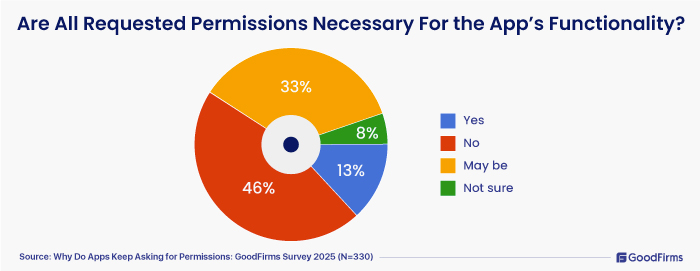
- 46% survey participants mentioned that they don’t think all requisition permissions are necessary for the app’s functionality.
- 13% research partners clearly indicated that all app permissions are designed to maintain the on-going functionality and features of the apps. Without enabling access, they feel no point in having the app.
- 33% and 8% indicated “may be,” and “not sure.”
6. Which Of The Following Are the Commonly Requested Permissions That You Come Across From Your Mobile Apps:
There are certain most commonly requested permissions that users typically encounter when installing or using mobile apps. A few apps are purposely designed to over-request permissions that are not required for their core function. Apps that are built without any transparent privacy policy fall under these red flag concerns. Apps on Google Play generally are said to push permission notifications more explicitly and more in detail. On the App Store, apps can be managed individually and apps prompt permissions only if access is needed.
Let us understand what our research partners have come across from their mobile apps:
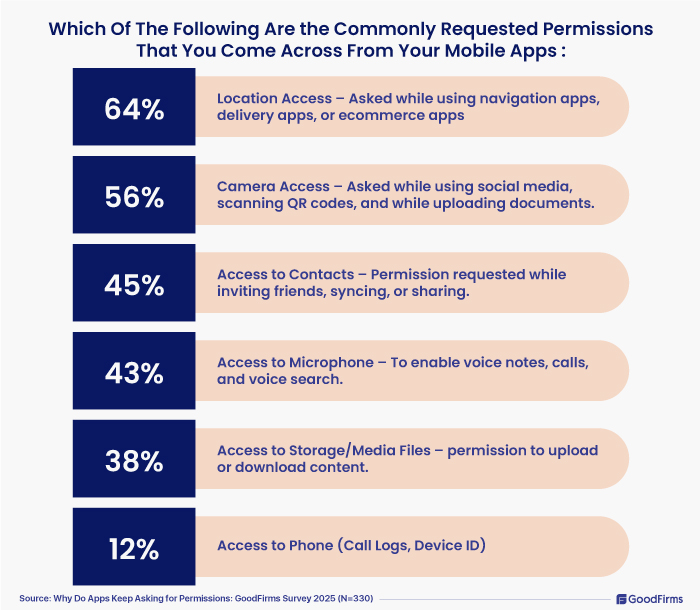
- 64% indicated that they often get permission to access their location as they use more navigation apps, delivery apps, or ecommerce apps.
- 56% mentioned that they often get access requests for their camera while using social media apps, scanning QR codes, and while uploading documents.
- Access to Contacts – Permission requested while inviting friends, syncing, or sharing. 45%
- 43% said they get permission requests to access their phone’s microphone to enable voice notes, calls, and enable voice search.
- 38% mentioned that they get requests frequently to access their phone storage and media files.
- 12% survey participants clearly indicated that they often get permission requests to access their call logs, device ID and so on.
Allowing permissions might potentially be risky. It is always better to verify the reviews of the app before downloading the application. Users have to mindfully enable access only if it is required for the app functionality. Privacy settings should be thoroughly understood to have complete control over the data.
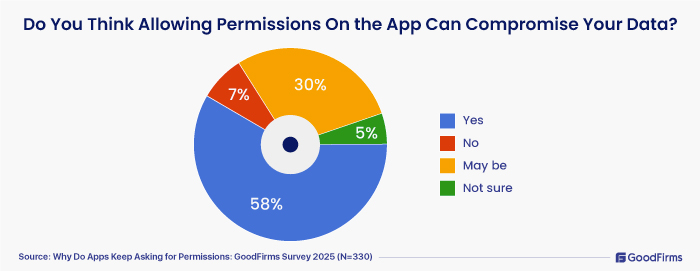
- 58% survey participants indicated that allowing permissions can compromise their data.
- 30% said “Maybe.” 7% believe that their data will not be traded and 5% not sure.
Recently, reports surfaced about a highly advanced Android malware campaign (4) aimed at Indian banking users. The attackers are spreading fake apps that closely resemble official banking applications. These malicious apps use a dropper technique to deceive users into installing a hidden core module, which then requests sensitive permissions such as installing other apps, accessing SMS (read/send/receive), and querying all installed packages.
These permissions enable it to install additional malware silently, intercept OTP messages, monitor installed apps, and perform overlay attacks to steal credentials, debit card information, and even hijack calls via USSD forwarding. It communicates with command‑and‑control servers through Firebase infrastructure, allowing remote commands and persistent data exfiltration while remaining hidden and persistent across reboots.
This was just one wake up call, but there are many threats that arise due to granting permissions without vetting properly.
Here, Goodfirms attempted to find out from the survey participants the top 5 data-security threats that they came across by purely granting app permissions. The response is as follows;
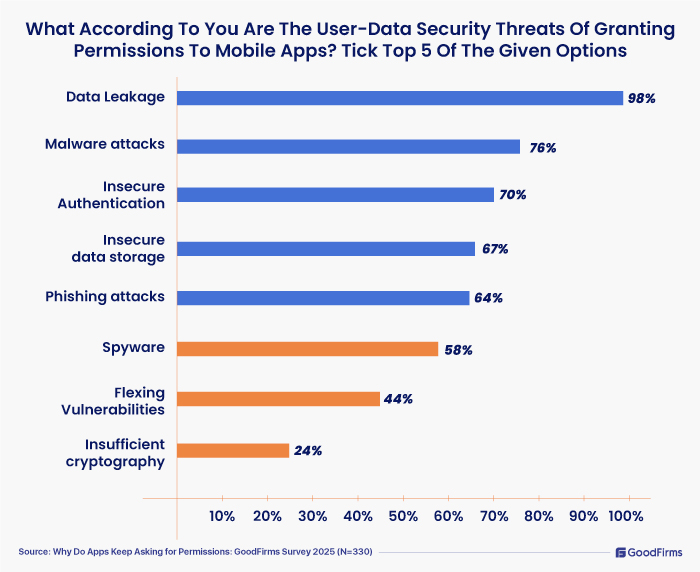
The top 5 responses included Data Leakage - 98%; Malware attacks - 76%; Insecure Authentication - 70%; Insecure data storage - 67%; Phishing attacks - 64%.
Spyware -(58%), Flexing Vulnerabilities - (44%), Insufficient cryptography - (24%) were other threats indicated by the participants.
9. Will You Uninstall Apps that Request “Too Many” Permissions?
It is always better to safeguard your data. You can unknowingly hand it over to the hackers.
“Too much data collection can lead to privacy risks, misuse, and tracking — users deserve more control over what they share.” Systweak Software.
Apple advises its users to leverage the AppTrackingTransparency framework (5) if their app tracks and shares data from their device. The AppTrackingTransparency framework is a safety regulation that allows users to authorize app tracking and double-check it through tracking authorization status. Apple also advises users to watch for apps requesting permissions with bright “Accept” icons and greyed-out options to decline permissions. Such practice could be typical dark UX design.
When questioned what our survey participants would do, the following are the responses:
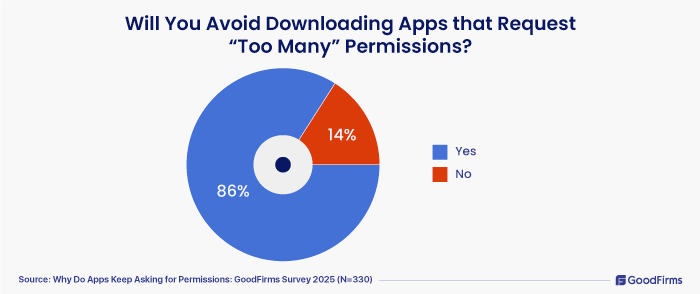
- 86% marked as “Yes,” and they said they would uninstall apps due to poor performance of too many permissions; 14% marked as “No.”
It is clear that users deserve their privacy and data control facility. They can avoid an app that fails to follow security guidelines.
10. What Type Of User-Data Security Measures Should the Developers Leverage Before Launching An App?
Mobile app development is committed to providing great experiences to the end-users by prioritizing privacy and security. Top mobile app development companies (6) and web app developers (7) stringently follow the safety and security guidelines provided to them while developing apps. Developers should verify the codes before it goes live. Testing them at every development stage and adding SSDLC - Software and security development lifecycle and conducting audits before the app is launched.
“Before launching an app, developers should implement strong user-data security measures including end-to-end encryption for data in transit and at rest, secure authentication protocols like multi-factor authentication, and strict access controls. APIs and third-party integrations must be hardened with proper authorization, while sensitive data should be minimized, anonymized, and stored securely using platform-specific secure storage. Regular vulnerability testing, compliance with data privacy laws such as GDPR or HIPAA, and secure cloud infrastructure are essential. Additionally, in-app protections and real-time monitoring should be in place to detect and respond to threats promptly.” Agiletech Vietnam.
“Embrace privacy-by-design principles, ensure data minimization and anonymization, and align with compliance standards like GDPR and CCPA. Secure all APIs, perform regular security audits and penetration tests, and store data using robust methods like hashed passwords. Be transparent with users about data usage, and have a solid incident response plan ready. Finally, leverage AI-driven monitoring for real-time threat detection.” Biz4Group LLC.
“Before launching an app, developers must implement strong user-data security measures to protect user information and maintain trust. Core protections include encrypting data both in transit (via HTTPS/TLS) and at rest (using AES encryption), ensuring that user data cannot be easily intercepted or accessed by unauthorized parties. Strong authentication mechanisms like OAuth 2.0 and multi-factor authentication (MFA) further protect user accounts, while proper authorization ensures users can only access data relevant to their role.” Branding Marketing Agency.
“Data minimization plays a vital role—apps should only collect data essential to functionality, and anonymization or pseudonymization should be used wherever possible to reduce privacy risks. Backend APIs must be secured through authentication, rate limiting, and by avoiding exposure of sensitive data in responses. For data storage, it's important to use secure cloud platforms with strict access policies and to hash sensitive information such as passwords using robust algorithms like bcrypt or Argon2. On the user side, developers must offer transparent privacy policies and obtain explicit consent before collecting personal data, while also enabling users to delete or export their information.” Buimb Digital Marketing.
“Use least-privilege permissions, encrypt data in transit and at rest, enforce strong authentication and secure key management, conduct regular penetration testing, and follow OWASP MASVS guidelines.” Cybergarden Software Development.
“Principle of Least Privilege (PoLP) and "limited" user-controlled access that top apps like Instagram have implemented.” Innovation Vista.
“Sensitive data should be stored using secure storage solutions such as EncryptedSharedPreferences on Android or the Keychain on iOS. To prevent reverse engineering and code tampering, developers should apply code obfuscation and conduct regular security testing, including penetration tests and code reviews.” Iqonic Design.
“Developers should implement end-to-end encryption, secure API communication, regular vulnerability testing, and clear permission-based data access structures before launch.” Messapps.
“Encrypt user data, both at rest and in transit, use secure authentication like OAuth and 2FA, collect only the data we truly need, store everything on secure, compliant servers and run regular security audits and vulnerability tests.” MindStudios.
“Minimize local data storage, process sensitive data server-side; Implement end-to-end encryption, secure key management, and strong hashing; Isolate sensitive operations from the main OS.” Pragmatic Coders.
“Encrypt all sensitive data, implement security authentication (OAuth 2, etc); minimize data collection; conduct thorough security testing; maintain transparent privacy policies.” Ripe Media, Inc.
“Verify the permissions.” Sitka Ai Technologies LLC.
11. Can You Share a Few Safety Tips For the Users To Avoid Data Vulnerabilities While Using An App?
“Try to minimise the app permissions, avoid cookies, and use private mode if possible.” Aafiyah Technologies.
“First — don’t just tap “Allow” without thinking. If an app asks for something that feels unrelated to what it actually does, pause and question it. You don’t need to give a weather app access to your microphone. Second, always install from trusted sources — that means the App Store or Google Play, not some random website. Keep your phone and apps updated, not just for features, but because updates often patch security holes. Use strong passwords, avoid reusing them, and turn on two-factor authentication when it's available. And watch out for those apps that offer to “log in with Facebook” or Google — convenient, sure, but you’re handing over a lot more than just login access. Better to use email and a solid password when you can.” Arete Soft Labs Inc.
“Users can avoid data vulnerabilities by regularly updating their apps to patch security flaws, using strong and unique passwords along with two-factor authentication (2FA) for added protection. It's also important to be cautious when granting app permissions, only allowing access to necessary data, and avoiding public or unsecured Wi-Fi networks when using sensitive apps. Finally, users should review app permissions periodically and uninstall apps they no longer use to minimize exposure.” Conversion Perk.
“Your data (name, contacts, photos, etc.) is the currency you pay with when using free apps. If an app is free, be very cautious to what permissions you give to the app. The developers need to make money, and if they offer the app for free, it is almost certain they will get their money back using your data. (Think AI model training, or contact selling).” Cosmic Pulse.
“First, always download apps from trusted sources like official app stores. Check app reviews and permissions before installing - if something feels off, it probably is. Use strong, unique passwords and enable two-factor authentication wherever possible. Keep your apps and phone updated to patch security gaps. And most importantly, avoid giving unnecessary permissions - if an app doesn’t need access to your location or contacts to work, don’t allow it. Small steps like these go a long way in keeping your data safe.” Creuto.
“One big thing users can do is always review the permissions an app is asking for before downloading or installing it. If something feels unnecessary, it probably is. It’s also smart to regularly check and update your app permissions in your phone settings—you don’t always have to keep giving apps full access.” Hexxen.
“Don’t share personal information unless you're certain the app is secure and trustworthy.” Imenso Software.
“User information like username, email address and passwords should be all encrypted both while resting and in transit.” Instasoft Inc.
“Absolutely. Despite what may be said, it is the users themselves who play one of the most critical roles in protecting their data. Ultimately, awareness is your first firewall—users who pause to question what's being asked of them are already more secure.”Jay Analytix.
“Do not install apps you don't trust, check security dashboards for personal data leaks.” JetRuby Agency LTD.
“Users should adopt a 'permission-conscious' approach: review app permissions before installation, grant only essential permissions initially, regularly audit app permissions in device settings, and revoke unused permissions.” KheyaMind AI Technologies Private Limited.
“Be cautious with in-app links or popups asking for personal information. Use Biometric Locks – Enable fingerprint or face recognition if your device supports it. Be Aware of Privacy Settings – Customize privacy settings to limit data sharing and tracking.” Lumitech.
“Most security patches come through app updates, so ignoring those can leave you exposed. And lastly, don’t connect through public Wi-Fi without a VPN if you’re sharing sensitive data.” Naktublak.
“Read which permissions are necessary for which apps. For downloading the Paint app, you don't need to give Contact, camera, permissions.” Right Path Global Services Private Limited.
“Avoid using public Wi-Fi, keep the app updated, use strong passwords, review permissions regularly, and avoid sharing sensitive data unless necessary.” Shakuro.
“Users should avoid using the same or predictable password across apps, always enable two-factor authentication, and keep their apps and devices updated.” Softcoding Solutions.
“Don't give permission that you think isn't necessary for the app to function.” Spirinova Technologies Pvt Ltd.
“Keep Apps Updated, MFA, Limit App permission, Download from App or Play store.” Tech.us, Inc.
“Prepare a breach notification and mitigation strategy. Include logging, monitoring, and alert systems for suspicious activities.” Technoloader Pvt Ltd.
“Carefully grant access, especially apps requesting sensitive data.” Tekxai.
“Comparing app's functionality and requested permissions - if requested too much, there should be another app on the market with lesser number of permissions and more secure.” TerraForce Software.
“Review permissions on first launch and turn off anything that isn’t essential for features you use. Keep the OS and apps updated to patch newly discovered vulnerabilities. Install from trusted stores only and avoid sideloading unknown APKs.” Testscenario.
“Don’t share your location, camera, or contacts unless it's necessary. Download apps only from safe sources.” Versatile Commerce.
“Use apps made by trusted developers.” Web Labs LLC.
“Install applications from a verified source.” WEB-RECRUITERS.
“Reading privacy policies helps you understand how your data will be used, so you can make informed decisions.” WebDesk Solution.
“Be cautious with links and attachments shared within apps.” Webential Technologies Pvt Ltd.
“Transparency and user consent must guide data practices.” WEDOWEBAPPS.
“Avoid storing sensitive info on devices, use encrypted storage if needed.” Xiteb LLC.
12. Do You Think There Should Be Limits To How Much Personal Data Can Be Collected?
Yes, privacy and data trading should be done within the requirements of the app and not unnecessarily exceed them. Compliance with data privacy laws is a strong practice towards data ethics. Here are a few responses from our research participants on the same;
“Yes, to protect privacy and prevent misuse, only essential data should be collected.” ACIAGA Inc.
“I don't think so, the reason is, it depends on the usability of the app that may need some user-data to perform its functionality. For example, if we don't allow the contact book access to WhatsApp, then it won't work properly or we may not use the complete features of WhatsApp.” AlphaSquad Technologies.
“Yes – collect only what directly enables a user-visible feature; anything more is a liability.” Celadonsoft.
“Setting limits also builds trust between users and developers. When users know that an app respects their privacy and doesn't collect unnecessary personal information, they are more likely to use it and recommend it to others. Additionally, limiting data collection helps apps stay compliant with privacy laws like GDPR or CCPA, which are designed to protect user rights and hold companies accountable.” Codeteak Technologies Pvt. Ltd.
“Yes—because if your flashlight app knows your location, contacts, and menstrual cycle, we’ve officially lost the plot.” Colormatics.
“Yes, apps should collect only the data needed for core functionality. Excessive data collection increases privacy risks and reduces user trust, so clear limits and consent are important.” Digitalscouts.
“Yes, only essential data should be collected, and users should be fully informed and in control. Drish Infotech Ltd.
“Yes — data collection should follow data minimisation principles, collecting only what's essential for core functionality. Any data collected beyond that must be consensual, optional, and well-documented.” FAIR Consulting Group.
“Yes. Apps should collect only essential data, with user consent and full transparency. This protects privacy and builds trust.” Finesseink.
“Excessive data collection increases both security risks and regulatory exposure. Prioritizing user privacy through limited, purpose-driven data collection fosters long-term user loyalty and regulatory alignment.” Net Solutions.
“Yes, absolutely — there should be clear limits on how much personal data an app can collect.” Rhytmelo Design Agency.
“Yes, there should be strict limits on personal data collection, ensuring apps only gather what is essential for functionality while complying with privacy regulations to protect user rights and minimise risks of misuse.” Scale Suite.
“There should be clear limits on how much personal data apps can collect - only what’s truly necessary for the service should be gathered. Over-collection raises the risk of misuse or breaches, and users often don’t realize what they’re signing away. Transparency and consent are key because people should know exactly what data is being taken and why, with easy-to-understand controls to manage it.” TestFort.
“Yes. Apps should collect only the data necessary to deliver their core service. Limiting data collection reduces the risk of misuse, strengthens user trust, and promotes ethical tech use.” Virtual Assistant Indonesia.
App statistics in 2025 indicate that 8.93 million mobile apps are available worldwide. (xx) Instagram, WhatsApp, ChatGPT, and TikTok are some of the most popular apps and most-downloaded apps in the world today. Apps that misrepresent their functionality, claim unnecessary attention, mislead the user, and install unwanted components are unsafe. Apps that continuously frustrate users, displaying ads that fail to close, are prone to security concerns. Apps that facilitate 3rd party apps to control the users’ system without their consent, apps that collect data and pass it to other parties without user consent, and apps that control users’ experiences are suspicious.
“Safer permission management means requesting only essential permissions, asking at the right time (just-in-time prompts), clearly explaining why each is needed, and allowing users to easily review, grant, or revoke permissions anytime.” Ambibuzz Technologies LLP.
“Users should have the ability to manage permissions manually and modify them at any time. Apps should request access only when it is truly necessary.” ANODA UX Design Agency.
“As users, it’s important to find the right balance between using the app’s features and protecting our privacy. Some permissions are clearly needed for the app to work, but many apps ask for more access than they really need.” Black Kite Technologies.
“It's tricky, the more data we give the more the experience can tailor to our interests but this data leakage and sale to third party organizations perhaps for political advertisements is not ethical. We haven't even tapped into the data sharing of minors.” Blue Noda.
“Safer permission management for mobile apps means requesting only the necessary permissions, asking for them at the right time (just-in-time), clearly explaining why they’re needed, allowing users to grant or revoke permissions anytime, and securely handling the data accessed through those permissions.” CODEVINER.
“In my point of view, the system should be an arbitrator in data collection. The user should be able to see what kind of data was collected by the app. Not just the permissions. If you have permission to the whole gallery, who knows which the developer can collect.” Dualboot Partners.
“It's all about putting the customer first - giving them control over which data that they are sharing, clarity on why they need to share it and limiting the amount of information which must be shared to the minimum. This reduces security risks and improves usability.” Epos Now.
“Safer permission management means requesting only the minimum data needed, using runtime permissions instead of upfront access, providing clear justifications, giving users granular control, and allowing revocation at any time.” Global BrainForce.
“Safer permission management for mobile apps means requesting only the minimum permissions necessary for the app’s core functionality, clearly explaining why each permission is needed, allowing users to control or revoke permissions anytime, and ensuring collected data is securely handled in compliance with privacy laws.” iShivax.
“Ask for only the permissions the feature truly needs, explain the reason in plain language, and let users easily review or revoke those permissions at any time in the settings.” Kobzza.
“Permissions should be requested contextually and users should be able to easily review and revoke them at any time. Everything should be transparent and a user should be able to review the permissions and manage them any time.” Leobit.
“Safer permission management for mobile apps means giving users clear, informed control over what data and features the app can access only requesting permissions that are essential for functionality.” Magoom.
“Request only necessary permissions, ask at runtime, explain why they're needed, let users control access, respect denials, and avoid collecting extra data.” Nexus It Solutions.
“Ensure users can easily modify or revoke permissions from app settings without breaking the app.” Scarlet Media.
“There should be a clear justification given to the user as to why that much information is required as well there should be an alternate flow.” Techwishes Solution.
“Before installing an app, the developer should explain why some data is collected and what is the use of that data.” Teknikali Tech.
“In practice, it’s about giving users clear choices and limiting the app’s reach to only what’s truly needed.” Thirdbridge.
“Safer permission management means giving users full control over what data they share, allowing them to opt in or out easily, and making permissions time-bound and transparent.” Versys Media.
“Excessive data collection increases the risk of abuse, identity theft, or surveillance. Users should retain control over their personal information.” Visernic Limited.
“Avoid "all-access" permissions when only one specific function is needed.” WebCastle Technologies L.L.C.
Permission bothers
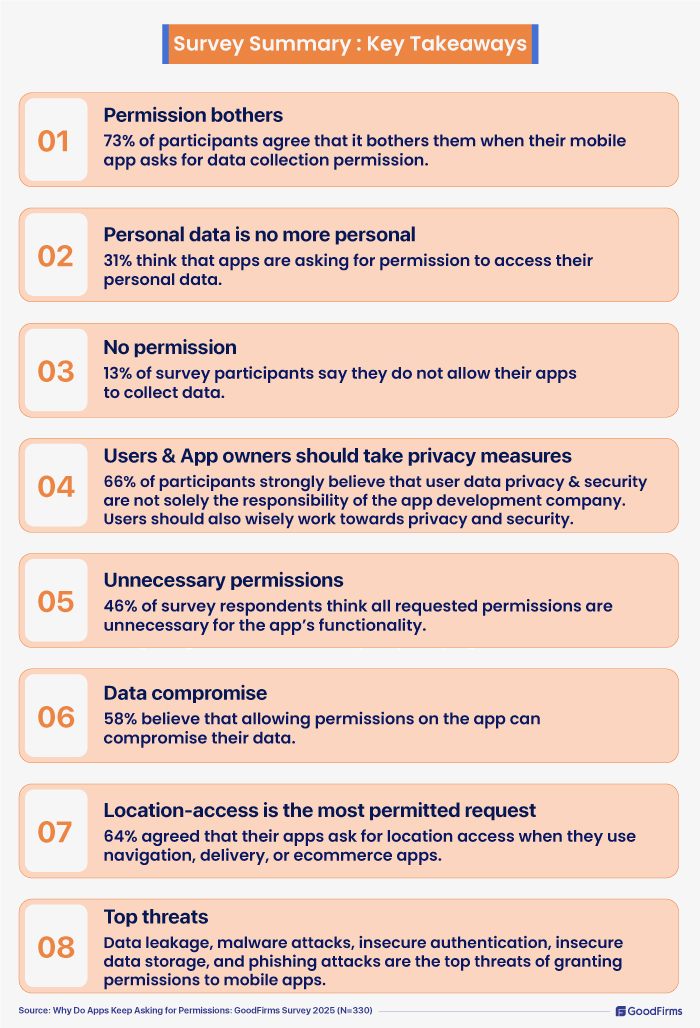
73% of participants agree that it bothers them when their mobile app asks for data collection permission.
Personal data is no more personal
31% think that apps are asking for permission to access their personal data.
No permission
13% of survey participants say they do not allow their apps to collect data.
Users & App owners should take privacy measures
66% of participants strongly believe that user data privacy and security are not solely the responsibility of the app development company. Users should also wisely work towards privacy and security.
Unnecessary permissions
46% of survey respondents think all requested permissions are unnecessary for the app’s functionality.
Data compromise
58% believe that allowing permissions on the app can compromise their data
Location-access is the most permitted request
64% agreed that their apps ask for location access when they use navigation, delivery, or ecommerce apps.
Top threats
Data leakage, malware attacks, insecure authentication, insecure data storage, and phishing attacks are the top threats of granting permissions to mobile apps.
Final Thoughts: Data Control Is in Your Hands
Apps developed a few years ago, and the apps developed today are different in terms of the development stages, process, and the focus on agility, security, and privacy. As we progress towards a completely digital environment, mobile app developers will have a strong and responsible role in creating applications with complete transparency towards data privacy and control. But, as a user, you must decide what to share and what not. Always review app permissions regularly, do not allow unnecessary access, check and update your knowledge on user permission managers (Android/iOS settings), stick to apps with strong privacy policies, install only trusted apps from official app stores, and update apps and operating systems regularly. Data control is in users’ hands.
We appreciate and sincerely thank our research partners for their valuable inputs and thoughtful suggestions. Their collaboration has made this study truly thought-provoking and impactful. We are grateful for their support and look forward to future opportunities to collaborate with even more experts.

References:
1. https://www.thetimes.com/article/508d5fa0-f082-4a49-809c-16f06b096c6d
2. https://www.pcloud.com/invasive-apps
3. https://cybernews.com/security/popular-android-apps-ask-for-too-many-dangerous-permissions/
4. https://www.cyfirma.com/research/android-malware-posing-as-indian-bank-apps/
5. https://developer.apple.com/documentation/apptrackingtransparency
6. https://www.goodfirms.co/directory/platform/app-development
7. https://www.goodfirms.co/companies/web-development-agency